Vue-js-modal: Allow `vh` and `vw` units for width & height
Problem:
I'd love to be be able to use the following:
<modal name="userLogin" :scrollable="true" width="100vw" height="100vh"></modal>
for a full-screen modal that I need to replicate in my design.
Example & screenshots:
I get the following error:

Is there any reason not to allow those units?
Thanks!
 drewrawitz
All 2 comments
if you will implement it - go for it. Those are not css values. width/height are recalculated if your modal draggable or resizable, or your screen size changes. It is more like "suggestion" to the modal, but the plugin itself has "fool" protection to make sure that, for example, your modal will not be bigger than screen or will not fly outside the viewport.
 euvl
on 1 Oct 2018
euvl
on 1 Oct 2018
Those are not css values.
Those are totally legit values. I use vh and vw for my modals too, and since CSS is for styling and not code, I use !important to override what vue-js-modal is doing, like so:
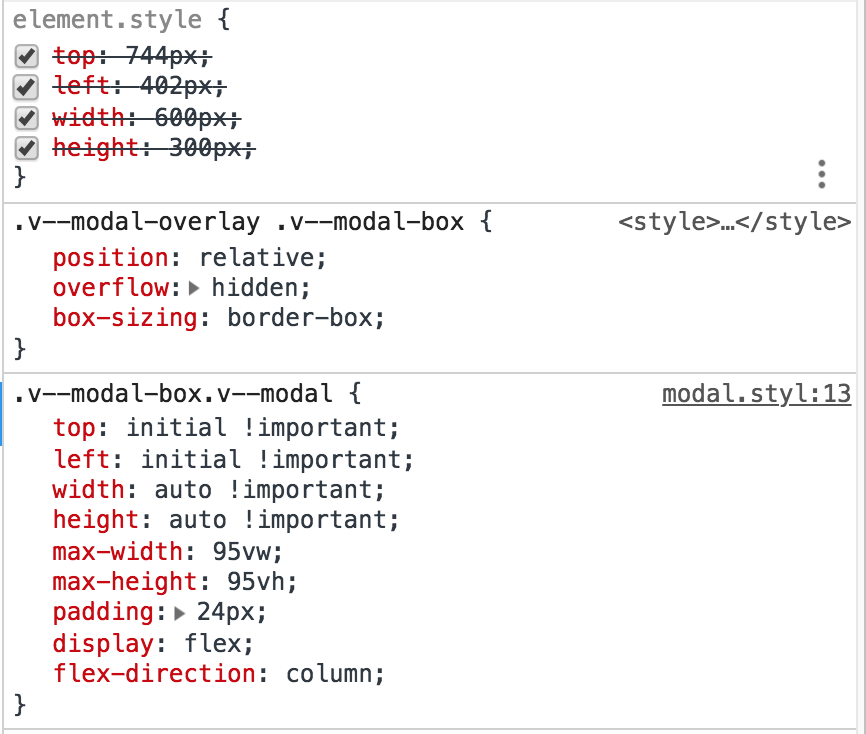
Perfectly centered, dynamic modals via flexbox 🎉. There's no reason to force users to specify exact pixel widths and heights for a modal in this day and age.
 nathanboktae
on 12 Oct 2018
nathanboktae
on 12 Oct 2018
Related issues
 smholsen
·
4Comments
smholsen
·
4Comments
 Max64
·
4Comments
Max64
·
4Comments
 ar53n
·
4Comments
ar53n
·
4Comments
 chris-rowe
·
4Comments
chris-rowe
·
4Comments
 yyh1102
·
3Comments
yyh1102
·
3Comments
Most helpful comment
Those are totally legit values. I use
vhandvwfor my modals too, and since CSS is for styling and not code, I use!importantto override whatvue-js-modalis doing, like so:Perfectly centered, dynamic modals via flexbox 🎉. There's no reason to force users to specify exact pixel widths and heights for a modal in this day and age.