Vue-instantsearch: Clearing all refinements does not update the URL when using custom routing via Vue Router
Bug 🐞
What is the current behavior?
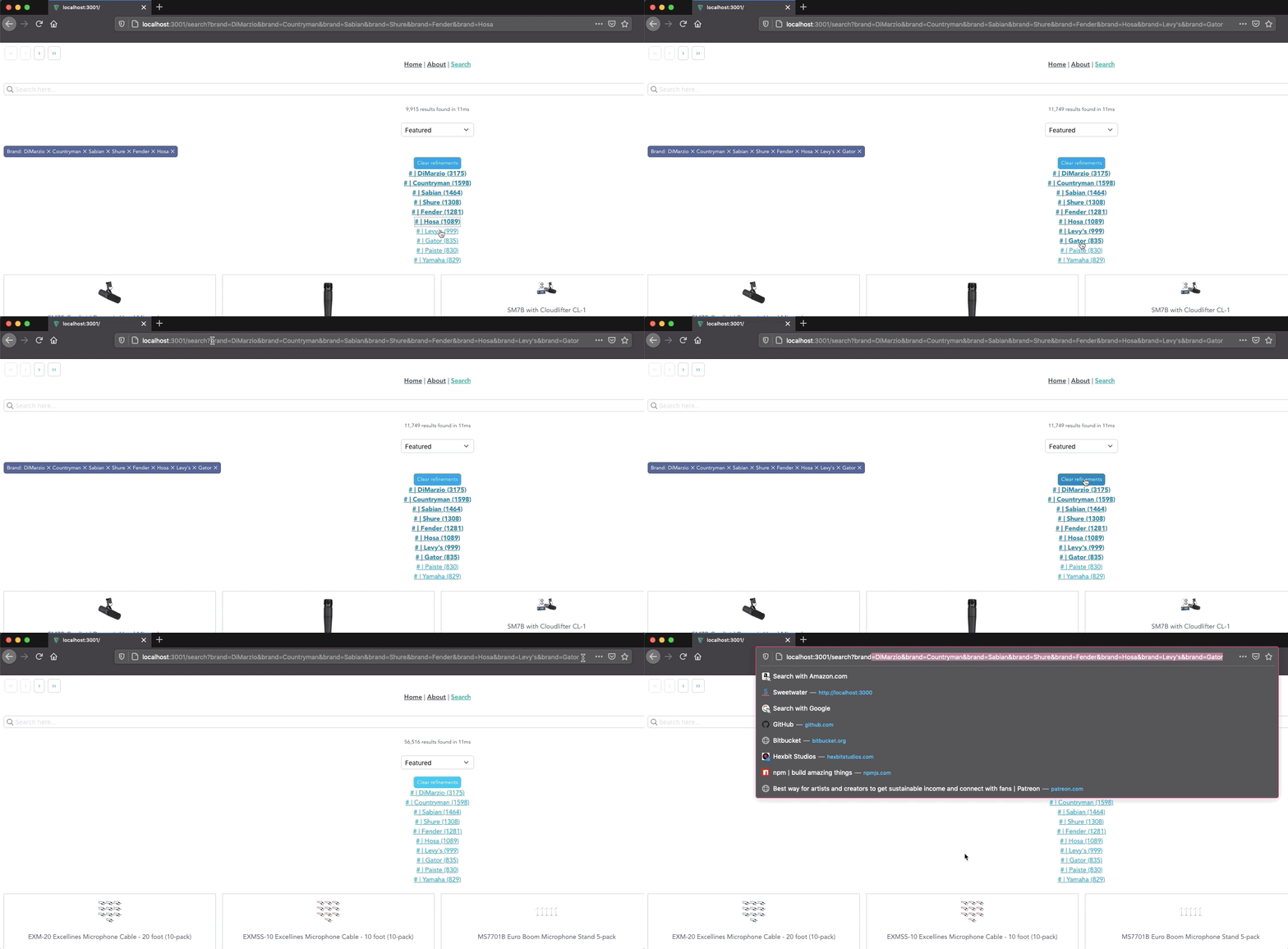
Removing the last filter or clicking the clear all filters button (AisClearRefinements), does not update the URL.
If you apply multiple filters with the AisCurrentRefinements component and then remove some, the URL updates properly, but if you remove the last filter or use the clear all button, the URL remains unchanged.
Make a sandbox with the current behavior
Some configuration is required:
You'll need to copy .env.example to .env.local and provide the following in that file:
VUE_APP_ALGOLIA_APP_ID
VUE_APP_ALGOLIA_INDEX_NAME
To run, execute npm run ssr:serve then navigate to the search page and select a some refinements from the list.

Then remove them one by one and you should notice your browser's URL update correctly, but removing the last one does not affect the URL (or using the clear all button).
What is the expected behavior?
Removing the last filter or clearing all filters should remove all the query strings from the URL.
Does this happen only in specific situations?
Happens whenever the last or all filters are cleared at once.
What is the proposed solution?
We are using Vue Router and so we had to setup a custom instantsearch routing (src/modules/createInstantSearchRouting.js) and it is possible that we are doing something incorrect here.
I suspect the issue may lie in our state mapping (stateToRoute()) but I'm not sure.
Here it is for context:
stateToRoute(uiState) {
            const indexUiState = uiState[indexName] || {};
            const refinementList = {};
            if (indexUiState && indexUiState.refinementList) {
                const refinementArr = Object.keys(indexUiState.refinementList);
                const refinementLength = refinementArr.length;
                let i = 0;
                for (; i < refinementLength; i++) {
                    const key = refinementArr[i];
                    refinementList[key] = indexUiState.refinementList[key];
                }
            }
            return {
                page: indexUiState.page,
                query: indexUiState.query,
                sortBy:
                    indexUiState.sortBy === indexName
                        ? undefined
                        : indexUiState.sortBy,
                ...refinementList,
            };
        },
I know we followed the guide on using Vue Router. It seems like indexUiState.query isn't updating correctly.
What is the version you are using?
vue-instantsearch: 3.1.0
 jackwkinsey
All 2 comments
This behaviour indeed was related to the routing itself. If there's no items in the query string, qs will return an empty string. This means that you are then calling history.pushState(routeState, null, ''), which is considered as "don't navigate" (correctly). A workaround is either to use pathname as a fallback (as I've done in https://github.com/jackwkinsey/uvue-sandbox/pull/1), or alternatively writing location.pathname + query.
Hope that's what you expected. Since I'm sure that that was the issue, I'll close this, but don't hesitate to open something else if there's something else if you struggle with. Thanks for giving high-quality reproductions
 Haroenv
on 6 Aug 2020
Haroenv
on 6 Aug 2020
A workaround is either to use pathname as a fallback
@Haroenv this worked perfectly! Thanks for this!
jackwkinsey
on 6 Aug 2020
Related issues
 matthewmnewman
·
6Comments
matthewmnewman
·
6Comments
 francoischalifour
·
3Comments
francoischalifour
·
3Comments
 socieboy
·
5Comments
socieboy
·
5Comments
 shaunnez
·
3Comments
shaunnez
·
3Comments
 rayrutjes
·
4Comments
rayrutjes
·
4Comments
Most helpful comment
This behaviour indeed was related to the routing itself. If there's no items in the query string, qs will return an empty string. This means that you are then calling
history.pushState(routeState, null, ''), which is considered as "don't navigate" (correctly). A workaround is either to use pathname as a fallback (as I've done in https://github.com/jackwkinsey/uvue-sandbox/pull/1), or alternatively writinglocation.pathname + query.Hope that's what you expected. Since I'm sure that that was the issue, I'll close this, but don't hesitate to open something else if there's something else if you struggle with. Thanks for giving high-quality reproductions