Vue-good-table: Checkbox bug with vue 2.6.2 and template compiler 2.6.5
Issue Type
- [x] Bug
Specs
- vgt v2.16
- vue v2.6.2
- vue-template-compiler v2.6.5
What browser?
- Chrome
Expected Behavior
Checking the box should check the box.
Circumstances out of my control require these latest versions of vue and template-compiler.
Actual Behavior
Checking the box does add the item to the selected vue array but the checkbox itself doesn't show as checked
Steps to Reproduce the Problem
Please detail your steps here
- Just use the versions as shown above
jsfiddle
https://jsfiddle.net/vcL20phw/3/
EDIT
Upon closer inspection the version of vue-template-compiler doesn't seem to matter, it's just Vue 2.6.2 https://jsfiddle.net/TheFrankman/L72u0dh8/1/
Row click is fine, but clicking the checkbox doesn't work properly.
 TheFrankman
All 15 comments
@TheFrankman @rahul1500 a preliminary fix has been merged. It's late here, so I haven't had time to test it extensively, but the fix appears to be working on my end.
The source of the issue seems to be a problem with the event.preventDefault directive in vue's latest release conflicting with Chrome/Webkit. From what I've found, the assumption is that Vue's DOM update launches before the browser checks for the preventDefault directive's output. The browser resets the checkbox state when it detects that the e.default behavior has been prevented, nullifying the DOM updates made by Vue.
 ow-en
on 13 Feb 2019
ow-en
on 13 Feb 2019
Hi @ow-en,
Thanks for quick turn around,
still it is behaving weirdly, it randomly shows some selection while missing others.
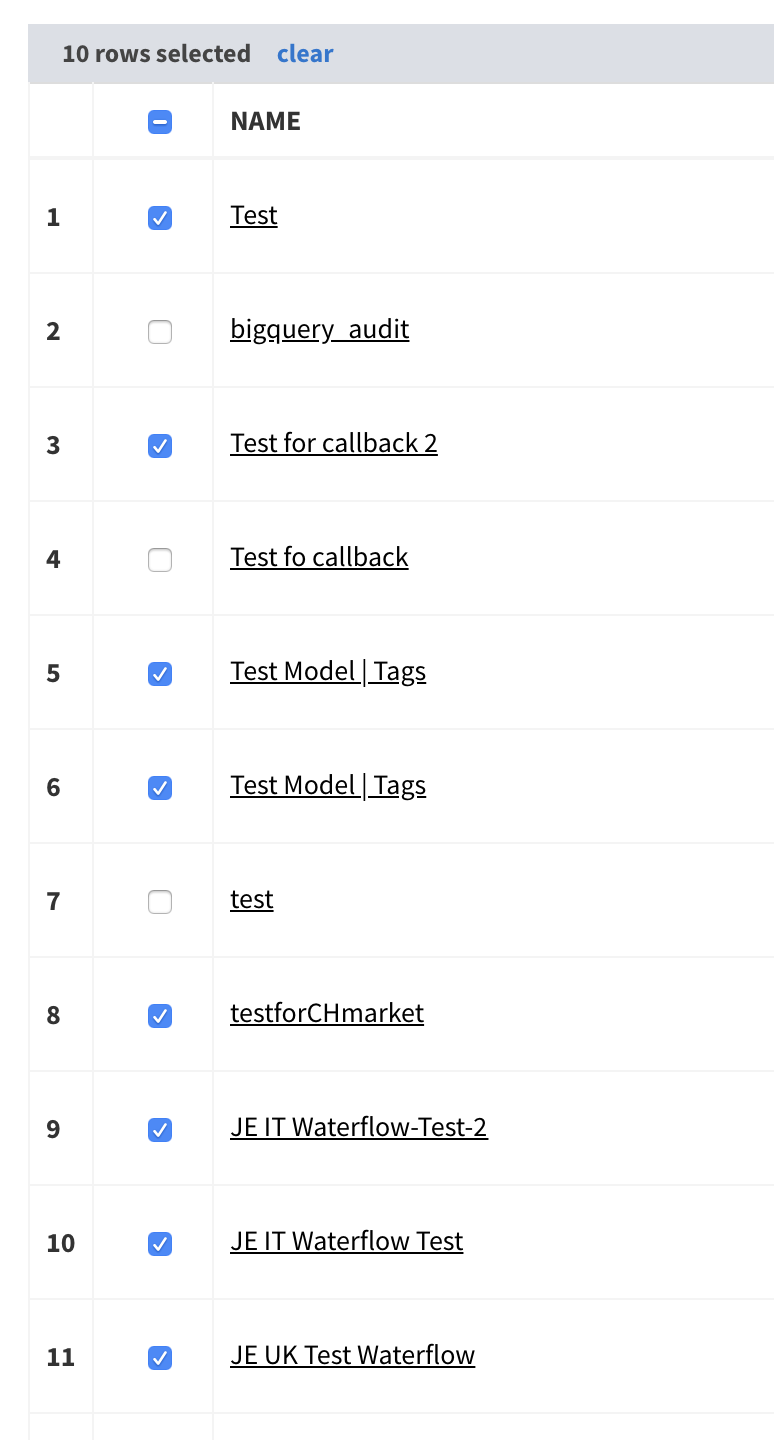
 rahul1500
on 13 Feb 2019
rahul1500
on 13 Feb 2019
Thanks for looking into this so quickly @ow-en I had a feeling it was something to do with e.prevent.
I've created a fork of my jsfiddle, assuming that adding https://unpkg.com/vue-good-table/dist/vue-good-table.js as the source will pull your newest changes, it still isn't working.
Wish I could be of more help but JS isn't my strongest.
TheFrankman
on 13 Feb 2019
Hm, that's weird. It appeared to be working correctly last night, but as mentioned, it was late so I didn't really have much time to test it more extensively.
I'll take a look at your fiddle as soon as I get home this evening, @TheFrankman .
@rahul1500 thank you for your update as well.
I'll keep you guys posted on this - I should be able to get it sorted out tonight.
ow-en
on 13 Feb 2019
@TheFrankman @rahul1500 I apologize for the delay on this, but I think I have it figured out. I ended up writing a custom directive that essentially performs the e.preventdefault functionality on its own. I'd like to test this further before merging, though, so it likely won't be live until tomorrow. I'll keep you posted - thanks for your patience on this.
ow-en
on 15 Feb 2019
@ow-en Thanks man! Really appreciate it!
TheFrankman
on 15 Feb 2019
@ow-en - Any update ?
TheFrankman
on 18 Feb 2019
@TheFrankman @rahul1500
So, I've got it. After testing this more extensively, it appears my original merge did indeed fix this issue, as I originally thought. What I didn't realize, however, was that I need @xaksis to update the npm package/cdn/external providers (I don't have access to those assets).
I let @xaksis know that this fix is good to go, and he should have the patch live shortly.
Thanks for your patience on this.
ow-en
on 19 Feb 2019
@xaksis - Do you know when you will be able to get this updated ?
TheFrankman
on 19 Feb 2019
hey @TheFrankman ETA is EOD today. We're just doing some final cleanup.
 xaksis
on 19 Feb 2019
xaksis
on 19 Feb 2019
the new release (with the fix) has been published - 2.16.1
closing.
xaksis
on 20 Feb 2019
@xaksis @ow-en - I can confirm that this is now resolved! Thanks for the quick turn around on this guys!
TheFrankman
on 20 Feb 2019
@TheFrankman awesome ! Glad it's working now.
Best,
ow-en
on 20 Feb 2019
@xaksis @ow-en,
Its fixed now, thanks a lot for quick fix.
rahul1500
on 22 Feb 2019
Thanks, I was waiting for this fix.. but now I get the error:
_TypeError: Cannot create property 'table-column' on boolean 'true'_
on ALL my good-table components that don't even load anymore.
Installing back v.2.16.0 everything works as before
 ordinov
on 22 Feb 2019
ordinov
on 22 Feb 2019
Related issues
 tverilytt
·
6Comments
tverilytt
·
6Comments
 oflittlemother
·
6Comments
oflittlemother
·
6Comments
 dsinibaldi77
·
4Comments
dsinibaldi77
·
4Comments
 hoanghiep1x0
·
5Comments
hoanghiep1x0
·
5Comments
 Sharvadze
·
4Comments
Sharvadze
·
4Comments
Most helpful comment
Hm, that's weird. It appeared to be working correctly last night, but as mentioned, it was late so I didn't really have much time to test it more extensively.
I'll take a look at your fiddle as soon as I get home this evening, @TheFrankman .
@rahul1500 thank you for your update as well.
I'll keep you guys posted on this - I should be able to get it sorted out tonight.