Vue-element-admin: 相同的API地址,运行npm run dev请求成功,运行npm run build:prod请求API报404错误
vue-admin-template,"version": "4.1.0"。
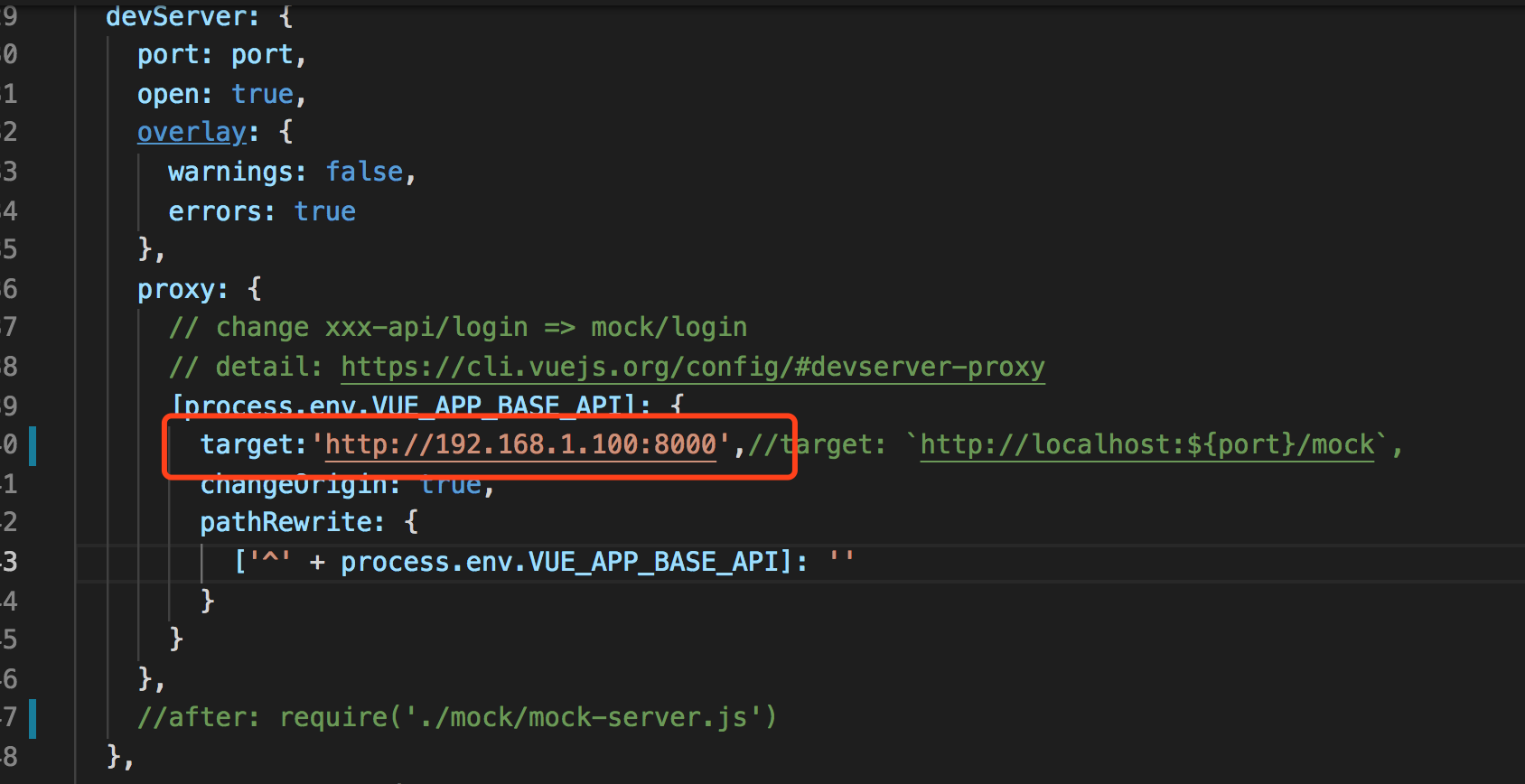
1.修改vue.config.js proxy中的target为实际请求的API地址,注释掉after: require('./mock/mock-server.js'),如下图
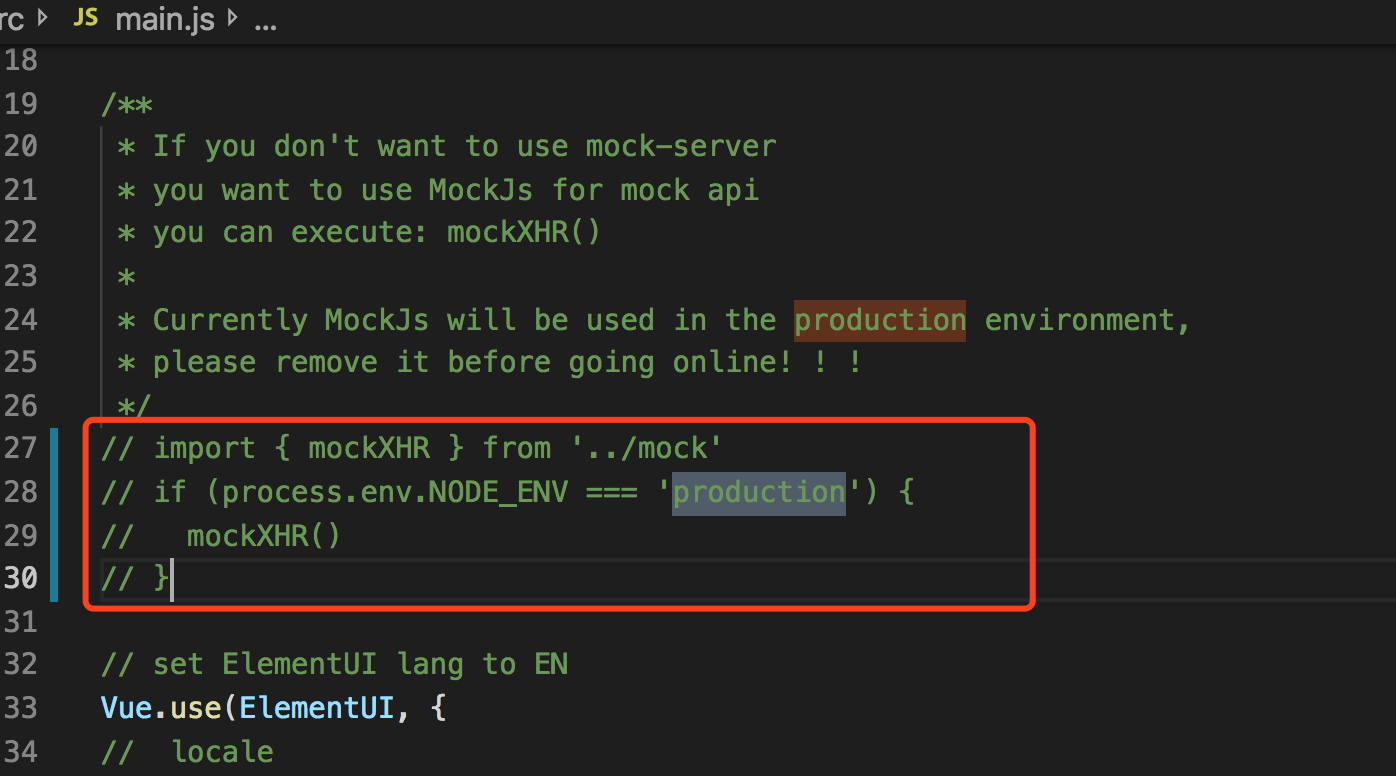
2.修改main.js,注释掉mockXHR,如下图
3.运行npm run dev ,点击登录按钮,能够正常请求API接口中的login接口,并能登录进入系统。login接口:http://192.168.1.100:8000/login/
- 运行npm run build:prod,将dist文件夹下发布生成的文件,在windows iis中发布,点击登录按钮,报404错误,无法请求接口。发布在Apache上也是相同的问题

已在Apache、IIS、Nginx里都试过,均是同样都错误
尝试了多种方法,都未能解决。。。。
 wang4978
All 14 comments
我也遇到同样的问题,
 kobef08
on 2 Jul 2019
kobef08
on 2 Jul 2019
close
 jxZhangLi
on 2 Jul 2019
jxZhangLi
on 2 Jul 2019
我这里都没改,直接改的.env.production ,没碰到你们说的问题
 bihell
on 2 Jul 2019
bihell
on 2 Jul 2019
我这里都没改,直接改的.env.production ,没碰到你们说的问题
.env.production需要改成什么,默认是这个
ENV = 'production'
VUE_APP_BASE_API = '/prod-api'
kobef08
on 2 Jul 2019
我的问题解决了,给后来人参考,比如我的数据接口地址为 http://api.xxx.com/api/user/login
- 修改.env.production文件中的VUE_APP_BASE_API为 http://api.xxx.com/api
- 修改vue.config.js中的target为 http://api.xxx.com
kobef08
on 2 Jul 2019
我的问题解决了,给后来人参考,比如我的数据接口地址为 http://api.xxx.com/api/user/login
- 修改.env.production文件中的VUE_APP_BASE_API为 http://api.xxx.com/api
- 修改vue.config.js中的target为 http://api.xxx.com
这个之前试过,报跨域的问题
Access to XMLHttpRequest at 'http://192.168.1.100:8000/login/' from origin 'http://127.0.0.1:8080' has been blocked by CORS policy: Response to preflight request doesn't pass access control check: The value of the 'Access-Control-Allow-Origin' header in the response must not be the wildcard '*' when the request's credentials mode is 'include'. The credentials mode of requests initiated by the XMLHttpRequest is controlled by the withCredentials attribute.
wang4978
on 2 Jul 2019
我的问题解决了,给后来人参考,比如我的数据接口地址为 http://api.xxx.com/api/user/login
- 修改.env.production文件中的VUE_APP_BASE_API为 http://api.xxx.com/api
- 修改vue.config.js中的target为 http://api.xxx.com
这个之前试过,报跨域的问题
Access to XMLHttpRequest at 'http://192.168.1.100:8000/login/' from origin 'http://127.0.0.1:8080' has been blocked by CORS policy: Response to preflight request doesn't pass access control check: The value of the 'Access-Control-Allow-Origin' header in the response must not be the wildcard '*' when the request's credentials mode is 'include'. The credentials mode of requests initiated by the XMLHttpRequest is controlled by the withCredentials attribute.
这个问题我也遇到过,原因是因为你的后端Access-Control-Allow-Origin设置的是*,因为*会和 Access-Control-Allow-Credentials:true 冲突,需配置指定的地址
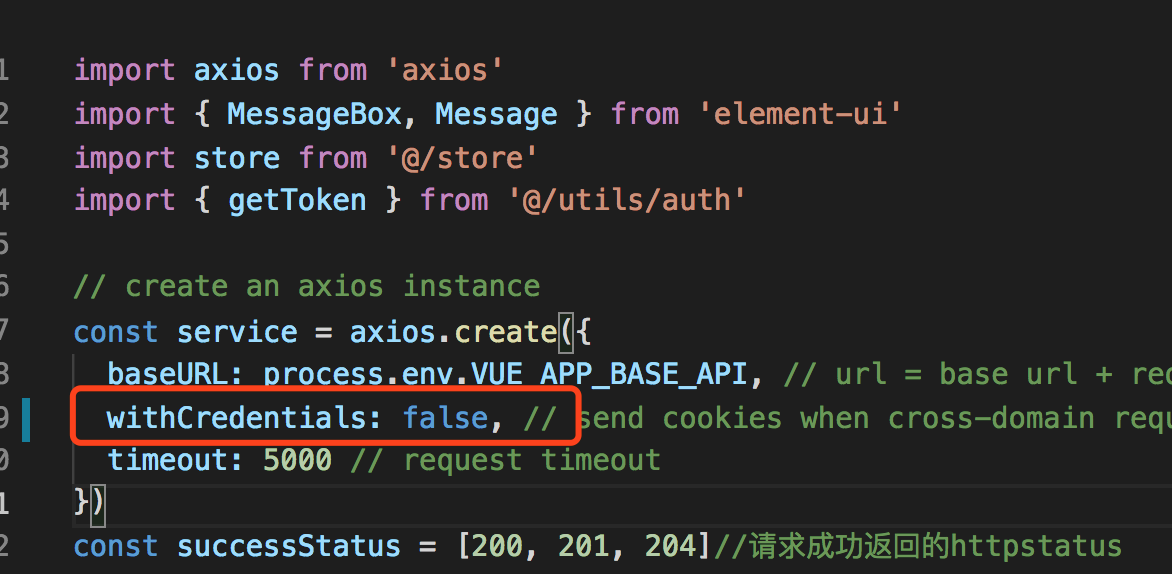
src/utils/request.js里有这样的一个设置withCredentials:true
const service = axios.create({
  baseURL: process.env.VUE_APP_BASE_API,
  withCredentials: true, // send cookies when cross-domain requests
  timeout: 5000
})
我的问题解决了,给后来人参考,比如我的数据接口地址为 http://api.xxx.com/api/user/login
- 修改.env.production文件中的VUE_APP_BASE_API为 http://api.xxx.com/api
- 修改vue.config.js中的target为 http://api.xxx.com
这个之前试过,报跨域的问题
Access to XMLHttpRequest at 'http://192.168.1.100:8000/login/' from origin 'http://127.0.0.1:8080' has been blocked by CORS policy: Response to preflight request doesn't pass access control check: The value of the 'Access-Control-Allow-Origin' header in the response must not be the wildcard '*' when the request's credentials mode is 'include'. The credentials mode of requests initiated by the XMLHttpRequest is controlled by the withCredentials attribute.这个问题我也遇到过,原因是因为你的后端Access-Control-Allow-Origin设置的是
*,因为*会和 Access-Control-Allow-Credentials:true 冲突,需配置指定的地址
src/utils/request.js里有这样的一个设置withCredentials:trueconst service = axios.create({ baseURL: process.env.VUE_APP_BASE_API, withCredentials: true, // send cookies when cross-domain requests timeout: 5000 })
withCredentials设为false 就好了,多谢
wang4978
on 2 Jul 2019
整理一下解决的方法:
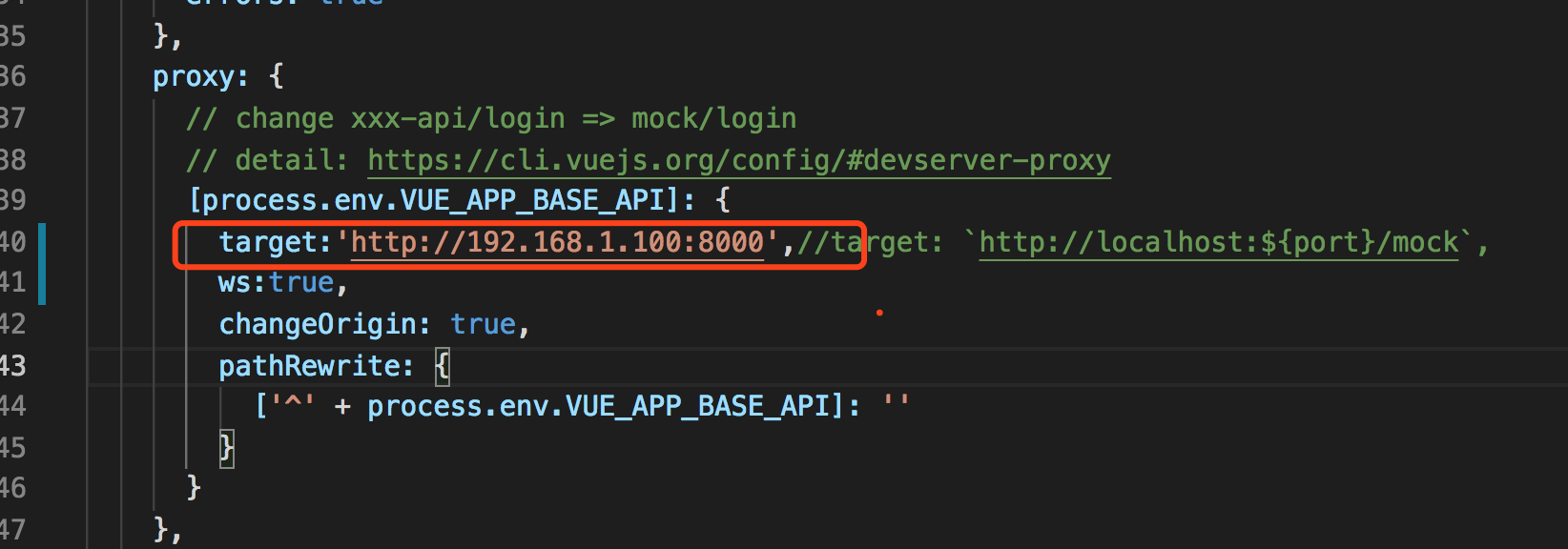
1.设置vue.config.js proxy中的target为实际请求的API地址
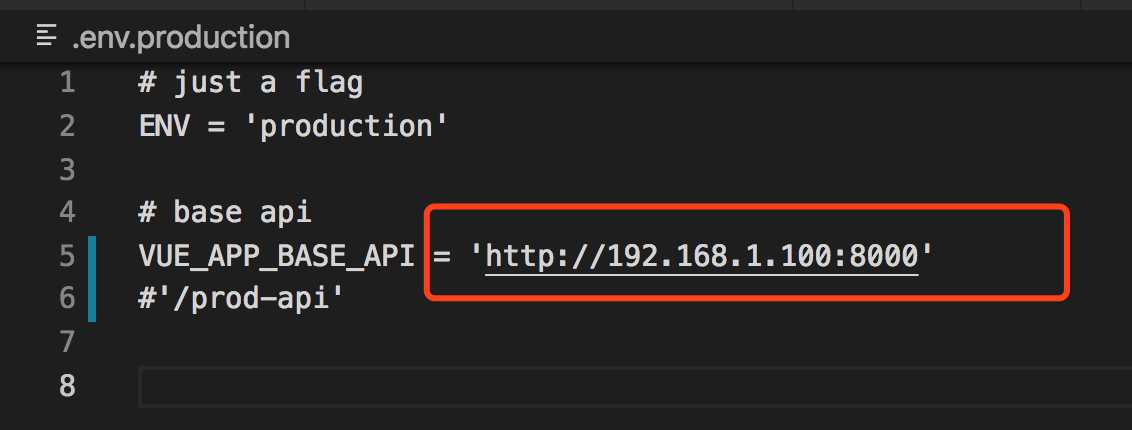
2.设置.env.production文件中的VUE_APP_BASE_API为实际请求的API地址
3.设置 utils文件夹中的reques.js 中的withCredentials为false。因为我的后台接口Access-Control-Allow-Origin设置的是*
多谢chengquan223 的指点
wang4978
on 2 Jul 2019
方便自己,方便他人。
kobef08
on 2 Jul 2019
@wang4978 为什么我第二部没做没碰到什么问题?
bihell
on 19 Jul 2019
@wang4978 为什么我第二部没做没碰到什么问题?
不知你做其他设置了么,第二步我不做就报404错误
wang4978
on 30 Jul 2019
如果是引用的组件内容有http请求,好像不能被正常代理,不知道在哪里可以设置。比如分块上传文件,块文件的上传是组件内部发起的,如果我把url设置为/api/v1/chunk,就始终访问的是vue本身的地址,不是代理地址
 nipeone
on 14 Oct 2019
nipeone
on 14 Oct 2019
如果是引用的组件内容有http请求,好像不能被正常代理,不知道在哪里可以设置。比如分块上传文件,块文件的上传是组件内部发起的,如果我把url设置为/api/v1/chunk,就始终访问的是vue本身的地址,不是代理地址
生产环境需要设置nginx反向代理,比如下面这样:
location ^~/prod-api/ {
       proxy_set_header   Host             $host;
       proxy_set_header   x-forwarded-for  $remote_addr;
       proxy_set_header   X-Real-IP        $remote_addr;
       proxy_pass  http://127.0.0.1:8010/; #实际的接口地址
}
Related issues
 343512292
·
3Comments
343512292
·
3Comments
 Mr-arvin
·
3Comments
Mr-arvin
·
3Comments
 Sihan-Tan
·
4Comments
Sihan-Tan
·
4Comments
 ghost
·
4Comments
ghost
·
4Comments
 TianYouH
·
4Comments
TianYouH
·
4Comments
Most helpful comment
我的问题解决了,给后来人参考,比如我的数据接口地址为 http://api.xxx.com/api/user/login