Vue-dropzone: v-on:vdropzone-removed-file being called when navigating to new component (pretty urgent!)
Hi
This is pretty urgent as about to deliver work, mad rush! Though all was working fine but when I leave the page that deals with the dropzone file it calls v-on:vdropzone-removed-file which then triggers my delete function!
No idea why it's happening, if it's something I'm doing. Any ideas quickly would be appreciated
 richlove1
All 13 comments
Hi @richlove1
There is an undocumented prop destroyDropzone, try and set that to false
 rowanwins
on 20 Dec 2017
rowanwins
on 20 Dec 2017
fiuuuu.. I read this thread just right before setting my mac on fire and join the local circus.
I had the same problem and setting destroyDropzone to false fixed the issue.
Although it only worked as an inline property
<vue-dropzone ref="myVueDropzone" :destroyDropzone="false" :options="dzOptions" v-on:vdropzone-success="imageAdded" v-on:vdropzone-removed-file="imageRemoved"></vue-dropzone>
As a property of the object dzOptions wasn't recognized
dzOptions: {
  url: 'https://httpbin.org/post',
  thumbnailWidth: 150,
  maxFilesize: 13,
  addRemoveLinks: true,
  destroyDropzone: false,
},
I think it would be good to add it to the documentation.
 FrancescoMussi
on 23 Dec 2017
FrancescoMussi
on 23 Dec 2017
@FrancescoMussi ~You may be using older version of component. Make sure when you upgrade to 3.* version, all props like destroyDropzone goes to options object prop.~
destroyDropzone is inline property! Thanks @FrancescoMussi
 vrajroham
on 23 Dec 2017
vrajroham
on 23 Dec 2017
@vrajroham I had already upgraded to version 3.
To be precise, in my package json I have: "vue2-dropzone": "^3.0.3",
I have tried again. As a property of the dzOptions the issue still happen.
As an inline property no.
I remember that to put property inline was an old trick for version 2, when sometimes some property weren't recognized.
For example: https://github.com/rowanwins/vue-dropzone/issues/188
In this case it happens something similar.
Maybe if @richlove1 manage to also try both solutions we can see in his case which one does work for him.
FrancescoMussi
on 23 Dec 2017
Hi guys. I tried the dropzone to false, actually before reading this and it worked! 100% sure if it was the correct way to fix it bet left it as it got it working. Not quite sure of the logic or why it works!
I have it as an inline property :destroyDropzone="false"
Thanks for your replies
richlove1
on 23 Dec 2017
@richlove1 thanks for quick feedback!
Just one last thing: if you momentarily remove :destroyDropzone="false" as inline property, and try to set it as a property of the object dzOptions:
dzOptions: {
  url: 'https://httpbin.org/post',
  thumbnailWidth: 150,
  maxFilesize: 13,
  addRemoveLinks: true,
  destroyDropzone: false,
},
does the issue still happen?
FrancescoMussi
on 23 Dec 2017
Hey @FrancescoMussi, My bad :(
You are right. It only supports inline prop only!
Thanks for pointing...
vrajroham
on 23 Dec 2017
@vrajroham you're welcome!
Keep up the great work guys!
FrancescoMussi
on 23 Dec 2017
Just tried for you. If I add as part of the options object (not inline) the unwanted behaviour returns.
Docs seem to show it separate from the options object parameter:
https://rowanwins.github.io/vue-dropzone/docs/dist/index.html#/props
richlove1
on 23 Dec 2017
Unfortunatly it's a bit confusing but sound like everyone is on the right track now.
Currently this is a Vue prop because we're overriding some of the default dropzone behaviour. The may come a day when something changes up stream in dropzone and it can be passed into the options object but for the moment a prop is the best we can do.
Cheers
rowanwins
on 23 Dec 2017
Setting destroyDropzone to false prevents it from being deleted. This may cause problems.
I think this workaround should work:
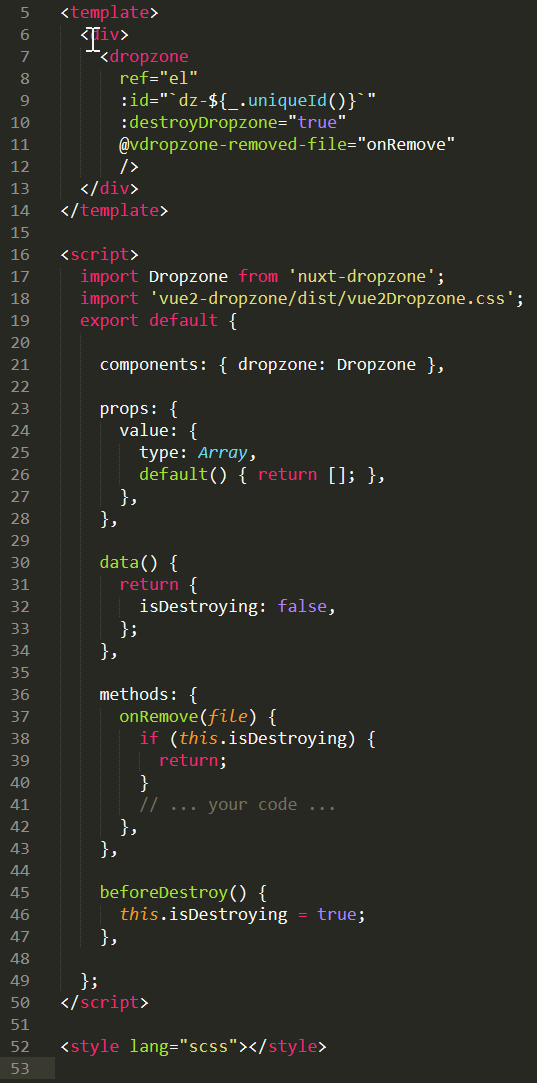
 gleam-ru
on 7 May 2018
gleam-ru
on 7 May 2018
@gleam-ru working fine thx !
 jonathan-snark
on 11 Jul 2018
jonathan-snark
on 11 Jul 2018
@gleam-ru
man.. thanks a bunch, you saved me from this dz config hell
and to show my gratitude, here's mine
// initially set false
isDestroying = false

// only remove the file when dz is not in destroying mode
dzRemovedFile(file: any) {
    // ignore this remove event
    if( this.isDestroying )
      return

    // now we're safe to remove a file, for example
    // remove a file in vuex store
}

// then just before navigating to another page, set
this.isDestroying = true
this.$router.push('/go-to-next-url')
 wakjoko
on 12 Dec 2020
wakjoko
on 12 Dec 2020
Related issues
 kyoukhana
·
5Comments
kyoukhana
·
5Comments
 ServerJunge
·
5Comments
ServerJunge
·
5Comments
 demonmind
·
5Comments
demonmind
·
5Comments
 jd-0001
·
5Comments
jd-0001
·
5Comments
 pdt590
·
3Comments
pdt590
·
3Comments
Most helpful comment
fiuuuu.. I read this thread just right before setting my mac on fire and join the local circus.
I had the same problem and setting
destroyDropzonetofalsefixed the issue.Although it only worked as an inline property
<vue-dropzone ref="myVueDropzone" :destroyDropzone="false" :options="dzOptions" v-on:vdropzone-success="imageAdded" v-on:vdropzone-removed-file="imageRemoved"></vue-dropzone>As a property of the object
dzOptionswasn't recognizedI think it would be good to add it to the documentation.