Vue-dropzone: manuallyAddFile css quircks
Note: using font awesome here
This is my file, right after uploading:
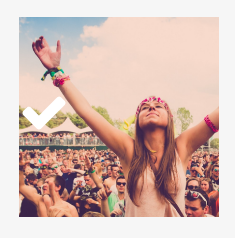
I would expect the checkmark to be centered, just like in the demo. After digging some more, my guess is that this can be fixed by adding text-align: center on the .dz-success-mark class or a similar solution (with flexbox for example)
Manually adding this same file (when I reload the page) looks like this. I don't know why the image is suddenly zoomed in and not rescaled correctly.
var file = { size: 123, name: "Icon" };
var url = "/storage/" + this.domain.icon;
this.$refs.dropzone.manuallyAddFile(file, url);
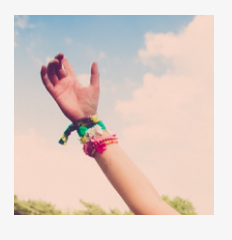
Any idea what can be wrong or if this is a CSS bug somewhere?
Finally, when I use the manuallyAddFile method (it works and adds the file just fine exact for the resizing issue above), an extra GET request shows up to route /undefined. I'm unable to trace this and find out what the reason is for this request. When I remove the .manuallyAddFile statement, the extra request disappears from my console.

 iamgoodbytes
All 10 comments
Hey @iamgoodbytes, for dropzone preview I would suggest don't change default css, try to add your own preview template which will give you full control over preview.
Check this docs for implementation. Also you can refer demo with custom preview here.
About that undefined request, Even I have gone through this error but in other aspect not in this component (with no solution :frowning_face: ). Need to look in to it again!
Hope it helps.
 vrajroham
on 24 Jun 2017
vrajroham
on 24 Jun 2017
I'm also seeing the lack of centring on the new demo page
I think there is probably a need to add some simple css to ensure icons get centred, around here, could add something like
width: 100%;
margin-left: auto;
margin-right: auto;
 rowanwins
on 25 Jun 2017
rowanwins
on 25 Jun 2017
@vrajroham I'm currently not changing the default CSS, just noticing these weird quirks with the shipped CSS
iamgoodbytes
on 25 Jun 2017
A possible fix could be the following, in order to fit the bigger thumbnails inside of the preview box
.dropzone .dz-preview .dz-image img
{
max-width: 100%;
}
Also related:
setting thumbnailWidth: 210, thumbnailHeight: 210 in the extra dropzone options has zero effect
iamgoodbytes
on 25 Jun 2017
@rowanwins On new demo page I am importing dropzone from npm. I'll look into centering the icon on component itself.
vrajroham
on 25 Jun 2017
I'm also seeing this. If you actually remove all the .vue-dropzone styles...
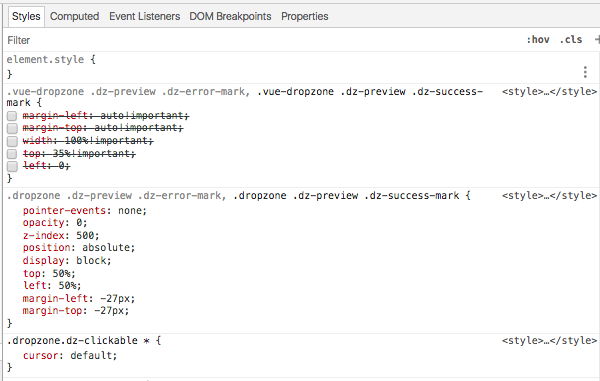
...it actually works fine as far as I can see, so looks like it's an issue with this package's extra styles not DZ itself.
Also, this happens on normal uploads without calling manuallyAddFile, so the name of this issue should probably be changed to clarify?
I'm also getting the undefined error. Should probably be a new issue. Just sayin... :)
 oldskool73
on 29 Jun 2017
oldskool73
on 29 Jun 2017
Same problem here...
 guyver-dash
on 3 Jul 2017
guyver-dash
on 3 Jul 2017
hey all, here's what I'm using to override the defaults and fix the layout issues, works ok for me...
/**
* some fixes to the dropzone styles
*/
// center error message
.vue-dropzone .dz-preview .dz-error-message {
//note the ~ prevents less trying to parse the calc
top: ~"calc(100% + 10px)" !important;
left: ~"calc(50% - 70px)" !important;
}
//center feedback overlays
.vue-dropzone .dz-preview .dz-error-mark,
.vue-dropzone .dz-preview .dz-success-mark {
margin-left: -27px !important;
left: 50% !important;
width: auto;
}
//cover fit the image preview
.vue-dropzone .dz-preview .dz-image img {
object-fit: cover;
width: inherit;
height: inherit;
}
... you could pick a different object-fill if you like depending on how you want the images to look - https://developer.mozilla.org/en-US/docs/Web/CSS/object-fit
oldskool73
on 5 Jul 2017
Resolved in version 3. Check out the new docs
rowanwins
on 29 Oct 2017
Related issues
 dainemedia
·
4Comments
dainemedia
·
4Comments
 jd-0001
·
5Comments
jd-0001
·
5Comments
 vesper8
·
4Comments
vesper8
·
4Comments
 demonmind
·
5Comments
demonmind
·
5Comments
 Shhu
·
5Comments
Shhu
·
5Comments
Most helpful comment
I'm also seeing the lack of centring on the new demo page
I think there is probably a need to add some simple css to ensure icons get centred, around here, could add something like
width: 100%;
margin-left: auto;
margin-right: auto;