Vue.draggable: MultiDrag: wrong order
I use MultiDrag.
After dropped, the order of items is wrong.
How can I fix this?
Jsfiddle link
https://jsfiddle.net/tokuiti/vL8d906b/14/
Step by step scenario
create nuxt app
$ yarn create nuxt-app app
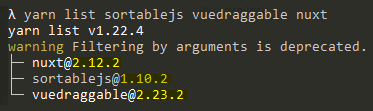
add vuedraggable
$ yarn add vuedraggable
modify pages/index.vue
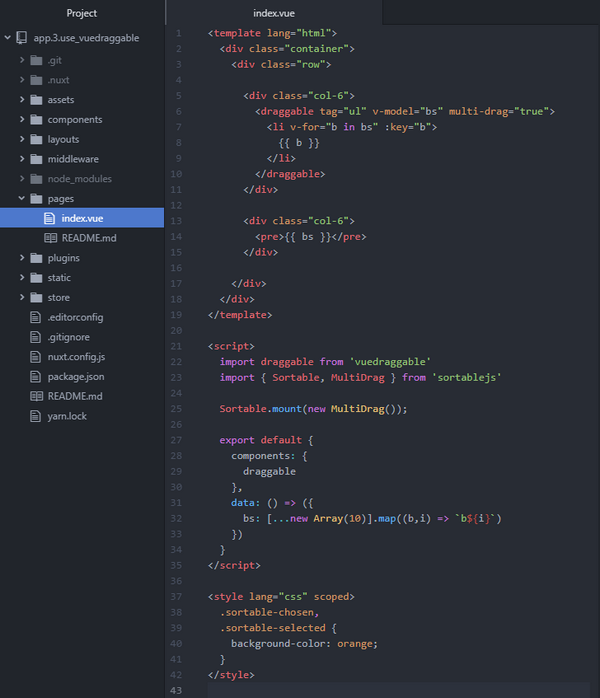
<template lang="html">
  <div class="container">
    <div class="row">

      <div class="col-6">
        <draggable tag="ul" v-model="bs" multi-drag="true">
          <li v-for="b in bs" :key="b">
            {{ b }}
          </li>
        </draggable>
      </div>

      <div class="col-6">
        <pre>{{ bs }}</pre>
      </div>

    </div>
  </div>
</template>

<script>
  import draggable from 'vuedraggable'
  import { Sortable, MultiDrag } from 'sortablejs'

  Sortable.mount(new MultiDrag());

  export default {
    components: {
      draggable
    },
    data: () => ({
      bs: [...new Array(10)].map((b,i) => `b${i}`)
    })
  }
</script>

<style lang="css" scoped>
  .sortable-chosen,
  .sortable-selected {
    background-color: orange;
  }
</style>
run
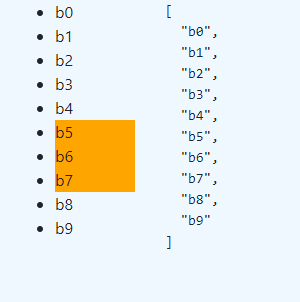
select items
drag items
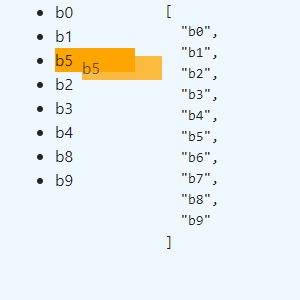
drop items
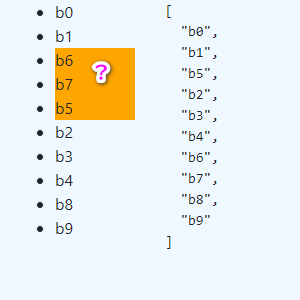
I expected following result.
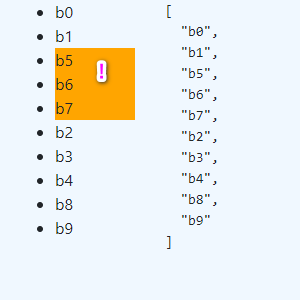
What is wrong with my codes?
 tokuiti
>All comments
Multi drag is not supported by vue.draggable at this moment. It will be incorporated later.
 David-Desmaisons
on 10 Apr 2020
David-Desmaisons
on 10 Apr 2020
😕3
Was this page helpful?
0 / 5 - 0 ratings
Related issues
 ghost
·
3Comments
ghost
·
3Comments
 Kuohao-wu
·
3Comments
Kuohao-wu
·
3Comments
 Sualty
·
3Comments
Sualty
·
3Comments
 Kgwkgwkgw
·
3Comments
Kgwkgwkgw
·
3Comments
 Nrqz
·
3Comments
Nrqz
·
3Comments