Vue.draggable: Change event should have any passed argument wrapped in event type key
At the time being any passed arguments to the change event is printed in double which makes it difficult to use the arguments for any custom actions, potentially making api call, just like having the added/removed keys when logging any passed arguments making it pointless.
Is it possible to do so ?
update(event, argument) {
    console.log(event); => this print {added: {}} and {removed: {}}
    //console.log(argument.id) => this prints (1) and (2)
}
so you can access the event.added and the event.removed
Maybe we can get something like
update(event, group) {
    console.log(event); // {addedTo: {group}} and {removedFrom: {group}}
}
You can see this closed issue as well #336
 minedun6
All 9 comments
I've taken the liberty of preparing a fiddle to illustrate my point of vue.
Draggable-demo
When you pull the console, you will see that the group being passed to the updateGroup function is logged 2 times and not keyed so it's hard for anyone to access the addedTo group.
And if you console the event, all you get is added/removed data of the dragged element.
I really hope @David-Desmaisons that you answer this because I've seen a lot of people asking can this be acheived and so far, no one has gotten a "clean" and good way of handling this.
minedun6
on 30 Jan 2018
@minedun6 , This is a question on how use vue.draggable not a feature request nor a bug description, so it should go to stackoverflow.
Besides that it is very difficult to understand what you try to achieve from your description. Where is the step by step scenario, where is the expected vs actual?
I make some correction on your fiddle (uncorrect use of v-model, v-for element not keyed..):
https://jsfiddle.net/dede89/025fausd/
On change is called once on the component where the component is removed and once on the component where the element is added. This is normal.
 David-Desmaisons
on 30 Jan 2018
David-Desmaisons
on 30 Jan 2018
The problem is that when I'm doing drag dropping, I want to get which item was moved, where did the item move TO without having to rely on the ui.
The only half way to do so is through the change event.
For the other events (add/start/...), when I try to log the event, it returns UI related informations, like the item(HTML) and not the data.
I get the item I'm moving but the problem is that the group is not KEYED so when I try to access the id, it returns 2 values instead of 1 and that's the problem I'm facing.
In this case, I can do event.added or event.removed but I can't seem to do so on the passed argument to the updateGroup.
In the end, all I'm trying to do is get two values and send them to the backend to update the new group of the dragged story instead of resending the entire list to be re-synced again.
minedun6
on 30 Jan 2018
From the log, of the example:
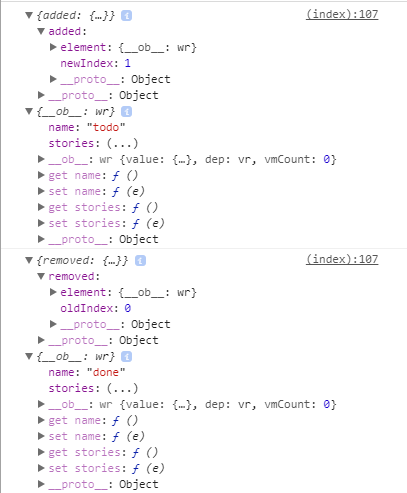
You got the group, the added or removed item, the old or new index. Why would you need to rely on the Ui to get more info?
I get the item I'm moving but the problem is that the group is not KEYED so when I try to access the id, it returns 2 values instead of 1 and that's the problem I'm facing.
I don't undersatnd this.
David-Desmaisons
on 30 Jan 2018
the two groups you get on the console "todo" and done, you can't access one of them, they are not key-based meaning that if you do
console.log(group.name) => this line will log "todo" and "done"
so you can't extract a single value.
on the other hand when you do
console.log(e) => this line will log "{added: object}" and "{removed: object}"
so using this same concept why not wrap any passed arguments into {added} and {object} and building on the same fiddle you provided, here's a more accurate fiddle to target the problem.
https://jsfiddle.net/minedun6/sjn78wt7/19/
as well as an image to illustrate it even more.
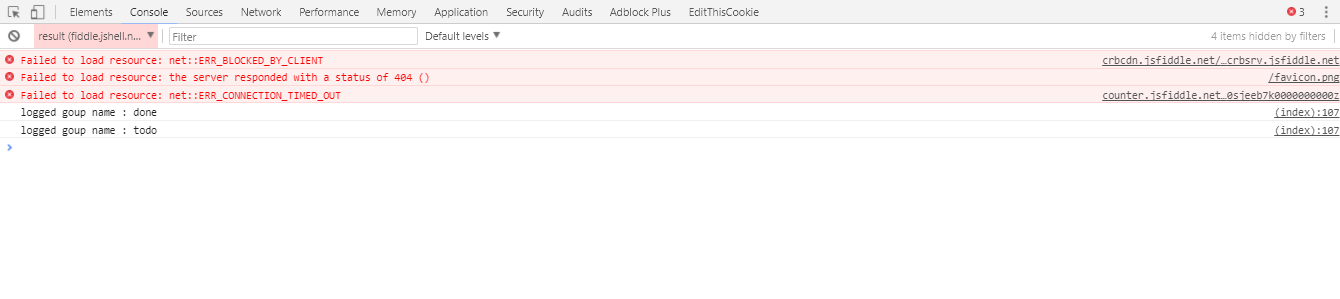
You can't use the group like you can do
    console.log(e.added)
    console.log(e.removed)
Sorry I don't understand what you mean.
I can't think of something you can not do with the current solution. You can merge the event and the group if needed. There is no need for vue,draggable to do it for you.
If I miss something, you can open a PR with the corresponding changes.
David-Desmaisons
on 30 Jan 2018
@David-Desmaisons merge the event and the group ? how ?
And seriously, is it hard really hard to understand that I want to get the target group ?
Did you run the fiddle and open the console on my last comment ?
Didn't you see in the screenshot that it printed out two lines instead of one ?
minedun6
on 30 Jan 2018
1) Object.assign()
2) yes (seriously): I mean you already have it as parameter, What do you want more?
3) yes
4) yes
David-Desmaisons
on 30 Jan 2018
Well as it turned out,
I used a different approach at the end which is in a first time use the add event to get the added to group then to get the dragged item using event.added
All I wanted at the end was some way to get all these values without using two events.
and again regarding you answer to the second question ?
I mean you already have it as parameter
no from the start that's not what I mean, when I console.log the group in the change event, it returns two groups objects. The group which the story was removed from and the group which the the story was added to.
The issue is that these groups do not have a "key" to access one of them. this is the issue I've been trying to tell from the start.
minedun6
on 31 Jan 2018
Related issues
 Sualty
·
3Comments
Sualty
·
3Comments
 fedenko
·
3Comments
fedenko
·
3Comments
 Stetzon
·
3Comments
Stetzon
·
3Comments
 karam94
·
3Comments
karam94
·
3Comments
 tomdong
·
3Comments
tomdong
·
3Comments
Most helpful comment
Well as it turned out,
I used a different approach at the end which is in a first time use the add event to get the added to group then to get the dragged item using event.added
All I wanted at the end was some way to get all these values without using two events.
and again regarding you answer to the second question ?
no from the start that's not what I mean, when I console.log the group in the change event, it returns two groups objects. The group which the story was removed from and the group which the the story was added to.
The issue is that these groups do not have a "key" to access one of them. this is the issue I've been trying to tell from the start.