Vue.draggable: Array.push() on the model breaks the model order
Hi! Loving Vue.Draggable so far, it has been amazing 😄
I'm having this bug where new array elements are not visually appended at the end when they have been added programmatically to the array (array.push()) after previously having swapped two items. It does not happen if previously the existing items are moved more than one position. See capture below:
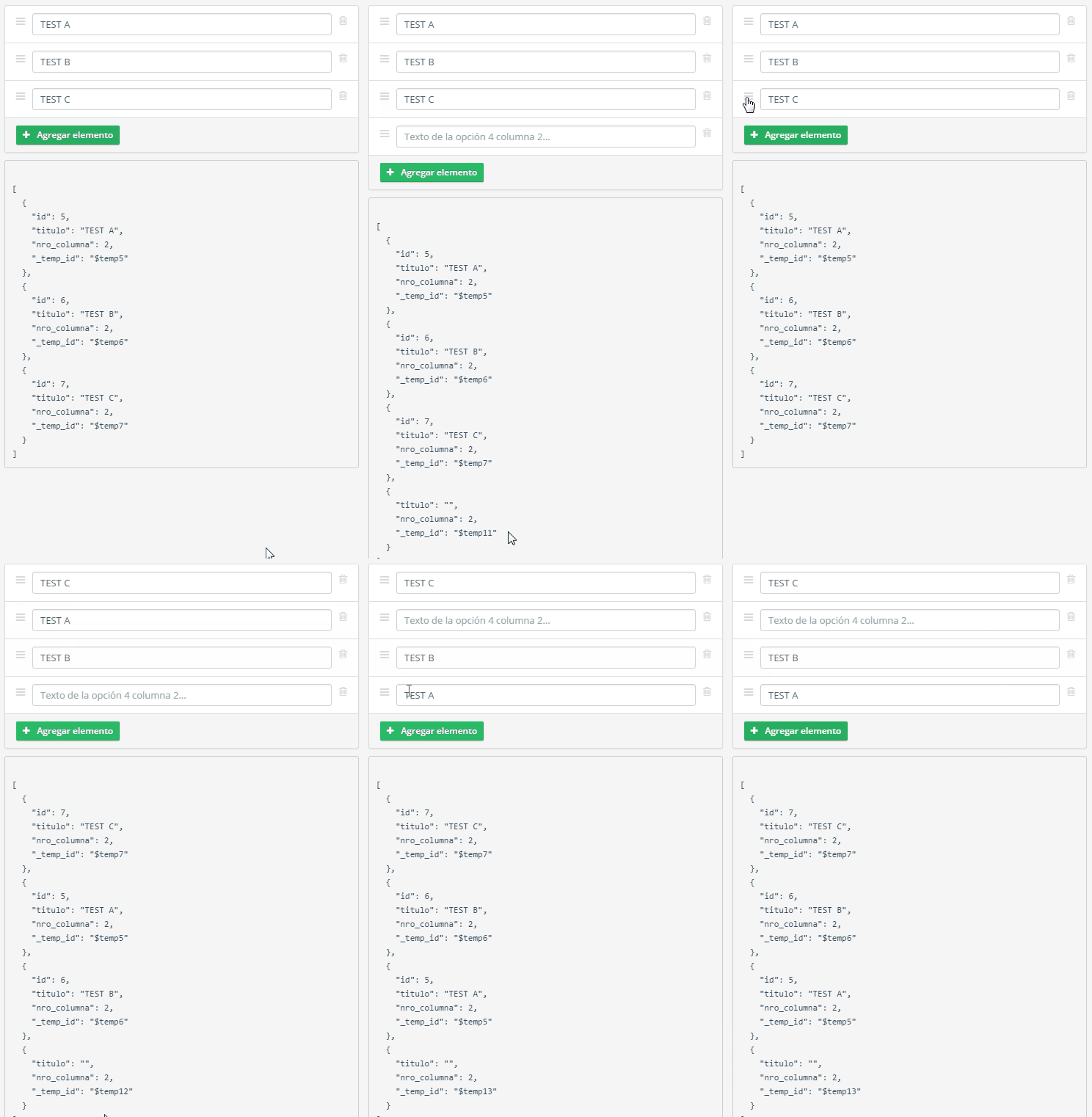
As you can see, the order of the new item on the model is correct, but the UI is out of sync. It's been several hours and I cannot find a way to make the UI get in sync again with the model. I've tried on my handleAddOption() method to fiddle with the array on $nextTick so perhaps it could be refreshed, but no avail, and I ran out of ideas.
Am I doing something wrong? Thanks!
That section of the template looks like this:
<ul class="list-group">
    <draggable v-model="internalModel.col1" :options="draggableOptions">
        <li class="list-group-item list-group-item-editable canBeDragged"
            v-for="elemento, i in internalModel.col1"
            :key="elemento._temp_id"
        >
            <div class="handle">
                <i class="fa fa-navicon"></i>
            </div>
            <div class="content">
                <input type="text" class="form-control" v-model="elemento.titulo"
                       :placeholder="'Texto de la opción ' + (i+1) +  ' columna 1...'">
            </div>
            <div class="actions">
                <i class="fa fa-trash-o" v-on:click="handleDeleteOption(elemento, 1)"></i>
            </div>
        </li>
        <li class="list-group-item list-group-item-add">
            <a href="javascript:" class="btn btn-success btn-sm" v-on:click="handleAddOption(1)">
                <i class="fa fa-plus mr10"></i>Agregar elemento
            </a>
        </li>
    </draggable>
</ul>
My model looks like this:
internalModel: { "id": 13, "col1": [ { "id": 1, "titulo": "Cuadrado", "nro_columna": 1, "_temp_id": "$temp1" }, { "id": 2, "titulo": "Pentágono", "nro_columna": 1, "_temp_id": "$temp2" }, { "id": 3, "titulo": "Triángulo", "nro_columna": 1, "_temp_id": "$temp3" }, { "id": 4, "titulo": "Hexágono", "nro_columna": 1, "_temp_id": "$temp4" } ], "col2": [ { "id": 5, "titulo": "3", "nro_columna": 2, "_temp_id": "$temp5" }, { "id": 6, "titulo": "5", "nro_columna": 2, "_temp_id": "$temp6" }, { "id": 7, "titulo": "4", "nro_columna": 2, "_temp_id": "$temp7" } ], "discr": "compitemevalapareamiento" }
And I'm instancing the draggable with these options:
export default {
    handle: '.handle',
    forceFallback: true,
    fallbackOnBody: true,
    animation: 150,
    draggable: '.canBeDragged'
}
New empty items are added like this
handleAddOption: function(col) {
    let newOption = {
        titulo: "",
        nro_columna: col,
        _temp_id: uniqueId(),
    };
    this.internalModel[`col${col}`].push(newOption);
},
 Danita
All 13 comments
Hi @Danita , there is something wrong with the draggable mark-up: draggable children should be only v-for elements. Somethong like this:
<ul class="list-group">
    <draggable v-model="internalModel.col1" :options="draggableOptions">
        <li class="list-group-item list-group-item-editable canBeDragged"
            v-for="elemento, i in internalModel.col1"
            :key="elemento._temp_id"
        >
            <div class="handle">
                <i class="fa fa-navicon"></i>
            </div>
            <div class="content">
                <input type="text" class="form-control" v-model="elemento.titulo"
                       :placeholder="'Texto de la opción ' + (i+1) +  ' columna 1...'">
            </div>
            <div class="actions">
                <i class="fa fa-trash-o" v-on:click="handleDeleteOption(elemento, 1)"></i>
            </div>
        </li>
    </draggable>
    <li class="list-group-item list-group-item-add">
        <a href="javascript:" class="btn btn-success btn-sm" v-on:click="handleAddOption(1)">
            <i class="fa fa-plus mr10"></i>Agregar elemento
        </a>
    </li>
</ul>
If there does not solve the problem, please isolate the scanerio in a jsfidle and send the link here.
 David-Desmaisons
on 22 Apr 2017
David-Desmaisons
on 22 Apr 2017
Hi, @David-Desmaisons, thanks for your quick reply!
I was just taking advantage of the draggable: '.canBeDragged' option of Sortable, but now that I see it, it was not really necessary. I'll try that markup and see what happens.
Danita
on 22 Apr 2017
OMG thanks! That did the trick 😺 I guess I was too many hours in front of the monitor.
The only problem remaining is the extra <div> created inside the <ul> where the <draggable> element used to be. The generated DOM now looks like this:
<ul class="list-group sortable-container mb10">
    <div>
        <li id="$temp5" class="list-group-item list-group-item-editable canBeDragged">...</li>
        <li id="$temp6" class="list-group-item list-group-item-editable canBeDragged">...</li>
        <li id="$temp7" class="list-group-item list-group-item-editable canBeDragged">...</li>
    </div>
    <li class="list-group-item list-group-item-add">
        <a href="javascript:" class="btn btn-success btn-sm">...</a>
    </li>
</ul>
Which causes a rendering artifact. Is there any way to remove it?
Danita
on 22 Apr 2017
@Danita , I would consider using element props and take-out the add button from the the ul. Like this:
<div>
  <draggable element="ul" class="list-group" v-model="internalModel.col1" :options="draggableOptions">
    <li class="list-group-item list-group-item-editable canBeDragged"
            v-for="elemento, i in internalModel.col1"
            :key="elemento._temp_id">

            <div class="handle">
                <i class="fa fa-navicon"></i>
            </div>
            <div class="content">
                <input type="text" class="form-control" v-model="elemento.titulo"
                       :placeholder="'Texto de la opción ' + (i+1) +  ' columna 1...'">
            </div>
            <div class="actions">
                <i class="fa fa-trash-o" v-on:click="handleDeleteOption(elemento, 1)"></i>
            </div>
        </li>
    </draggable>
    <div class="list-group-item list-group-item-add">
        <a href="javascript:" class="btn btn-success btn-sm" v-on:click="handleAddOption(1)">
            <i class="fa fa-plus mr10"></i>Agregar elemento
        </a>
    </div>
</div>
That will render:
<div>
   <ul class="list-group sortable-container mb10">
    <li id="$temp5" class="list-group-item list-group-item-editable canBeDragged">...</li>
    <li id="$temp6" class="list-group-item list-group-item-editable canBeDragged">...</li>
    <li id="$temp7" class="list-group-item list-group-item-editable canBeDragged">...</li>
  </ul>
    <div class="list-group-item list-group-item-add">
        <a href="javascript:" class="btn btn-success btn-sm">...</a>
    </div>
</div>
Ah I understand, but the whole point is the Add button needs to be part of the list. No problem, I'll figure out, thanks again for your help! 😄
Danita
on 22 Apr 2017
Thanks for the feedback, I am closing the issue.
David-Desmaisons
on 24 Apr 2017
I also am having this problem. If you can explain how you figured it out (if you did) it would be appreciated! Otherwise I've got to think this issue is a bug.
 lbjones
on 15 Jun 2017
lbjones
on 15 Jun 2017
@lbjones I left the markup as per @David-Desmaisons' example, the button outside the draggable elements. The draggable option of Sortable doesn't work in the context of this library.
<div>
  <draggable element="ul" ...>
    <li v-for="elemento, i in internalModel.col1" ...>
    ...
    </li>
  </draggable>
  <div>
    <a class="btn" ...></a>
  </div>
</div>
Darn I was afraid of that! Pulling the last element out of the draggable really ruins the UI for me.
lbjones
on 17 Jun 2017
@Danita and @lbjones I just released version v2.14.0 that supports footer slot. It adresses your original problem: adding a none-draggable item inside a draggable component
David-Desmaisons
on 24 Jun 2017
@David-Desmaisons Good to know, I'll try it soon. Thanks!! <3
Danita
on 26 Jun 2017
Just tried it, works like a charm! You are the man @David-Desmaisons
lbjones
on 27 Jun 2017
Hola @Danita vi tu esquema con Vue.Draggable y resolviste algo que llevo mucho tiempo intentando, mi ejercicio es tener una lista y clonar sus elementos en varias listas, sin embargo no he podido eliminar los elementos clonados en las otras listas y además no sé como hacerlo sin que se borre el elemento de la lista principal, únicamente quiero borrarlo de la lista a la cual pertenece. Si tienes alguna idea de como resolverlo te lo agradecería mucho. Mil gracias
 creamosdavid
on 10 Feb 2018
creamosdavid
on 10 Feb 2018
Related issues
 clemsontiger
·
3Comments
clemsontiger
·
3Comments
 AnnaStuehlmeyer
·
3Comments
AnnaStuehlmeyer
·
3Comments
 Stetzon
·
3Comments
Stetzon
·
3Comments
 Leadaxe
·
3Comments
Leadaxe
·
3Comments
 steffanhalv
·
3Comments
steffanhalv
·
3Comments
Most helpful comment
@Danita and @lbjones I just released version v2.14.0 that supports footer slot. It adresses your original problem: adding a none-draggable item inside a draggable component