Vue-devtools: No Vuex store detected
Hello,
I'm seeing no Vuex store inside devtools anymore. With other projects on other Vue+Vuex versions it works perfectly.
Current env:
"vue": "^2.4.1",
"vuex": "^2.4.0"
// main.js
import Vue from 'vue'
import App from './components/App.vue'
import router from './router'
import store from './vuex'
import localforage from 'localforage'

localforage.config({
    driver: localforage.LOCALSTORAGE,
    storeName: 'guildlabs'
})

Vue.config.devtools = true

const app = new Vue({
    el: '#app',
    store,
    router,
    render: h => h(App)
})
// vuex/index.js
import Vue from 'vue'
import Vuex from 'vuex'
import auth from '../app/auth/vuex'

Vue.use(Vuex)

export default new Vuex.Store({
    modules: {
        auth: auth
    }
})
// app/auth/vuex/index.js
import state from './state'
import * as mutations from './mutations'
import * as actions from './actions'
import * as getters from './getters'

export default {
    namespaced: true,
    state,
    mutations,
    actions,
    getters
}
Yes, all the other files for state, mutations, actions and getters also exist and have content inside app/auth/vuex.
Is this a known problem with devtools, that it doesn't detect newer versions?
 visualcookie
All 36 comments
Hey, can you boil down the error and provide a repro using this template?
Thanks!
 posva
on 1 Sep 2017
posva
on 1 Sep 2017
@posva It's a private project. Can't really give the full stuff out. Only thing I can confirm now, that a downgrade of Vuex 2.4 to Vuex 2.3.1 worked.
visualcookie
on 2 Sep 2017
Ok, make sure to open a new issue if you manage to reproduce it in a simple HTML page or a codepen
posva
on 2 Sep 2017
I had the same issue and the downgrade worked for me too.
But I couldn't reproduce it.
Could it be webpack related?
 TerryHibbert
on 9 Sep 2017
TerryHibbert
on 9 Sep 2017
I also have the same issue, downgrade to 2.3.1 worked.
 kjakobson
on 18 Sep 2017
kjakobson
on 18 Sep 2017
The issue still exists. Could it be Vuex related, since it only works with Vuex 2.3.1, but not with 2.5 or 3.0?
visualcookie
on 16 Oct 2017
Same issue here. Using vue-dev tools on firefox. I used to see vuex store before. Now it's gone. Using:
"vue": "^2.4.4",
"vuetify": "^0.16.9",
"vuex": "^3.0.0",
Yet, for some strange reason, my vue-developer window is showing the vue version as:
Ready. Detected Vue 2.5.2.
Infact, I can't even see any components in it.
 gopalagrawal
on 5 Nov 2017
gopalagrawal
on 5 Nov 2017
Same issue here. Using vue-dev tools on firefox. I used to see vuex store before. Now it's gone. Using:
"vue": "^2.4.4",
"vuetify": "^0.16.9",
"vuex": "^3.0.0",
Yet, for some strange reason, my vue-developer window is showing the vue version as:
Ready. Detected Vue 2.5.2.
Update: Ok, seems there was a error in the way I was using ...mapGetters which caused vue-dev to not detect anything. I was passing an array with [ x, y ] instead of [ 'x', 'y' ]. Once this was fixed, I see the vuex store again in vue-developer tools.
gopalagrawal
on 5 Nov 2017
"vue": "^2.5.13"
"vuex": "^3.0.1"
I'm experiencing this issue as well. The store works, but it doesn't get detected by dev tools, could be a dev tools bug?
However, I noticed a pattern. The store gets detected if I define it and add it to the Vue constructor in the same file, but it doesn't get detected if I have the store imported from a module. I'm also using portal-vue, but not sure whether that makes a difference.
This gets detected:
// app.js
import Vue from 'vue';
import Vuex from 'vuex';
Vue.use(Vuex);

let store = new Vuex.Store({
    state: {
        ..
    }
});

let vueApp = new Vue({
    store,
    ..
});

vueApp.$mount(..);
This doesn't get detected:
// app.js
import Vue from 'vue';
import store from './store';

let vueApp = new Vue({
    store,
    ..
});

vueApp.$mount(..);

// store/index.js
import Vue from 'vue';
import Vuex from 'vuex';
Vue.use(Vuex);

export default new Vuex.Store({
    state: {
        ..
    }
});
 edgarssults
on 10 Jan 2018
edgarssults
on 10 Jan 2018
I'm also having this issue, within a freshly started https://github.com/vuejs/vue-cli webpack project.
Strange.
// package.json:
"vue": "^2.5.2",
"vue-router": "^3.0.1",
"vuex": "^3.0.1"
Just as @edgarssults suggests above though, when all the vuex logic get's included inside main.js - rather than being imported from say: /store/index.js - the devtools detects the vuex store just fine.
I suspect noone can replicate using codepen, because it's some kind of weirdness happening within the webpack build.
 glomotion
on 24 Jan 2018
glomotion
on 24 Jan 2018
glomotion
on 24 Jan 2018
glomotion
on 24 Jan 2018
glomotion
on 24 Jan 2018
glomotion
on 24 Jan 2018
I am getting the same, with this error on first load:
vue.esm.js?65d7:3120 Uncaught TypeError: Cannot read property '0' of undefined
    at getGpcHTMLData (webpack-internal:///240:7:35)
    at wrappedGetter (webpack-internal:///320:741:12)
    at Vue$3.computed.(anonymous function) (webpack-internal:///320:541:42)
    at Watcher.get (webpack-internal:///32:3114:25)
    at Watcher.evaluate (webpack-internal:///32:3221:21)
    at Vue$3.computedGetter [as getGpcHTMLData] (webpack-internal:///32:3473:17)
    at Object.get [as getGpcHTMLData] (webpack-internal:///320:543:42)
    at e (chrome-extension://nhdogjmejiglipccpnnnanhbledajbpd/build/backend.js:1:16473)
    at e (chrome-extension://nhdogjmejiglipccpnnnanhbledajbpd/build/backend.js:1:16503)
    at Object.t.b (chrome-extension://nhdogjmejiglipccpnnnanhbledajbpd/build/backend.js:1:16664)
"vue": "^2.5.13",
    "vue-router": "^2.8.1",
    "vue-template-compiler": "^2.5.13",
    "vuetify": "^0.16.1",
    "vuex": "^3.0.0"
Vue.js devtools 4.1.1
Chrome 63.0.3239.132
I've updated to the latest vue and CLI, but still get same error.
 TonyThorne
on 25 Jan 2018
TonyThorne
on 25 Jan 2018
Had this problem in Firefox dev tools.
Went to Developer Tools -> Toolbox (cog icon) -> installed by add-ons
clicked, then unclicked.
Went back to workking.
EDIT:
this apparently gets the last state, but isn't interactive :-1:
 disarticulate
on 26 Jan 2018
disarticulate
on 26 Jan 2018
Had this problem also and discovered that devtools does not work for Vuex IF NODE_ENV is not 'development'. Regardless of whether devtools is explicitly turned on with
Vue.config.devtools = true;
The fix for us was to use a different flag to turn on production things and leave NODE_ENV as 'development'.
 nshgraph
on 1 Feb 2018
nshgraph
on 1 Feb 2018
Had this problem with this env:
"vue": "^2.4.1",
"vuex": "^2.4.0"
my store.js file
import Vuex from 'vuex'
import Vue from 'vue'

Vue.use(Vuex);

export const store = new Vuex.Store({
  state: {
    here: 'test'
  },
  getters: {
    here (state) {
      return state.here
    }
  }
});
main.js
...
import { store } from './store/store'
Vue.config.devtools = true;
new Vue({
  el: '#app',
  router,
  store,
  components: { App },
  template: '<App/>'
})
trying to console.log(this.$store.getters.here) its works properly but still not detected by vue-devtools
 kalidiagne
on 17 Feb 2018
kalidiagne
on 17 Feb 2018
@nshgraph 's hint helps. I just changed NODE_ENV to "development" and now vue-devtools can find my vuex instance.
NODE_ENV=development
 ghost
on 23 Feb 2018
ghost
on 23 Feb 2018
I found that dev-tools in firefox doesn't show my vuex store, but chrome dev-tools does.
[email protected]
[email protected]
[email protected] Firefox
the store works fine, just dev-tools doesn't detect it. And only in firefox.
NODE_ENV is development
Vue.config.devtools = true;
doesn't help..
 exophunk
on 26 Feb 2018
exophunk
on 26 Feb 2018
612 . check this incase if you use vue-perftools extension
 mcsekar12
on 26 Feb 2018
mcsekar12
on 26 Feb 2018
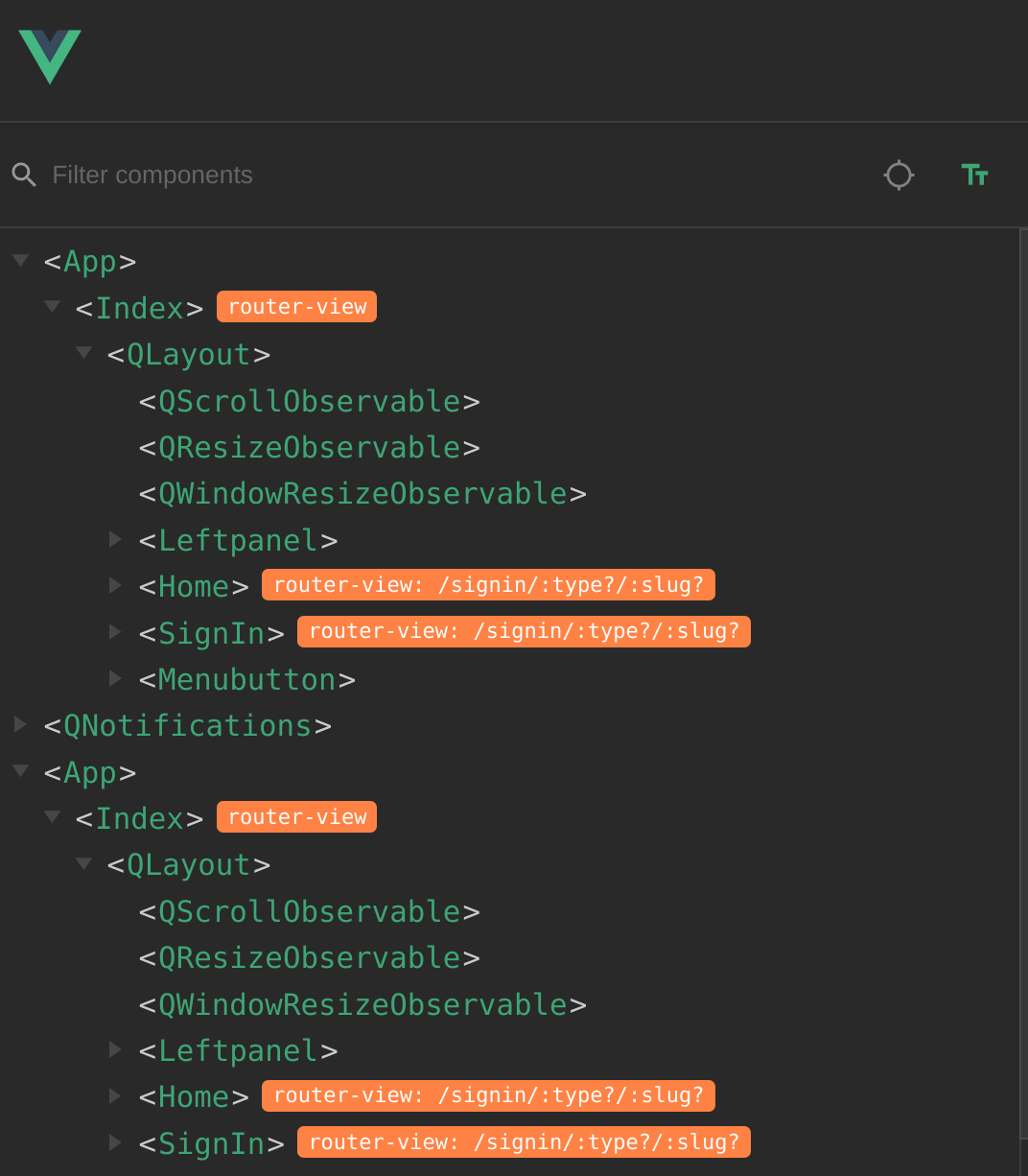
Vuex store is not detected. I have two similar apps in the component tree (see screenshot). Looked through all issue 'solutions' (switched off/ deinstalled other extensions), but does not help.
 musicformellons
on 4 Apr 2018
musicformellons
on 4 Apr 2018
Ah! The double app related to having default and ontop routes and thus was not related. Not showing vuex was due to one of my vuex getters causing an error. When commenting that getter out vuex showed in vue-developer instantly!
musicformellons
on 4 Apr 2018
I struggled with this issue for awhile. I found that just declaring
Vue.config.devtools = true;
in the root app file was not enough. It seems that when I imported a store from another file like this:
// main.js
import store from './store'
then I had to add:
Vue.config.devtools = true;
in ./store.js as well.
 weexpectedTHIS
on 6 Apr 2018
weexpectedTHIS
on 6 Apr 2018
then I had to add:
Vue.config.devtools = true;
in ./store.js as well.
This worked for me as well.
I suspect it has something to do with the devtools property being set to true before the store is created, such that it is true on creation of the store.
That's probably why moving the creation of the Store in the same file as the Vue instance in the main entry file worked as well.
 readered
on 7 Apr 2018
readered
on 7 Apr 2018
I struggled with this for a bit too long before I realized that I forgot make my store a new Instance of Vuex.Store
 staghouse
on 1 May 2018
staghouse
on 1 May 2018
I solved this issue by making sure Vue.config.devtools = true happened before instantiated the store new Vuex.Store(...)
 MathieuDerelle
on 25 Jun 2018
MathieuDerelle
on 25 Jun 2018
@MathieuDerelle Thanks, you made my day!
 YongX
on 5 Aug 2018
YongX
on 5 Aug 2018
Why need to use ?
Vue.config.devtools = true
what if production version ?
 mandeepsinghgill
on 8 Sep 2018
mandeepsinghgill
on 8 Sep 2018
Why need to use ?
Vue.config.devtools = truewhat if production version ?
try this
Vue.config.devtools = process.env.NODE_ENV === 'development'
 wing-kai
on 29 Oct 2018
wing-kai
on 29 Oct 2018
that's the default case
https://github.com/vuejs/vue/blob/d483a49c86874b2e75863b661f81feecd46ae721/src/core/config.js#L58
but the point is precisely to be able to debug the production environnement
Either it's a demo site and you can just use Vue.config.devtools = true or it is not and you should add other conditions
MathieuDerelle
on 29 Oct 2018
I ran into this error and just want to put it out there to make sure you actually export the new Vuex Store. I was exporting
export default {
  state,
  mutations,
  actions,
  getters
};
Which actually works with getting things from the state. However, the minute you use ...mapGetters you start running into issues. Also, the devtools doesn't see the Vuex instance because... well... it's not there. Simple mistake that can lead to a some confusion when you're copying / pasting across projects
I should have had:
export default new Vuex.Store({
  state,
  mutations,
  actions,
  getters
});
 dolbex
on 28 Nov 2018
dolbex
on 28 Nov 2018
Adding
Vue.config.devtools = true;
Doesn't solve my problem, event if added in both app.is & store.js files
 marwan2
on 10 Mar 2019
marwan2
on 10 Mar 2019
It needs to be before the store initialization new Vuex.Store(...) so it depends on how your code is structured
MathieuDerelle
on 10 Mar 2019
It needs to be before the store initialization
new Vuex.Store(...)so it depends on how your code is structured
solve my problem
it toast me another problem, my process.env.NODE_ENV is production
 songlairui
on 22 Mar 2019
songlairui
on 22 Mar 2019
We have encountered such a problem. Has anyone of you solved it?
 qiqingfu
on 19 Apr 2019
qiqingfu
on 19 Apr 2019
I just encountered this too after switching from the
Related issues
 psycura
·
4Comments
psycura
·
4Comments
 phromo
·
4Comments
phromo
·
4Comments
 BOSSLMH
·
3Comments
BOSSLMH
·
3Comments
 matthewsunrise
·
3Comments
matthewsunrise
·
3Comments
 sithuaung
·
4Comments
sithuaung
·
4Comments
Most helpful comment
I struggled with this issue for awhile. I found that just declaring
in the root app file was not enough. It seems that when I imported a store from another file like this:
then I had to add:
in ./store.js as well.