Vue-devtools: [Firefox] "Proxy injection failed" while using Responsive Design Mode.
Firefox: 54.0.1 (64-bit)
Vue,js Devtools: 3.1.6
Vue.js: 2.4.2
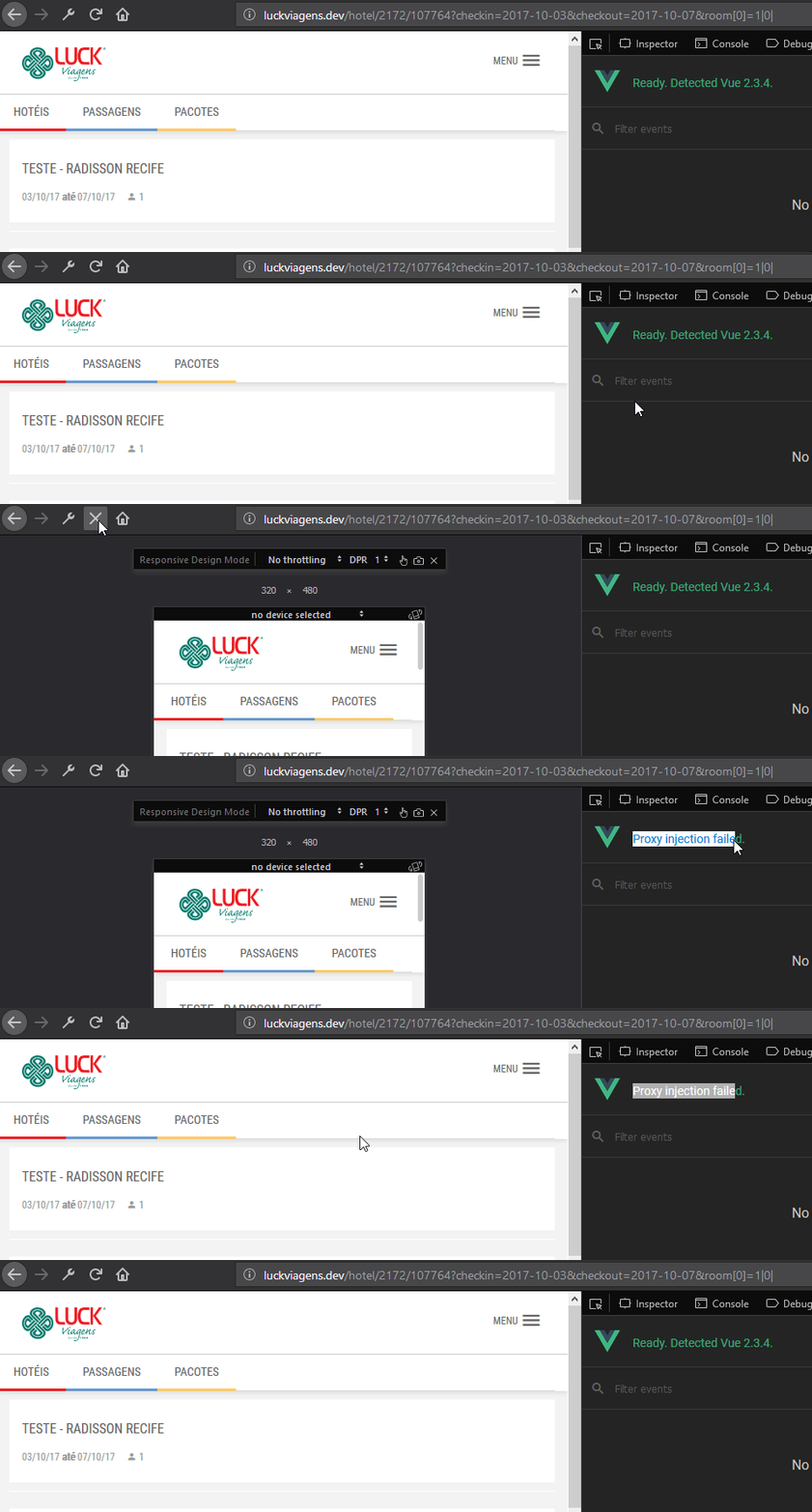
When using Firefox Responsive Design Mode, Vue.js Devtools is not initializing.
It's giving me the response: Proxy injection failed.
No error is given in the console, but 3 of our projects that's using Vue is giving me the same response.
One of these projects is using Sentry.io logging and we received an error:
TypeError: can't redefine non-configurable property "__VUE_DEVTOOLS_GLOBAL_HOOK__"
in installHook at line 66:3
Steps to reproduce:
- Use Vue.js in your application
- Have the official Vue.js Devtools installed in Firefox
- Enable Responsive Design Mode
- Open the Vue.js Devtools tab
 Hendriksie
All 17 comments
Same issue here:
 jsvini
on 28 Sep 2017
jsvini
on 28 Sep 2017
same here! mine doesn't even work in normal view
 ghost
on 29 Oct 2017
ghost
on 29 Oct 2017
same here!
Vue 2.5.3
Firefox 57
 andyedward
on 13 Nov 2017
andyedward
on 13 Nov 2017
👍 same here
 laphilosophia
on 6 Dec 2017
laphilosophia
on 6 Dec 2017
I'm having issue with firefox quantum too.
 rdpascua
on 29 Dec 2017
rdpascua
on 29 Dec 2017
Chrome: Version 63.0.3239.132
Vue Tools: Version 4.0.0
VueJS: 2.5.13
I've also noticed reloading with command + R(⌘ + R) causes the _Proxy Injection Failed_ error sometimes too. Reloading with the browser button gets it right again, though. Also important to note, my developer tools window is open each time this happens. Happens more often as my project gets bigger.
This seems to be about Firefox but I thought I'd mention there are similar problems in Chrome
 yasare16
on 20 Jan 2018
yasare16
on 20 Jan 2018
Confirming, still exists in:
Firefox: 57.0.3 (64-bit)
Vue.js devtools: 4.1.3
VueJS: 2.5.13
 tmladek
on 5 Feb 2018
tmladek
on 5 Feb 2018
TypeError: can't redefine non-configurable property "__VUE_DEVTOOLS_GLOBAL_HOOK__" was addressed in 4.1.2, so if this issue still happens, it is unrelated to that error.
 simplesmiler
on 1 Aug 2018
simplesmiler
on 1 Aug 2018
I was not able to reproduce in:
Firefox: 61.0.1 (64-bit)
Devtools: 4.1.4
simplesmiler
on 1 Aug 2018
I'm not getting the error anymore using:
Firefox: 62 (64-bit)
Vue,js Devtools: 4.1.4
Vue.js: 2.5.16
yay!
(what is the normal procedure to close issues like these, do I have to do it or a mod?)
Hendriksie
on 1 Aug 2018
Good, glad to the the issue resolved!
simplesmiler
on 1 Aug 2018
Unfortunately, this error still persists in Firefox Nightly. It always happens after the initial reload in responsive design mode (i.e. when the user agent changes) or after manually reloading in that mode.
Firefox: 69.0a1 (64-bit)
Vue.js devtools: 5.1.1
Vue.js: 2.6.10
Even a complete refresh of Firefox (thus also resetting customized about:config entries) didn't get me rid of this issue.
EDIT: I even cleaned Firefox Nighty from my drive and reinstalled it to exclude other potential causes for this behaviour.
 entepe85
on 1 Jul 2019
entepe85
on 1 Jul 2019
This is the error message I get upon reloading the tab in Responsive Design Mode (from the browser debugging dev tools):
Unchecked lastError value: Error: No matching message handler
EDIT: Before reloading I get this message in the developer tools console, confirming that the extension is actually working:
10:12:02.890 backend -> devtools
Array [ {…} ]
background.js:1:1367
10:12:02.962 backend -> devtools
Array(10) [ {…}, {…}, {…}, {…}, {…}, {…}, {…}, {…}, {…}, {…} ]
background.js:1:1367
10:12:03.029 devtools -> backend
Array [ {…} ]
background.js:1:1241
10:12:03.035 devtools -> backend
Array [ {…} ]
background.js:1:1241
Please reopen this issue as the problem persists across Firefox Nightly (69.0a1) and Developer Edition / Beta (69.0b1 as of today).
entepe85
on 3 Jul 2019
Restarting the browser seems to have solved this problem for me. (Firefox Developer Edition 69.0b1)
 zkriszti
on 11 Jul 2019
zkriszti
on 11 Jul 2019
Thanks, zkriszti. I tried restarting the browser but with no luck. After restarting the corresponding tab / app reloads in normal mode and upon entering RDM and the subsequent reloading of the app / page (due to touch emulation and user agent changes) I get the same error.
EDIT: Additionally, it seems hardly feasible to have to restart the browser every time I try to debug a Vue app in RDM (e.g. a mobile app developed with Ionic, Capacitor and Vue).
entepe85
on 12 Jul 2019
Bug is fixed in Firefox Nightly 70.0a1 (2019-07-25). Corresponding changes in mozilla-central
entepe85
on 25 Jul 2019
Related issues
 mitramejia
·
3Comments
mitramejia
·
3Comments
 BOSSLMH
·
3Comments
BOSSLMH
·
3Comments
 gustojs
·
3Comments
gustojs
·
3Comments
 Gedminas
·
3Comments
Gedminas
·
3Comments
 ispal
·
4Comments
ispal
·
4Comments
Most helpful comment
Please reopen this issue as the problem persists across Firefox Nightly (69.0a1) and Developer Edition / Beta (69.0b1 as of today).