I've noticed when using this with Vuex if I leave the dev tools open in a tab in the background and forget about it for a few hours I end up with the process for the dev tools using upwards of 1GB, some of the time even getting as high as 3GB of RAM just by itself.
I don't know where to start looking for issues but I thought I'd report it so someone may be able to look into it.
 OmgImAlexis
All 12 comments
I've never faced this problem.
Can you, please, boil down the error and provide a repro using this template?
Thanks!
 posva
on 12 Mar 2017
posva
on 12 Mar 2017
This makes sense when you are recording actions with high frequency updates - Vuex stores snapshots of your state so it incurs a lot of memory usage.
You can turn off the recording when you don't need it to prevent this from happening.
In the meanwhile, we may want to add a max entry limit to the vuex history.
 yyx990803
on 14 Mar 2017
yyx990803
on 14 Mar 2017
@yyx990803 I've done some more testing and this looks like it actually happens AFTER the vuex store is filled. While history is being added it goes up a tad but not all that much. I've seen my RAM at 500MB or so after using it for a while but leaving it causes it to get over 1GB which shouldn't be happening as the app only handles updating the state when I click a button in my app.
I'm guessing this is some kinda of memory leak that's happening in the background. Is there anything I can do to help you guys find the issue?
OmgImAlexis
on 14 Mar 2017
Hey, sorry for the delay. Yeah, a new issue (in the corresponding repository) with a boiled down repro would help 🙂
posva
on 12 Apr 2017
@yyx990803 how can I turn off the recording ?
 buddyff
on 19 Jun 2017
buddyff
on 19 Jun 2017
@yyx990803 @buddyff I would like to know how to turn off "recording" as well
 fridgerator
on 27 Jun 2017
fridgerator
on 27 Jun 2017
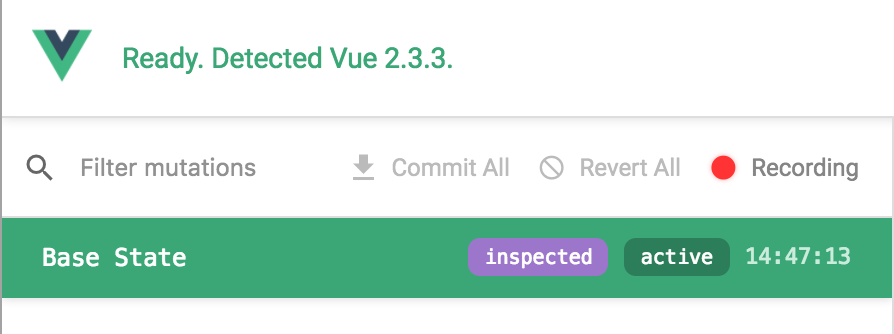
There's a recording button in the Vuex tab (also in events tab):
yyx990803
on 28 Jun 2017
@yyx990803 @posva I face this problem too. I'm using VueCLI for my development so there is lots of browser refreshes. After a while ram usage goes to 2.7 GB.
 al1b
on 14 Apr 2018
al1b
on 14 Apr 2018
I'm facing the same issue as other posters. As soon as Vuex is clicked in devtools, the browser will freeze and my iMac will drop from 19G to 9G. Turning off recording seems to help but both Vuex and Events have to be toggled "off" -- not easy since the entire devtool is unresponsive.
Turning on "record" in either Vuex or Events returns the browser to non responsiveness and instant drops in RAM
 bresson
on 16 Apr 2018
bresson
on 16 Apr 2018
you can try this, sometimes the problem is libraries external to Vue, https://vuejs.org/v2/cookbook/avoiding-memory-leaks.html
 Ar7profacex
on 12 Sep 2018
Ar7profacex
on 12 Sep 2018
Does anyone have news about this?
 xereda
on 6 Dec 2018
xereda
on 6 Dec 2018
I tried the new beta release which is supposed to help, but no luck. The stop recording button doesn't work either, see #830, so the devtools are pretty much unusable.
 DoubleB123
on 23 Jan 2019
DoubleB123
on 23 Jan 2019
Related issues
 mitramejia
·
3Comments
mitramejia
·
3Comments
 sparlos
·
3Comments
sparlos
·
3Comments
 kevinaskin
·
3Comments
kevinaskin
·
3Comments
 BOSSLMH
·
3Comments
BOSSLMH
·
3Comments
 trollderius
·
3Comments
trollderius
·
3Comments
Most helpful comment
This makes sense when you are recording actions with high frequency updates - Vuex stores snapshots of your state so it incurs a lot of memory usage.
You can turn off the recording when you don't need it to prevent this from happening.
In the meanwhile, we may want to add a max entry limit to the vuex history.