Vue-cli-plugin-electron-builder: Use the shortcut key to refresh the page after the page blank
When I finished packaging my project, I refreshed the page with the menu role= 'reload' shortcut provided by the electron official, the page was blank.While In development mode, it is normal to use the shortcut key to reload the page.
{
                label:'刷新',
                role:'reload'
            },
When I debug my packaged project, after refreshing the page, the debug found.
The refresh before:
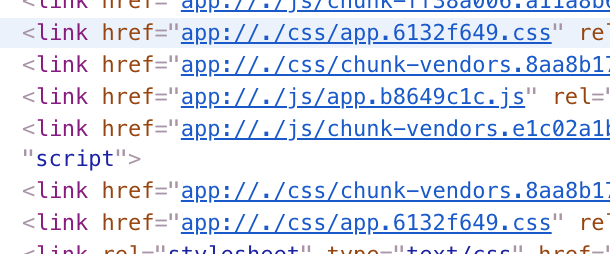
After the refresh:

 HeiShanLaoYao889
All 5 comments
router用history模式的情况下会出现这种情况。
测试了几个版本都有这个问题,具体原因不清楚,但桌面软件一般都是禁止用户手动刷新的吧
如果确实有这个需求,将vue-router改为hash模式
 ding-e
on 12 May 2019
ding-e
on 12 May 2019
So do I
 ioslide
on 9 Jun 2019
ioslide
on 9 Jun 2019
This is because routed path will not resolve to ./index.html
Replace createPorotocol('app') with:
protocol.registerBufferProtocol(
      'app',
      (req, cb): void => {
        const send = (p: string): void => {
          fs.readFile(
            path.join(__dirname, p),
            (error, data): void => {
              if (error) {
                return send('index.html');
              }
              const extension = path.extname(p).toLowerCase();
              // Used files mime types, reference:
              // https://developer.mozilla.org/en-US/docs/Web/HTTP/Basics_of_HTTP/MIME_types/Complete_list_of_MIME_types
              const types: Record<string, string | undefined> = {
                '.js': 'text/javascript',
                '.html': 'text/html',
                '.css': 'text/css',
                '.svg': 'image/svg+xml',
                '.svgz': 'image/svg+xml',
                '.json': 'application/json',
                '.woff': 'font/woff',
              };
              const mimeType = types[extension];
              if (!mimeType) {
                throw new Error(`Unknown file type: ${p}`);
              }

              cb({ mimeType, data });
            }
          );
        };

        send(decodeURI(new URL(req.url).pathname));
      },
      (err: Error): void => {
        console.log({ level: 'ERROR', err });
      }
    );
Tested on my end.
 NateScarlet
on 23 Jul 2019
NateScarlet
on 23 Jul 2019
Maybe there should be a fallback option for createProtocol function
NateScarlet
on 24 Jul 2019
Electron has ctrl-r to reload enabled by default and it works fine.
 nklayman
on 28 Jun 2020
nklayman
on 28 Jun 2020
Related issues
 sanch941
·
6Comments
sanch941
·
6Comments
 mrin9
·
6Comments
mrin9
·
6Comments
 devlerone
·
4Comments
devlerone
·
4Comments
 fridzema
·
4Comments
fridzema
·
4Comments
 grantdfoster
·
3Comments
grantdfoster
·
3Comments
Most helpful comment
router用history模式的情况下会出现这种情况。
测试了几个版本都有这个问题,具体原因不清楚,但桌面软件一般都是禁止用户手动刷新的吧
如果确实有这个需求,将vue-router改为hash模式