Vue-chartjs: Reactive data example not working
Expected Behavior
Reactive LineChart example from the docs should render the chart on load, and re-render the chart on button click
Actual Behavior
The chart does not render (axes are drawn, but chart area stays blank), even though chartData is populated correctly (as seen with VueJS Chrome plugin).
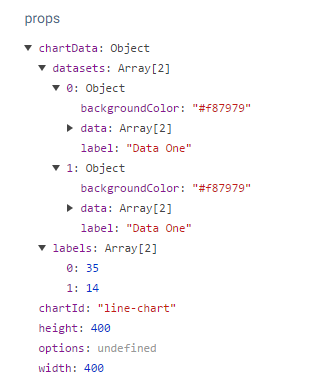
On click I get:
[Vue warn]: Error in callback for watcher "chartData": "TypeError: Cannot set property 'label' of undefined"
and
TypeError: Cannot set property 'label' of undefined
Environment
- vue.js version: 2.3.4
- vue-chart.js version: 2.6.5
- npm version: 4.2.0
 kjfdebruin
All 8 comments
Can you please provide a minimal reproduction? Codepen or jsfiddle?
 apertureless
on 19 Jun 2017
apertureless
on 19 Jun 2017
Struggled a bit getting this into one JS file. Not sure if this is a true reproduction. The graph doesn't render, but I'm not getting any console errors when clicking on the button.
Here is my fiddle
I worked from this example fiddle
kjfdebruin
on 19 Jun 2017
You have to pass the mixin as an array ;)
mixins: [VueChartJs.mixins.reactiveProp]
here is also a working codepen https://codepen.io/apertureless/pen/BZKBdX
apertureless
on 19 Jun 2017
Thanks so much for checking this out and providing the codepen.
I had the mixin as an array in my code, just not in the fiddle (sorry about that), so that wasn't the issue. Working from your codepen I realized that the issue was that the datacollection variable was initialized as null.
Would you mind confirming that this is the issue? Reactive data cannot be initialized as null.
kjfdebruin
on 19 Jun 2017
Hey @kjfdebruin
that seem to be the problem. However it actually should work with an empty initial data model. Could be related to https://github.com/apertureless/vue-chartjs/pull/109
Because as far as I remember, it worked with an empty / null data model before.
I will digg into it and fix it ASAP. However a temporary fix would be to initialize your data model as an empty object.
data () {
  return {
    datacollection: {}
  }
}
Thanks!
Yes, it works when initializing as an empty object.
What is interesting, is that with
responsive: true, maintainAspectRatio: false
then with a data model e.g.
message: {
                      labels: ['January', 'February', 'March', 'April', 'May', 'June', 'July'],
                      datasets: [
                        {
                          label: 'Data One',
                          backgroundColor: '#f87979',
                          data: [40, 39, 10, 40, 39, 80, 40]
                        }
                      ]
                    }
the height looks like this:

with an empty data model e.g.
message: {}
it looks like this:

(Note the different height)
This is with your codepen randomly generated values. The only difference is having an initial datamodel vs having an empty initial datamodel. The datamodel for both cases is updated the same way through this.fillData(), and no other parameters are changed.
kjfdebruin
on 20 Jun 2017
Hey, this issue is fixed with #135 and will be available with the next release 2.7.0
apertureless
on 2 Jul 2017
Hello, I had this issue and initializing the chart-data like @apertureless said was not enough, as I had this error:
[Vue warn]: Error in callback for watcher "chartData": "TypeError: Cannot read property 'map' of undefined"
I fixed it by initializing the chart-data like the following:
thirty_chartdata: {
  labels: [''],
  datasets: []
},
Empty labels and empty datasets removed that error for me, anyone had the same thing?
 iamanas20
on 11 Jan 2020
iamanas20
on 11 Jan 2020
Related issues
 humanismusic
·
3Comments
humanismusic
·
3Comments
 Tirke
·
4Comments
Tirke
·
4Comments
 DavidSotoA
·
3Comments
DavidSotoA
·
3Comments
 rzb
·
4Comments
rzb
·
4Comments
 egorzekov
·
4Comments
egorzekov
·
4Comments
Most helpful comment
Hey @kjfdebruin
that seem to be the problem. However it actually should work with an empty initial data model. Could be related to https://github.com/apertureless/vue-chartjs/pull/109
Because as far as I remember, it worked with an empty / null data model before.
I will digg into it and fix it ASAP. However a temporary fix would be to initialize your data model as an empty object.