Vue-awesome-swiper: Swiper slide inline styling dissapears while navigating
Vue.js version and component version
vue v2.6.11 (nuxt.js)
vue-awesome-swiper v3.1.3, but 5.x doesn't work either
What is Expected?
During navigation styles should not dissapear. If there are 5 slidesPerView it should stay that way and it should not show one slide with inherited width: 100% from swiper-slide. It happens briefly, but long enough to confuse users.
This is how it should stay regardless if user is currently being navigated to another page or just using the current one.

Directive implementation is used. Basically the same as in Readme.md.
What is actually happening?
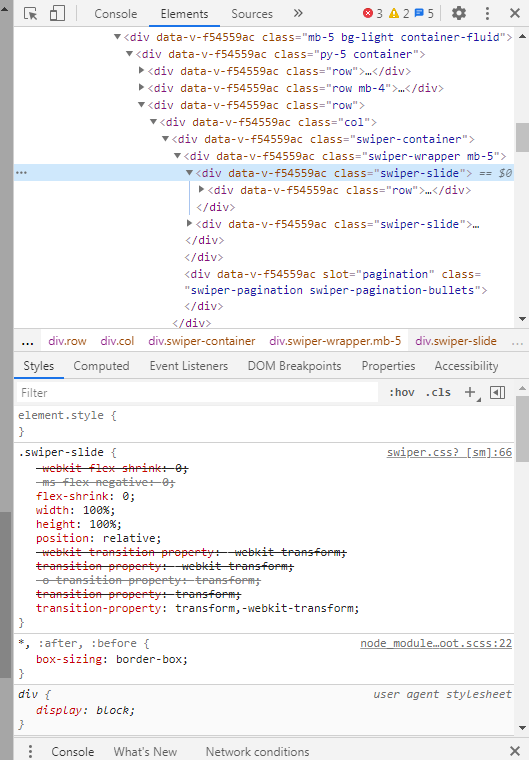
For some reason inline styling dissapears as can be seen on the picture below. Only class="swiper-slide" remains. Usually width and margin-right are defined.
 Tiamatmate
All 3 comments
Did you find a way to solve this ? I'm experiencing exactly the same problem.
 cbernard
on 8 Dec 2020
cbernard
on 8 Dec 2020
Currently we use a sort of a hack to keep it steady.
.swiper-slide {
    width: 100%;
    @media screen and (min-width: $md) and (max-width: $lg) {
      width: calc(50% - 20px);
    }
    @media screen and (min-width: $lg) {
      width: calc(25% - 20px);
    }
  }
Tiamatmate
on 8 Dec 2020
I just found this thread, seems to be related... I'll go deeper later : https://github.com/surmon-china/vue-awesome-swiper/issues/317
Edit : fixed here https://github.com/surmon-china/vue-awesome-swiper/issues/317#issuecomment-620965479
cbernard
on 8 Dec 2020
Related issues
 Bobur-kobilov
·
4Comments
Bobur-kobilov
·
4Comments
 ljanecek
·
5Comments
ljanecek
·
5Comments
 LJade
·
6Comments
Bobur-kobilov
·
5Comments
LJade
·
6Comments
Bobur-kobilov
·
5Comments
 pfasang
·
5Comments
pfasang
·
5Comments
Most helpful comment
I just found this thread, seems to be related... I'll go deeper later : https://github.com/surmon-china/vue-awesome-swiper/issues/317
Edit : fixed here https://github.com/surmon-china/vue-awesome-swiper/issues/317#issuecomment-620965479