Vue-awesome-swiper: [Intervention] Ignored attempt to cancel a touchmove event with cancelable=false, for example because scrolling is in progress and cannot be interrupted.
[Intervention] Ignored attempt to cancel a touchmove event with cancelable=false, for example because scrolling is in progress and cannot be interrupted.
Vue.js version and component version
- vue-cli 3.0.1
- vue 2.5.17
- vue-awesome-swiper 3.1.3
Steps to reproduce
Global registration
import VueAwesomeSwiper from 'vue-awesome-swiper'

// require styles
import 'swiper/dist/css/swiper.css'

Vue.use(VueAwesomeSwiper, /* { default global options } */)
Component code
<!-- The ref attr used to find the swiper instance -->
<template>
  <swiper :options="swiperOption" ref="mySwiper">
    <!-- slides -->
    <swiper-slide>I'm Slide 1</swiper-slide>
    <swiper-slide>I'm Slide 2</swiper-slide>
    <swiper-slide>I'm Slide 3</swiper-slide>
    <swiper-slide>I'm Slide 4</swiper-slide>
    <swiper-slide>I'm Slide 5</swiper-slide>
    <swiper-slide>I'm Slide 6</swiper-slide>
    <swiper-slide>I'm Slide 7</swiper-slide>
  </swiper>
</template>

<script>
  export default {
    name: 'carrousel',
    data() {
      return {
        swiperOption: {
          // some swiper options/callbacks
          // 所有的参数同 swiper 官方 api 参数
          // ...
        }
      }
    },
    computed: {
      swiper() {
        return this.$refs.mySwiper.swiper
      }
    },
    mounted() {
      // current swiper instance
      // 然后你就可以使用当前上下文内的swiper对象去做你想做的事了
      console.log('this is current swiper instance object', this.swiper)
      this.swiper.slideTo(3, 1000, false)
    }
  }
</script>
It can still trigger a slide when it is about 5-10 pixels beneath the swiper component, and the following error is reported in the console
[Intervention] Ignored attempt to cancel a touchmove event with cancelable=false, for example because scrolling is in progress and cannot be interrupted.
What is Expected?
He shouldn't be executed when sliding a component, because the sliding is out of the scope of the component, and the swiper parent element can see overflow: hidden; when I've looked through a lot of data and couldn't find the right answer, I think I should be here to find the answer
What is actually happening?
It may seem like an insignificant problem for a component, but it's unusual for him to be able to slide underneath and out of the component so he can trigger the slide.
 delfws
All 15 comments
给html元素添加一个css3属性
touch-action: none;
即可解决这个问题
 xiaoxiongzi
on 24 Oct 2018
xiaoxiongzi
on 24 Oct 2018
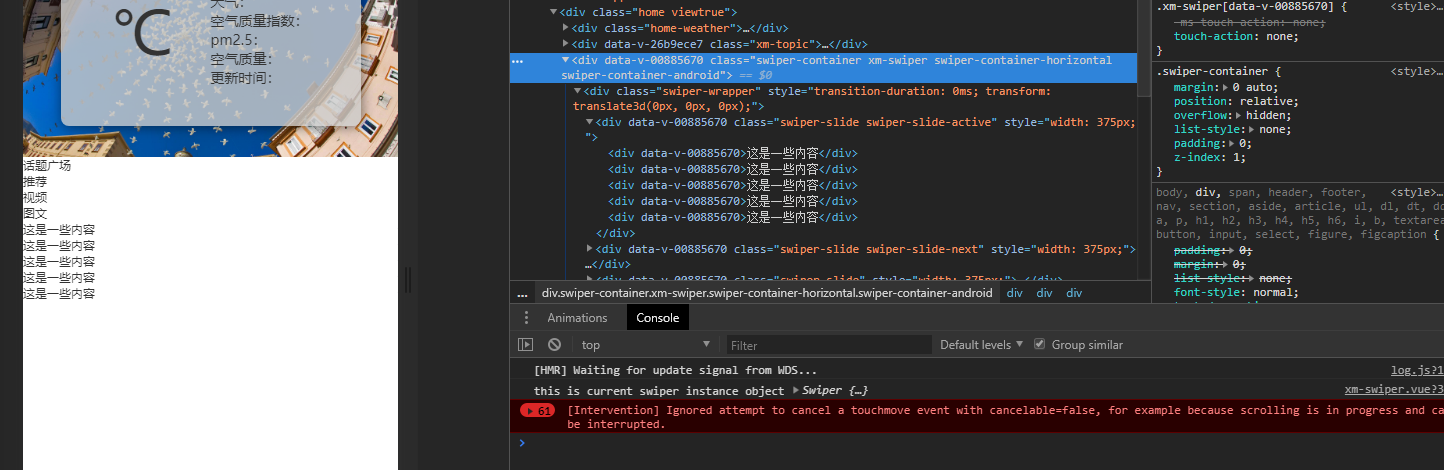
我试过了这种方法,但是它依然会报错
delfws
on 24 Oct 2018
给HTML元素添加一个CSS3属性
touch-action: none;即可解决这个问题
我使用这个方法解决了问题
 DemoorBug
on 9 Nov 2018
DemoorBug
on 9 Nov 2018
hi,
my app still error like that
[Intervention] Ignored attempt to cancel a touchmove event with cancelable=false, for example because scrolling is in progress and cannot be interrupted.
i added in vuejs app.js
<style scoped>
html, body { touch-action: none }
</style>
but still error
 elviskudo
on 29 Nov 2018
elviskudo
on 29 Nov 2018
我试过了这种方法,但是它依然会报错
是给HTML元素添加:
html {
  touch-action: none;
}
不过需要注意的是,添加了 touch-action: none之后页面滚动可能有问题,慎用
xiaoxiongzi
on 29 Nov 2018
hi,
my app still error like that
[Intervention] Ignored attempt to cancel a touchmove event with cancelable=false, for example because scrolling is in progress and cannot be interrupted.i added in
vuejs app.js<style scoped> html, body { touch-action: none } </style>
but still error

try
html {
  touch-action: none;
}
but it make cause a problem with the page scrolling in Android,caution while using
xiaoxiongzi
on 29 Nov 2018
hi,
my app still error like that[Intervention] Ignored attempt to cancel a touchmove event with cancelable=false, for example because scrolling is in progress and cannot be interrupted.
i added in vuejs app.js
but still error
try
html {
touch-action: none;
}
but it make cause a problem with the page scrolling in Android,caution while using
因为最近一段时间比较忙没有顾得上这个问题,现在又遇到了,所以我自己尝试了直接修改swiper源文件1876行,将这段阻止默认事件的代码注释掉了,也不会报错,滑动底部接近于边缘的地方也不会触发swiper的滑动事件了,看起来好像正常了,然后测试了安卓与苹果,都很正常
swiper.allowClick = false;
// e.preventDefault();
if (params.touchMoveStopPropagation && !params.nested) {
  e.stopPropagation();
}
hi,
my app still error like that[Intervention] Ignored attempt to cancel a touchmove event with cancelable=false, for example because scrolling is in progress and cannot be interrupted.
i added in vuejs app.js
but still error
try
html {
touch-action: none;
}
but it make cause a problem with the page scrolling in Android,caution while using
mmm i still dont understand
hi,
my app still error like that
[Intervention] Ignored attempt to cancel a touchmove event with cancelable=false, for example because scrolling is in progress and cannot be interrupted.
i added in vuejs app.js
but still error
try
html {
touch-action: none;
}
but it make cause a problem with the page scrolling in Android,caution while using因为最近一段时间比较忙没有顾得上这个问题,现在又遇到了,所以我自己尝试了直接修改swiper源文件1876行,将这段阻止默认事件的代码注释掉了,也不会报错,滑动底部接近于边缘的地方也不会触发swiper的滑动事件了,看起来好像正常了,然后测试了安卓与苹果,都很正常
swiper.allowClick = false;
// e.preventDefault();
if (params.touchMoveStopPropagation && !params.nested) {
  e.stopPropagation();
}
where functions is?
so, there's any bug fixed from code in new version?
elviskudo
on 3 Dec 2018
hi,
my app still error like that
[Intervention] Ignored attempt to cancel a touchmove event with cancelable=false, for example because scrolling is in progress and cannot be interrupted.
i added in vuejs app.js
but still error
try
html {
touch-action: none;
}
but it make cause a problem with the page scrolling in Android,caution while usingmmm i still dont understand
hi,
my app still error like that
[Intervention] Ignored attempt to cancel a touchmove event with cancelable=false, for example because scrolling is in progress and cannot be interrupted.
i added in vuejs app.js
but still error
try
html {
touch-action: none;
}
but it make cause a problem with the page scrolling in Android,caution while using因为最近一段时间比较忙没有顾得上这个问题,现在又遇到了,所以我自己尝试了直接修改swiper源文件1876行,将这段阻止默认事件的代码注释掉了,也不会报错,滑动底部接近于边缘的地方也不会触发swiper的滑动事件了,看起来好像正常了,然后测试了安卓与苹果,都很正常
swiper.allowClick = false;
// e.preventDefault();
if (params.touchMoveStopPropagation && !params.nested) {
  e.stopPropagation();
}
where functions is?
so, there's any bug fixed from code in new version?

我这里是better-scroll 依赖的swiper版本的2759行
注释掉可以正常
安卓ios运行正常 我暂时没发现有任何问题
但是不代表他是有问题的,这个只是我提出来的一种旁门的方法吧,毕竟报更新后都需要修改,很费事,touch-action: none加在html标签上我也试过,依然会出现问题,所以这个可能会解决吧,毕竟我只是一个小小的程序员,只是混口饭吃
delfws
on 7 Dec 2018
please, till now, i still cannot fix this problem
elviskudo
on 14 Dec 2018
try to add attribute “ontouchstart” at the body tag. like this:

 jocchoc
on 5 Mar 2019
jocchoc
on 5 Mar 2019
e.cancelable && e.preventDefault()
 ManfredHu
on 3 Jun 2019
ManfredHu
on 3 Jun 2019
try to add attribute “ontouchstart” at the body tag. like this:
It worked
 CharleeWa
on 19 Jan 2020
CharleeWa
on 19 Jan 2020
You can try add cssMode: true in option
 damianglazer
on 9 Mar 2020
damianglazer
on 9 Mar 2020
You can try add cssMode: true in option
Same, the problem still persists
try to add attribute “ontouchstart” at the body tag. like this:
thanks, it works.
 liho98
on 7 Apr 2020
liho98
on 7 Apr 2020
Related issues
 Bobur-kobilov
·
4Comments
Bobur-kobilov
·
4Comments
 PolanZ
·
4Comments
PolanZ
·
4Comments
 KevinCN511
·
4Comments
KevinCN511
·
4Comments
 wuxiaobin1995
·
4Comments
wuxiaobin1995
·
4Comments
 baokuanze
·
5Comments
baokuanze
·
5Comments
Most helpful comment
给html元素添加一个css3属性
即可解决这个问题