Vue-awesome-swiper: 使用spa方式的时候 this.$refs.mySwiper.swiper 是undefined的 但是this.$refs.mySwiper确实是有swiper属性
中文用户注意:
- 尽量用英文描述你的 issue
- 不要把内容堆彻在标题上,逻辑清晰地写在内容区
- 贴代码要提前格式化好,有颜色高亮那种,贴文本,不要贴图片
- 提问题前,必须仔细阅读 REMADE.md + 在已关闭的问题中寻找与自身相关的问题,90% 的可能它已经被解决
- 如果无法做到提一个合格、优秀的问题,则问题会被 close + block
BUG REPORT TEMPLATE
Vue.js version and component version
Reproduction Link
- A minimal JSBin, JSFiddle, Codepen, or a GitHub repository that can reproduce the bug.
- You could start with this template: https://jsfiddle.net/39epgLj0/
Steps to reproduce
What is Expected?
What is actually happening?
 zhangfan6644777
All 8 comments
你在生命周期的哪个阶段获取的对象,贴代码
 surmon-china
on 22 Dec 2017
surmon-china
on 22 Dec 2017
name: "Download",
data() {
return {
changeActive:0,
swiperOption: {
loop: true,
autoHeight: true,
pagination:{
el:'.nav',
type:'custom',
},
on:{
init:()=>{
},
slideChange:()=>{
console.log(this.swiper)
},
onSlideChangeEnd:()=>{
}
}
}
}
},
watch:{
},
methods: {
  changeSwiper(item){
    this.swiper.slideTo(item+1,1000,false);
    this.changeActive=item;
  },
  // test(){
  //
  // }

},
computed: {
  swiper() {
    return this.$refs.mySwiper.swiper
  }
},
mounted() {
  console.log(this.swiper);


},
components: {
  swiper,
  swiperSlide
}
我也遇到了这个问题,
 Domingowen
on 26 Dec 2017
Domingowen
on 26 Dec 2017
@wenguangcheng
- 要贴组件代码,这很重要,没有人知道你组件内有没有定义 ref 属性
- 代码 格式化、高亮!
surmon-china
on 26 Dec 2017
@wenguangcheng @surmon-china
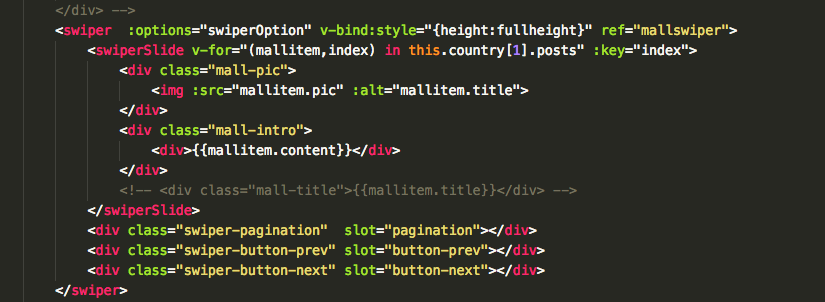
我遇到一样的问题,下图是我的组件代码,给swiper组件设置了ref属性
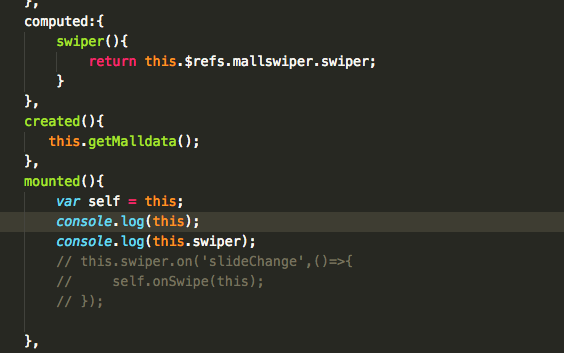
下图是我的mounted钩子中的打印代码
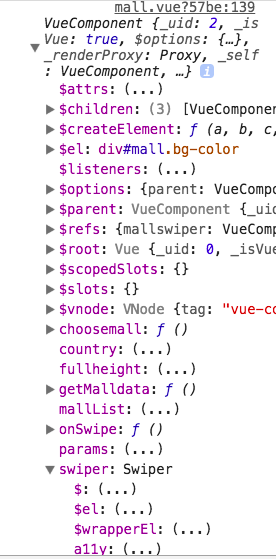
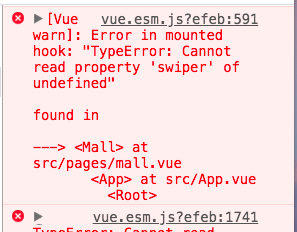
然后下图是我在google的开发者工具面板中打印的内容,可以看到swiper属性存在,但是取到该属性时,出现未定义报错
 leobaixinxin
on 14 May 2018
leobaixinxin
on 14 May 2018
我也遇到同样的问题,发现是以组件的方式引入就会报这个错误,改成全局引入后,解决了这个问题
 reynold-Yang
on 15 May 2018
reynold-Yang
on 15 May 2018
能不能把解决方法弄上来呢?
 xiaohelang
on 8 Jun 2018
xiaohelang
on 8 Jun 2018
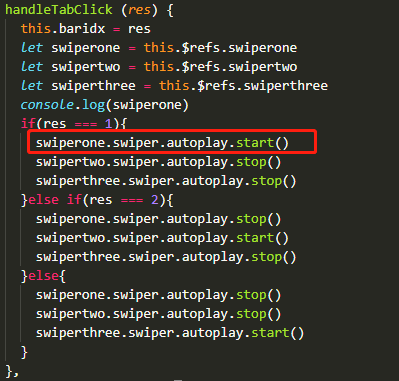
上面的问题已经解决了 多谢leobaixinxin老哥的贴图 让我意识到了 问题再swiper方法下面,也就是通过refs.ref获取对象后需要再refs.ref.swiper里面使用swiper4的方法 下面贴图 ,灵光一现 哈哈 亲测OK
 hugselina2019
on 14 Jun 2019
hugselina2019
on 14 Jun 2019
在吐槽一下 楼主应该把使用方法的方式说一下~ @somemethods = "callback" 。。。 太简单了 菜鸟瑟瑟发抖
hugselina2019
on 14 Jun 2019
Related issues
 Bobur-kobilov
·
5Comments
Bobur-kobilov
·
5Comments
 pfasang
·
5Comments
pfasang
·
5Comments
 wuxiaobin1995
·
4Comments
Bobur-kobilov
·
4Comments
wuxiaobin1995
·
4Comments
Bobur-kobilov
·
4Comments
 tilight
·
5Comments
tilight
·
5Comments
Most helpful comment
我也遇到同样的问题,发现是以组件的方式引入就会报这个错误,改成全局引入后,解决了这个问题