Vue-apollo: Cannot use apollo in Typescript @Component decorator with 'components' key
In my vue typescript application, I'm trying to use vue apollo with the vue-property-decorator library.
I have the following code:
import { Component, Prop, Vue } from 'vue-property-decorator'
import HeaderPrimary from '@/components/Header/HeaderPrimary.vue'
import query from '@/graphql/users.gql'

@Component({
    components: {           // Error from here
        HeaderPrimary,  // ...
    },                      // to here.
    apollo: {
        users: query,
    },
})
export default class TheHeader extends Vue {
    users: any = null
}

I'm receiving the following error:
Argument of type '{ components: { HeaderPrimary: {}; }; apollo: { users: DocumentNode; }; }' is not assignable to parameter of type 'VueClass<Vue>'.
  Object literal may only specify known properties, but 'components' does not exist in type 'VueClass<Vue>'. Did you mean to write 'component'?
When I remove the apollo part of the @Component, the error goes away.
The app still runs fine and queries correctly, but unfortunately I'm not sure how to get past this TypeScript error.
 Acidic9
All 15 comments
I had the same type error problem and looked at the typings for the VueApolloComponentOptions. It seems the query should be either a DocumentNode or a function returning a DocumentNode, but for some reason, it errors on the DocumentNode alone.
Your error should be sorted out with
@Component({
    components: {
        HeaderPrimary,
    },
    apollo: {
        users: () => query,
    },
})
 Kresten
on 28 Jan 2019
Kresten
on 28 Jan 2019
I have exactly the same issue and unfortunately @Kresten suggestion didn't work for me. Any help would be much appreciated :)
Source:
index.vue
import { Vue, Component } from 'vue-property-decorator';

import gqlTranslations from './translations.gql';
import Logo from '~/components/Logo.vue';

@Component({
  components: {
    Logo,
  },
  apollo: {
    translations: {
      query: gqlTranslations,
      variables() {
        return {
          namespace: 'index',
          language: 'en',
        };
      },
    },
  },
})
export default class IndexPage extends Vue {
  private translations = {};
}
translations.gql
query translations($namespace: String!, $language: String!) {
  translations(input: { namespace: $namespace, language: $language })
}
 jurgisrudaks
on 11 Apr 2019
jurgisrudaks
on 11 Apr 2019
any solution to this?
 gdpaulmil
on 9 Jun 2019
gdpaulmil
on 9 Jun 2019
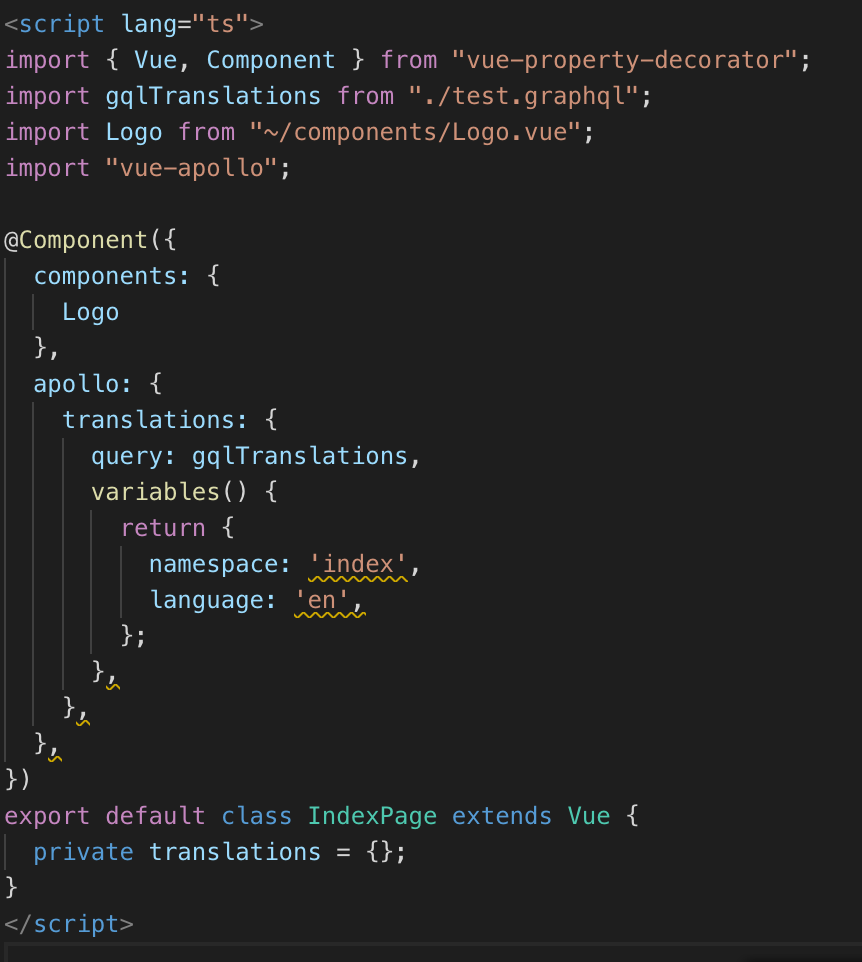
@Acidic9 @jurgisrudaks @gdpaulmil
I suggest this is not gonna be happened if vue-apollo module is imported correct.
If it's not loaded, it could be like as @Acidic9 said.
like below

but if you import vue-apollo module somewhere on your codebase, it should be work.
As you can see error has disapieared.
 joe-re
on 8 Jul 2019
joe-re
on 8 Jul 2019
That doesn't work for me. I've imported vue-apollo as shown and in multiple other places. The only situation that works for a DocumentNode is assigning with a function:
import { SomeDocument } from 'documents'

apollo: {
  thing: () => SomeDocument
}
 bbugh
on 6 Aug 2019
bbugh
on 6 Aug 2019
@bbugh
Can you share us whole of your example?
This code is working for me..
<script lang="ts">
import { Vue, Component } from "vue-property-decorator";
import gqlTranslations from "./test.graphql";
import Logo from "~/components/Logo.vue";
import "vue-apollo";

@Component({
  components: {
    Logo
  },
  apollo: {
    translations: () => gqlTranslations
  }
})
export default class IndexPage extends Vue {
  private translations = {};
}
</script>
Also I think you can write it like this. Does this work for you?
@Component({
  components: {
    Logo
  },
  apollo: {
    translations: {
      query: () => gqlTranslations
    },
  },
})
Using a function works but it's not ideal. When will this be fixed ?
 gotenxds
on 18 Oct 2019
gotenxds
on 18 Oct 2019
It will be fixed by using the composition function. I'm almost giving up fixing all of those typing issues, which is both frustrating and taking way too much of my time (still open to PRs :smile_cat: ).
 Akryum
on 20 Oct 2019
Akryum
on 20 Oct 2019
@Akryum
By mentioned about composition function, Do you mean Vue Composition API?
Could you help to explain how to use the composition function to fix this?
Is it like
setup() {
    const apollo = {};
    apollo.addSmartQuery('todoList', ...);

    // expose to template
    return {
      apollo
    }
  }
or like this?
setup() {
    const apollo = {
      todoList: {
         query: getTodoList
      }
    };

    // expose to template
    return {
      apollo
    }
  }
 alexxiyang
on 30 Mar 2020
Akryum
on 30 Mar 2020
alexxiyang
on 30 Mar 2020
Akryum
on 30 Mar 2020
Just add "vue-apollo" in tsconfig.json :
{
  "compilerOptions": {
    "types": [..., "vue-apollo"]
  }
}
 stphdenis
on 22 Apr 2020
stphdenis
on 22 Apr 2020
@Akryum the purpose of the composition API for vue 2 is to let developers experiment the composition API in Vue 3. But it is not something to be used in production, as stated on the repo in bold:
We do not recommend using this package for production yet at this stage
So using the composition API in Vue 2 seems not to be a viable solution, is it ? I think there should be both:
- a vue-apollo release for Vue 2 without using the composition API
- optionally a vue-apollo release for Vue 3 using exclusively the composition API
Don't you think solutions built around the composition API for Vue 2 will be compromised at Vue 3 release ?
I should add the purpose of this issue is to solve a typescript error, but using the composition API at the moment imply dozens of new typescript errors, unsolvable for most of them since they are in the @vue/composition-api module
 loicmarie
on 11 Jun 2020
loicmarie
on 11 Jun 2020
thanks , i got it that how to use vue-apollo in typescript!
 heavenkiller2018
on 26 Jul 2020
heavenkiller2018
on 26 Jul 2020
Just add
"vue-apollo"intsconfig.json:{ "compilerOptions": { "types": [..., "vue-apollo"] } }
Worked for me. Thanks
 toshoajibade
on 8 Aug 2020
toshoajibade
on 8 Aug 2020
I always geht a typeerror as soon as I try to add variables in the query. Any solution? :)
 Manubi
on 21 Aug 2020
Manubi
on 21 Aug 2020
Related issues
 aleks63
·
46Comments
aleks63
·
46Comments
 DougDavenport
·
115Comments
DougDavenport
·
115Comments
 matteodem
·
20Comments
matteodem
·
20Comments
 shomodj
·
15Comments
shomodj
·
15Comments
 dietergoetelen
·
14Comments
dietergoetelen
·
14Comments
Most helpful comment
I had the same type error problem and looked at the typings for the
VueApolloComponentOptions. It seems the query should be either aDocumentNodeor a function returning aDocumentNode, but for some reason, it errors on theDocumentNodealone.Your error should be sorted out with