https://kitware.github.io/vtk-js/docs/develop_class.html
I am following this tutorial to create new vtk.js class,
but it results error when
when I use
import macro from 'vtk.js/Sources/macro';
it results error saying
node_modules\vtk.js\Sources\macro.js:1
(function (exports, require, module, __filename, __dirname) { import vtk from './vtk';
                                                                     ^^^

SyntaxError: Unexpected identifier
How can I make a new vtk.js class without error?
Thanks
 EJShim
All 30 comments
I am guessing you didn't set up the proper loaders for your project.
 jourdain
on 16 Sep 2019
jourdain
on 16 Sep 2019
Did you try to follow that first?
jourdain
on 16 Sep 2019
@jourdain I imported vtk.js based on create-react-app setting. there were problems of using filename macro.js in basic react-app setting, so I copied macro.js from vtk.js source and pasted it in my project folder using different name (vtkMacro.js) and solved it temporarily..
EJShim
on 17 Sep 2019
Once the file moved inside your project the name should not matter. What you are explaining totally makes sense since you didn't set the loader rules to handle babel within node_modules/vtk.js. But as long as you are moving forward and keep learning more that's good.
jourdain
on 17 Sep 2019
Thank you for your replying. Actually I added vtkRules and some additional webpack settings according to vtk.js manual, and all the vtk features worked fine.
this is one of my project using vtk.js with react-app setting
I found that some of babel rules that is pre-defined in create-react-app, handles files with filename macro.js for some kind of special usage. So it did not properly work when I copied this file into my project without changing filename.
Thank you for your kind reply anyway!
EJShim
on 18 Sep 2019
Hi there,
I am having same issue, I have followed all the instructions on vtk.js site
GET http://localhost/vtk.js/Sources/marco net::ERR_ABORTED 404 (Not Found)
This is the error I am getting.
Help needed!
 SohailButt
on 17 Sep 2020
SohailButt
on 17 Sep 2020
https://kitware.github.io/vtk-js/docs/develop_class.html
I am following this tutorial to create new vtk.js class,
but it results error when
when I use
import macro from 'vtk.js/Sources/macro';it results error saying
node_modules\vtk.js\Sources\macro.js:1
(function (exports, require, module, __filename, __dirname) { import vtk from './vtk';
                                                                     ^^^

SyntaxError: Unexpected identifier
How can I make a new vtk.js class without error?
Thanks
can you tell me how to solve this problem?Help needed
 LYF620
on 29 Sep 2020
LYF620
on 29 Sep 2020
Your loaders? How did you configure your web project?
jourdain
on 29 Sep 2020
I guess that was my comment when that bug was created and that still stand. Just scroll up to get the answer to your question.
jourdain
on 29 Sep 2020
Your loaders? How did you configure your web project?
I followed this setup guide sir
https://kitware.github.io/paraviewweb/docs/setup.html#Install-ParaViewWeb
SohailButt
on 29 Sep 2020
That's the paraviewweb setup docs, not the vtk.js setup docs. You can follow the vtk.js setup docs here: https://kitware.github.io/vtk-js/docs/intro_vtk_as_es6_dependency.html
 floryst
on 29 Sep 2020
floryst
on 29 Sep 2020
That's the paraviewweb setup docs, not the vtk.js setup docs. You can follow the vtk.js setup docs here: https://kitware.github.io/vtk-js/docs/intro_vtk_as_es6_dependency.html
I need to setup paraviewweb not vtk.js, I have already setup vtk.js
SohailButt
on 29 Sep 2020
This is not true @SohailButt.
Your problem is that you think you need ParaViewWeb but you do not need it based on what you are trying to do.
jourdain
on 29 Sep 2020
Sir is vtkjs different from paraviewweb?
SohailButt
on 29 Sep 2020
In practice all the new ParaViewWeb applications that we have created in the last 2 years are based on vtk.js and not on the ParaViewWeb repo.
Do you start hearing me now, when I'm telling you that you do not need to build ParaViewWeb? And the same is true for vtk.js. All those apps, depends on vtk.js but does not build it either...
jourdain
on 29 Sep 2020
Hello everyone,
I'm trying to set vtk.js following this tutorial: [https://kitware.github.io/vtk-js/docs/intro_vtk_as_es6_dependency.html]
but I got some issues:
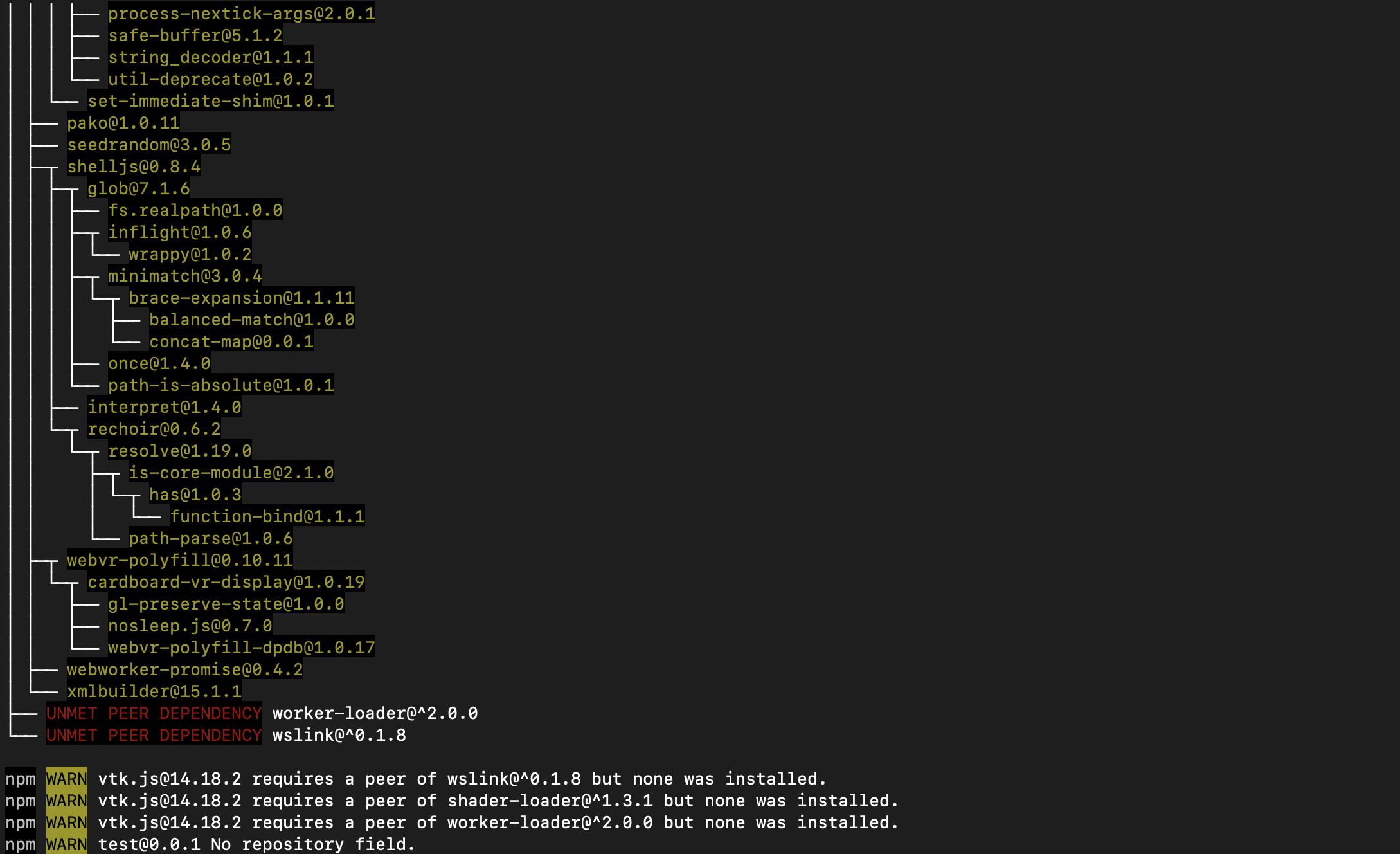
Is it because I'm on macOs?
Big thanks in advance for your help!
 HugoPrin
on 18 Nov 2020
HugoPrin
on 18 Nov 2020
Where is the error, I only see expected warnings?
Just follow along the guide and you should be good to go.
jourdain
on 18 Nov 2020
I'm developing on macOS, so I'm pretty sure that won't be an issue.
jourdain
on 18 Nov 2020
You're right sorry, the error are after the command npm run build:
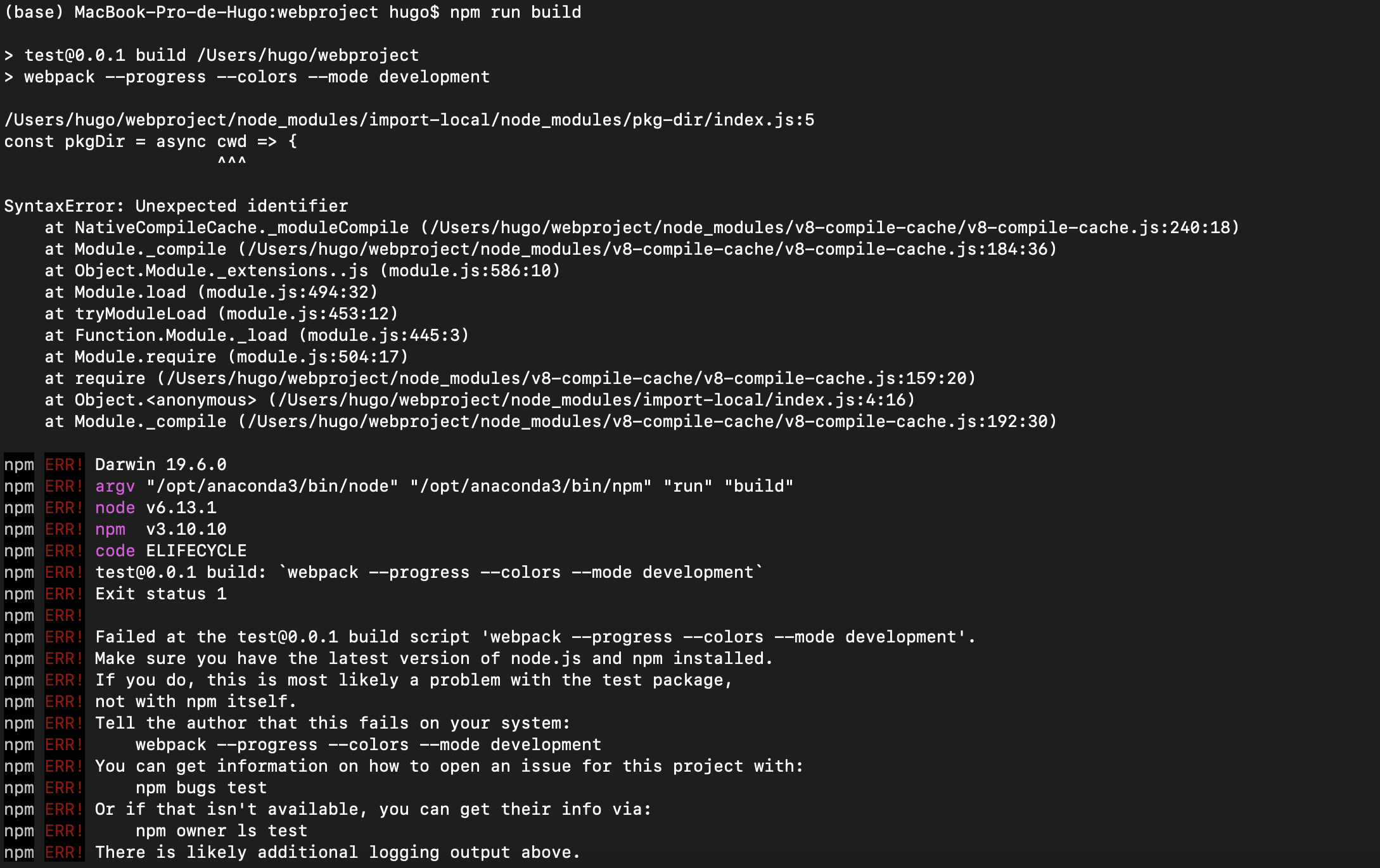
Thank for your previous response I really appreciated
HugoPrin
on 18 Nov 2020
Which version of kw-web-suite got pulled in? You may have to specify an older version. Like the one currently used in package.json.
Should do npm install [email protected] instead of npm install kw-web-suite
FYI @floryst
jourdain
on 18 Nov 2020
I downloaded the MyWebProject.zip file you mentioned and it worked saying my project Project is running at http://localhost:8081/
Thank you so much
HugoPrin
on 18 Nov 2020
Can you do a diff to see what was the difference between what you have and what I created a while back following that guide?
jourdain
on 18 Nov 2020
what do you mean by a diff ?
HugoPrin
on 18 Nov 2020
diff -r /path/to/your/source /path/to/my/source
Make sure you remove the /node_modules directory so only few files are compared
jourdain
on 18 Nov 2020
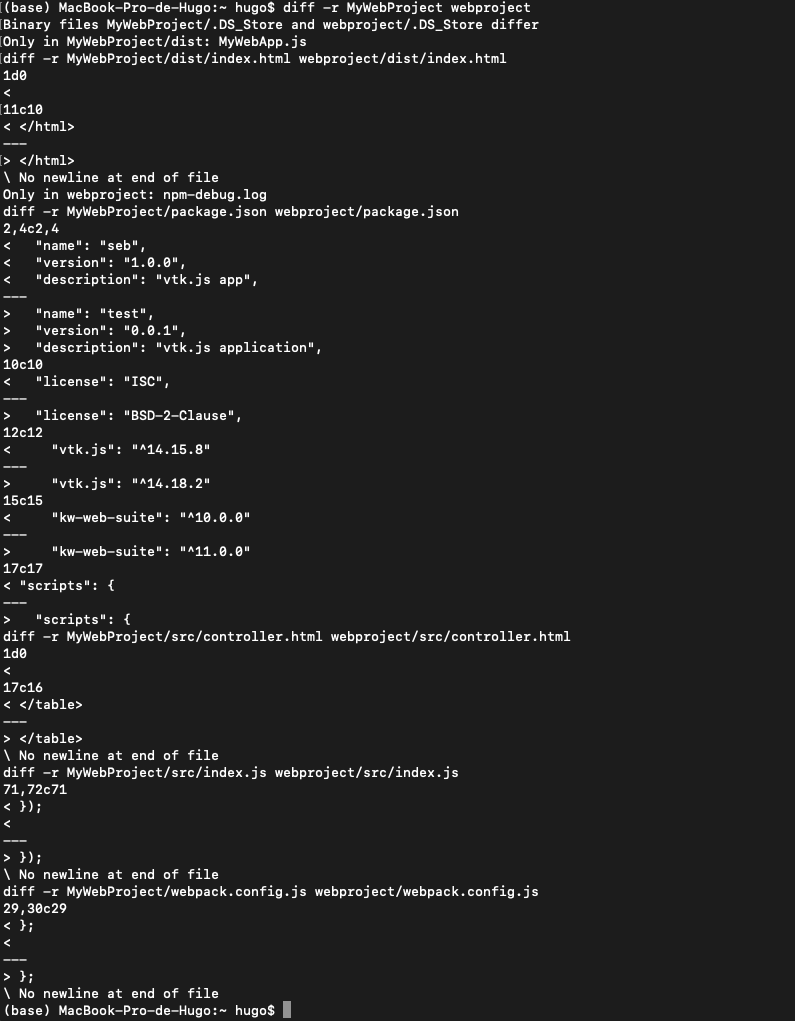
Hopping this could help you
HugoPrin
on 18 Nov 2020
This is perfect, thanks!
This show that my assumption on kw-web-suite version is indeed the issue here.
jourdain
on 18 Nov 2020
@floryst we should fix the version of kw-web-suite in the doc.
jourdain
on 18 Nov 2020
Oh, this is a result of us not yet releasing the latest version of vtk.js that is compatible with the latest version of kw-web-suite. Once that happens then this will work fine.
floryst
on 18 Nov 2020
https://kitware.github.io/vtk-js/docs/develop_class.html
I am following this tutorial to create new vtk.js class,
but it results error when
when I use
import macro from 'vtk.js/Sources/macro';it results error saying
node_modules\vtk.js\Sources\macro.js:1
(function (exports, require, module, __filename, __dirname) { import vtk from './vtk';
                                                                     ^^^

SyntaxError: Unexpected identifier
How can I make a new vtk.js class without error?
Thanks
I have this same issue, I also solved this by copying and renaming macro.js (I am also using create react app). macro.js has some private variables used for deciding if things need updating on the pipeline and this doesn't work correctly with a duplicated file. Is there some kind of babel work around for this?
 GeorgeFuller
on 7 May 2021
GeorgeFuller
on 7 May 2021
This is because you are consuming vtk.js sources without applying the proper webpack rules.
If you don't want to dig into webpack rules while using create react app it might be easier to use the ESM build of vtk.js (@kitware/vtk.js) as those files are already transpilled so you can consume them as-is without specific loader.
We are still in the process of documenting that part, but if you have some understanding of web development you might be able to figure it out on your own.
HTH
jourdain
on 7 May 2021
Related issues
 rjsgml5698
·
6Comments
rjsgml5698
·
6Comments
 BotellaA
·
3Comments
BotellaA
·
3Comments
 johannesring
·
6Comments
rjsgml5698
·
4Comments
johannesring
·
6Comments
rjsgml5698
·
4Comments
 thesharkm4n
·
7Comments
thesharkm4n
·
7Comments