Vsvim: .vimrc is not loaded or setting ":set number=true" does not work
Describtion
If I place "set number=true" in .vsvimrc or .vimrc file it doe not work.
Its only working manually typed in VisualStudio ":set number=true".
To Reproduce
Yust place .vsvirmrc like this in your user home dir:

(tried with or without ':')
Settings in VS like:

Expected behavior
Settings of the .vimrc file should be loaded and executed.
Environment
- Visual Studio version: 2017
- VsVim version: 2.8.234
- Programming Language: C#
- Check(Type 'x') any that are installed:
- [ ] ReSharper
- [ ] Visual Assist
Additional context
Add any other context about the problem here.
 Adrian-Grimm
All 2 comments
When "Use Visual Studio Settings" is in effect (see below):
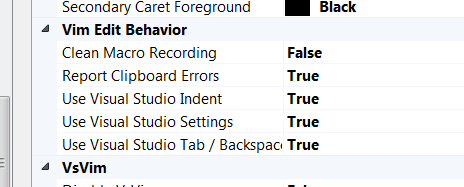
VsVim will use the line numbering scheme specified in Tools -> Options -> Text Editor that is appropriate for the current type of file being edited. As a result, your Visual Studio line number settings override your VsVim line number settings.
To handle this situation you can either:
1) Turn off Tools -> Options -> VsVim -> Defaults -> Vim Edit Behavior -> Use Visual Studio Settings (and in that case your vim rc file settings will be obeyed)
2) Turn on Tools -> Options -> Text Editor -> All Languages -> Settings -> Line Numbers (and line numbers will apply to all file types in Visual Studio and in VsVim)
 ricksladkey
on 4 Oct 2019
ricksladkey
on 4 Oct 2019
Thx 👍✔
Adrian-Grimm
on 4 Oct 2019
Related issues
 keithn
·
4Comments
keithn
·
4Comments
 drhoda
·
7Comments
drhoda
·
7Comments
 kkorus
·
7Comments
kkorus
·
7Comments
 myopicmage
·
5Comments
myopicmage
·
5Comments
 deevus
·
4Comments
deevus
·
4Comments
Most helpful comment
When "Use Visual Studio Settings" is in effect (see below):
VsVim will use the line numbering scheme specified in Tools -> Options -> Text Editor that is appropriate for the current type of file being edited. As a result, your Visual Studio line number settings override your VsVim line number settings.
To handle this situation you can either:
1) Turn off Tools -> Options -> VsVim -> Defaults -> Vim Edit Behavior -> Use Visual Studio Settings (and in that case your vim rc file settings will be obeyed)
2) Turn on Tools -> Options -> Text Editor -> All Languages -> Settings -> Line Numbers (and line numbers will apply to all file types in Visual Studio and in VsVim)