I confirmed that it occurs in the following environment.
Visual Studio 2017, 2019
VsVim 2.7.1422
Create a console application project in VB.Net.
Module Module1

     Sub Main()
     End Sub

End Module
Move to "Sub Main()" of the above code.
Type o
Type "Dim str as string"
Type Esc
Type j
An exception occurs.
This is ActivityLog.xml.
 TKumadaki
All 17 comments
Ha, ha it is super helpful when the exception text is localized into Japanese, except when the investigator doesn't speak Japanese!
First, there is no stack trace. This is a clear sign that "protected operations" is somehow involved.
Second, the exception text is HTML entity encoded which makes it completely unreadable and I can find no application to easily display entity-encoded structured XML. The whole ActivityLog file format is extremely frustrating. Can anyone help with how a human is supposed to read this kind of encoding?
Anyway, I am not to be dissuaded from finding out what the exception text means so I renamed the file to .html and added <html><body> and </body></html> to the file and got this exception text:
System.ArgumentException: 指定された SnapshotPoint は、間違ったスナップショットにあります。 場所
which looks like it is the Japanese localized exception text of this US English localized exception text:
System.ArgumentException: The supplied SnapshotPoint is on an incorrect snapshot. Parameter name: bufferPosition
which has been encountered before in VsVim in issues #1485, #1040, #958, #946, and #119.
 ricksladkey
on 11 May 2019
ricksladkey
on 11 May 2019
@ricksladkey
I'm sorry.
I was not aware that ActivityLog.xml is in Japanese.
I upload ActivityLog.xml when I localized Visual Studio to English.
It seems that the same message is output as you analyzed.
I examined this problem but could not identify where the error occurred.
TKumadaki
on 11 May 2019
I do not know if this is useful information,
The following is the output information when an error occurs.
VsVim Debug MarkGlyphTagger::GetTags: starting...
VsVim Debug MarkGlyphTagger::GetTags: tag 0 '
VsVim Debug MarkGlyphTagger::GetTags: starting...
VsVim Debug MarkGlyphTagger::GetTags: starting...
VsVim Debug MarkGlyphTagger::GetTags: starting...
VsVim Debug MarkGlyphTagger::GetTags: starting...
VsVim Debug MarkGlyphTagger::GetTags: tag 4 .[]^
VsVim Debug MarkGlyphTagger::GetTags: starting...
VsVim Debug MarkGlyphTagger::GetTags: starting...
VsVim Debug MarkGlyphTagger::GetTags: starting...
VsVim Debug MarkGlyphTagger::GetTags: starting...
VsVim Debug AsyncTagger::GetTags 0 - 7
VsVim Debug VsCommandTarget::QueryStatus Comment Key.None: 1496a755-94de-11d0-8c3f-00c04fc2aae2 136
VsVim Debug VsCommandTarget::QueryStatus PassOn
VsVim Debug VsCommandTarget::QueryStatus Uncomment Key.None: 1496a755-94de-11d0-8c3f-00c04fc2aae2 137
VsVim Debug VsCommandTarget::QueryStatus PassOn
VsVim VimKeyProcessor::KeyDown J None None
VsVim VimKeyProcessor::KeyDown Handled = False
VsVim VimKeyProcessor::TextInput Text=j ControlText= SystemText=
VsVim VimBuffer.Process: j:RawCharacter:None
VsVim Debug MarkGlyphTagger::TextBufferChanged V25 (r25)
VsVim Debug MarkGlyphTagger: Glyph Pairs
VsVim Debug MarkGlyphTagger: 0 -> '
VsVim Debug MarkGlyphTagger: 4 -> .[]^
VsVim Debug AsyncTagger::GetTags 4 - 4
VsVim Debug MarkGlyphTagger::GetTags: starting...
VsVim Debug MarkGlyphTagger::GetTags: tag 4 .[]^
Exception thrown: 'System.ArgumentException' in Microsoft.VisualStudio.Platform.VSEditor.dll
VsVim VimKeyProcessor::TextInput Handled=True
VsVim VimBufferCoordinator::PreviewKeyUp J
VsVim VimKeyProcessor::KeyUp J None
VsVim VimKeyProcessor::KeyUp Handled = False
VsVim VimBufferCoordinator::KeyUp J
VsVim Debug MarkGlyphTagger::GetTags: starting...
VsVim Debug MarkGlyphTagger::GetTags: tag 0 '
VsVim Debug MarkGlyphTagger::GetTags: starting...
VsVim Debug MarkGlyphTagger::GetTags: starting...
VsVim Debug MarkGlyphTagger::GetTags: starting...
VsVim Debug MarkGlyphTagger::GetTags: starting...
VsVim Debug MarkGlyphTagger::GetTags: tag 4 .[]^
VsVim Debug MarkGlyphTagger::GetTags: starting...
VsVim Debug MarkGlyphTagger::GetTags: starting...
VsVim Debug MarkGlyphTagger::GetTags: starting...
VsVim Debug MarkGlyphTagger::GetTags: starting...
VsVim Debug AsyncTagger::GetTags Count 2
VsVim Debug AsyncTagger::GetTags 2 - 2
VsVim Debug AsyncTagger::GetTags 5 - 5
Yes, that is interesting because this pair of log messages:
VsVim VimBuffer.Process: j:RawCharacter:None
VsVim Debug MarkGlyphTagger::TextBufferChanged V25 (r25)
implies that the j key, when processed by the current mode (which is presumably normal), produced an operation that somehow caused the text buffer to be modified. Obviously, j is not supposed to modify the buffer.
It seems unlikely, but you wouldn't happen to have the j key mapped would you?
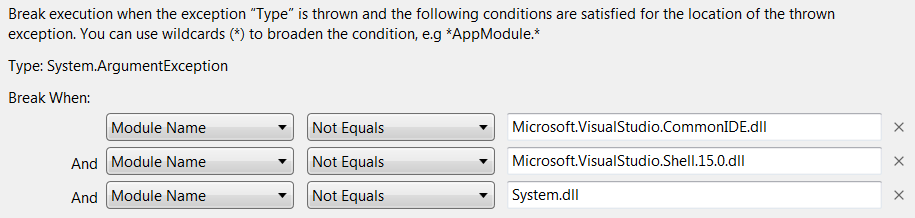
In any case, I haven't been able to reproduce the exception myself. But if you can run (or are already running) Visual Studio + VsVim under the debugger, you can break into the debugger when that exception is thrown using "Exception Settings" by putting System.ArgumentException in the search box:
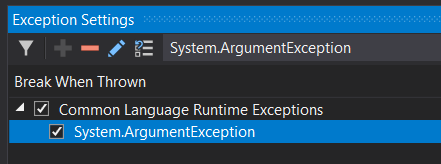
and then make sure the conditions do not include "except in Microsoft.VisualStudio.Platform.VSEditor.dll" by using Right Click -> Edit Conditions:
ricksladkey
on 11 May 2019
Reviewing the other issues, this problem is usually caused when some other component of Visual Studio (such as the editor, a language service, or another extension besides VsVim) modifies the text buffer during some intermediate step which does not normally modify the text buffer. In such a situation, VsVim takes a snapshot point from the buffer that is recorded in a local variable, and uses it as an argument to some editor API like moving the caret, and the boom, the exception.
If VsVim is aware that performing an external operation might modify the buffer, it can take special precautions to invalidate or translate outdated snapshot points around the operation. That was the fix for all the prior issues where this happened.
ricksladkey
on 11 May 2019
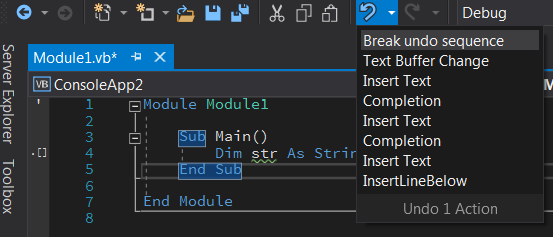
Another test you can do in this situation is to save the buffer with Ctrl+Shift+S before you press j, and then after you press j and after you dismiss the exception, I would expect that Visual Studio thinks the buffer is modified, i.e. shows, say, "Module1.vb*" in the tab header. At that point, you can use the dropdown of the Undo button on the toolbar to find out what the most recent modification was:
ricksladkey
on 11 May 2019
OK, using the insight provided in issue #119 (from 2010!), I was able to come up with a repro for this.
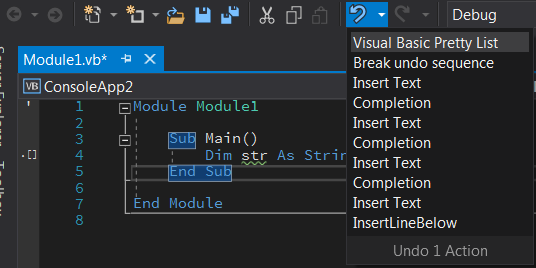
The VisualBasic "PrettyLister" is apparently something that can reformat a line of VB code when you navigate away from the line. So the trick to causing the repro is to introduce some issue when you are typing the line in the first place that will cause it to be reformatted when you navigate away. A simple way to do this is to use two spaces instead of one anywhere on the line, or to not accept the completion suggestion of String. I used two spaces:
Dim str As String
which the PrettyLister reformats to have only one space:
Dim str As String
Here is a stack trace from VimBuffer.Process where the exception is reported:
    Microsoft.VisualStudio.Platform.VSEditor.dll!Microsoft.VisualStudio.Text.Editor.Implementation.WpfTextView.ValidateBufferPosition(Microsoft.VisualStudio.Text.SnapshotPoint bufferPosition) Unknown
    Microsoft.VisualStudio.Platform.VSEditor.dll!Microsoft.VisualStudio.Text.Editor.Implementation.WpfTextView.Microsoft.VisualStudio.Text.Editor.IWpfTextView.GetTextViewLineContainingBufferPosition(Microsoft.VisualStudio.Text.SnapshotPoint bufferPosition)    Unknown
    Microsoft.VisualStudio.Platform.VSEditor.dll!Microsoft.VisualStudio.Text.Editor.Implementation.WpfTextView.GetTextViewLineContainingBufferPosition(Microsoft.VisualStudio.Text.SnapshotPoint bufferPosition)    Unknown
>   Vim.Core.dll!Vim.TextViewUtil.CheckScrollToPoint(Microsoft.VisualStudio.Text.Editor.ITextView textView, Microsoft.VisualStudio.Text.SnapshotPoint point) Line 3121  F#
    Vim.Core.dll!Vim.CommonOperations.EnsurePointVisible(Microsoft.VisualStudio.Text.SnapshotPoint point) Line 2093 F#
    Vim.Core.dll!Vim.CommonOperations.EnsureAtPoint(Microsoft.VisualStudio.Text.SnapshotPoint point, Vim.ViewFlags viewFlags) Line 2076 F#
    Vim.Core.dll!Vim.CommonOperations.MoveCaretToVirtualPoint(Microsoft.VisualStudio.Text.VirtualSnapshotPoint point, Vim.ViewFlags viewFlags) Line 924 F#
    Vim.Core.dll!Vim.CommonOperations.MoveCaretToPoint(Microsoft.VisualStudio.Text.SnapshotPoint point, Vim.ViewFlags viewFlags) Line 911   F#
    Vim.Core.dll!Vim.CommonOperations.MoveCaretToMotionResultCore(Vim.MotionResult result) Line 1098    F#
    Vim.Core.dll!Vim.CommonOperations.MoveCaretToMotionResult(Vim.MotionResult result) Line 974 F#
    Vim.Core.dll!Vim.CommonOperations.Vim.ICommonOperations.Vim-ICommonOperations-MoveCaretToMotionResult(Vim.MotionResult data) Line 2244  F#
    Vim.Core.dll!Vim.CommandUtil.MoveCaretToMotion(Vim.Motion motion, Microsoft.FSharp.Core.FSharpOption<int> count) Line 1914  F#
    Vim.Core.dll!Vim.CommandUtil.RunNormalCommand(Vim.NormalCommand command, Vim.CommandData data) Line 2995    F#
    Vim.Core.dll!Vim.CommandUtil.RunCommand(Vim.Command command) Line 2809  F#
    Vim.Core.dll!Vim.CommandUtil.Vim.ICommandUtil.Vim-ICommandUtil-RunCommand(Vim.Command command) Line 4060    F#
    Vim.Core.dll!Vim.CommandRunner.Run(Vim.KeyInput ki) Line 353    F#
    Vim.Core.dll!Vim.CommandRunner.Vim.ICommandRunner.Vim-ICommandRunner-Run(Vim.KeyInput ki) Line 420  F#
    Vim.Core.dll!Vim.Modes.Normal.NormalMode.Process(Vim.KeyInput keyInput) Line 370    F#
    Vim.Core.dll!Vim.Modes.Normal.NormalMode.Vim.IMode.Vim-IMode-Process(Vim.KeyInput keyInput) Line 405    F#
    Vim.Core.dll!Vim.VimBuffer.ProcessOneKeyInput(Vim.KeyInput keyInput) Line 494   F#
    Vim.Core.dll!<StartupCode$Vim-Core>[email protected](Vim.KeyInputSet keyInputSet) Line 597  F#
    Vim.Core.dll!Vim.VimBuffer.ProcessCore(Vim.KeyInputSet keyInputSet) Line 612    F#
    Vim.Core.dll!Vim.VimBuffer.Process(Vim.KeyInput keyInput) Line 674  F#
Also, as predicted, we indeed catch this exception, so just like the situation in issue #2533, an exception that we have caught and handled bubbles up to the user and is very unhelpfully reported with no stack trace. This new ultra-strict behavior of Visual Studio means that there are some exceptions that we cannot handle by catching; we must instead prevent them from happening in the first place. I would like to get @jaredpar's take on this problem.
For reference, here is the relevant code in EditorUtils.CheckScrollToPoint that catches that exception:
        // Be careful because using ITextViewLines can result in an exception.
        try
=>          let textViewLine = textView.GetTextViewLineContainingBufferPosition point
            let onScreen = textViewLine.VisibilityState = Formatting.VisibilityState.FullyVisible
            if not onScreen then

                // The line the point is on is off-screen.
                match GetTextViewLines textView with
                | Some textViewLines -> doScrollToPoint textViewLines
                | _ -> ()
        with
        | _ -> ()
For reference, here is what the undo history looks like when reproducing the bug:
ricksladkey
on 11 May 2019
@ricksladkey
Thanks to your detailed explanation I understood what is happening here.
I have confirmed that your branch not occur an error.
(Visual Studio 2017, 2019)
In any case, I haven't been able to reproduce the exception myself. But if you can run (or are already running) Visual Studio + VsVim under the debugger, you can break into the debugger when that exception is thrown using "Exception Settings" by putting System.ArgumentException in the search box:
I did not know that there was such a way.
I think next time I can find out more.
TKumadaki
on 12 May 2019
The VisualBasic "PrettyLister" is apparently something that can reformat a line of VB code when you navigate away from the line.
Indeed that is a behavior of the pretty lister
I would like to get @jaredpar's take on this problem.
In general if we are holding onto a SnapshotPoint or really any snapshot value and do an operation that can edit the buffer then we need to re-map it to a new snapshot value. This will be a no-op when the ITextBuffer doesn't change but result in an actual IBufferGraph call when it does. This seems like another case where we may need to do that.
 jaredpar
on 14 May 2019
jaredpar
on 14 May 2019
Sorry, I mixed two problems in the same comment. The problem described in this issue is fixed by the PR that I submitted. But a separate and much more troublesome general problem is this:
An exception that we have caught and handled bubbles up to the user and is very unhelpfully reported with no stack trace. This new ultra-strict behavior of Visual Studio means that there are some exceptions that we cannot handle by catching; we must instead prevent them from happening in the first place.
Solving this particular issue was made much harder by Visual Studio for two big reasons:
1) It unilaterally decides to report exceptions that we have caught for the express reason that they not be reported
2) The stack trace that is reported is so truncated that it is useless and we cannot determine which part of VsVim was involved
The combination of these two (new?) behaviors in Visual Studio makes remote troubleshooting nearly impossible. It is now unlikely that we will be able to fix any problem we cannot reproduce unless we can guess how it happened. All extension developers are now in the same boat.
ricksladkey
on 14 May 2019
@jaredpar I filed an issue for the general problem here:
ricksladkey
on 14 May 2019
@madskristensen for the usability issue here with extension authors. This does appear problematic here. It's unclear why VS has changed here.
jaredpar
on 14 May 2019
We haven't changed editor extension exception handling (except that in 16.1 it's now reported as an infobar instead of a dialog), we should still be only showing the dialog for the unhandled exceptions. Are there simple repro steps I can try to investigate this?
 olegtk
on 20 May 2019
olegtk
on 20 May 2019
@olegtk
Disassembling the IL for the method that threw the exception is this issue produces this:
C#
// Microsoft.VisualStudio.Text.Editor.Implementation.WpfTextView
private void ValidateBufferPosition(SnapshotPoint bufferPosition)
{
    if (bufferPosition.Snapshot != this._textSnapshot)
    {
        ArgumentException ex = new ArgumentException(Strings.InvalidSnapshotPoint);
        this.GuardedOperations.HandleException(this, ex);
        throw ex;
    }
}
so it is clear now that no caller can prevent this exception from being reported to the user by using a try / catch block.
ricksladkey
on 21 May 2019
There is an internal issue tracking this behavior now. I'm following along and adding VsVim perspective on the problem.
https://devdiv.visualstudio.com/DevDiv/_workitems/edit/896241
jaredpar
on 21 May 2019
Related issues
 kalebpederson
·
12Comments
kalebpederson
·
12Comments
 wiserfirst
·
30Comments
wiserfirst
·
30Comments
 idchlife
·
18Comments
idchlife
·
18Comments
 loosche
·
29Comments
loosche
·
29Comments
 jcouv
·
27Comments
jcouv
·
27Comments