Ctrl+R Ctrl+R is the default trigger for the Visual Studio "rename all references" tool, which highlights the word in question and then waits for the text to be renamed and the enter key to be pressed upon which it'll rename all instances of the word in question to the new name.
There are several issues with VsVim that render the experience subpar, here are some suggestions:
- Ctrl+R Ctrl+R should result in the word being highlighted and the editor placed in Insert mode (and making sure that the highlight of the symbol at the cursor is correctly reflected)
Enterafter Ctrl+R Ctrl+r should be passed through to Visual Studio and not interpreted by VsVim
 mqudsi
All 12 comments
VsVim is designed to allow for both of those actions. When a refactoring operation is detected VsVim will enter External Edit mode and remain there until the refactoring is complete. External Edit is similar to Insert except it doesn't have any commands hence everything, including Enter goes to Visual Studio.
Wonder if the checks I do to see if refactoring is in place have changed. What version of Visual Studio are you using?
 jaredpar
on 26 Mar 2018
jaredpar
on 26 Mar 2018
This is weird, on one PC that is indeed the case (after rename triggered the text is selected and VsVim is in insert mode, pressing enter at any point applies the change), but on my main dev PC the text is selected but VsVim is in normal mode and pressing enter passes through to the editor (not the inline rename symbol dialog); on this PC after ctrl+r,ctrl+r I have to press c to change highlighted text then use alt+a (the key accelerator for the apply button in the rename dialog).
Any ideas?
mqudsi
on 3 Apr 2018
Are you using Parallels (Windows on a Mac) in either of the cases? Prob sounds like an odd question but I've seen this type of behavior there before.
jaredpar
on 12 Apr 2018
On my side, CTRL+R, CTRL+R works almost like I would expect. The only thing that is very annoying is that VsVim makes you lose the ability to cancel the renaming before validating it (which is done with a single press to Esc without VsVim). With VsVim there doesn't seem to be a key combination for this, or am I mistaken?
I'm on Microsoft Visual Studio Professional 2015, Version 14.0.25431.01 Update 3.
 mortelle1806
on 26 Apr 2018
mortelle1806
on 26 Apr 2018
The PC exhibiting the broken ctrl+r,r behavior is running Visual Studio 2017 15.7 Preview 4.0.
@jaredpar I presumed it was intentional as a result of the way support for ctrl+r,r is implemented, but am I supposed to see a message
Unexpected undo / redo event. Falling back to Visual Studio undo
When "rename variable" is triggered?
mqudsi
on 26 Apr 2018
Oh, one more thing: Esc is mapped as the hotkey accelerator to close the "rename variable" dialog and abort the operation. Unlike "Apply" which may be triggered (without VsVim) by clicking the "Apply" button, pressing alt+a to use the hotkey accelerator, or pressing <Enter>; the "abort" option has no keyboard mapping aside from Esc.
With VsVim enabled, Esc has no effect when a rename operation is in progress (the operation is not aborted).
mqudsi
on 26 Apr 2018
I have the same issue as @mqudsi .
When I press Ctrl + R, it seems VsVim doesn't enter External Edit mode but still in Normal Mode, and I see the error message below.
Unexpected undo / redo event. Falling back to Visual Studio undo
I tried to uninstall/reinstall VsVim, but nothing changed.
 nosu
on 9 Aug 2018
nosu
on 9 Aug 2018
@nosu do you have any other extensions installed or are you just using VS standard refactoring here? If so what language / construct are you doing the refactoring operation on?
jaredpar
on 9 Aug 2018
@jaredpar I don't use any other extensions which can override VS standard refactoring such as ReSharper.
I created a simple .NET console app (C#) and captured the operation.
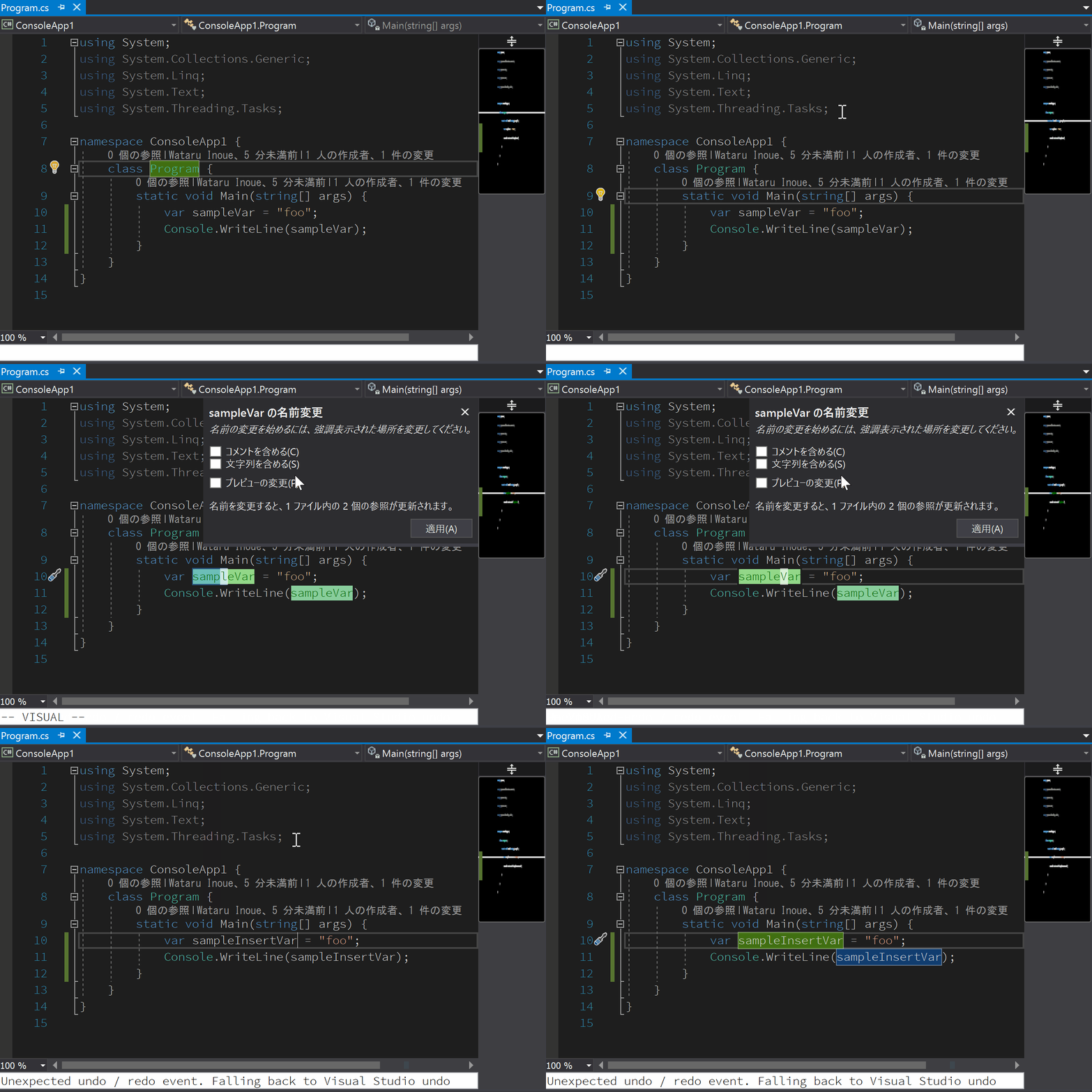
Here's the repro steps:
- Move cursor to
sampleVar - Press
Ctrl + R-> Nothing happens - Press
Ctrl + Ragain -> VS rename panel is shown, but VsVim is still in normal mode. The error message is shown in the white message bar. Can move cursor by pressinghorl - Press
Esc->ito switch Insert mode - Press
Alt + Ato finish renaming operation
Environment:
- Windows 10 Pro 17134.167 (Japanese)
- Visual Studio Enterprise 15.7.6 (Japanese)
- VsVim 2.5.0.0
nosu
on 10 Aug 2018
I've been able to reproduce this locally since I moved to a newer build. I understand what the problem is now and I'm working on a solution.
jaredpar
on 15 Aug 2018
Really glad to hear that, thank you!
mqudsi
on 16 Aug 2018
Thank you @jaredpar !
nosu
on 16 Aug 2018
Related issues
 Kazark
·
12Comments
Kazark
·
12Comments
 rgrinberg
·
26Comments
rgrinberg
·
26Comments
 wiserfirst
·
30Comments
wiserfirst
·
30Comments
 radutomy
·
13Comments
radutomy
·
13Comments
 loosche
·
29Comments
loosche
·
29Comments
Most helpful comment
I've been able to reproduce this locally since I moved to a newer build. I understand what the problem is now and I'm working on a solution.