Vstest: VSTest Task Fails even though all tests pass
Description
I have an azure release pipeline that deploys and runs UI tests using a VSTest task. I am now getting this issue where it fails even though all tests are passing. Please see logs below.
Steps to reproduce
Let me know what I can do, this is just a build pipeline task.
Expected behavior
I expect it to pass when all tests pass.
Actual behavior
Task fails even when all tests pass.
Diagnostic logs
**** Completed test execution *******
2019-08-09T17:00:33.0175876Z Test results files: C:\agent_work_temp\TestResults\cbelt_DC-DEVELOPMENT_2019-08-09_16_58_49_736.trx
2019-08-09T17:00:33.5028188Z Created test run: 1000376
2019-08-09T17:00:33.5030297Z Publishing test results: 10
2019-08-09T17:00:33.6097053Z Publishing test results to test run '1000376'.
2019-08-09T17:00:33.6133446Z TestResults To Publish 10, Test run id:1000376
2019-08-09T17:00:33.6233369Z Test results publishing 10, remaining: 0. Test run id: 1000376
2019-08-09T17:00:33.7778048Z Published test results: 10
2019-08-09T17:00:33.7778946Z Publishing Attachments: 1
2019-08-09T17:00:34.8993571Z ##[warning]Could not find valid build, skipping code coverage merge.
2019-08-09T17:00:35.0902244Z Completed TestExecution Model...
2019-08-09T17:00:35.1220465Z ##[warning]Vstest failed with error. Check logs for failures. There might be failed tests.
2019-08-09T17:00:35.1221743Z ##[error]Error: The process 'C:\agent_work_tasks\VSTest_ef087383-ee5e-42c7-9a53-ab56c98420f9\2.155.4\Modules\DTAExecutionHost.exe' failed with exit code 1
2019-08-09T17:00:35.1226476Z ##[error]Vstest failed with error. Check logs for failures. There might be failed tests.
2019-08-09T17:00:35.1381760Z ##[section]Finishing: VsTest - Run UI Tests
Environment
MS Server 2019 with latest Azure Dev Ops Agent
 camerontbelt
All 31 comments
@camerontbelt could you please set system.debug = true and provide the full set of zip logs that you get.
That should provide us with enough info to get started. Thanks.
 ShreyasRmsft
on 12 Aug 2019
ShreyasRmsft
on 12 Aug 2019
@ShreyasRmsft
Im not sure how to do that.
camerontbelt
on 12 Aug 2019
https://docs.microsoft.com/en-us/azure/devops/pipelines/troubleshooting?view=azure-devops#get-logs-to-diagnose-problems
On the Variables tab, add system.debug and set it to true. Select to allow at queue time.

Queue the build or release.

In the explorer tab, view your completed build or release and click the failing task to view its output.

If you need a copy of all the logs, click Download all logs as zip.
Follow the above.
ShreyasRmsft
on 12 Aug 2019
On the Variables tab, add system.debug and set it to true. Select to allow at queue time.
Queue the build or release.
In the explorer tab, view your completed build or release and click the failing task to view its output.
If you need a copy of all the logs, click Download all logs as zip.
ShreyasRmsft
on 12 Aug 2019
tasklog_5.log
If you need anything else just let me know!
camerontbelt
on 13 Aug 2019
@camerontbelt could you please upload the entire zip? there are additional log files we upload that might indicate something. They'd be of the form *.diag, i would need all of them (example: Attempt--1_kkcfzd.diag)
Uploading the entire zip would help
ShreyasRmsft
on 13 Aug 2019
@ShreyasRmsft When I click on the zip link to the right of the task name in the pipeline, it just downloads the .log file.
Unless i'm missing something.
camerontbelt
on 13 Aug 2019
@ShreyasRmsft
Ok I had to click "Download All Logs" to get that zip you mentioned.
camerontbelt
on 13 Aug 2019
@camerontbelt went through the logs, the issue seems extremely strange. no indications that anything went wrong. The last thing i can take a look at is the trx file, could you please upload that? Also how often is this occurring, would it be possible for you to provide a repro so that i can debug it through?
ShreyasRmsft
on 14 Aug 2019
@ShreyasRmsft
I can try to find the trx file for you. It happens every time I run the pipeline.
camerontbelt
on 14 Aug 2019
@ShreyasRmsft It tells me that I can find the file here C:\agent\_work\_temp\TestResults\cbelt_DC-DEVELOPMENT_2019-08-13_17_08_06_300.trx but when I navigate to that location _temp is empty.
camerontbelt
on 14 Aug 2019
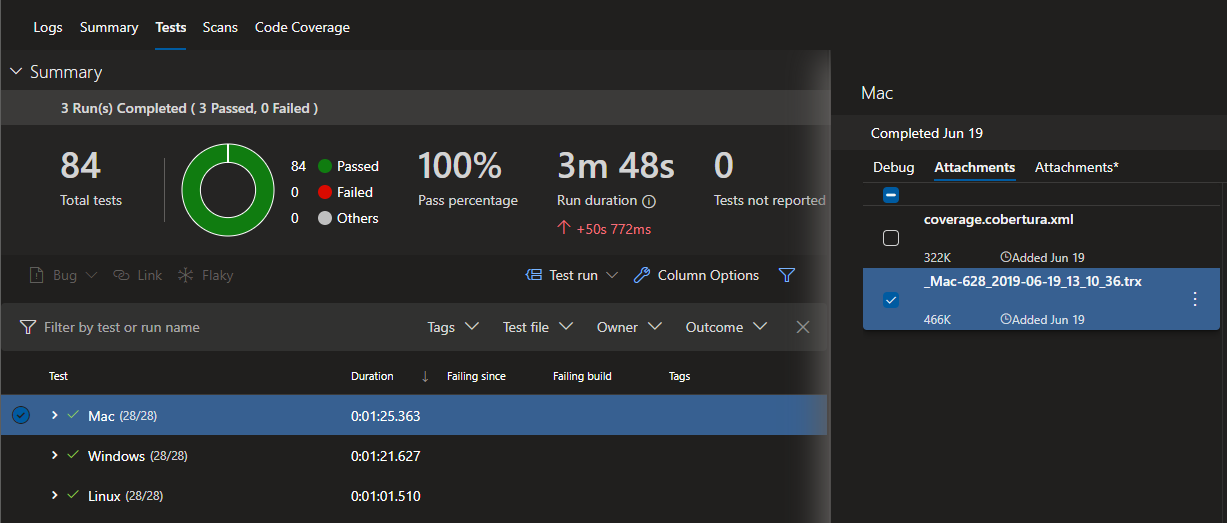
@camerontbelt the trx gets uploaded as an attachment to your test run. Could you please navigate to the tests tab a take a look there?
Something like this
ShreyasRmsft
on 16 Aug 2019
I found the root cause. it's a bug on our end and we will be fixing this.
ShreyasRmsft
on 20 Aug 2019
@ShreyasRmsft I apologize. I could have sworn I uploaded the zip file to you, I guess the comment did not post.
ReleaseLogs_103.zip
camerontbelt
on 20 Aug 2019
ShreyasRmsft
on 22 Aug 2019
@ShreyasRmsft When will I see those changes reflected in my pipeline? I assume you guys release every two weeks.
camerontbelt
on 22 Aug 2019
@ShreyasRmsft The reason I ask is because I ran it again and it still failed for the same reason even though all tests passed. But I dont know if the task has been updated or not.
camerontbelt
on 22 Aug 2019
@camerontbelt As @ShreyasRmsft has mentioned, the fixes have gone in, but it'll take a couple of weeks to get deployed.
 vagisha-nidhi
on 27 Aug 2019
vagisha-nidhi
on 27 Aug 2019
@vagisha-nidhi I look forward to having it fixed! Thank you!
camerontbelt
on 27 Aug 2019
Hello, I have the exact same issue. All tests passed, but task failed :
2019-09-03T08:36:46.6378436Z Série de tests réussie.
2019-09-03T08:36:46.6494745Z Total tests: 3
2019-09-03T08:36:46.6678611Z Passed: 3
2019-09-03T08:36:46.6865858Z Durée d'exécution des tests : 2,3940 Minutes
2019-09-03T08:36:46.7251682Z Vstest.console.exe exited with code 0.
2019-09-03T08:36:46.7551117Z **** Completed test execution *******
2019-09-03T08:36:46.8065014Z Test results files: C:\agent_work_temp\TestResults\conntest_VMWINCLT02_2019-09-03_08_35_04.trx
2019-09-03T08:36:47.3877978Z Created test run: 1001964
2019-09-03T08:36:47.4152479Z Publishing test results: 3
2019-09-03T08:36:47.5504266Z Publishing test results to test run '1001964'.
2019-09-03T08:36:47.5620453Z TestResults To Publish 3, Test run id:1001964
2019-09-03T08:36:47.5796259Z Test results publishing 3, remaining: 0. Test run id: 1001964
2019-09-03T08:36:47.7289084Z Published test results: 3
2019-09-03T08:36:47.7303743Z Publishing Attachments: 1
2019-09-03T08:36:48.5688397Z ##[warning]Could not find valid build, skipping code coverage merge.
2019-09-03T08:36:48.7771484Z Execution Result Code 1 is non zero, checking for failed results
2019-09-03T08:36:48.8115522Z Completed TestExecution Model...
2019-09-03T08:36:48.8335526Z ##[warning]Vstest failed with error. Check logs for failures. There might be failed tests.
2019-09-03T08:36:48.8336483Z ##[error]Error: The process 'C:\agent_work_tasks\VSTest_ef087383-ee5e-42c7-9a53-ab56c98420f9\2.156.2\Modules\DTAExecutionHost.exe' failed with exit code 1
2019-09-03T08:36:48.8340136Z ##[error]Vstest failed with error. Check logs for failures. There might be failed tests.
Do you have any work around ?
 gabrieldausque
on 3 Sep 2019
gabrieldausque
on 3 Sep 2019
@gabrieldausque They fixed it but we're waiting on them to release the fix into production.
camerontbelt
on 4 Sep 2019
@ShreyasRmsft, @vagisha-nidhi , it seems that the fix has not been deployed. do you have any information on the day it will be ? It's quite blocking for our release now. I've tried to change to mstest to see if it is related to NUnit, but we still have the issue. Does it exists any work around on that issue ?
gabrieldausque
on 10 Sep 2019
@gabrieldausque The "work around" I used is for it to always pass or continue on error. It shows up as a warning now instead of an actual fail but you also have to go inspect your test logs on each release to see if any tests have failed. This just prevents from being a failed release.
camerontbelt
on 11 Sep 2019
@gabrieldausque or @ShreyasRmsft I'm experiencing the same issue, but when running the tests in a container. Is there an email address that I can send my logs to to help diagnosis the issue?
 munchra
on 12 Sep 2019
munchra
on 12 Sep 2019
@munchra could you please elaborate? Are you using the vstest task to run tests inside the container? Do you have an azure-pipelines agent setup inside the container?
ShreyasRmsft
on 16 Sep 2019
@camerontbelt what version of the vstest task do you have? The fix is in the version 2.157.3.
We do deploy every 3 weeks but the deployment is done stage wise. The inner stages get it first (mostly internal and pre-prod accounts) and then released to other stages. This fix has already been deployed to some accounts and will get deployed to the rest of the accounts by end of this week hopefully.
ShreyasRmsft
on 16 Sep 2019
@shreyasrmsft I noticed it was fixed for me late last week. It now only fails if a test fails.
camerontbelt
on 16 Sep 2019
@ShreyasRmsft We are not using Azure DevOps are are CI system. We are using Jenkins that is passing in a dotnet test command into a docker container. We are getting intermittent build failures when this command is ran, although Unit Tests are successfully ran. Extending verbosity to _detailed_ results in nothing that stands out as the cause.
Test Run Successful.
Total tests: 131
Passed: 131
Total time: 1.1705 Minutes
Done executing task "Microsoft.TestPlatform.Build.Tasks.VSTestTask" -- FAILED. (TaskId:155)
14:05:56.596 1:7>Done building target "VSTest" in project "####.####.Tests.csproj" -- FAILED.: (TargetId:30)
14:05:56.598 1:7>Done Building Project "/src/####.####.Tests/####.####.Tests.csproj" (VSTest target(s)) -- FAILED.
That the reason I piggybacked off this issue was the thought that it is related to VSTEST and not Azure. If that's the not the case, and/or if needed, I can submit a separate request.
munchra
on 16 Sep 2019
@munchra Can you please file a separate issue with full logs?
We track the issues internally as well so this messes up the tracking.
Closing this as this has been fixed.
vagisha-nidhi
on 19 Sep 2019
Hi There.
I'm seeing the exact same issue with version 2.157.3
[debug]Exit code 1 received from tool 'F:\Workfolder01_tasks\VSTest_ef087383-ee5e-42c7-9a53-ab56c98420f9*2.157.3*Modules\DTAExecutionHost.exe'
[debug]STDIO streams have closed for tool 'F:\Workfolder01_tasks\VSTest_ef087383-ee5e-42c7-9a53-ab56c98420f9\2.157.3\Modules\DTAExecutionHost.exe'
[warning]Vstest failed with error. Check logs for failures. There might be failed tests.
[debug]Processed: ##vso[task.issue type=warning;]Vstest failed with error. Check logs for failures. There might be failed tests.
 miroras
on 19 Sep 2019
miroras
on 19 Sep 2019
Ok - my issue was different than those mentioned above.
My issues concerned an endless looping condition which crashed the test before it was able to report a failure. and due to the fact i didn't have an updated testing platform i didn't get a dump
miroras
on 19 Sep 2019
Related issues
 MarcoRossignoli
·
3Comments
MarcoRossignoli
·
3Comments
 adamralph
·
4Comments
adamralph
·
4Comments
 matthew-horrocks
·
4Comments
matthew-horrocks
·
4Comments
 aumanjoa
·
3Comments
aumanjoa
·
3Comments
 GreenDavidA
·
5Comments
GreenDavidA
·
5Comments
Most helpful comment
I found the root cause. it's a bug on our end and we will be fixing this.