I am trying to run LoadTests developed in VS 2017 that reference a webtest which does a simple load test of 100 users using the record and play option in Visual studio. I have also setup a Agent and controller to generate load tests and all this works fine in Visual studio when I run the LoadTest, it invokes the webtest and runs successfully.
When I try to run it in VSTest.console.exe , I get the following error
Command
vstest.console.exe "C:\Users\lmonteir\Source\Repos\Capacity Testing\LoadTests\LoadTests\bin\Debug\LoadTest1.loadtest" /Diag:c:\lloyd\diaglogs\aab.txt
Error
Additionally, path to test adapters can be specified using /TestAdapterPath command. Example /TestAdapterPath:
What am I doing wrong, why is it not running loadtests in console mode?
From other MSDN article, I am using this path
C:\Program Files (x86)\Microsoft Visual Studio\2017\TestAgent\Common7\IDE\CommonExtensions\Microsoft\TestWindow\
 lloydmonteiro
All 13 comments
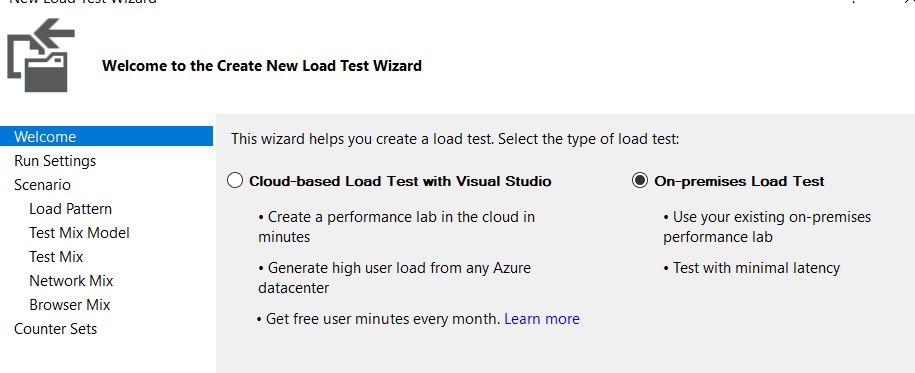
When I created the load test, I specified it as such and also configured Local Agent/Controller
lloydmonteiro
on 19 Mar 2018
Further updates....
So after reading couple of MSDN articles, I now added a TestSettings file and a ordered test with a single webtest. I then executed this command in VSTEST.CONSOLE> and see a different error.
COMMAND
vstest.console.exe "C:\Users\lmonteir\Source\Repos\Capacity Testing\LoadTests\LoadTests\bin\Release\OrderedTest1.orderedtest" /Settings:"C:\Users\lmonteir\Source\Repos\Capacity Testing\LoadTests\TestSettingDistributedLoadTestWalkthrough.testsettings" /Diag:c:\lloyd\diaglogs\aab.txt
Result
Total tests: 1. Passed: 1. Failed: 0. Skipped: 0.
Test Run Successful.
However in logs I can clearly see the error
Trace Verbose: 0 : 23892, 6, 2018/03/19, 16:47:04.856, 230728624978, vstest.console.exe, LengthPrefixCommunicationChannel: Error sending data: System.IO.IOException: Unable to write data to the transport connection: An existing connection was forcibly closed by the remote host. ---> System.Net.Sockets.SocketException: An existing connection was forcibly closed by the remote host
at System.Net.Sockets.Socket.Send(Byte[] buffer, Int32 offset, Int32 size, SocketFlags socketFlags)
at System.Net.Sockets.NetworkStream.Write(Byte[] buffer, Int32 offset, Int32 size)
--- End of inner exception stack trace ---
at System.Net.Sockets.NetworkStream.Write(Byte[] buffer, Int32 offset, Int32 size)
at System.IO.BufferedStream.Flush()
at System.IO.BinaryWriter.Flush()
at Microsoft.VisualStudio.TestPlatform.CommunicationUtilities.LengthPrefixCommunicationChannel.Send(String data).
TpTrace Warning: 0 : 23892, 6, 2018/03/19, 16:47:04.857, 230728626683, vstest.console.exe, ProxyOperationManager: Failed to end session: Microsoft.VisualStudio.TestPlatform.CommunicationUtilities.Interfaces.CommunicationException: Unable to send data over channel. ---> System.IO.IOException: Unable to write data to the transport connection: An existing connection was forcibly closed by the remote host. ---> System.Net.Sockets.SocketException: An existing connection was forcibly closed by the remote host
at System.Net.Sockets.Socket.Send(Byte[] buffer, Int32 offset, Int32 size, SocketFlags socketFlags)
at System.Net.Sockets.NetworkStream.Write(Byte[] buffer, Int32 offset, Int32 size)
--- End of inner exception stack trace ---
at System.Net.Sockets.NetworkStream.Write(Byte[] buffer, Int32 offset, Int32 size)
at System.IO.BufferedStream.Flush()
at System.IO.BinaryWriter.Flush()
at Microsoft.VisualStudio.TestPlatform.CommunicationUtilities.LengthPrefixCommunicationChannel.Send(String data)
--- End of inner exception stack trace ---
at Microsoft.VisualStudio.TestPlatform.CommunicationUtilities.LengthPrefixCommunicationChannel.Send(String data)
at Microsoft.VisualStudio.TestPlatform.CommunicationUtilities.TestRequestSender.EndSession()
at Microsoft.VisualStudio.TestPlatform.CrossPlatEngine.Client.ProxyOperationManager.Close()
TpTrace Warning: 0 : 23892, 6, 2018/03/19, 16:47:04.857, 230728626942, vstest.console.exe, ProxyOperationManager: Timed out waiting for test host to exit. Will terminate process.
TpTrace Information: 0 : 23892, 6, 2018/03/19, 16:47:04.867, 230728649247, vstest.console.exe, TestRunRequest:TestRunComplete: Completed.
TpTrace Verbose: 0 : 23892, 6, 2018/03/19, 16:47:04.867, 230728649843, vstest.console.exe, TestRequestSender.SetOperationComplete: Setting operation complete.
TpTrace Verbose: 0 : 23892, 1, 2018/03/19, 16:47:04.869, 230728653017, vstest.console.exe, TestRunRequest.Dispose: Starting.
TpTrace Information: 0 : 23892, 1, 2018/03/19, 16:47:04.869, 230728653249, vstest.console.exe, TestRunRequest.Dispose: Completed.
TpTrace Information: 0 : 23892, 1, 2018/03/19, 16:47:04.869, 230728653389, vstest.console.exe, TestRequestManager.RunTests: run tests completed, sucessful: True.
TpTrace Information: 0 : 23892, 1, 2018/03/19, 16:47:04.869, 230728654011, vstest.console.exe, RunTestsArgumentProcessor:Execute: Test run is completed.
TpTrace Verbose: 0 : 23892, 1, 2018/03/19, 16:47:04.869, 230728654177, vstest.console.exe, Executor.Execute: Exiting with exit code of 0
and when I open the SQLLoad Test DB, I can see that it hasn't executed the Test RUN at all.....
Please help !!!
lloydmonteiro
on 19 Mar 2018
@lloydmonteiro Please use mstest.exe cmdline to execute the loadtests. LoadTests is not supported by the vstest.console.exe. Also instead of using the agent controller infrastructure to generate load, you can use the Cloud Load Test Service that helps provision agents for you. You can read more about it here: https://www.visualstudio.com/team-services/cloud-load-testing/
 cltshivash
on 26 Mar 2018
cltshivash
on 26 Mar 2018
please tell me how do I run loadtest using mstest on release pipeline, what task should I add?
lloydmonteiro
on 28 Mar 2018
@lloydmonteiro please use the load test task for running load tests in the build/release pipeline
 ShreyasRmsft
on 28 Mar 2018
ShreyasRmsft
on 28 Mar 2018
@cltshivash You said to use mstest.exe cmdline to execute the loadtests
We started to use agent controller infrastructure instead of cloud because the cloud is deprecated next year. When I run mstest, I'm getting an error "Visual Studio Enterprise is required to execute the test."
But I do have Enterprise edition and selected the mstest path from that.
Maybe you know something about it?
Maybe mstest is not supported when using test controller??
 LirazShay
on 10 Sep 2019
LirazShay
on 10 Sep 2019
I'm having the same issue when trying to run a load test using mstest. The load test runs fine with Visual Studio Enterprise 2019 on the same machine. The error message indicates that Visual Studio Enterprise is required but I do have Visual Studio Enterprise installed. I also make sure that is the only version of VS on this machine. Please see run log below:
C:\Program Files (x86)\Microsoft Visual Studio\2019\Enterprise\Common7\IDE>mstest /TestContainer:"C:\Repos\Automation Load Tests\WebEstimateLoadTests\LoadTests\PartsCatalog - 500.loadtest" /TestSettings:"C:\Repos\Automation Load Tests\WebEstimateLoadTests\Local.testsettings" /detail:errormessage
Microsoft (R) Test Execution Command Line Tool Version 16.0.28326.58
Copyright (c) Microsoft Corporation. All rights reserved.
Loading C:\Repos\Automation Load Tests\WebEstimateLoadTests\Local.testsettings...
Loading C:\Repos\Automation Load Tests\WebEstimateLoadTests\LoadTests\PartsCatalog - 500.loadtest...
Starting execution...
Results Top Level Tests
------- ---------------
Error c:\repos\automation load tests\webestimateloadtests\loadtests\partscatalog - 500.loadtest
[errormessage] = Visual Studio Enterprise is required to execute the test.
0/1 test(s) Passed, 1 Error
Summary
Test Run Warning.
Error 1
Total 1
Results file: C:\Program Files (x86)\Microsoft Visual Studio\2019\Enterprise\Common7\IDE\TestResults\NNguyen_CR-NNGUYE-L9W10 2019-10-09 13_28_37.trx
Test Settings: Local
Run has the following issue(s):
Visual Studio Enterprise is required to execute the test.
C:\Program Files (x86)\Microsoft Visual Studio\2019\Enterprise\Common7\IDE>
 nnguyen2102
on 9 Oct 2019
nnguyen2102
on 9 Oct 2019
@cltshivash Hi Shiva, I saw that you reopened this issue 11 days ago. Do you have any updates on this issue? Thanks.
nnguyen2102
on 21 Oct 2019
@cltshivash
Hi dear friend!
I was very glad to see that you've reopened this issue.
Just to remind, @ShreyasRmsft explained that to run loadtest on release pipeline we should use load test task but this option is deprecated since the cloud load test is deprecated.
So currently if we want to run the loadtest on premise on pipeline there is no way to do so
This is a very big pain for our company that we must run it manually
So it will be so great if you will work on it to make it work using the new runner
LirazShay
on 22 Oct 2019
Please read this comment to help fixing this bug:
I opened a bug about this issue in VisualStudio Developer Community,
I've been told that "It has very small amount of new votes or comments. Based on this, its severity, and affected area, it’s my experience that this issue is very unlikely to be fixed."
If you want this issue to be fixed , please to up-vote for the issue here:
https://developercommunity.visualstudio.com/content/problem/729606/cannot-run-loadtest-with-test-controller-using-cmd.html
It is very simple, you just need to be signed in, it will help a lot!!!
LirazShay
on 22 Oct 2019
@LirazShay Just up vote it. Thanks.
nnguyen2102
on 22 Oct 2019
As discussed above the issue is not related to any component inside this repo.
The issue should be tracked using the developer community feedback ticket tagged above.
 singhsarab
on 23 Oct 2019
singhsarab
on 23 Oct 2019
@singhsarab
No, but why this was reopened by @cltshivash?
I think the reason is to open this repo to support running load test also
Because the development of mstest has stopped years ago
The only way to achieve solution for this is by adding the funtionallity for this repo
so please help us with it and open it, until we know the direction it goes.
Currently it is a very pain for that the cloud load test will be deprecated next year and we're migrating to run the load tests using test controller and agent architecture on premise
But the main problem and pain is that we cannot run the load test in this was using script during pipeline - only from visual studio manually clicking run test
I think that this issue should be opened to track the progress
LirazShay
on 23 Oct 2019
Related issues
 ejcoyle88
·
3Comments
ejcoyle88
·
3Comments
 TheRealPiotrP
·
3Comments
TheRealPiotrP
·
3Comments
 dlemstra
·
5Comments
dlemstra
·
5Comments
 jnm2
·
5Comments
jnm2
·
5Comments
 ChaosEngine
·
5Comments
ChaosEngine
·
5Comments
Most helpful comment
@singhsarab
No, but why this was reopened by @cltshivash?
I think the reason is to open this repo to support running load test also
Because the development of mstest has stopped years ago
The only way to achieve solution for this is by adding the funtionallity for this repo
so please help us with it and open it, until we know the direction it goes.
Currently it is a very pain for that the cloud load test will be deprecated next year and we're migrating to run the load tests using test controller and agent architecture on premise
But the main problem and pain is that we cannot run the load test in this was using script during pipeline - only from visual studio manually clicking run test
I think that this issue should be opened to track the progress