vstest.console.exe crashing on UWP unit test project with “Data at the root level is invalid.”
Trying to run a UWP unit test project using vstest.console.exe, I generate the appx package using MSBuild, and call:
C:\Program Files (x86)\Microsoft Visual Studio\2017\Professional\Common7\IDE\Extensions\TestPlatform> ./vstest.console.exe C:\builds\droplocation\Uwp.UnitTesting\AppPackages\Uwp.UnitTesting_1.0.0.0_x86_Debug_Test\wp.UnitTesting_1.0.0.0_x86_Debug.appx
But getting:
Microsoft (R) Test Execution Command Line Tool Version 15.5.0
Copyright (c) Microsoft Corporation.  All rights reserved.

Starting test execution, please wait...
Failed to launch testhost with error: System.AggregateException: One or more errors occurred. ---> Microsoft.Build.Exceptions.InvalidProjectFileException: The project file could not be loaded. Data at the root level is invalid. Line 1, position 1.  C:\builds\droplocation\RS.Uwp.UnitTesting\AppPackages\RS.Uwp.UnitTesting_1.0.0.0_x86_Debug_Test\RS.Uwp.UnitTesting_1.0.0.0_x86_Debug.appx ---> System.Xml.XmlException: Data at the root level is invalid. Line 1, position 1.
   at System.Xml.XmlTextReaderImpl.Throw(Exception e)
   at System.Xml.XmlTextReaderImpl.Throw(String res, String arg)
   at System.Xml.XmlTextReaderImpl.ParseRootLevelWhitespace()
   at System.Xml.XmlTextReaderImpl.ParseDocumentContent()
   at System.Xml.XmlTextReaderImpl.Read()
   at System.Xml.XmlTextReader.Read()
   at Microsoft.Build.Internal.XmlReaderExtension.GetXmlReader(StreamReader input, Encoding& encoding)
   at Microsoft.Build.Internal.XmlReaderExtension..ctor(String file)
   at Microsoft.Build.Construction.ProjectRootElement.LoadDocument(String fullPath, Boolean preserveFormatting)
   --- End of inner exception stack trace ---
   at Microsoft.Build.Shared.ProjectFileErrorUtilities.VerifyThrowInvalidProjectFile(Boolean condition, String errorSubCategoryResourceName, BuildEventFileInfo projectFile, Exception innerException, String resourceName, Object[] args)
   at Microsoft.Build.Construction.ProjectRootElement.LoadDocument(String fullPath, Boolean preserveFormatting)
   at Microsoft.Build.Construction.ProjectRootElement..ctor(String path, ProjectRootElementCache projectRootElementCache, Boolean preserveFormatting)
   at Microsoft.Build.Construction.ProjectRootElement.CreateProjectFromPath(String projectFile, IDictionary`2 globalProperties, String toolsVersion, ProjectRootElementCache projectRootElementCache, Boolean preserveFormatting)
   at Microsoft.Build.Construction.ProjectRootElement.<>c__DisplayClass200_0.<OpenProjectOrSolution>b__0(String path, ProjectRootElementCache cache)
   at Microsoft.Build.Evaluation.ProjectRootElementCache.Get(String projectFile, OpenProjectRootElement openProjectRootElement, Boolean isExplicitlyLoaded, Nullable`1 preserveFormatting)
   at Microsoft.Build.Construction.ProjectRootElement.OpenProjectOrSolution(String fullPath, IDictionary`2 globalProperties, String toolsVersion, ProjectRootElementCache projectRootElementCache, Boolean isExplicitlyLoaded)
   at Microsoft.Build.Evaluation.ProjectCollection.LoadProject(String fileName, IDictionary`2 globalProperties, String toolsVersion)
   at Microsoft.VisualStudio.UwpTestHostRuntimeProvider.RecipeFile.get_Project()
   at Microsoft.VisualStudio.UwpTestHostRuntimeProvider.RecipeFile.get_LayoutPath()
   at Microsoft.VisualStudio.UwpTestHostRuntimeProvider.Deployer.Microsoft.VisualStudio.UwpTestHostRuntimeProvider.IDeployer.Deploy()
   at Microsoft.VisualStudio.UwpTestHostRuntimeProvider.UwpTestHostManager.<LaunchHostAsync>d__35.MoveNext()
--- End of stack trace from previous location where exception was thrown ---
   at System.Runtime.CompilerServices.TaskAwaiter.ThrowForNonSuccess(Task task)
   at System.Runtime.CompilerServices.TaskAwaiter.HandleNonSuccessAndDebuggerNotification(Task task)
   at Microsoft.VisualStudio.UwpTestHostRuntimeProvider.UwpTestHostManager.<Microsoft-VisualStudio-TestPlatform-ObjectModel-Host-ITestRuntimeProvider-LaunchTestHostAsync>d__30.MoveNext()
   --- End of inner exception stack trace ---
   at System.Threading.Tasks.Task.ThrowIfExceptional(Boolean includeTaskCanceledExceptions)
   at System.Threading.Tasks.Task`1.GetResultCore(Boolean waitCompletionNotification)
   at System.Threading.Tasks.Task`1.get_Result()
   at Microsoft.VisualStudio.TestPlatform.CrossPlatEngine.Client.ProxyOperationManager.SetupChannel(IEnumerable`1 sources, CancellationToken cancellationToken)
---> (Inner Exception #0) Microsoft.Build.Exceptions.InvalidProjectFileException: The project file could not be loaded. Data at the root level is invalid. Line 1, position 1.  C:\builds\droplocation\RS.Uwp.UnitTesting\AppPackages\RS.Uwp.UnitTesting_1.0.0.0_x86_Debug_Test\RS.Uwp.UnitTesting_1.0.0.0_x86_Debug.appx ---> System.Xml.XmlException: Data at the root level is invalid. Line 1, position 1.
   at System.Xml.XmlTextReaderImpl.Throw(Exception e)
   at System.Xml.XmlTextReaderImpl.Throw(String res, String arg)
   at System.Xml.XmlTextReaderImpl.ParseRootLevelWhitespace()
   at System.Xml.XmlTextReaderImpl.ParseDocumentContent()
   at System.Xml.XmlTextReaderImpl.Read()
   at System.Xml.XmlTextReader.Read()
   at Microsoft.Build.Internal.XmlReaderExtension.GetXmlReader(StreamReader input, Encoding& encoding)
   at Microsoft.Build.Internal.XmlReaderExtension..ctor(String file)
   at Microsoft.Build.Construction.ProjectRootElement.LoadDocument(String fullPath, Boolean preserveFormatting)
   --- End of inner exception stack trace ---
   at Microsoft.Build.Shared.ProjectFileErrorUtilities.VerifyThrowInvalidProjectFile(Boolean condition, String errorSubCategoryResourceName, BuildEventFileInfo projectFile, Exception innerException, String resourceName, Object[] args)
   at Microsoft.Build.Construction.ProjectRootElement.LoadDocument(String fullPath, Boolean preserveFormatting)
   at Microsoft.Build.Construction.ProjectRootElement..ctor(String path, ProjectRootElementCache projectRootElementCache, Boolean preserveFormatting)
   at Microsoft.Build.Construction.ProjectRootElement.CreateProjectFromPath(String projectFile, IDictionary`2 globalProperties, String toolsVersion, ProjectRootElementCache projectRootElementCache, Boolean preserveFormatting)
   at Microsoft.Build.Construction.ProjectRootElement.<>c__DisplayClass200_0.<OpenProjectOrSolution>b__0(String path, ProjectRootElementCache cache)
   at Microsoft.Build.Evaluation.ProjectRootElementCache.Get(String projectFile, OpenProjectRootElement openProjectRootElement, Boolean isExplicitlyLoaded, Nullable`1 preserveFormatting)
   at Microsoft.Build.Construction.ProjectRootElement.OpenProjectOrSolution(String fullPath, IDictionary`2 globalProperties, String toolsVersion, ProjectRootElementCache projectRootElementCache, Boolean isExplicitlyLoaded)
   at Microsoft.Build.Evaluation.ProjectCollection.LoadProject(String fileName, IDictionary`2 globalProperties, String toolsVersion)
   at Microsoft.VisualStudio.UwpTestHostRuntimeProvider.RecipeFile.get_Project()
   at Microsoft.VisualStudio.UwpTestHostRuntimeProvider.RecipeFile.get_LayoutPath()
   at Microsoft.VisualStudio.UwpTestHostRuntimeProvider.Deployer.Microsoft.VisualStudio.UwpTestHostRuntimeProvider.IDeployer.Deploy()
   at Microsoft.VisualStudio.UwpTestHostRuntimeProvider.UwpTestHostManager.<LaunchHostAsync>d__35.MoveNext()
--- End of stack trace from previous location where exception was thrown ---
   at System.Runtime.CompilerServices.TaskAwaiter.ThrowForNonSuccess(Task task)
   at System.Runtime.CompilerServices.TaskAwaiter.HandleNonSuccessAndDebuggerNotification(Task task)
   at Microsoft.VisualStudio.UwpTestHostRuntimeProvider.UwpTestHostManager.<Microsoft-VisualStudio-TestPlatform-ObjectModel-Host-ITestRuntimeProvider-LaunchTestHostAsync>d__30.MoveNext()<---


Test Run Aborted.
When I change the vstest.console.exe lcoation from:
C:\Program Files (x86)\Microsoft Visual Studio\2017\Professional\Common7\IDE\Extensions\TestPlatform
to:
C:\Program Files (x86)\Microsoft Visual Studio\2017\Professional\Common7\IDE\CommonExtensions\Microsoft\TestWindow
It works on my local machine with VS2017 Professional, but when called with the build agent on the remove build server, it's still the same:
******************************************************************************
Starting: VsTest - UWP
******************************************************************************
==============================================================================
Task         : Visual Studio Test
Description  : Run tests with Visual Studio test runner
Version      : 2.3.8
Author       : Microsoft Corporation
Help         : [More Information](https://go.microsoft.com/fwlink/?LinkId=835764)
==============================================================================
Run the tests locally using vstest.console.exe
========================================================
Test selector : Test assemblies
Test assemblies : C:\agent\_work\2\a\AppxPackages\Uwp.UnitTesting_1.0.0.0_x86_Test\Uwp.UnitTesting_1.0.0.0_x86.appx
Test filter criteria : null
Search folder : C:\agent\_work\2\s
Run settings file : C:\agent\_work\2\s
Run in parallel : false
Run in isolation : true
Path to custom adapters : null
Other console options : null
Code coverage enabled : false
Rerun failed tests: false
vstest.console.exe, specified location : C:\Program Files (x86)\Microsoft Visual Studio\2017\Community\Common7\IDE\CommonExtensions\Microsoft\TestWindow
========================================================
"C:\Program Files (x86)\Microsoft Visual Studio\2017\Community\Common7\IDE\CommonExtensions\Microsoft\TestWindow\vstest.console.exe" @C:\agent\_work\_temp\635f6641-039f-11e8-b3d5-d35598e183b1.txt
Microsoft (R) Test Execution Command Line Tool Version 15.5.0
Copyright (c) Microsoft Corporation.  All rights reserved.
vstest.console.exe
"C:\agent\_work\2\a\AppxPackages\Uwp.UnitTesting_1.0.0.0_x86_Test\Uwp.UnitTesting_1.0.0.0_x86.appx"
/InIsolation
/logger:"trx"
/TestAdapterPath:"C:\agent\_work\2\s"
Starting test execution, please wait...
Failed to launch testhost with error: System.AggregateException: One or more errors occurred. ---> Microsoft.Build.Exceptions.InvalidProjectFileException: The project file could not be loaded. Data at the root level is invalid. Line 1, position 1.  C:\agent\_work\2\a\AppxPackages\Uwp.UnitTesting_1.0.0.0_x86_Test\Uwp.UnitTesting_1.0.0.0_x86.appx ---> System.Xml.XmlException: Data at the root level is invalid. Line 1, position 1.
   at System.Xml.XmlTextReaderImpl.Throw(Exception e)
What's strange, when I try to run it manually on the build server, it crashes with following output:
PS C:\Program Files (x86)\Microsoft Visual Studio\2017\Community\Common7\IDE\CommonExtensions\Microsoft\TestWindow> ./vs
test.console.exe C:\agent\_work\2\a\AppxPackages\Uwp.UnitTesting_1.0.0.0_x86_Test\Uwp.UnitTesting_1.0.0.0_x86.appx
 /InIsolation /Platform:x86
Microsoft (R) Test Execution Command Line Tool Version 15.0.27130.2020
Copyright (c) Microsoft Corporation.  All rights reserved.

Starting test execution, please wait...

Unhandled Exception: System.Runtime.CallbackException: A user callback threw an exception.  Check the exception stack an
d inner exception to determine the callback that failed. ---> System.ArgumentNullException: Value cannot be null.
Parameter name: applicationName
   at Microsoft.VisualStudio.TestPlatform.ObjectModel.ValidateArg.NotNull[T](T arg, String parameterName)
   at Microsoft.VisualStudio.TestPlatform.Client.LocalCrashDumpUtilities.TryGetLocalCrashDumpPath(String applicationName
, String& crashDumpPath)
   at Microsoft.VisualStudio.TestPlatform.Client.TestExecutorServiceClient.TryGetLocalCrashDumpPath(String applicationNa
me, String& crashDumpPath)
   at Microsoft.VisualStudio.TestPlatform.Client.TestExecutorServiceClient.GetTestRunAbortedMessage(String executorProce
ssName, Int32 executorProcessId, Boolean hasExited, Boolean isRemoteExecution)
   at Microsoft.VisualStudio.TestPlatform.Client.TestExecutorServiceClient.TestExecutorServiceChannel_Reset(Object sende
r, EventArgs e)
   at System.ServiceModel.Channels.CommunicationObject.OnClosed()
   --- End of inner exception stack trace ---
   at System.ServiceModel.Channels.CommunicationObject.OnClosed()
   at System.ServiceModel.ServiceHostBase.OnClosed()
   at System.ServiceModel.ServiceHost.OnClosed()
   at System.ServiceModel.Channels.CommunicationObject.Close(TimeSpan timeout)
   at Microsoft.VisualStudio.TestPlatform.Client.UniversalTestExecutorProxy.Close()
   at Microsoft.VisualStudio.TestPlatform.Client.TestExecutorServiceClient.StarPlatformSpecificTestExecution(IPlatformTe
stExecutorClient platformTestExecutorClient, ITestExecutorLauncher launcher, Architecture targetPlatform, FrameworkVersi
on targetFramework)
   at Microsoft.VisualStudio.TestPlatform.Client.TestExecutorServiceClient.Initialize_NoLock(Architecture targetPlatform
, FrameworkVersion targetFramework)
   at Microsoft.VisualStudio.TestPlatform.Client.TestExecutorServiceClient.EnsureInitialized(IDictionary`2 environmentVa
riables, TestExecutionContext context)
   at Microsoft.VisualStudio.TestPlatform.Client.TestExecutorServiceClient.<>c__DisplayClass18_0.<StartTestRun>b__0()
   at Microsoft.VisualStudio.TestPlatform.Client.TestExecutorServiceClient.InvokeTestExecutorServiceAction(Action action
)
   at Microsoft.VisualStudio.TestPlatform.Client.TestExecutorServiceClient.StartTestRun(IEnumerable`1 sources, TestExecu
tionContext executionContext, String runSettings, IDictionary`2 environmentVariables, String dataCollectionServiceUri, I
TestCaseLog testCaseLog, ITestRunLog testRunLog, IFrameworkHandleInternal frameworkHandle)
   at Microsoft.VisualStudio.TestPlatform.Client.Rocksteady.RocksteadyExecutionManager.StartTestRun(TestRunCriteria test
RunCriteria, Boolean inIsolation, DataCollectionParameters dataCollectionParameters, ITestRunEventsHandler runEventsHand
ler)
   at Microsoft.VisualStudio.TestPlatform.Client.TestRunRequest.ExecuteAsync()
   at Microsoft.VisualStudio.TestPlatform.CommandLine.Processors.RunTestsArgumentProcessor.RunTests(IEnumerable`1 source
s, String packageFullName, String deviceInfo, Boolean isPhoneAppx, Boolean isUniversalTestAppx)
   at Microsoft.VisualStudio.TestPlatform.CommandLine.Processors.RunTestsArgumentProcessor.ExecuteAppContainerSources(Li
st`1 appContainerSources, String deviceInfo, Boolean isPhoneAppx)
   at Microsoft.VisualStudio.TestPlatform.CommandLine.Processors.RunTestsArgumentProcessor.Execute()
   at Microsoft.VisualStudio.TestPlatform.CommandLine.Executor.Execute(String[] args)
   at RockSteady.Program.Main(String[] args)
 alekkowalczyk
All 17 comments
@alekkowalczyk for CLI please continue using vstest.console from TestWindow folder, & not from TestPlatform.
Regarding the UWP issue can you please provide info regarding following
- Are you building your UWP Test app targetting RS3 SDK( 16299) as the minimum SKD?
If you are targeting RS3 SDK then it will go via our newer platform present in "Common7\IDE\Extensions\TestPlatform", & if you create an appx out of it to run for CLI it will not work.
Alternatively for this scenario you can use
vstest.console/framework:FrameworkUap10
E.G.
vstest.console "C:\Users\vseqa1\source\repos\UnitTestProject10\UnitTestProject10\bin\x86\Debug\UnitTestProject10.build.appxrecipe" /framework:FrameworkUap10
We plan to bring in support for appx for our newer testplatform by VS2017 update 7
- The build server where you are getting the exception, does the app launches there? or does it even fails to launch the app?
- Is your build server a Windows Server machine? We have seen issues on build server where UWP UT app launches, but it fails to connect to vstest.console, & fails afterwards.
 mayankbansal018
on 8 Feb 2018
mayankbansal018
on 8 Feb 2018
@alekkowalczyk , I'm closing this issue for now, please re-open it if you hit it again
mayankbansal018
on 19 Feb 2018
@alekkowalczyk I ran into a similar problem. I'm using a totally different version of Visual Studio but I'm seeing the same error you see on your build server. I wanted to share my solution in case it helps you.
Also, @DerGary, I noticed you linked to alekkowalczyk's issue here. They seem different to me but I wanted to loop you in just in case this gave some ideas for your problem.
My App
C++/CX UWP App
CX UWP test projects
C++ test projects
Previous Config
Visual Studio 15.2
Platform Toolset: v140
Windows SDK: 10586
Referenced extensions:
- Microsoft Visual Studio Test Core 14.0
- MSTest for CPP Phone Projects 14.0
New Config
Same Visual Studio version, just retargeting the app to newer compiler and SDK.
Visual Studio 15.2
Platform Toolset: v141
Windows SDK: 15063
Referenced extensions:
- Microsoft Visual Studio Test Core 15.0
- MSTest for CPP Phone Projects 15.0
Symptom
After the upgrade, everything compiled but the UWP test projects failed to run. They crashed with exception: "Value cannot be null. Parameter name: applicationName"
Problem
The value of $(VCInstallDir) changed from
C:\Program Files (x86)\Microsoft Visual Studio 14.0\VC\
to
C:\Program Files (x86)\Microsoft Visual Studio\2017\Enterprise\VC
While I was manually updating the AdditionalLibraryDirectories declarations in the UWP test project I made a copy/paste mistake and accidentally linked the non-UWP version of the Microsoft.VisualStudio.TestTools.CppUnitTestFramework.lib library.
Solution
C++ UWP Test projects must link the matching test framework lib:
$(VCInstallDir)Auxiliary\VS\UnitTest\lib\UWP
Non-UWP C++ test projects must link the non-uwp lib:
$(VCInstallDir)Auxiliary\VS\UnitTest\lib
 till6r
on 9 Mar 2018
till6r
on 9 Mar 2018
OK, so what's the workaround until 15.7 is rolled out. It not clear in this comment exactly how to workaround the issue.
For us UWP UT app launches, but I think it fails to connect to vstest.console. There are no tests reported as being passing/failing.
Any suggestions.
Visual Studio 2017: 15.6
UWP framework 16299 (Both Min and target)
 pMaske
on 10 Mar 2018
pMaske
on 10 Mar 2018
I have tried vstest.console from both locations
C:\Program Files\Microsoft Visual Studio\2017\Professional\Common7\IDE\CommonExtensions\Microsoft\TestWindowvstest.console.exe
and
C:\Program Files\Microsoft Visual Studio\2017\Professional\Common7\IDE\Extensions\TestPlatform
with and without /framework:FrameworkUap10
All it does is launches the app and sits there forever when run from command line.
Only, when I open the project and Click Run-All then tests are discovered and start run correctly. It 's important for tests to run on Jenkins automatically. It's a big roadblock.
pMaske
on 10 Mar 2018
@pMaske as you mentioned that the UWP app is launched, can you please share the screenshot once the app is launched.
Also is the app closed after certain time, say approx after 60secs? Can you share what is the error you see on CLI?
Can you enable CLI diagnostics logs for vstest, by following steps here, & share the logs.
mayankbansal018
on 12 Mar 2018
Thanks for responding @mayankbansal018
@mayankbansal018 after app is launched we see a launch page.
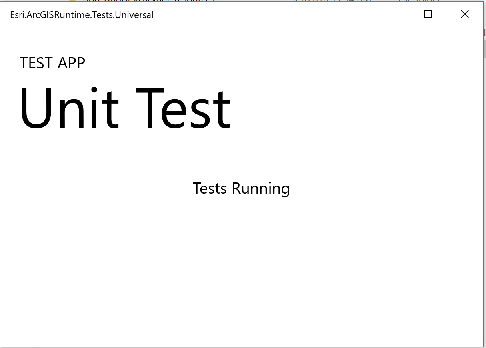
App is not closed until manually killed.
I will send the CLI logs in a day or so.
pMaske
on 19 Mar 2018
@pMaske to run your UWP tests, are you giving ".appx" as input to CLI? Looking at the App launched it seems you are using "appx" generated from VS2017 update 5 or older.
Can you please try to rebuild your project in VS2017 update 6, & then pass ".appxrecipe" as input to CLI, with above parameters that I mentioned.
mayankbansal018
on 20 Mar 2018
OK, this is what I am getting same error with both commands
C:\Program Files\Microsoft Visual Studio\2017\Professional\Common7\IDE\Extensions\TestPlatform> vstest.console "C:\output\winuwp_x86_release\bin\Esri.ArcGISRuntime.Tests\Esri.ArcGISRuntime.Tests.Universal.build.appxrecipe" /Logger:trx /InIsolation /framework:FrameworkUap10
OR
C:\Program Files\Microsoft Visual Studio\2017\Professional\Common7\IDE\CommonExtensions\Microsoft\TestWindow> vstest.console.exe "C:\output\winuwp_x86_release\bin\Esri.ArcGISRuntime.Tests\Esri.ArcGISRuntime.Tests.Universal.build.appxrecipe" /Logger:trx /InIsolation /framework:FrameworkUap10
Microsoft.VisualStudio.TestPlatform.ObjectModel.TestPlatformException: Failed to initialize client proxy: could not connect to test process.
   at Microsoft.VisualStudio.TestPlatform.CrossPlatEngine.Client.ProxyOperationManager.SetupChannel(IEnumerable`1 sources, CancellationToken cancellationToken)
   at Microsoft.VisualStudio.TestPlatform.CrossPlatEngine.Client.ProxyExecutionManager.StartTestRun(TestRunCriteria testRunCriteria, ITestRunEventsHandler eventHandler)

Test Run Aborted.
When I tried to run the debug version I get
Command: C:\Program Files\Microsoft Visual Studio\2017\Professional\Common7\IDE\Extensions\TestPlatform>vstest.console.exe C:\output\winuwp_x86_debug\bin\Esri.ArcGISRuntime.Tests\Esri.ArcGISRuntime.Tests.Universal.build.appxrecipe /framework:FrameworkUap10
C:\Program Files\Microsoft Visual Studio\2017\Professional\Common7\IDE\Extensions\TestPlatform>vstest.console.exe C:\output\winuwp_x86_debug\bin\Esri.ArcGISRuntime.Tests\Esri.ArcGISRuntime.Tests.Universal.build.appxrecipe /framework:FrameworkUap10
Microsoft (R) Test Execution Command Line Tool Version 15.6.1
Copyright (c) Microsoft Corporation.  All rights reserved.

Starting test execution, please wait...
Creating a new clean layout...

Copying files: Total 82 mb to layout...

Checking whether required frameworks are installed...

Registering the application to run from layout...

Deployment complete (0:00:09.153). Full package name: "d160b1a9-2c65-41ed-82af-4d4939e99742_1.0.0.0_x86__zy2ctb9gr90we"

Deployment operation succeeded, package moniker: 'd160b1a9-2c65-41ed-82af-4d4939e99742_1.0.0.0_x86__zy2ctb9gr90we'.
Attempting to launch app with app user model Id 'd160b1a9-2c65-41ed-82af-4d4939e99742_zy2ctb9gr90we!vstest.executionengine.universal.App' and arguments '--port 62879 --endpoint 127.0.0.1:062879 --role client --parentprocessid 11556 --telemetryoptedin false'.
Successfully launched process Id '6924'.
No test is available in entrypoint\Esri.ArcGISRuntime.Tests.exe. Make sure that test discoverer & executors are registered and platform & framework version settings are appropriate and try again.
Attempting to close app with package full name 'd160b1a9-2c65-41ed-82af-4d4939e99742_1.0.0.0_x86__zy2ctb9gr90we'.

Additionally, path to test adapters can be specified using /TestAdapterPath command. Example  /TestAdapterPath:<pathToCustomAdapters>.
@mayankbansal018 just wanted to update, I was finally able to run the UWP unit tests using appxrecipe
and /framework:FrameworkUap10 switch. Thanks for your help.
pMaske
on 4 Apr 2018
@pMaske , good to know it worked for you, however as I mentioned the support for ".appx" will be available from 15.7 update, you would need to rebuild ".appx" in 15.7 though before trying it out.
mayankbansal018
on 5 Apr 2018
@mayankbansal018 I updated my Visual Stuido to 15.7.4 and realize the old appx way is not working. I updated my command to use appx and saw same behavior I reported earlier. Can you please confirm if I should continue to use appxrecipe or switch to appx. Well at the moment none of them are working for me
APPXRECIPE
C:>"C:\Program Files (x86)\Microsoft Visual Studio\2017\Professional\Common7\IDE\CommonExtensions\Microsoft\TestWindowvstest.console.exe" C:\output\winuwp_x64_release\bin\Esri.ArcGISRuntime.Tests\Esri.ArcGISRuntime.Tests.Universal.build.appxrecipe /Logger:trx;LogFileName=AgainRecipe /InIsolation /Platform:x64 /framework:FrameworkUap10
Microsoft (R) Test Execution Command Line Tool Version 15.7.2
Copyright (c) Microsoft Corporation. All rights reserved.
Starting test execution, please wait...
Attempting to deploy to target 'Local Machine'.
DEP0600: Deployment failed. InvalidOperationException - Operation is not valid due to the current state of the object. [0x80131509]
Deployment operation failed.
Microsoft.VisualStudio.TestPlatform.ObjectModel.TestPlatformException: Failed to initialize client proxy: could not connect to test process.
at Microsoft.VisualStudio.TestPlatform.CrossPlatEngine.Client.ProxyOperationManager.SetupChannel(IEnumerable`1 sources)
at Microsoft.VisualStudio.TestPlatform.CrossPlatEngine.Client.ProxyExecutionManager.StartTestRun(TestRunCriteria testRunCriteria, ITestRunEventsHandler eventHandler)
Test Run Aborted.
APPX
C:>"C:\Program Files (x86)\Microsoft Visual Studio\2017\Professional\Common7\IDE\CommonExtensions\Microsoft\TestWindowvstest.console.exe" C:\Temp\QuartzU4\UWP\Test\Esri.ArcGISRuntime.Tests.Universal\AppPackages\Esri.ArcGISRuntime.Tests.Universal_1.0.0.0_x64_Test\Esri.ArcGISRuntime.Tests.Universal_1.0.0.0_x64.appx /Logger:trx;LogFileName=AgainRecipe /InIsolation /Platform:x64 /framework:FrameworkUap10
Microsoft (R) Test Execution Command Line Tool Version 15.7.2
Copyright (c) Microsoft Corporation. All rights reserved.
Starting test execution, please wait...
Attempting to deploy to target 'Local Machine'.
DEP0820: The appx file 'C:\Temp\QuartzU4\UWP\Test\Esri.ArcGISRuntime.Tests.Universal\AppPackages\Esri.ArcGISRuntime.Tests.Universal_1.0.0.0_x64_Test\Esri.ArcGISRuntime.Tests.Universal_1.0.0.0_x64.appx' failed to install. [0x80073CFB]
Deployment operation failed.
Microsoft.VisualStudio.TestPlatform.ObjectModel.TestPlatformException: Failed to initialize client proxy: could not connect to test process.
at Microsoft.VisualStudio.TestPlatform.CrossPlatEngine.Client.ProxyOperationManager.SetupChannel(IEnumerable`1 sources)
at Microsoft.VisualStudio.TestPlatform.CrossPlatEngine.Client.ProxyExecutionManager.StartTestRun(TestRunCriteria testRunCriteria, ITestRunEventsHandler eventHandler)
Closing app with package full name 'd160b1a9-2c65-41ed-82af-4d4939e99742_1.0.0.0_x64__zy2ctb9gr90we'.
Can you please advise
pMaske
on 16 Aug 2018
Having the same problem.
If I do the following when logged into my PC it works....
vstest.console.exe /Diag:diaglogs.txt /Logger:"trx;LogFileName=unit_tests_results.trx" /Platform:x64 /Framework:FrameworkUap10 path.to.appxrecipe
It doesn't work for Jenkins. Same symptoms as the person above describes.
So I wondered if it was something to do with the fact I'm logged in. I set up sshd and connected remotely to the PC, logged in as the same user and launched the tests again as above but in the diagnostic logs I can see that an exception is thrown after the tests run successfully when an attempt is made to kill the tests process.
I've attached the diagnostic log so you can see yourself.
 phraemer
on 3 Oct 2018
phraemer
on 3 Oct 2018
@phraemer from the diag file it says System.UnauthorizedAccessException: Access is denied when we are attempting to deploy to machine, I'm assuming it is local since in your command above you have not specified any IP.
@MSLukeWest can you please check why this could be happening?
@pMaske , apologies, I've not gotten back on this issue yet. Can you please do following
- Make sure you have uninstalled(in case it was still lingering on device) your UWP Test App.
- Compile it again from latest VS IDE(15.8.5), & please use if ".appxrecipe".
- If you still face issue, please enable diagnostic logs via
--diag:<path_to_somefile>, & share those with us
@MSLukeWest, can you see logs from @pMaske DEP0600: Deployment failed. InvalidOperationException - Operation is not valid due to the current state of the object. [0x80131509] if something obvious comes out, & tells you why deployment is failing?
mayankbansal018
on 3 Oct 2018
@mayankbansal018 , I was able to get it working again but I can't recall what I did to get it running again 😁 .
pMaske
on 3 Oct 2018
@mayankbansal018 hi,
yeah it's local.
In the case I described above where it works there is no error after this line in the logs...
SocketServer.Stop: Cancellation requested. Stopping message loop.
Seems like there is some subtle permission difference when starting vstest.console.exe by hand from the command line versus it being launched from a script by a running process.
Using Process Explorer I examined the security properties of vstest.console.exe for the working case versus the failing case and the main differences I can see are in the working case the process is part of the groups CONSOLE LOGON, LOCAL, NT AUTHORITY\INTERACTIVE and the failing case's process is not but is part of NT AUTHORITY\NETWORK (since it's a child process of sshd)
I would bet that non-interactive processes cannot kill processes and that's why it fails.
Just speculation though.
Is there any other information I can gather to help diagnose this?
phraemer
on 4 Oct 2018
Related issues
 ahaleiii
·
3Comments
ahaleiii
·
3Comments
 adamralph
·
4Comments
adamralph
·
4Comments
 aumanjoa
·
3Comments
aumanjoa
·
3Comments
 GreenDavidA
·
5Comments
GreenDavidA
·
5Comments
 eerhardt
·
5Comments
eerhardt
·
5Comments