Vstest: Runsettings from command line (--) doesnt have capability to pass TestRunParameters
Description
TestPlatform can handle only those settings which is of the form
<RunSettings>
    <node1>
        <node2>
             <node3>value</node3>
        </node2>
    </node1>
</RunSettings>
by running command dotnet test -- node1.node2.node3=value
It doesn't have capability to pass attribute and its value for a runsetting element.
for example:
  <TestRunParameters>
    <Parameter name="webAppUrl" value="http://localhost" />
    <Parameter name="webAppUserName" value="Admin" />
    <Parameter name="webAppPassword" value="Password" />
  </TestRunParameters>
Creating this issue to enhance command line to handle the above scenario.
 Faizan2304
All 77 comments
/cc @pvlakshm
Faizan2304
on 14 Jun 2017
For the above example, can we have something like
dotnet test -- TestRunParameters.Parameter(name=webAppUrl,value=http://localhost) TestRunParameters.Parameter(name=webAppUserName,value=Admin) TestRunParameters.Parameter(name=webAppPassword,value=Password)
Currently, if same argument is passed more than once with different values after --, last value is used and other values are ignored, so we might need a way to support passing same arguments with different values in such a way that they become multiple nodes in the runsettings.
 harshjain2
on 16 Jun 2017
harshjain2
on 16 Jun 2017
Note that the addition of command line parameters should overlay the file contents passed in through the dotnet test -s <settingfile>
In this way, you can easily have default test options, but override just a few.
 jhgoodwin
on 16 Jun 2017
jhgoodwin
on 16 Jun 2017
@harshjain2 Personally, I would rather error than allow multiple overrides in the command line. Odds are if I provided multiple overrides to the same key, I made a mistake.
jhgoodwin
on 16 Jun 2017
Maybe add a flag to indicate intentionally adding multiple values, for example
TestRunParameters.Parameter(name=webAppUrl,append=true,value=http://localhost)
 ebekker
on 23 Jun 2017
ebekker
on 23 Jun 2017
It might be better to add testrunparameters as first class parameter in the cmdline.
dotnet test --TestRunParameter:webAppUrl="http://localhost --TestRunParameter:webAppUser=faizan
 sbaid
on 7 Jul 2017
sbaid
on 7 Jul 2017
It might be better to add testrunparameters as first class parameter in the cmdline.
It is adapter specific currently, we should think if other adapters are interested in implementing this behavior (in order to make it first class in vstest.console)?
 codito
on 7 Jul 2017
codito
on 7 Jul 2017
Closing; reactivate if still required.
 pvlakshm
on 15 Nov 2017
pvlakshm
on 15 Nov 2017
If you can show me where the unit tests are for related behaviors, and the argument parsing, I will add the feature myself.
The core problem with requiring a config/settings file to execute tests with parameters is that it makes it harder to make general purpose tests. For example, I have created a set of unit tests which allow validation of project and solution configuration. For example: hint paths for Project Dependencies must exist, warnings must be set as errors, dependencies across projects in the same solutions must be imported in the same manner, so on. Reusing this test project requires that I somehow inform the unit tests which project files to inspect. Without command line parameters, settings files must be managed in addition to invoking the test runner.
As a test runner is already a wrapper to a test framework for the purposes of execution, it seems unnecessary to wrap it again, just so I can pass in arguments. As an alternate solution, I have tried environment variables, but they don't seem to make it to the execution context of the test.
Thanks in advance for any assistance you can provide @pvlakshm
jhgoodwin
on 15 Nov 2017
It seems like this is still unresolved - why was it closed so hastily? The thing that makes the least sense is how it works right now, which is to simply throw up a random XML error
 onionhammer
on 15 Dec 2017
onionhammer
on 15 Dec 2017
So is this possible now? :|
 remiX-
on 5 Sep 2018
remiX-
on 5 Sep 2018
This still doesn't seem to be possible. Can this issue be reopened?
 mvarblow
on 17 Sep 2018
mvarblow
on 17 Sep 2018
I also need to be able to modify TestRunParameters from cmdln.
Please re-open this issue.
 zootyzoot
on 17 Sep 2018
zootyzoot
on 17 Sep 2018
Yes pleaaase
remiX-
on 18 Sep 2018
Please make this work!
 dschob
on 2 Oct 2018
dschob
on 2 Oct 2018
For those of you struggling with this, I was able to work around it for configurations. I'm not too thrilled with the pattern, so if anyone has a better answer, I'll gladly switch.
The idea is that my test classes can ask for a configuration. Locally, I tend to use the user-secrets. On my build server, I use environment variables. So far, this has helped me:
$ cat Config.cs # static config builder
using System;
using System.IO;
using System.Reflection;
using Microsoft.Extensions.Configuration;

namespace MetadataService.Server.Oracle.Tests
{
    public static class Config
    {
        private static readonly Lazy<string> _getTestRootPath =
            new Lazy<string>(() => Path.GetDirectoryName(Assembly.GetAssembly(typeof(Config)).Location));
        public static IConfigurationBuilder CreateConfigBuilder()
        {
            var user = Environment.GetEnvironmentVariable("USER")
                ?? Environment.GetEnvironmentVariable("USERNAME")
                ?? throw new NullReferenceException($"Expected environment to have a USER or USERNAME variable");

            return new ConfigurationBuilder()
                .AddJsonFile("appsettings.json", optional: true, reloadOnChange: true)
                .AddJsonFile($"appsettings.{user}.json", optional: true)
                .AddUserSecrets(typeof(Config).Assembly, true)
                .AddEnvironmentVariables();
        }
    }
}
$ cat AbstractOracleTests.cs # example of me consuming the config
using System;
using System.Data;
using MetadataService.Contracts.Exceptions;
using Microsoft.Extensions.Configuration;
using Oracle.ManagedDataAccess.Client;

namespace MetadataService.Server.Oracle.Tests
{
    public abstract class AbstractOracleTests : IDisposable
    {
        protected IConfiguration Configuration { get; }
        protected IDbConnection Connection { get; }

        protected AbstractOracleTests()
        {
            Configuration = Config.CreateConfigBuilder().Build();
            var connectionString = Configuration.GetConnectionString(ConfigKeys.OracleDb)
               ?? throw new ConfigurationKeyMissingException($"Missing required connection string '{ConfigKeys.OracleDb}'");
            Connection = new OracleConnection(connectionString);
        }

        public void Dispose()
        {
            Connection.Dispose();
        }
    }
}
$ cat MetadataService.Server.Oracle.Tests.csproj # I truncated lines for brevity
<Project Sdk="Microsoft.NET.Sdk">
  <PropertyGroup>
    <TargetFramework>netcoreapp2.1</TargetFramework>
    <IsPackable>false</IsPackable>
    <UserSecretsId>MetadataService.Server.Oracle.Tests</UserSecretsId>
  </PropertyGroup>
... # truncated lines here
  <ItemGroup>
    <None Update="appsettings.json">
      <CopyToPublishDirectory>PreserveNewest</CopyToPublishDirectory>
      <CopyToOutputDirectory>PreserveNewest</CopyToOutputDirectory>
    </None>
    <None Update="appsettings.*.json">
      <CopyToPublishDirectory>PreserveNewest</CopyToPublishDirectory>
      <CopyToOutputDirectory>PreserveNewest</CopyToOutputDirectory>
    </None>
  </ItemGroup>
  <ItemGroup>
      <None Remove="Data\*\*.json" />
      <EmbeddedResource Include="Data\*\*.json" />
  </ItemGroup>
</Project>
@pvlakshm Why would you close this? This is something alot of people need. (Currently needing to find work arounds for this issue).
 Huffman17
on 7 Nov 2018
Huffman17
on 7 Nov 2018
please reopen this. This is crucial for our integration with Azure Dev ops
 millsy013
on 7 Nov 2018
millsy013
on 7 Nov 2018
???? @pvlakshm
remiX-
on 6 Dec 2018
A little ugly but you could do something along the lines of:
dotnet test -- TestRunParameters/Parameter[contains(@name,'SETTINGNAME')]/@value=SETTINGVALUE
Left-hand-side of the '=' can be xpath that needs to resolve to an existing attribute or element.
Note: that the xpath cannot contain '='.
 kanchm-zz
on 21 Feb 2019
kanchm-zz
on 21 Feb 2019
For Azure Dev Ops, we have moved away from dotnet test and started using VSTest. Instead we use a dotnet publish in our build pipeline than in release, we choose a settings file when running our vstest. This is no longer an issue for us.
Huffman17
on 21 Feb 2019
Runsetting is an option for me if there's a secure way of storing credentials in it.
 ghost
on 13 Apr 2019
ghost
on 13 Apr 2019
What? I did not unassign @pvlakshm from this ticket...
ghost
on 13 Apr 2019
A little ugly but you could do something along the lines of:
dotnet test -- TestRunParameters/Parameter[contains(@name,'SETTINGNAME')]/@value=SETTINGVALUELeft-hand-side of the '=' can be xpath that needs to resolve to an existing attribute or element.
Note: that the xpath cannot contain '='.
This gives an error:
Unhandled Exception: System.Xml.XmlException: The '/' character, hexadecimal value 0x2F, cannot be included in a name.
at System.Xml.XmlDocument.CheckName(String name)
at System.Xml.XmlElement..ctor(XmlName name, Boolean empty, XmlDocument doc)
at System.Xml.XmlDocument.CreateElement(String prefix, String localName, String namespaceURI)
at System.Xml.XmlDocument.CreateElement(String name)
at Microsoft.VisualStudio.TestPlatform.Common.Utilities.RunSettingsProviderExtensions.CreateNode(XmlDocument doc, String xPath)
at Microsoft.VisualStudio.TestPlatform.Common.Utilities.RunSettingsProviderExtensions.UpdateRunSettingsNode(IRunSettingsProvider runSettingsProvider, String key, String data)
at Microsoft.VisualStudio.TestPlatform.CommandLine.Processors.CLIRunSettingsArgumentExecutor.CreateOrOverwriteRunSettings(IRunSettingsProvider runSettingsProvider, String[] args)
at Microsoft.VisualStudio.TestPlatform.CommandLine.Processors.CLIRunSettingsArgumentExecutor.Initialize(String[] arguments)
at Microsoft.VisualStudio.TestPlatform.CommandLine.Processors.ArgumentProcessorFactory.<>c__DisplayClass21_0.b__0()
at System.Lazy1.PublicationOnlyViaFactory(LazyHelper initializer) at System.Lazy1.CreateValue()
at System.Lazy1.get_Value() at Microsoft.VisualStudio.TestPlatform.CommandLine.Executor.GetArgumentProcessors(String[] args, List1& processors)
at Microsoft.VisualStudio.TestPlatform.CommandLine.Executor.Execute(String[] args)
at Microsoft.VisualStudio.TestPlatform.CommandLine.Program.Main(String[] args)
 kbirger
on 30 Apr 2019
kbirger
on 30 Apr 2019
@kbirger the xpath must resolve to an existing node. Otherwise it will try and create the node.
Refer code here
kanchm-zz
on 30 Apr 2019
Not having this capability makes it difficult to use Azure DevOps "secret" pipeline variables from unit tests. Secret variables are not automatically added to environment variables, and not having this feature means there's no way to explicitly reference the pipeline variable from the .NET Core CLI task and pass it in on the command line.
 qidydl
on 22 May 2019
qidydl
on 22 May 2019
Why was this issue closed without a resolution? I'm also facing this with vstest.console.exe`. My scenario is to override some property already defined in my runsettings file through commandline arguments.
 jainaashish
on 2 Jul 2019
jainaashish
on 2 Jul 2019
Still no way of passing cmdline to the runsettings? Seems a bit silly to close the issue without any resolution.
 A141749
on 19 Jul 2019
A141749
on 19 Jul 2019
For folks using Azure Devops vstest task, you can use
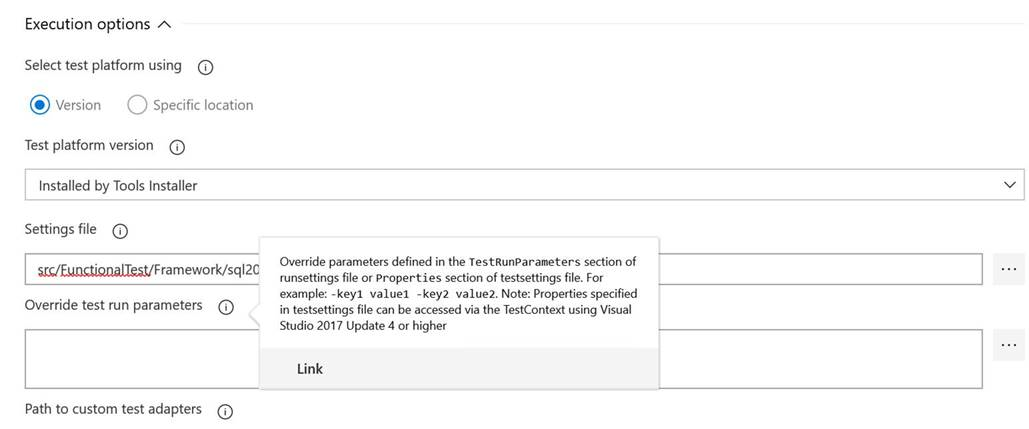
 singhsarab
on 25 Jul 2019
singhsarab
on 25 Jul 2019
+++++++
remiX-
on 2 Sep 2019
There is no way to set TestRunParameters from the command line using -- RunSettings. This issue needs should never have been closed as that was the original topic. All other discussions are work arounds to the fundamental issue of needing to set run parameters dynamically during the CI process without needing a runsettings.xml file to manipulate.
 cslutgen
on 8 Oct 2019
cslutgen
on 8 Oct 2019
Yay reopened :)
remiX-
on 10 Oct 2019
Woohoo!
zootyzoot
on 10 Oct 2019
@cslutgen, Completely agree. It is quite annoying when documentation (and) clearly states that you can just specify RunSettings on the commandline, but that doesn't work for NUnit test project.
 gkalnytskyi
on 24 Oct 2019
gkalnytskyi
on 24 Oct 2019
This PR should fix this issue https://github.com/microsoft/vstest/pull/2251
singhsarab
on 2 Jan 2020
So how do I override TestRunParameters via the command line?
dotnet test .\tests.dll --no-build --settings:nunit.runsettings -- Foo=Bar
Gives an error:
Unhandled exception. System.NotImplementedException: The method or operation is not implemented.
   at Microsoft.VisualStudio.TestPlatform.CommandLine.Processors.CLIRunSettingsArgumentExecutor.Initialize(String argument)
   at Microsoft.VisualStudio.TestPlatform.CommandLine.Processors.ArgumentProcessorFactory.<>c__DisplayClass20_0.<WrapLazyProcessorToInitializeOnInstantiation>b__0()
   at System.Lazy`1.PublicationOnlyViaFactory(LazyHelper initializer)
   at System.Lazy`1.CreateValue()
   at System.Lazy`1.get_Value()
   at Microsoft.VisualStudio.TestPlatform.CommandLine.Executor.GetArgumentProcessors(String[] args, List`1& processors)
   at Microsoft.VisualStudio.TestPlatform.CommandLine.Executor.Execute(String[] args)
   at Microsoft.VisualStudio.TestPlatform.CommandLine.Program.Main(String[] args)
 kamilzzz
on 11 Feb 2020
kamilzzz
on 11 Feb 2020
Have you tried the following ?
-- TestRunParameters.Parameter(name="YourParamterName",value="YourParameterValue")
singhsarab
on 11 Feb 2020
I'm getting the same error.
Also it shows that I'm using version 16.3.0 (and here in the repo I can see the newest version is 16.5.0).
I've just installed .NET Core 3.1.1.
Tests which I'm trying to run are using NUnit.
  <ItemGroup>
    <PackageReference Include="Microsoft.NET.Test.Sdk" Version="16.5.0" />
    <PackageReference Include="NUnit" Version="3.12.0" />
    <PackageReference Include="NUnit3TestAdapter" Version="3.16.1" />
  </ItemGroup>
@kamilzzz You are right, this is available since 16.5.0-preview version. You will probably have to wait a couple of weeks for new dotnet sdk to be out to be able to consume this feature.
singhsarab
on 11 Feb 2020
@singhsarab what of reason to reference package in csproj file if we still use old package inside of sdk ?
<PackageReference Include="Microsoft.NET.Test.Sdk" Version="16.5.0" />
It is possible to use version from reference when we start tests from cli ?
 goblinmaks
on 12 Feb 2020
goblinmaks
on 12 Feb 2020
Test SDK does not carry the console, just the targets that make your project a test project and give it a default entry point. And then it depends on test host nuget.
The version of console is selected by the runner, not by the project. Either you select it because you invoke vstest.console.exe directly. Or VS uses the one that is built in into it. Or dotnet test uses the one the is built into the sdk. You can also override it using the VSTestConsolePath msbuild param shown above:
C:\Projects\temp\UnitTestProject1 [master +12 ~9 -0 !]> dotnet --version
3.1.101
C:\Projects\temp\UnitTestProject1 [master +12 ~9 -0 !]> dotnet test
Test run for C:\Projects\temp\UnitTestProject1\UnitTestProject1\bin\Debug\netcoreapp3.1\UnitTestProject1.dll(.NETCoreApp,Version=v3.1)
Microsoft (R) Test Execution Command Line Tool Version 16.3.0
Copyright (c) Microsoft Corporation.  All rights reserved.

Starting test execution, please wait...

A total of 1 test files matched the specified pattern.

Test Run Successful.
Total tests: 1
     Passed: 1
 Total time: 1,9922 Seconds
C:\Projects\temp\UnitTestProject1 [master +10 ~9 -0 !]> dotnet test -p:VSTestConsolePath="C:\Users\jajares\Downloads\microsoft.testplatform.portable.16.6.0-preview-20200309-01\tools\netcoreapp2.1\vstest.console.dll"
Test run for C:\Projects\temp\UnitTestProject1\UnitTestProject1\bin\Debug\netcoreapp3.1\UnitTestProject1.dll(.NETCoreApp,Version=v3.1)
Microsoft (R) Test Execution Command Line Tool Version 16.6.0-preview-20200309-01
Copyright (c) Microsoft Corporation.  All rights reserved.

Starting test execution, please wait...

A total of 1 test files matched the specified pattern.

Test Run Successful.
Total tests: 1
     Passed: 1
 Total time: 1,9813 Seconds
 nohwnd
on 13 Mar 2020
nohwnd
on 13 Mar 2020
I am trying to pass TestRunParameters through the CLI using dotnet test -- TestRunParameters syntax, but I am getting an error.
I use this command:
dotnet test --settings local.runsettings -- TestRunParameters.Parameter(name="myparam",value="foo")
but get the following error:
ParserError:
Line |
   1 |  … al.runsettings -- TestRunParameters.Parameter(name="myparam",value="f …
     |                                                                ~
     | At line:1 char:106 + … al.runsettings -- TestRunParameters.Parameter(name="myparam",value="f … +                                                               ~
Missing argument in parameter
     | list.
I have just updated to .NET Core SDK 3.1.201 and when running dotnet test, I can see that the MS Test CLI used for running the tests is v16.5.0. The tests are Nunit test and my project have the following package references.
<PackageReference Include="nunit" Version="3.12.0" />
<PackageReference Include="NUnit3TestAdapter" Version="3.16.1">
<PackageReference Include="Microsoft.NET.Test.Sdk" Version="16.5.0" />
It seems like the issue is with the comma and I am missing a parameter, but I cant find any documentation on it. Initially I figured out the syntax based on output from the test CLI which showed this output:
The test run parameter argument 'TestRunParameters.myparam=foo' is invalid. Please use the format below.
     Format: TestRunParameters.Parameter(name=\"<name>\", value=\"<value>\")
What argument am I missing?
 mikanyg
on 25 Mar 2020
mikanyg
on 25 Mar 2020
@mikanyg that looks like PowerShell 7 error, so you are running into powershell parser that does not understand your intent, because what you provided is not a valid powershell syntax, as you did not wrap it into a string.
You can overcome this in few ways, the easies is to always specify your -- settings last and use --% to terminate the parsing before it. The --% will be stripped by powershell and won't be passed to the dotnet command. See below my test program that just outputs the args it got each on a new line:
.\ConsoleApp18.exe test --settings local.runsettings --% -- TestRunParameters.Parameter(name="myparam",value="foo")

args
test
--settings
local.runsettings
--
TestRunParameters.Parameter(name=myparam,value=foo)
The parsing (that is done in dotnet cli, needs to be revisited. We already did few fixes on this in 16.6.0, but I think a proper revisit is warranted in 16.7.0. Ideally we would:
- Make sure that the xml and cli runsettings are 1:1 and will remain 1:1
- at least warn about seeing unknown settings
- make settings case insensitive
- document usage of
--% - see how we are handling this in bash because there
--is used as parsing terminator I think - figure out how to apply settings from command line over the ones in xml
- figure out how to denote that we are adding cli settings to the ones in xml
- figure out how to disable setting that is in xml but we don't want it to be applied
nohwnd
on 25 Mar 2020
@nohwnd Thx for the tip, yes I do use Powershell 7.
Now tried this command
dotnet test --settings local.runsettings --% -- TestRunParameters.Parameter(name="myparam", value="foo")
but got new error
The test run parameter argument 'TestRunParameters.Parameter(name=myparam,' is invalid. Please use the format below.
     Format: TestRunParameters.Parameter(name=\"<name>\", value=\"<value>\")
I have tried escaping the double quote with backslash as shown in the error output, I even tried single quote and no quote, but same error is output.
When I try running the command from cmd (without the --%) I get the same error.
Does this even work in 16.5?
mikanyg
on 25 Mar 2020
This is a double escape issue.
The parameters are parsed and split by both powershell and the default commandline parsing mechanism in the dotnet.exe. That parsing is also the same thing that happens in any other console app. The problem here is that the console parse strips out the quotes and splits on spaces. Again using my toy app, I think the best option here is to actually NOT use the --% (contrary to what I said in the previous post) but instead make sure that we provide each setting as a distinct non-expandable string:
 .\consoleapp18.exe test -- 'TestRunParameters.Parameter(name=\"myparam\", value=\"foo\")'
args

test
--
TestRunParameters.Parameter(name="myparam", value="foo")
.\consoleapp18.exe test -- 'TestRunParameters.Parameter(name=\"myparam\", value=\"foo\")' 'TestRunParamet
ers.Parameter(name=\"myparam\", value=\"foo\")'
args

test
--
TestRunParameters.Parameter(name="myparam", value="foo")
TestRunParameters.Parameter(name="myparam", value="foo")
Escaping should also be pretty easy to automate the escape by a powershell function that you put into your profile if you want the convenience of not having to escape the settings manually.
($settings -replace '"', '\"')
Did exactly this and still got an error. Could you try with the dotnet test instead of your test app?
dotnet test --settings local.runsettings -- 'TestRunParameters.Parameter(name=\"myparam\", value=\"foo\")'
Test run for D:\source\IntegrationTests.dll(.NETCoreApp,Version
=v3.1)
Microsoft (R) Test Execution Command Line Tool Version 16.5.0
Copyright (c) Microsoft Corporation.  All rights reserved.

The test run parameter argument 'TestRunParameters.Parameter(name=myparam, value=foo)' is invalid. Please use the format below.
     Format: TestRunParameters.Parameter(name=\"<name>\", value=\"<value>\")
Help is much appreciated
mikanyg
on 25 Mar 2020
Oh I see it. It also passes it to msbuild which then passes it to vstest.console via a msbuild parameter for the vstest task. The problem there is that the pass mechanism already puts the string into double quotes so we can't simple double the single quotes to give msbuild a literal string (which is probably what we should do to avoid some of these quotest shenenigans). So we need to triply escape this.
dotnet test --settings local.runsettings -- 'TestRunParameters.Parameter(name=\\\"myparam\\\", value=\\\"foo\\\")'
Triple escape:
1) pass powershell parser by making the param a non-expandable string by putting single quotes around it, this will cause that the string will not be split on spaces, but it will get the quotes stripped.
PS> dotnet ConsoleApp18.dll 'a b'
args
a b
PS> dotnet ConsoleApp18.dll '"a b"'
args
a b
2) Escape quotes to get them through the command line parser while passed to dotnet.exe (or any other console).
PS> dotnet ConsoleApp18.dll '\"a b\"'
args
"a b"
3) escape the double quotes that are passed to msbuild to ensure we don't break the msbuild command by escaping every quote with \. That is why we need to end up with \" rather than just ".
"dotnet.exe" exec "...\MSBuild.dll"
    -verbosity:normal "-property:VSTestCLIRunSettings=\"TestRunParameters.Parameter(name=\"myparam\", value=\"foo\")\""

PS> dotnet ConsoleApp18.dll '\\\"a b\\\"'
args
\"a b\"
4) There is one more pass, but here the task probably escapes correctly before passing the call, because vstest console is correctly passed escaped quotes \", so we don't need to do anthing.
nohwnd
on 25 Mar 2020
@nohwnd Triple backslash confirmed working.
But I really do hope this feature get some more love? I don't have anything good to say about the workaround other than it works.
mikanyg
on 25 Mar 2020
@mikanyg I think the msbuild problem is reasonably easy to solve by using ' (as long as you don't want to provide params that contain ', or by doing the escape ourselves.
The dotnet.exe parsing we should be able to solve by grabbing Environment.Commandline instead of the parsed args, and the same in vstest.console testhost.
nohwnd
on 26 Mar 2020
@nohwnd Found another issue in the same area. Turns out I needed to use dotnet vstest (instead of dotnet test) since the test I was trying to execute were in a dll, not a csproj. When changing to vstest the parsing error returned.
After trying several backslash escape option, it works with a single backslash (not triple).
Like in this example:
dotnet vstest .\bin\Debug\netcoreapp3.1\IntegrationTests.dll -- 'TestRunParameters.Parameter(name=\"myparam\", value=\"myvalue\")'
Guess it is parsed less times than when running from dotnet test.
Hope this helps improve the feature.
mikanyg
on 30 Mar 2020
@mikanyg thanks for reporting back, I saw it as well in the issue that is linked just above your comment, see my original comment below:
@TroyWalshProf will close your issue #2377, and will track the improvements here.
_originally posted by @nohwnd in https://github.com/microsoft/vstest/issues/2377_
Please see https://github.com/microsoft/vstest/issues/862#issuecomment-603894275 for some workarounds and explanation. You will need to do some escaping, which will also depend on whether you run the commands from cmd or powershell. Because vstest does not route via msbuild you should be able to escape it like this, and in the same way for vstest.console.
# powershell
dotnet vstest tests.dll -- 'TestRunParameters.Parameter(name=\"Browser\",value=\"Chrome\")'
or
REM cmd
dotnet vstest tests.dll -- TestRunParameters.Parameter(name=\"Browser\",value=\"Chrome\")
We will be working on improving this, but can't promise any date.
nohwnd
on 30 Mar 2020
@nohwnd I tried what you outlined above and is worked for the most part.
The issue is that I have use a lot of code that uses parameter names with non alphanumeric characters.
Example:
dotnet vstest tests.dll -- TestRunParameters.Parameter(name=\"MainGroup:Browser\",value=\"Chrome\")
Any reason
https://github.com/microsoft/vstest/blob/7eaa0a21b51c8e75d99848de3e4e4555b8334dfe/src/Microsoft.TestPlatform.Common/Utilities/RunSettingsProviderExtensions.cs#L98
couldn't be changed to:
var attrName = $"(?<{AttributeNameString}>\\S+)";?
or you could also do something like this if you don't want to allow names to start or end with non alpha numeric:
var attrName = $"(?<{AttributeNameString}>(\\w+\\S*\\w+)|(\\w+))";)
- This would be closer aligned with what you can do in the VS Test task in Azure DevOps
https://docs.microsoft.com/en-us/azure/devops/pipelines/tasks/test/vstest?view=azure-devops
 TroyWalshProf
on 30 Mar 2020
TroyWalshProf
on 30 Mar 2020
@TroyWalshProf Honestly I don't know if there are any implications for changing this. To me it looks like it is just trying too hard to validate the format. In the PR that added it I see that this is an invalid case new object[] { "TestRunParameters.Parameter(name=\"asf@#!\",value=\"rgq\")" }, but I don't see any explanation why. This will need further investigation.
Were you able to use it with the special chars and it works?
nohwnd
on 30 Mar 2020
@nohwnd I agree, does seem like they are being a bit too strict. I think it is literally a one char change (w to S) to get this to align with what Azure DevOps currently supports.
To be clear, currently this works:
dotnet vstest tests.dll -- TestRunParameters.Parameter(name=\"MainGroupBrowser\",value=\"Chrome\")
But this does not:
dotnet vstest tests.dll -- TestRunParameters.Parameter(name=\"MainGroup:Browser\",value=\"Chrome\")
TroyWalshProf
on 30 Mar 2020
Note to self: Check if it will blow up in devops, if you provide space, or if there are any docs on the values they actually support in the task.
nohwnd
on 1 Apr 2020
Is this supposed to be working in bash on Linux?
I am trying to run dotnet test -- TestRunParameters.Parameter(name="myParam", value="myValue")
But I get the following error: bash: syntax error unexpected word '('
 philipreimer
on 17 Apr 2020
philipreimer
on 17 Apr 2020
@philipreimer You're hitting the same quoting/escaping issues as other people, bash is interpreting some of those characters as shell syntax instead of passing them through to the dotnet process, you'll probably have to quote the entire parameter entry and then escape the quotes inside it. Hopefully you won't need double- or triple-quoting/escaping like they did above.
qidydl
on 17 Apr 2020
@qidydl I tried several version but cannot figure out how to do get this working. Here's what I tried:
dotnet test -- 'TestRunParameters.Parameter(name="myParam", value="myValue")'
dotnet test -- "TestRunParameters.Parameter(name=\"myParam\", value=\"myValue\")"
dotnet test -- "TestRunParameters.Parameter(name=\\\"myParam\\\", value=\\\"myValue\\\")"
Now I always get: One or more runsettings provided contain invalid token
Any ideas?
BTW, would be nice if it could tell me which token is invalid.
philipreimer
on 17 Apr 2020
@philipreimer are you running from cmd or powershell? The last version looks like it is almost there but you would have to use single quotes around the whole string:
dotnet test -- 'TestRunParameters.Parameter(name=\\\"myParam\\\", value=\\\"myValue\\\")'
@nohwnd I am using bash on Manjaro Linux
GNU bash, Version 5.0.16(1)-release (x86_64-pc-linux-gnu)
$ dotnet --info
.NET Core SDK (gemäß "global.json"):
 Version:   3.1.103
 Commit:    6f74c4a1dd

Laufzeitumgebung:
 OS Name:     manjaro
 OS Version:
 OS Platform: Linux
 RID:         arch-x64
 Base Path:   /usr/share/dotnet/sdk/3.1.103/

Host (useful for support):
  Version: 3.1.3
  Commit:  ed88943d24

.NET Core SDKs installed:
  3.1.103 [/usr/share/dotnet/sdk]

.NET Core runtimes installed:
  Microsoft.AspNetCore.App 3.1.3 [/usr/share/dotnet/shared/Microsoft.AspNetCore.App]
  Microsoft.NETCore.App 3.1.3 [/usr/share/dotnet/shared/Microsoft.NETCore.App]
@philipreimer I am currently digging into this, what I plan to do is:
- take the literal part after -- from the Environment.CommandLine to get it unparsed
- pass this to msbuild already escaped, or using single-quoted string
This should take care of both of the issues, you as the caller will just have to ensure that you don't run into the parser of the command line you are using, I cannot do anything about that. Which in the case of bash is avoided by using -- as you already do.
Would be really nice if you helped me test this 🙂
nohwnd
on 20 Apr 2020
@nohwnd I can help testing.
I also have one general question: why is the format for passing TestRunParameters the way it is? It seems very complicated. I am not familiar with the internals of the dotnet CLI but wouldn't something like this -- TestRunParameters.myParam=myValue TestRunParameters.myOtherParam=myOtherValue be much easier to handle and be just as powerful?
philipreimer
on 20 Apr 2020
@philipreimer I can't answer that I don't have that context either. I started a new issue on your behalf. I think this might be coming from azdo, or maybe was always like that and was never meant to be used "interactively". I am not sure how soon we will get to the issue. It potentially has a ton of dependencies, and so it will be difficult to change.
Thanks for the testing part, I am building dotnet/sdk now, so I am not sure how feasible it will be for you to actually try it on your side 😔
nohwnd
on 20 Apr 2020
@nohwnd since this issue has been closed what is the usual process now? Will your changes be included in the next version of dotnet sdk? Do I have to wait for that and when will that happen? Or is there some preview version I can download?
philipreimer
on 28 Apr 2020
Heh, I did not know that GH now matches also part of the message, not just whole line. The fix for this is not complete.
nohwnd
on 28 Apr 2020
Right now there is a PR pending with the changes that I've done on vstest side, and I am waiting for them to build and merge, to test a fix that I wrote yesterday for sdk to PR it. Once that PR is merged it will be available via a local sdk build (on windows it's simple you just run build.cmd and then eng/dogfood.cmd, on linux I am not sure yet).
And then when sdk inserts into dotnet/installer it will be available to download directly as a pre-release.
nohwnd
on 28 Apr 2020
I could not get it to not require any escaping, that would only be possible on Windows via PInvoke, and even that was not 100%. So instead I aimed to make it the same syntax for dotnet test, dotnet vstest and vstest.console. It needs a single escapement, and will merge your test run parameters if they contain spaces. Typically ", value or when you provide value with spaces. In powershell --% parsing terminator is the secret sauce. On bash you need to escape all spaces quotes and parentheses, but the error messages are helpful. It also aligns nicely with the current error vstest console message if you do it wrong.
# cmd
dotnet test  -- TestRunParameters.Parameter(name=\"myParam\", value=\"value\")

# powershell
dotnet test --%  -- TestRunParameters.Parameter(name=\"myParam\", value=\"value\")

# bash
dotnet test -- TestRunParameters.Parameter\(name=\"myParam\",\ value=\"value\"\)
At the moment I am waiting for PR to dotnet/sdk to build to see if I pass their tests. It works locally on my Windows.
nohwnd
on 30 Apr 2020
Sorry for bringing that up but bash is not the only shell used on non-windows systems. For example, zsh is the default shell in current macos versions, I think.
Will the bash version work in those other shells as well?
philipreimer
on 30 Apr 2020
@philipreimer bash was an example. The point is that the syntax should be the same for dotnet vstest, dotnet test and (on windows) vstest.console, no matter how many hops there are. I am aware of zsh, and I hope it will work there as well using the same syntax as in bash, but that depends on the escaping rules that zsh has. There is a merge building in dotnet/sdk so let's hope we can have an installer for that soon.
nohwnd
on 4 May 2020
@philipreimer I was able to validate this on bash and zsh on Ubuntu (actually Ubuntu 18.4 in WSL2).
Download and extract to dotnet folder:
mkdir dotnet
wget https://aka.ms/dotnet/net5/dev/Sdk/dotnet-sdk-linux-x64.tar.gz
tar zxvf dotnet-sdk-linux-x64.tar.gz -C dotnet
And then just run it from that folder:
/mnt/c/temp/dotnet/dotnet test --no-build -- TestRunParameters.Parameter\(name=\"myParam\",\ value=\"value\ with\ space\"\)
I am attempting to use the syntax here using cmd.
dotnet test --logger:"trx;LogFileName=TestResults.trx" -- TestRunParameters.Parameter(name=\"myParam\", value=\"value\")
But when I do, I get the error message:
One or more runsettings provided contain invalid token
What (if any) version of .NET Core SDK was this fixed in?
 NightOwl888
on 17 May 2020
NightOwl888
on 17 May 2020
I installed .NET Core SDK 3.1.202 and tried again. Now I am getting a different error message with the same command on the same test project (also using cmd).
dotnet test --logger:"trx;LogFileName=TestResults.trx" -- TestRunParameters.Parameter(name=\"myParam\", value=\"value\")
The test run parameter argument 'TestRunParameters.Parameter(name=myParam,value=value)' is invalid. Please use the format below.
     Format: TestRunParameters.Parameter(name=\"<name>\", value=\"<value>\")
Since I have literally copied and pasted the command from above, it seems like this is a bug of some kind with the latest release.
NightOwl888
on 17 May 2020
This was fixed in the master of dotnet/sdk, so it will be part of the next 5.0 release. Checking with the team to get the simplest way to get it into 3.1 as well.
nohwnd
on 18 May 2020
The vstest.console part was released in this preview https://www.nuget.org/packages/Microsoft.TestPlatform.TestHost/16.7.0-preview-20200519-01
@NightOwl888 we will have to backport to net3.1.xxx after this proves to be working because the bar is a bit higher there than getting it into master of the current dotnet. So this will take some time till it's released... Can't think of any way to get it to you faster, that would be simpler than using the above escaping workaround.
nohwnd
on 20 May 2020
Thanks. Since our use case is a test framework library that many others will use, getting it to "us faster" wouldn't help. We can wait for an official release, but it would be great if we can get a notification when that happens so we can add the documentation about the feature as well as the minimum prerequisite version of .NET Core SDK.
NightOwl888
on 20 May 2020
It can be helpful while configuring VsTest step on Azure DevOps.
If u try to implement .runsettings TestRunParameters section for Azure DevOps VsTest step and you have similar log
##########################################################################
DtaExecutionHost version 18.170.30112.1.
Starting TestExecution Model...
Result Attachments will be stored in LogStore
Run Attachments will be stored in LogStore
Result Attachments will be stored in LogStore
Result Attachments will be stored in LogStore
Run Attachments will be stored in LogStore
Provided settings file:
<?xml version="1.0" encoding="utf-8"?>
<RunSettings>
    <RunConfiguration>
        <MaxCpuCount>0</MaxCpuCount>
        <BatchSize>1000</BatchSize>
    </RunConfiguration>

    ################# HERE SHOULD BE YOUR TestRunParameters SECTION #################
</RunSettings>
Updated Run Settings:
<RunSettings>
  <RunConfiguration>
    <MaxCpuCount>0</MaxCpuCount>
    <BatchSize>1000</BatchSize>
    </RunConfiguration>

    ################# HERE SHOULD BE YOUR UPDATED TestRunParameters SECTION #################

</RunSettings>
**************** Starting test execution *********************
Please just try to install this nuget to project where is located your .runsettings file
 arbitrary9
on 20 May 2021
arbitrary9
on 20 May 2021
Related issues
 MarcoRossignoli
·
3Comments
codito
·
3Comments
MarcoRossignoli
·
3Comments
codito
·
3Comments
 dlemstra
·
5Comments
dlemstra
·
5Comments
 alastairtree
·
4Comments
alastairtree
·
4Comments
 MoiMoiDG
·
5Comments
MoiMoiDG
·
5Comments
Most helpful comment
please reopen this. This is crucial for our integration with Azure Dev ops