Description
Code coverage does not work in .NET Core
Steps to reproduce
Run vstest.console.exe /enablecodecoverage /framework:netcoreapp
Expected behavior
Runs the tests with code coverage enabled on .NET Core
Actual behavior
Error: Invalid .Net Framework version:netcoreapp11. Supported .Net Framework versions are Framework35, Framework40 and Framework45.
Environment
VS 2017 RTM
Windows 10 14393.693
 twsouthwick
All 62 comments
Code coverage support not available in 15.0.0. Doc.
Please use /Framework:FrameworkCore10 for .Net core apps.
 smadala
on 8 Mar 2017
smadala
on 8 Mar 2017
Error message should display as follows:
Error: Invalid .Net Framework version:netcoreapp11. Supported .Net Framework versions are Framework35, Framework40, Framework45 and FrameworkCore10.
smadala
on 8 Mar 2017
What is the timeline to support .NET Core? Is this different on the console vs in Visual Studio?
twsouthwick
on 16 Mar 2017
@twsouthwick this will likely come in the next release (15.1 or 15.2 preview). We're still working out the details. Current thought process:
- In console, code coverage will show up as a data collector (spec is here). User may install the code coverage nuget package, and use it like
dotnet test --collect:coverage - In VS, it will show up as the existing
Analyze Code Coveragein test explorer
We're first enabling the infrastructure (data collectors), this will allow the community to author code coverage extensions for dotnet test. VS code coverage support will use the same infra.
 codito
on 17 Mar 2017
codito
on 17 Mar 2017
I was struggling with this, but found Microsoft.CodeCoverage started working when I added <debugtype>Full/>to the project containing the assembly to have coverage:
I'm using Microsoft.CodeCoverage 1.0.2, xunit 2.2.0, Ms.Test.sdk 15.0. The project under test is .net framework 4.5.1 and uses nuget packages for .net core 1.1.1 throughout
Can someone else please check and confirm?
  <PropertyGroup>
    <TargetFramework>net452</TargetFramework>
    <RuntimeIdentifier>win7-x86</RuntimeIdentifier>
    <PreserveCompilationContext>true</PreserveCompilationContext>
    <AssemblyName>ExtranetManager</AssemblyName>
    <OutputType>Exe</OutputType>
    <DebugType>Full</DebugType>
    <PackageId>ExtranetManager</PackageId>
  </PropertyGroup>
 robalexclark
on 30 Mar 2017
robalexclark
on 30 Mar 2017
@robalexclark your test is running on .NET Framework which is supported at the moment. The debugtype had to be changed because by default it builds with the new portable format, which is currently unsupported with vstest. If you switched your test to run as a .netcoreapp you won't see any coverage results.
uses nuget packages for .net core 1.1.1 throughout
This is probably not what you think it means. The nuget packages may support .NET Core 1.1.1, but are either targeting .NET Standard or have a .NET Framework version. These are then being selected when running on .NET Framework. The goal of .NET Standard is to allow the same binary to run on multiple runtimes (.NET Core and .NET Framework are two distinct runtimes).
If the project is one you can share, we can verify if this is the case based on the project files and packages.
twsouthwick
on 30 Mar 2017
Apologies yes you are right - I am running on .net 4.5.1 as runtime.
robalexclark
on 30 Mar 2017
Easy mistake to make in some projects!
twsouthwick
on 30 Mar 2017
Hi all!
Do you have any plans about implementation code coverage for dotNetCore for Linux?
If you have any not very complex PR or subtasks, I am ready to help.
 baor
on 10 Apr 2017
baor
on 10 Apr 2017
@codito I would like to try out the "dotnet test --collect:coverage" for my dotnet core VSTS builds. Do you have any insight/guidance as to when that will be available and we will need to do to get it working?
Thanks for your help!
 nperno
on 2 May 2017
nperno
on 2 May 2017
Hi all,
Is there any update on whether there will be .NET Core code coverage support for Linux too?
Thanks,
Mark
 markvincze
on 4 May 2017
markvincze
on 4 May 2017
Any update - VS 2017 is expensive product one of key features is code coverage
 HaroonSaid
on 5 May 2017
HaroonSaid
on 5 May 2017
Guys just yesterday I found a new Nuget Package:
Microsoft.CodeCoverage version 1.0.3
I updated the package into my XUnit test project and run Tests + Code Coverage in VS 2017 Ultimate.
The tests are executed but the Code Coverage is not even triggered:

So, what's going on? Any official Docs yet?
 raffaeu
on 5 May 2017
raffaeu
on 5 May 2017
Also if I pass dotnet test --collect:coverage
This is what we get NOT IMPLEMENTED
MSBUILD : error MSB1001: Unknown switch.
Switch: --collect:coverage
For switch syntax, type "MSBuild /help"
Process completed with exit code 1.
This feature hasn't shipped yet. We're pretty close though, will provide an update soon :)
codito
on 5 May 2017
In 15.3 Preview 1, code coverage for .NET core is available in VS. Instructions are here: https://github.com/Microsoft/vstest-docs/blob/master/docs/analyze.md#coverage. Please try it out.
We're working on bringing coverage to dotnet test command line.
Sharing an alternate command line in case folks want to try it in CI. This will generate a .coverage file that can be published as reports.
> & "C:\Program Files (x86)\Microsoft Visual Studio\Preview\Enterprise\Common7\IDE\Extensions\TestPlatform\vstest.console.exe" /framework:".NETCoreApp,Version=v1.1" /collect:"Code Coverage" "G:\tmp\trial\bin\Debug\netcoreapp1.1\trial.dll

Microsoft (R) Test Execution Command Line Tool Version 15.3.0-preview-20170427-09
Copyright (c) Microsoft Corporation.  All rights reserved.

Starting test execution, please wait...
[xUnit.net 00:00:00.6614583]   Discovering: trial
[xUnit.net 00:00:00.7762253]   Discovered:  trial
[xUnit.net 00:00:00.8162957]   Starting:    trial
[xUnit.net 00:00:00.9366491]   Finished:    trial

Attachments:
  G:\tmp\trial\TestResults\da20ba2e-2984-4d74-88d4-faf2bf018af0\armahapa_ARMAHAPA-SRV 2017-05-15 18_00_03.coverage

Total tests: 2. Passed: 2. Failed: 0. Skipped: 0.
Test Run Successful.
Test execution time: 2.1226 Seconds
@codito we just tried with these versions:
- Visual Studio 2017 15.2
- xunit 2.2.0
- Microsoft.NET.Test.Sdk" Version="15.3.0-preview-20170502-03"
Tests run and they are green but Code Coverage is not triggered.
Is it working only with MsTest? I hope we don't have to re-write all our tests 😢
raffaeu
on 15 May 2017
@raffaeu it is available in VS 2017 15.3 preview 1, you can get the build from https://www.visualstudio.com/vs/preview/. It works with all frameworks :)
codito
on 15 May 2017
Oh, thanks I will try then with the preview version
Thank you
raffaeu
on 15 May 2017
Currently known issues are tracked here: https://github.com/Microsoft/vstest/labels/exp%3A%20coverage
codito
on 16 May 2017
Hey, finally, great !
Nice to have it again with preview version. And I should also notice that this preview version (15.3) seems to works better than currently supported one (15.2) ...
Can't wait to use it every day
 cdie
on 16 May 2017
cdie
on 16 May 2017
@codito presumably the dotnet test version of the coverage runner you speak won't be the same as that vstest uses right? When you say something like that I get hopeful for those like me on mac/linux. Is there seperate issues for the dotnet test coverage support?
 twgraham
on 31 May 2017
twgraham
on 31 May 2017
@twgraham test code coverage is VS enterprise and windows only so far, current plan is to get the same level of support in dotnet test (windows + VS enterprise). Mac/linux support isn't in our immediate backlog. /cc @pvlakshm @sbaid to consider the feedback for prioritization.
codito
on 1 Jun 2017
@codito Furthermore, is it the plan to include support of dotnet test code coverage in 15.3 / 2.0 initial versions or should I be exploring other avenues for the time being? If not the stated versions, is there a proposed time/release for this behavior? (so I may explain to others the decision to use 3rd party tools instead of wait for official MSFT tools)
Additionally - is this bug tracking adding the code coverage behavior for vstest AND dotnet test? Or is there another bug/feature for dotnet test specifically
 npasqua
on 6 Jun 2017
npasqua
on 6 Jun 2017
@codito Do you have high-level timing you can share for when dotnet test with code coverage will be cross-platform? Q3? Q4? 2018? It'd be nice to know just for planning purposes.
 amattie
on 14 Jun 2017
amattie
on 14 Jun 2017
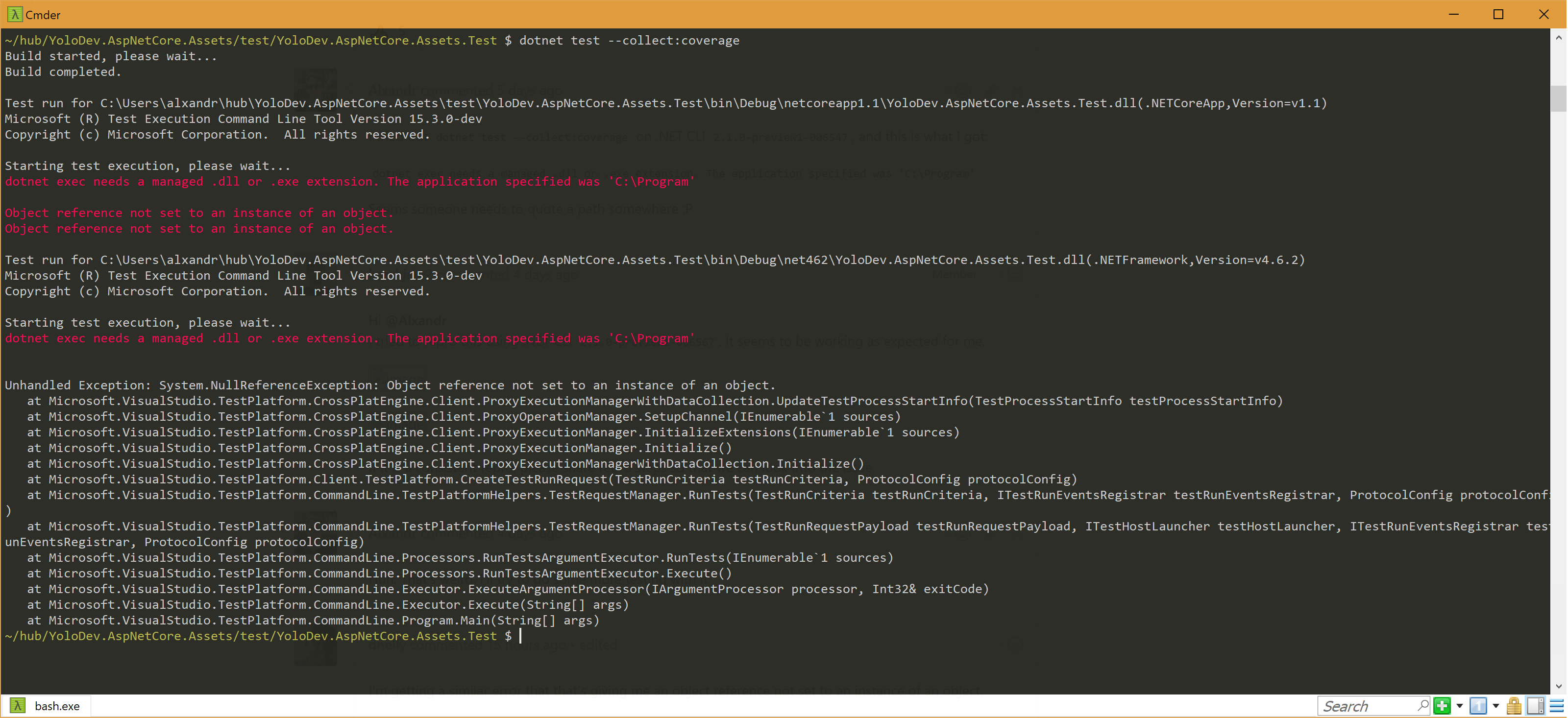
I tried out dotnet test --collect:coverage on .NET CLI 2.1.0-preview1-006547, and this is what I got:
dotnet exec needs a managed .dll or .exe extension. The application specified was 'C:\Program'
Seems someone needs to quote a path somewhere :P
 Alxandr
on 24 Jun 2017
Alxandr
on 24 Jun 2017
Hi @Alxandr
I tried to repro this using .NET CLI 2.1.0-preview1-006567. It seems to be working as expected for me.
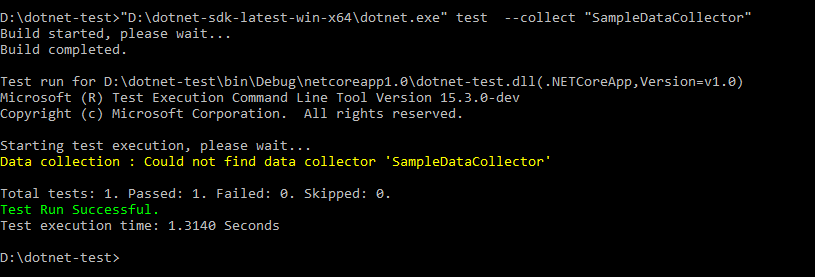
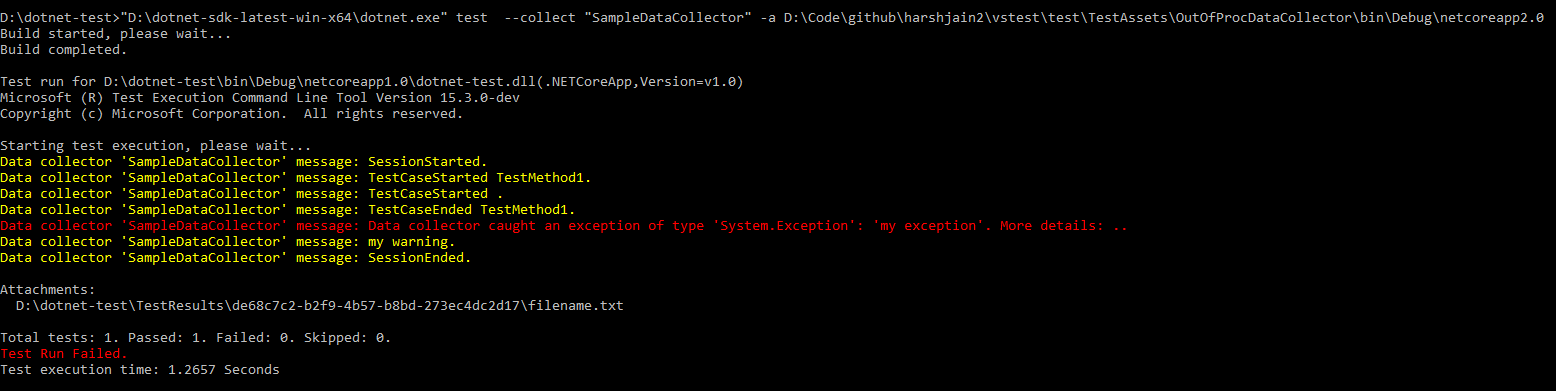
If it is a consistent repro, please share repro steps so that we can look into the issue.
 harshjain2
on 25 Jun 2017
harshjain2
on 25 Jun 2017
Huh. That's weird. I'll try to do some more testing with it.
Alxandr
on 25 Jun 2017
I'm getting a similar error that that's giving me an object reference not set to an instance of an object.
 1>Done building target "ShowCallOfVSTestTaskWithParameter" in project "UnitTestProject1.csproj".
   Done executing task "CallTarget".
   Using "Microsoft.TestPlatform.Build.Tasks.VSTestTask" task from assembly "C:\Program Files\dotnet\sdk\2.0.0-preview1-005977\Microsoft.TestPlatform.Build.dll".
   Task "Microsoft.TestPlatform.Build.Tasks.VSTestTask"
Object reference not set to an instance of an object.
Object reference not set to an instance of an object.
   Done executing task "Microsoft.TestPlatform.Build.Tasks.VSTestTask" -- FAILED.
 1>Done building target "VSTest" in project "UnitTestProject1.csproj" -- FAILED.
(VSTest target(s)) -- FAILED.
 dnelly
on 28 Jun 2017
dnelly
on 28 Jun 2017
@dnelly Please consider upgrading to latest version of CLI.
@Alxandr also faced similar issues in 2.1.0-preview1-006547 which are not there in 2.1.0-preview1-006567.
Do let us know if you face these issues even after upgrading to latest version.
harshjain2
on 29 Jun 2017
Still same error.
Alxandr
on 29 Jun 2017
@harshjain2 Yeah, it was still the same for me as well.
Here's the current version that I'm using 2.1.0-preview1-006632
dnelly
on 29 Jun 2017
the error seems to come from this Test Execution Command Line Tool Version 15.3.0-dev
dnelly
on 29 Jun 2017
@dnelly @Alxandr Created an issue https://github.com/Microsoft/vstest/issues/902 for investigating this further.
harshjain2
on 30 Jun 2017
Thank you!
dnelly
on 10 Jul 2017
Is there a way to get the code coverage flags to work on VSTS? The best I can tell VSTS only has 15.0 available and not any of the pre-releases.
Everything works fantastic locally. Thanks for all the hard work!
 mstephens-adig
on 1 Aug 2017
mstephens-adig
on 1 Aug 2017
Created a separate issue for providing support for dotnet test --collect:"Code Coverage" https://github.com/Microsoft/vstest/issues/981 as this issue is for code coverage support for vstest.console.exe
harshjain2
on 4 Aug 2017
Still doesn't work in VS2017 15.3 (incl preview 7) on framework projects. My coverage only shows for my test library, coverage for the tested library is not shown. I guess it didn't ship? Live unit testing works however!
Works with following workaround https://github.com/Microsoft/vstest-docs/blob/master/docs/analyze.md#working-with-code-coverage
 Mardoxx
on 14 Aug 2017
Mardoxx
on 14 Aug 2017
@mstephens-adig VS 2017 15.3 is released now.
https://blogs.msdn.microsoft.com/visualstudio/2017/08/14/visual-studio-2017-version-15-3-released/
Upgrading to latest released version in VSTS should solve your problem.
harshjain2
on 17 Aug 2017
@Mardoxx Thanks for trying it out. This workaround is required for code coverage to work on .NET Core
harshjain2
on 21 Aug 2017
Please try code coverage and let us know if there is any feedback/issues.
I am closing this issue for now.
harshjain2
on 21 Aug 2017
@harshjain2 Is the nuget package a temporary workaround or a permanent one ? I mean I don't want to spent a lot of time adding it now to remove it in two months...
cdie
on 21 Aug 2017
It seems it's not working with .NET Core 2.0 ?
Or maybe it's with xunit 2.2.0 ?
cdie
on 22 Aug 2017
Coverage is still not working in VSTS, at least I can get the test results
https://github.com/Microsoft/vsts-tasks/issues/5066
 IvanAlekseev
on 23 Aug 2017
IvanAlekseev
on 23 Aug 2017
I would imagine this is because your agent is not up to date. Check what version of VS2017 your agent is using. Any >15.3 should work.
Mardoxx
on 23 Aug 2017
@Mardoxx It is Hosted VS 2017, they updated to 15.3 recently
IvanAlekseev
on 23 Aug 2017
Ah! Now I look, mine don't have coverage either!
Mardoxx
on 23 Aug 2017
@harshjain2 Is the nuget package a temporary workaround or a permanent one ? I mean I don't want to spent a lot of time adding it now to remove it in two months...
@cdie We are tracking the issue to remove need to manually add nuget package here.
https://github.com/Microsoft/vstest/issues/852.
We will prioritize it soon.
harshjain2
on 24 Aug 2017
Hi, we followed all above, and still no luck. Found different paths from log:
2017-08-24T22:58:11.1157918Z Attachments:
2017-08-24T22:58:11.1157918Z d:\a\1\s\TestResults\672524f6-3c0c-4dc4-86c9-4b58f01c9577\buildguest_FACTORYVM-AZ220 2017-08-24 22_58_06.coverage
2017-08-24T22:58:11.1157918Z
2017-08-24T22:58:11.1157918Z Total tests: 1. Passed: 1. Failed: 0. Skipped: 0.
2017-08-24T22:58:11.1157918Z Test Run Successful.
2017-08-24T22:58:11.1167892Z Test execution time: 4.6567 Seconds
2017-08-24T22:58:11.1508492Z Results File: d:\a\1\s\TestResults\buildguest_FACTORYVM-AZ220_2017-08-24_22_58_11.trx
2017-08-24T22:58:13.3673473Z ##[section]Async Command Start: Telemetry
2017-08-24T22:58:13.3673473Z ##[section]Async Command End: Telemetry
2017-08-24T22:58:13.3673473Z ##[section]Async Command Start: Telemetry
2017-08-24T22:58:13.3673473Z ##[section]Async Command End: Telemetry
2017-08-24T22:58:13.3673473Z ##[section]Async Command Start: Telemetry
2017-08-24T22:58:13.3673473Z ##[section]Async Command End: Telemetry
2017-08-24T22:58:13.3673473Z ##[section]Async Command Start: Telemetry
2017-08-24T22:58:13.3673473Z ##[section]Async Command End: Telemetry
2017-08-24T22:58:13.3673473Z ##[section]Async Command Start: Publish test results
2017-08-24T22:58:13.8241527Z Publishing test results to test run '59'
2017-08-24T22:58:13.8241527Z Test results remaining: 1. Test run id: 59
2017-08-24T22:58:14.1399971Z ##[warning]Skipping attachment as it exceeded the maximum allowed size or not available on disk: d:\a\1\s\TestResults\buildguest_FACTORYVM-AZ220_2017-08-24_22_58_11\In\FACTORYVM-AZ220\buildguest_FACTORYVM-AZ220 2017-08-24 22_58_06.coverage
Could this be the case why codecoverage not published?
Also, once it's published, should it be visible under Code Coverage?
 a0z0ra
on 25 Aug 2017
a0z0ra
on 25 Aug 2017
CC @nigurr for vstest-task
harshjain2
on 28 Aug 2017
Hi,
We are fixing this issue as part of this https://github.com/Microsoft/vsts-agent/pull/1149/files
Will update the thread once we release the fix.
Sorry for the trouble.
 nigurr
on 28 Aug 2017
nigurr
on 28 Aug 2017
 xperiandri
on 4 Sep 2017
xperiandri
on 4 Sep 2017
Getting similar results as folks above
is referenced in my test project.
dotnet test --collect:coverage
Microsoft (R) Test Execution Command Line Tool Version 15.3.0-preview-20170628-02
Copyright (c) Microsoft Corporation.  All rights reserved.

Starting test execution, please wait...
dotnet exec needs a managed .dll or .exe extension. The application specified was 'C:\Program'

Object reference not set to an instance of an object.
Object reference not set to an instance of an object.
 Oceanswave
on 9 Oct 2017
Oceanswave
on 9 Oct 2017
even if I use vstest.console.exe like described in https://github.com/Microsoft/vstest-docs/blob/master/docs/analyze.md#coverage like this:
vstest.console.exe --collect:"Code Coverage" --framework:".NETCoreApp,Version=v2.0" bin\Debug\netcoreapp2.0\some.tests.dll
I am getting:
Microsoft (R) Test Execution Command Line Tool Version 15.0.26929.2
Copyright (c) Microsoft Corporation.  All rights reserved.

Error: The test source file "--collect:Code Coverage" provided was not found.
Error: The test source file "--framework:.NETCoreApp,Version=v2.0" provided was not found.
I am running VS2017 Enterprise V15.4.1
 davidreher
on 25 Oct 2017
davidreher
on 25 Oct 2017
pl use the vstest.console.exe in testplatform folder for .NET core
C:\Program Files (x86)>dir vstest.console.exe /s
 Volume in drive C is OSDisk
 Volume Serial Number is 4445-DB68

 Directory of C:\Program Files (x86)\Microsoft Visual Studio\2017\Enterprise\Common7\IDE\CommonExtensions\Microsoft\TestWindow

10/10/2017  09:42 AM           137,824 vstest.console.exe
               1 File(s)        137,824 bytes

 Directory of C:\Program Files (x86)\Microsoft Visual Studio\2017\Enterprise\Common7\IDE\Extensions\**TestPlatform**

09/06/2017  09:43 AM           133,240 vstest.console.exe
               1 File(s)        133,240 bytes
 sbaid
on 25 Oct 2017
sbaid
on 25 Oct 2017
@sbaid: Thank you so much, this works now :)
davidreher
on 25 Oct 2017
Is there a way to pass the --collect:"Code Coverage" switch to dotnet vstest instead of using vstest.console.exe?
davidreher
on 26 Oct 2017
I get the below error. Has any one see/resolved this.
Test run will use DLL(s) built for framework NETCoreApp,Version=v2.0 and platform X86. Following DLL(s) do not match framework/platform settings.
C:\Program Files (x86)\Microsoft Visual Studio\2017\Enterprise\Common7\IDE\Extensions\TestPlatformvstest.console.exe" F:\Vsts\agent-1_work\14\a\Release\Deploy\Publications\
 mundhras
on 5 Mar 2018
mundhras
on 5 Mar 2018
This is still an issue for XUnit on .NET Core 2.0 projects in the latest VS 2017. Why is this closed?
 BlitzkriegSoftware
on 17 Apr 2018
BlitzkriegSoftware
on 17 Apr 2018
Since Microsoft is unwilling or unable to provide a solution at this time, check out Coverlet:
Oceanswave
on 17 Apr 2018
Thats the latest update from Microsoft I believe - https://github.com/Microsoft/vstest-docs/blob/master/RFCs/0021-CodeCoverageForNetCore.md
IvanAlekseev
on 17 Apr 2018
Is there a solution available now for dotnet test --collect:Code Coverage for linux containers?
 swati-jain13
on 30 Jan 2019
swati-jain13
on 30 Jan 2019
Related issues
 matthew-horrocks
·
4Comments
matthew-horrocks
·
4Comments
 GreenDavidA
·
5Comments
GreenDavidA
·
5Comments
 ejcoyle88
·
3Comments
ejcoyle88
·
3Comments
 suryagh
·
3Comments
suryagh
·
3Comments
 chuanboz
·
5Comments
chuanboz
·
5Comments
Most helpful comment
Hi all!
Do you have any plans about implementation code coverage for dotNetCore for Linux?
If you have any not very complex PR or subtasks, I am ready to help.