Vscode: Typescript compiler broken on Ubuntu 20
Working on my react/typescript project when suddenly it stopped recongnizing JSX on returns. The project still runs, only vs marks a lot errors.
 ecanas44
All 7 comments
Having the same issue (with parsing JSX of typescript/react files, on a Mac) after updating.
Update
In my case, the issue was due to vscode assuming my .tsx files should use the typescript interpreter, instead of the typescript-react one. Adding this to my settings.json fixed the problem:
"files.associations": {
"*.tsx": "typescriptreact"
}
 IkeyBenz
on 8 Oct 2020
IkeyBenz
on 8 Oct 2020
I can confirm, I had the same issue today.
VSCode -> About
Version: 1.50.0
Commit: 93c2f0fbf16c5a4b10e4d5f89737d9c2c25488a3
Date: 2020-10-07T06:01:33.073Z
Electron: 9.2.1
Chrome: 83.0.4103.122
Node.js: 12.14.1
V8: 8.3.110.13-electron.0
OS: Linux x64 5.4.0-48-generic snap
Using Ubuntu 20.04.1 LTS 64bit
System
CPUs | Intel(R) Core(TM) i7-8750H CPU @ 2.20GHz (12 x 3900) -- | -- GPU Status | 2d_canvas: unavailable_software flash_3d: disabled_software flash_stage3d: disabled_software flash_stage3d_baseline: disabled_software gpu_compositing: disabled_software multiple_raster_threads: enabled_on oop_rasterization: disabled_off opengl: disabled_off protected_video_decode: disabled_off rasterization: disabled_software skia_renderer: enabled_on video_decode: disabled_software vulkan: disabled_off webgl: unavailable_software webgl2: unavailable_software Load (avg) | 2, 1, 2 Memory (System) | 15.29GB (1.50GB free) Process Argv | --force-user-env --no-sandbox --unity-launch --no-sandbox Screen Reader | no VM | 0%
Extensions
Extension | Author (truncated) | Version -- | -- | -- rainbow-brackets | 2gu | 0.0.6 jest-snippets | and | 1.8.0 simple-react-snippets | bur | 1.2.3 multi-cursor-case-preserve | Car | 1.0.5 vscode-github-actions | csc | 0.8.1 vscode-eslint | dba | 2.1.10 gitlens | eam | 10.2.2 vsc-material-theme | Equ | 33.0.0 vsc-material-theme-icons | equ | 1.2.0 json-tools | eri | 1.0.2 prettier-vscode | esb | 5.7.1 lintlens | ghm | 3.0.0 sass-lint | gle | 1.0.6 vscode-graphql | Gra | 0.3.10 beautify | Hoo | 1.5.0 minify | Hoo | 0.4.3 output-colorizer | IBM | 0.1.2 firebase-explorer | jsa | 0.3.3 vscode-colorize | kam | 0.8.17 kite | kit | 0.127.0 dotenv | mik | 1.0.1 mongodb-vscode | mon | 0.2.0 vscode-azureappservice | ms- | 0.19.0 vscode-azurefunctions | ms- | 0.24.1 vscode-azureresourcegroups | ms- | 0.2.0 vscode-azurestorage | ms- | 0.10.1 vscode-azurevirtualmachines | ms- | 0.2.0 vscode-cosmosdb | ms- | 0.15.0 vscode-docker | ms- | 1.6.0 csharp | ms- | 1.23.2 vscode-dotnet-runtime | ms- | 0.1.2 python | ms- | 2020.9.114305 azure-account | ms- | 0.9.3 azurecli | ms- | 0.5.0 github-issues-prs | ms- | 0.9.2 vscode-node-azure-pack | ms- | 0.0.11 vsliveshare | ms- | 1.0.2902 azurerm-vscode-tools | msa | 0.12.0 debugger-for-chrome | msj | 4.12.11 color-highlight | nau | 2.3.0 git-semantic-commit | nit | 2.0.0 material-icon-theme | PKi | 4.3.0 csharp2ts | raf | 0.0.24 LiveServer | rit | 5.6.1 synthwave-vscode | Rob | 0.1.8 code-settings-sync | Sha | 3.4.3 mdx | sil | 0.1.0 sass-indented | syl | 1.8.12 ayu | tea | 0.20.1 firebase-bolt | tha | 0.1.3 shellcheck | tim | 0.11.0 vsfire | tob | 1.4.1 vscode-icons | vsc | 11.0.0 vscode-wakatime | Wak | 4.0.9 vscode-todo-highlight | way | 1.0.4 markdown-all-in-one | yzh | 3.3.0
@IkeyBenz the files.associations fix saved me, although I still don't understand why it worked without it until now.
Don't know if related somehow, but I also suspect that the tsserver process here ate my RAM for breakfast, and the whole computer was extremely laggy.
This part only happened when I started a Node project (Next.js 9.5.4 with typescript 4.0.3 installed in the project as a dev dependency) with the yarn start command inside the VSCode terminal. Stopping it dropped the memory usage
Screenshots
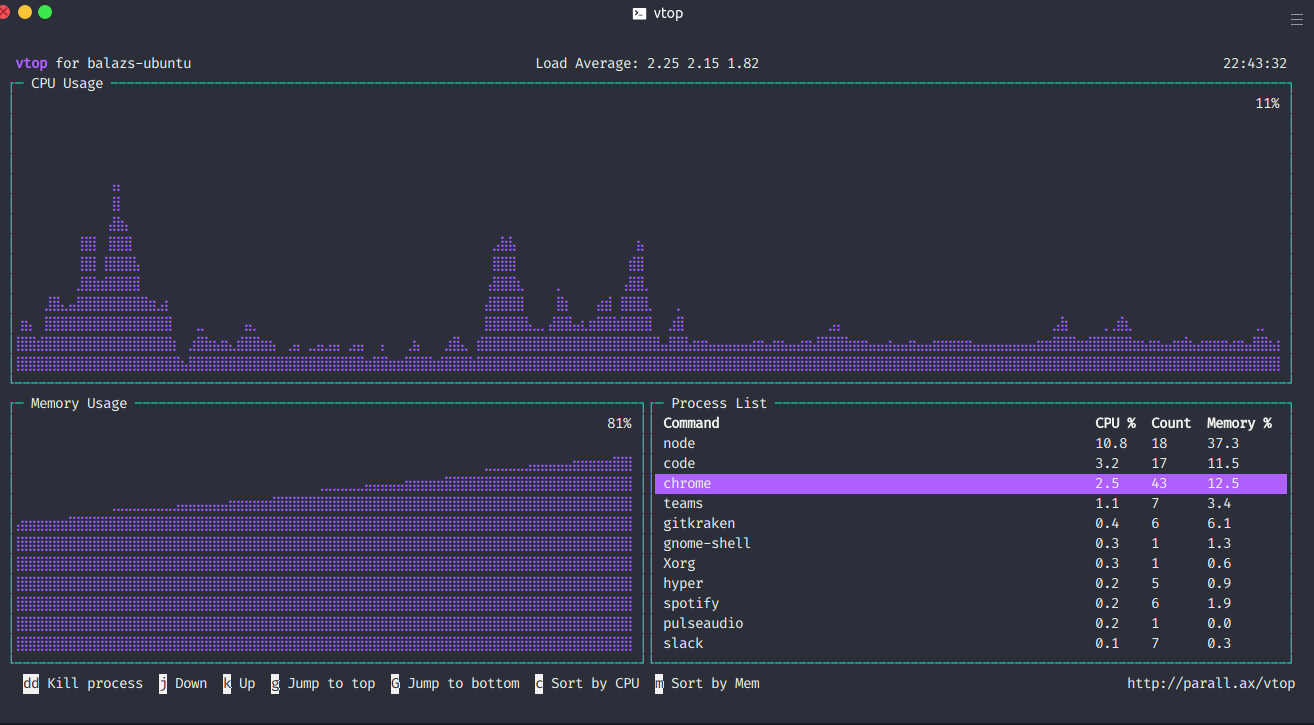

 balazsorban44
on 8 Oct 2020
balazsorban44
on 8 Oct 2020
Thanks! This worked for me too.
ecanas44
on 9 Oct 2020
Does this reproduce in the latest VS Code insiders build with all extensions disabled?
 mjbvz
on 9 Oct 2020
mjbvz
on 9 Oct 2020
@mjbvz Installed VS Code insiders clean, opened the same file in both VS Code and VS Code Insiders.
with --disable-extensions, it appears to be working in both!
With my extensions enabled, only if I explicitely do what @IkeyBenz wrote. (Cannot check VS Code Insiders with extensions)
balazsorban44
on 9 Oct 2020
@ecanas44? Is the issue fixed?
mjbvz
on 13 Oct 2020
@ecanas44? Is the issue fixed?
Yes, thanks a lot!
ecanas44
on 13 Oct 2020
Related issues
 ryan-wong
·
3Comments
ryan-wong
·
3Comments
 omidgolparvar
·
3Comments
omidgolparvar
·
3Comments
 NikosEfthias
·
3Comments
NikosEfthias
·
3Comments
 sijad
·
3Comments
sijad
·
3Comments
 vsccarl
·
3Comments
vsccarl
·
3Comments
Most helpful comment
I can confirm, I had the same issue today.
VSCode -> About
Using
Ubuntu 20.04.1 LTS 64bitSystem
CPUs | Intel(R) Core(TM) i7-8750H CPU @ 2.20GHz (12 x 3900) -- | -- GPU Status | 2d_canvas: unavailable_software flash_3d: disabled_software flash_stage3d: disabled_software flash_stage3d_baseline: disabled_software gpu_compositing: disabled_software multiple_raster_threads: enabled_on oop_rasterization: disabled_off opengl: disabled_off protected_video_decode: disabled_off rasterization: disabled_software skia_renderer: enabled_on video_decode: disabled_software vulkan: disabled_off webgl: unavailable_software webgl2: unavailable_software Load (avg) | 2, 1, 2 Memory (System) | 15.29GB (1.50GB free) Process Argv | --force-user-env --no-sandbox --unity-launch --no-sandbox Screen Reader | no VM | 0%
Extensions
Extension | Author (truncated) | Version -- | -- | -- rainbow-brackets | 2gu | 0.0.6 jest-snippets | and | 1.8.0 simple-react-snippets | bur | 1.2.3 multi-cursor-case-preserve | Car | 1.0.5 vscode-github-actions | csc | 0.8.1 vscode-eslint | dba | 2.1.10 gitlens | eam | 10.2.2 vsc-material-theme | Equ | 33.0.0 vsc-material-theme-icons | equ | 1.2.0 json-tools | eri | 1.0.2 prettier-vscode | esb | 5.7.1 lintlens | ghm | 3.0.0 sass-lint | gle | 1.0.6 vscode-graphql | Gra | 0.3.10 beautify | Hoo | 1.5.0 minify | Hoo | 0.4.3 output-colorizer | IBM | 0.1.2 firebase-explorer | jsa | 0.3.3 vscode-colorize | kam | 0.8.17 kite | kit | 0.127.0 dotenv | mik | 1.0.1 mongodb-vscode | mon | 0.2.0 vscode-azureappservice | ms- | 0.19.0 vscode-azurefunctions | ms- | 0.24.1 vscode-azureresourcegroups | ms- | 0.2.0 vscode-azurestorage | ms- | 0.10.1 vscode-azurevirtualmachines | ms- | 0.2.0 vscode-cosmosdb | ms- | 0.15.0 vscode-docker | ms- | 1.6.0 csharp | ms- | 1.23.2 vscode-dotnet-runtime | ms- | 0.1.2 python | ms- | 2020.9.114305 azure-account | ms- | 0.9.3 azurecli | ms- | 0.5.0 github-issues-prs | ms- | 0.9.2 vscode-node-azure-pack | ms- | 0.0.11 vsliveshare | ms- | 1.0.2902 azurerm-vscode-tools | msa | 0.12.0 debugger-for-chrome | msj | 4.12.11 color-highlight | nau | 2.3.0 git-semantic-commit | nit | 2.0.0 material-icon-theme | PKi | 4.3.0 csharp2ts | raf | 0.0.24 LiveServer | rit | 5.6.1 synthwave-vscode | Rob | 0.1.8 code-settings-sync | Sha | 3.4.3 mdx | sil | 0.1.0 sass-indented | syl | 1.8.12 ayu | tea | 0.20.1 firebase-bolt | tha | 0.1.3 shellcheck | tim | 0.11.0 vsfire | tob | 1.4.1 vscode-icons | vsc | 11.0.0 vscode-wakatime | Wak | 4.0.9 vscode-todo-highlight | way | 1.0.4 markdown-all-in-one | yzh | 3.3.0
@IkeyBenz the
files.associationsfix saved me, although I still don't understand why it worked without it until now.Don't know if related somehow, but I also suspect that the tsserver process here ate my RAM for breakfast, and the whole computer was extremely laggy.
This part only happened when I started a Node project (Next.js 9.5.4 with typescript 4.0.3 installed in the project as a dev dependency) with the
yarn startcommand inside the VSCode terminal. Stopping it dropped the memory usageScreenshots