Vscode: Can't find Extension on Vs Code Extension marketplace!
Can't find some extension on Vs Code extension marketplace. Though I can find those ext. on the official website.
Here's some specific extension that I can't find
[ ] [Flutter Awesome Snippets](https://marketplace.visualstudio.com/items?itemName=Nash.awesome-flutter-snippets)
[ ] [Android Ios Emulator](https://marketplace.visualstudio.com/items?itemName=DiemasMichiels.emulate)
[ ] [Pubspec Assist](https://marketplace.visualstudio.com/items?itemName=jeroen-meijer.pubspec-assist)
and more......
Here's some screenshot of it->
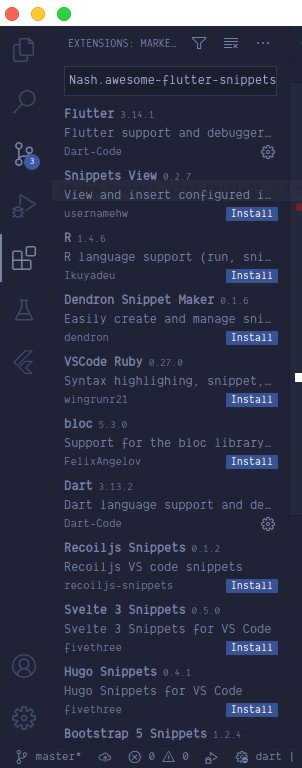

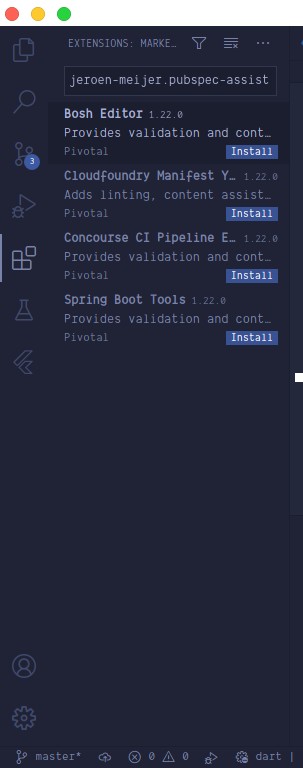
I've installed Vs Code from the official Manjaro Official Repositories
sudo pacman -S code
is there something i've done wrong or is this problem causes by my OS?
 RomjanHossain
All 9 comments
I'm having the same issue on Manjaro.
 Yuanda-Dong
on 7 Oct 2020
Yuanda-Dong
on 7 Oct 2020
I've got a solution to this situation @Yuanda-Dong !
Download the extension from VSCode marketplace, it'll be a .vsix file, then do like the image below.


RomjanHossain
on 7 Oct 2020
I am able to see those extensions, but I am on different platform. I do not think there is any platform dependency here.
Can you please try searching using id like this @id:nash.awesome-flutter-snippets ?
 sandy081
on 7 Oct 2020
sandy081
on 7 Oct 2020
I've downloaded those three extensions from the web and installed them as I've shown in my comment. Now I can find them on my installed extension.
But let me give another extension example:
-> Auto Rename Tag
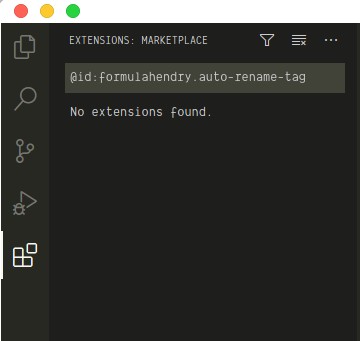
RomjanHossain
on 8 Oct 2020
Weird, can you open network tab in developer tools (F1 > Developer: Toggle Developer Tools > Network) and search again for the extension using id. Check if there are any requests to extension gallery in the network tab and can you please provide us the request and reponse info?
sandy081
on 8 Oct 2020
Here's the response->{"results":[{"extensions":[],"resultMetadata":[{"metadataType":"ResultCount","metadataItems":[{"name":"TotalCount","count":0}]}]}]}
I've provided some screenshot of response when I find some extension and when I'm not. -> ScreenShot
RomjanHossain
on 8 Oct 2020
I think it is the same problem: https://github.com/microsoft/vscode/issues/107997
ArchLinux and Manjaro no longer use the VS Code marketplace, but Open VSX. If the extension is not available on Open VSX, it does not appear in the search.
 ArmandPhilippot
on 8 Oct 2020
ArmandPhilippot
on 8 Oct 2020
Thanks @ArmandPhilippot !
Now all I have to do is ask the publisher to post it on OpenVSX or just download it and installed the vsix file. That helped. Thanks again!
RomjanHossain
on 8 Oct 2020
@RomjanHossain
Alternatively, you can install visual-studio-code-bin with pacman.
Yuanda-Dong
on 8 Oct 2020
Related issues
 philipgiuliani
·
3Comments
philipgiuliani
·
3Comments
 NikosEfthias
·
3Comments
NikosEfthias
·
3Comments
 vsccarl
·
3Comments
vsccarl
·
3Comments
 biij5698
·
3Comments
biij5698
·
3Comments
 ryan-wong
·
3Comments
ryan-wong
·
3Comments
Most helpful comment
I think it is the same problem: https://github.com/microsoft/vscode/issues/107997
ArchLinux and Manjaro no longer use the VS Code marketplace, but Open VSX. If the extension is not available on Open VSX, it does not appear in the search.