Vscode: Integrated terminal does not accept special characters like á, à, é, í, ú, ü, ã, etc.
- VSCode Version: 1.49.3
- OS Version: Fedora 32 with Plasma/KDE
- Shell: bash and zsh
- commit: 2af051012b66169dde0c4dfae3f5ef48f787ff69
Steps to Reproduce:
- Step into Terminal -> New Terminal -> select a project
- Start typing those special characters: á, à, ã, ä, etc.
Does this issue occur when all extensions are disabled?: Yes
 ferox
ferox
All 22 comments
It works for me on Arch Linux,
VSCode version:
1.49.3
2af051012b66169dde0c4dfae3f5ef48f787ff69
x64
OS Version: Arch Linux with Gnome
Shell: zsh
Works with all extensions
 manen
on 3 Oct 2020
manen
on 3 Oct 2020
It works for me on Arch Linux,
VSCode version:
1.49.3
2af0510
x64
OS Version: Arch Linux with Gnome
Shell: zshWorks with all extensions
Good for you!!
This bug is annoying me.
I had to switch to PHPStorm, there is no such bug in there.
ferox
on 3 Oct 2020
It's not works for me
VSCode version: 1.49.3
OS Version: Fedora 33 with Gnome
Shell: Bash
 jeffteixeira
on 3 Oct 2020
jeffteixeira
on 3 Oct 2020
It's not works for me
VSCode version: 1.49.3
OS Version: Fedora 33
Shell: Bash
 Josevaldos950
on 3 Oct 2020
Josevaldos950
on 3 Oct 2020
For me, it's happening the same bug as described by @ferox
None of the special characters áéíóúäëïöüâêîôû and all the others like this are accepted on the build-in terminal and the integrated one.
RPM for the VScode downloaded form the oficial website (//code.visualstudio.com/Download)
Version: 1.49.3
Commit: 2af051012b66169dde0c4dfae3f5ef48f787ff69
Date: 2020-10-02T17:56:11.027Z
Electron: 9.2.1
Chrome: 83.0.4103.122
Node.js: 12.14.1
V8: 8.3.110.13-electron.0
OS: Linux x64 5.8.13-200.fc32.x86_64
FEDORA 32 workstation
 geraldosimiao
on 4 Oct 2020
geraldosimiao
on 4 Oct 2020
This is definitely a VS Code bug. Everything is working as expected with Yakuake and PHPStorm 2020.2 terminal.

ferox
on 5 Oct 2020
I'm using Fedora 33 KDE Spin. If I type characters that have a key of its own it works fine, but if I use a modifier it doesn't. It either shows an unmodified character or something else completely. I have two layouts, German QWERTZ and Spanish Spain.
 Lailah
on 5 Oct 2020
Lailah
on 5 Oct 2020
It works for me on Fedora 31.
VSCode Version: 1.49.2

 edivancarvalho
on 6 Oct 2020
edivancarvalho
on 6 Oct 2020
I'm digging it to find the bug.
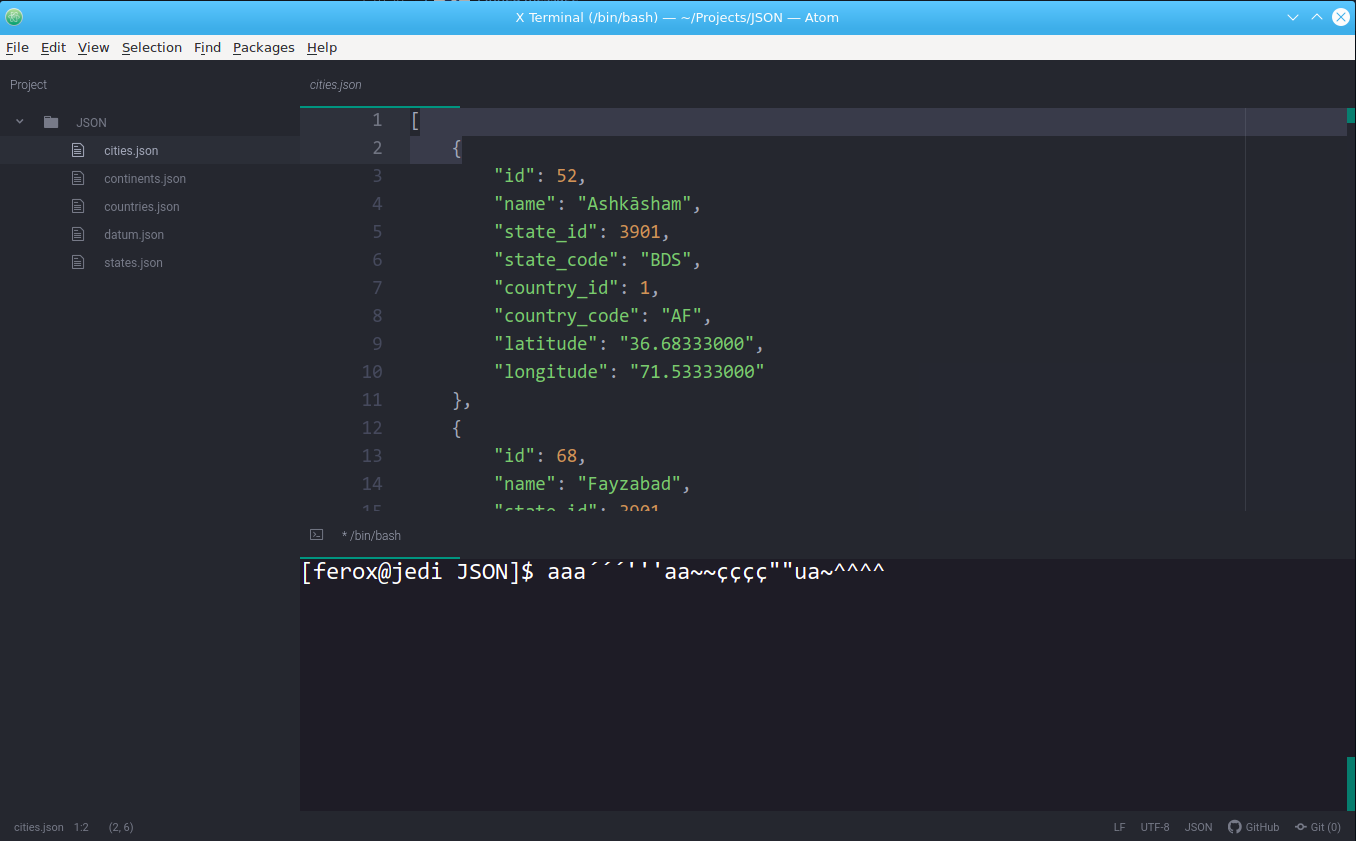
So I just installed Atom with the x-terminal plugin (https://github.com/bus-stop/x-terminal). X-Terminal is a fork of atom-xterm. So this annoying bug also occurs in Atom Text Editor.
Atom version: 1.51.0
Electron version: 5.0.13
Node version: v12.0.0
X-Terminal version: 10.0.1
ferox
on 7 Oct 2020
For me, it's happening the same bug as described by @ferox
None of the special characters áéíóúäëïöüâêîôû and all the others like this are accepted on the build-in terminal and the integrated one.
RPM for the VScode downloaded form the oficial website (//code.visualstudio.com/Download)
Version: 1.49.3
Commit: 2af051012b66169dde0c4dfae3f5ef48f787ff69
Date: 2020-10-02T17:56:11.027Z
Electron: 9.2.1
Chrome: 83.0.4103.122
Node.js: 12.14.1
V8: 8.3.110.13-electron.0
OS: Linux x64 5.4.0-48-generic
Linux Mint 20 Cinnamon
 viniciusmattosrj
on 7 Oct 2020
viniciusmattosrj
on 7 Oct 2020
It works for me on Fedora 31.
VSCode Version: 1.49.2
edivancarvalho
on 7 Oct 2020
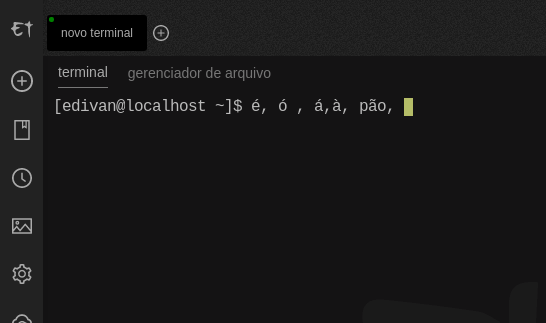
After some tests and research on a few VMs an baremetal too, we have this results (all with the most up-to-date versions)
VScode on F33KDE or F33workstation => bug
VScode on F31KDE => bug
VScode on F32workstation => bug
VScode on F31cinnamon or F33cinnamon => NO BUG!!!!!
We found that using electerm (a project that uses xterm too) the problem mimics the results above.
geraldosimiao
on 7 Oct 2020
I can confirm that the bug also occurs in Codium
Codium Version: 1.49.1
OS Version: Fedora 32 with Cinnamon
Shell: bash
commit: 58bb7b2331731bf72587010e943852e13e6fd3cf
Steps to Reproduce:
Step into Terminal -> New Terminal -> select a project
Start typing those special characters: á, à, ã, ä, etc.

ferox
on 7 Oct 2020
It works for me on Fedora 31.
VSCode Version: 1.49.2
Cinnamon right???
ferox
on 7 Oct 2020
yes
edivancarvalho
on 7 Oct 2020
It seems that on F32 Cinnamon the bug shows too on my setup, on VScode and on Electerm.
geraldosimiao
on 7 Oct 2020
I'm digging it to find the bug.
So I just installed Atom with the x-terminal plugin (https://github.com/bus-stop/x-terminal). X-Terminal is a fork of atom-xterm. So this annoying bug also occurs in Atom Text Editor.Atom version: 1.51.0
Electron version: 5.0.13
Node version: v12.0.0
X-Terminal version: 10.0.1
hmm, does that mean that it's an Electron issue?
manen
on 7 Oct 2020
I'm digging it to find the bug.
So I just installed Atom with the x-terminal plugin (https://github.com/bus-stop/x-terminal). X-Terminal is a fork of atom-xterm. So this annoying bug also occurs in Atom Text Editor.
Atom version: 1.51.0
Electron version: 5.0.13
Node version: v12.0.0
X-Terminal version: 10.0.1
hmm, does that mean that it's an Electron issue?
No, maybe in the xterm.js
ferox
on 7 Oct 2020
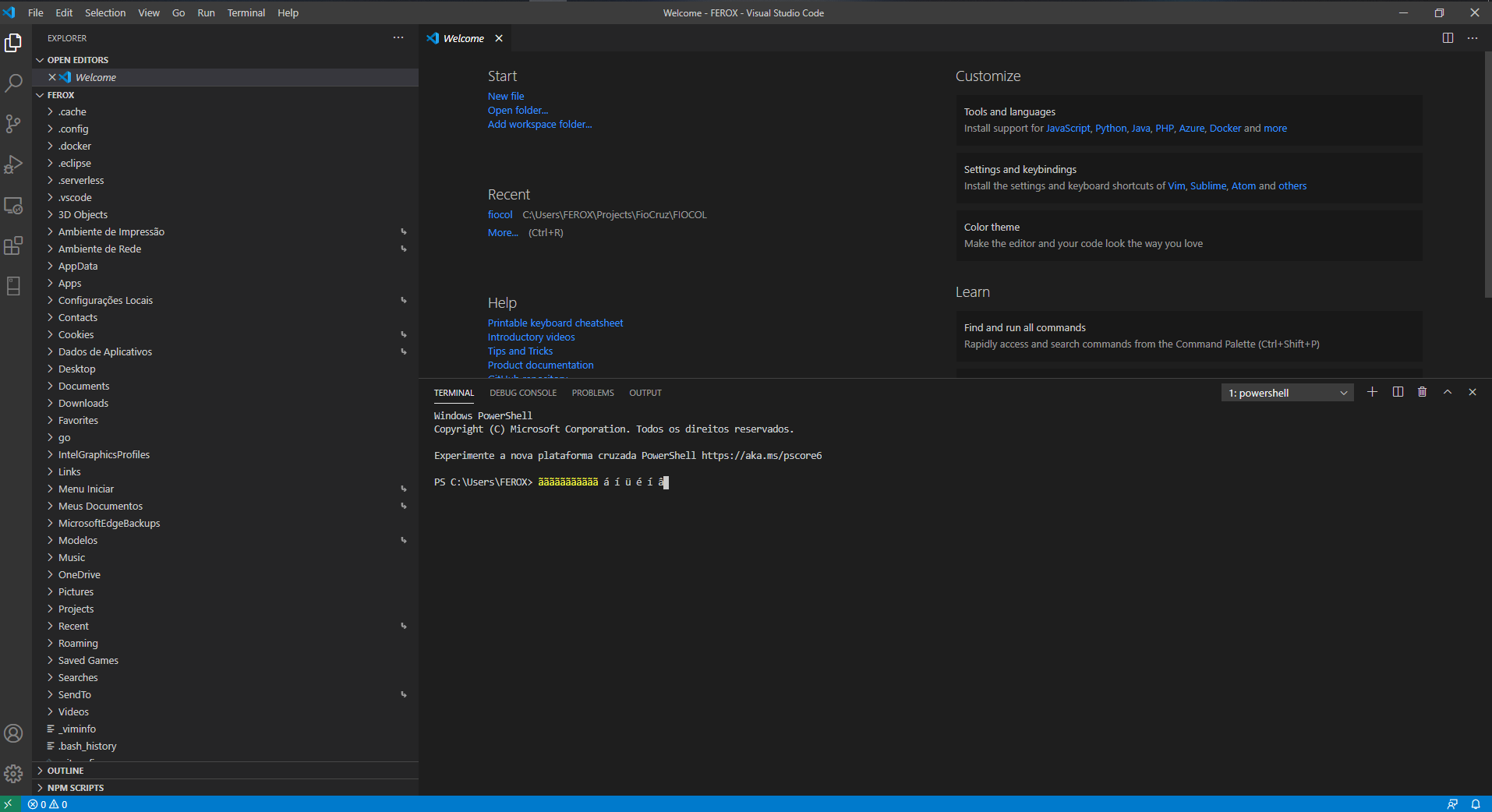
It´s working on Windows
- VSCode Version: 1.50.0
- OS Version: Windows 10
- Shell: Powershell
- commit: 93c2f0fbf16c5a4b10e4d5f89737d9c2c25488a3
ferox
on 10 Oct 2020
related to this
 meganrogge
on 4 Nov 2020
meganrogge
on 4 Nov 2020
I still have the same problem on Linux (Fedora 33 KDE).
Lailah
on 6 Nov 2020
I still have the same problem on Linux (Fedora 33 KDE).
Yeah, same here!!!!
Version: 1.50.1
Commit: d2e414d9e4239a252d1ab117bd7067f125afd80a
Date: 2020-10-15T11:13:06.921Z
Electron: 9.2.1
Chrome: 83.0.4103.122
Node.js: 12.14.1
V8: 8.3.110.13-electron.0
OS: Linux x64 5.8.18-300.fc33.x86_64
ferox
on 6 Nov 2020
Related issues
 NikosEfthias
·
3Comments
NikosEfthias
·
3Comments
 v-pavanp
·
3Comments
v-pavanp
·
3Comments
 borekb
·
3Comments
borekb
·
3Comments
 philipgiuliani
·
3Comments
philipgiuliani
·
3Comments
 trstringer
·
3Comments
trstringer
·
3Comments
Most helpful comment
It works for me on Fedora 31.
VSCode Version: 1.49.2