Vscode: Control Exclude checkbox in search from extension
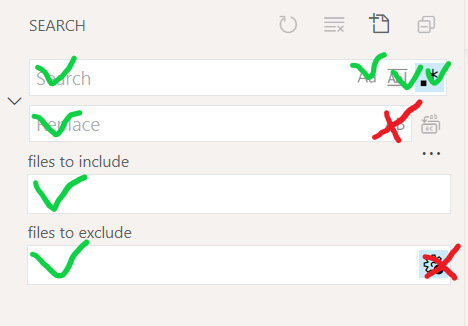
When executing search from extension api 2 checkboxes are not exposed:
- Preserve Case
- Use Exclude Settings and Ignore Files
vscode.commands.executeCommand('workbench.action.findInFiles', {
  query: regexStr,
  isRegex: true,
  triggerSearch: true,
});
 usernamehw
All 8 comments
Hey @usernamehw , Can you please explain a little more about the issue?
 dhairyanadapara
on 29 Sep 2020
dhairyanadapara
on 29 Sep 2020
@dhairyanadapara It's possible to trigger a search from extension by using this api:
vscode.commands.executeCommand('workbench.action.findInFiles', {
  query: 'example',
});
And it has a good amount of options:
export interface IFindInFilesArgs {
    query?: string;
    replace?: string;
    triggerSearch?: boolean;
    filesToInclude?: string;
    filesToExclude?: string;
    isRegex?: boolean;
    isCaseSensitive?: boolean;
    matchWholeWord?: boolean;
}
But 2 of them are missing:
Preserve CaseUse Exclude Settings and Ignore Files
usernamehw
on 29 Sep 2020
Thank @usernamehw, got the idea. I will raise a PR to fix the issue ASAP :)
dhairyanadapara
on 29 Sep 2020
@usernamehw @roblourens I have raised the PR. If you get time please review :)
dhairyanadapara
on 3 Oct 2020
@roblourens genuinely didn't notice the existing PR, apologies @dhairyanadapara
 rotem-bar
on 3 Oct 2020
rotem-bar
on 3 Oct 2020
Thanks @roblourens :). No problem @rotem-bar.
dhairyanadapara
on 4 Oct 2020
It great now that it's possible to control it 👍 but why does it called excludeSettingAndIgnoreFiles? Would it possible to have the same name as in label:
- excludeSettingAndIgnoreFiles
+ useExcludeSettingsAndIgnoreFiles
Updated to useExcludeSettingsAndIgnoreFiles as per @usernamehw's suggestion and for consistency with search editor post #108750. Also added these to the keybindings intellisense registry.
 JacksonKearl
on 21 Oct 2020
JacksonKearl
on 21 Oct 2020
Related issues
 sirius1024
·
3Comments
sirius1024
·
3Comments
 DovydasNavickas
·
3Comments
DovydasNavickas
·
3Comments
 omidgolparvar
·
3Comments
omidgolparvar
·
3Comments
 curtw
·
3Comments
curtw
·
3Comments
 shanalikhan
·
3Comments
shanalikhan
·
3Comments
Most helpful comment
@roblourens genuinely didn't notice the existing PR, apologies @dhairyanadapara