Vscode: Format on Save Mode : Modifications causes invalid indentation
- VSCode Version: v1.49.1
- OS Version: Windows 10 2004
Steps to Reproduce:
- Change Format On Save Mode to modifications
- Edit some code and save the file
Does this issue occur when all extensions are disabled?: Yes/No
Yes
 adnaanbheda
All 10 comments
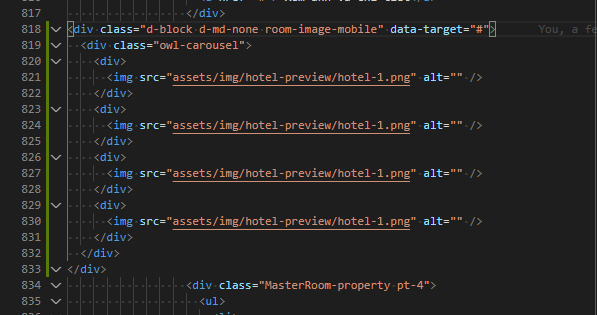
in my case, the html block is moved to the left side
 oclockvn
on 20 Sep 2020
oclockvn
on 20 Sep 2020
/needsMoreInfo
Please update this issue after reading https://github.com/Microsoft/vscode/wiki/Submitting-Bugs-and-Suggestions#writing-good-bug-reports-and-feature-requests. Thanks.
 jrieken
on 21 Sep 2020
jrieken
on 21 Sep 2020
Thanks for creating this issue! We figured it's missing some basic information or in some other way doesn't follow our issue reporting guidelines. Please take the time to review these and update the issue.
Happy Coding!
 vscode-triage-bot
on 21 Sep 2020
vscode-triage-bot
on 21 Sep 2020
@jrieken, this is happens when editor.formatOnSaveMode is set as modifications. I've changed the settings to file format on save has worked again
 tcelestino
on 21 Sep 2020
tcelestino
on 21 Sep 2020
And what formatter extension do you use? and what language is this?
jrieken
on 22 Sep 2020
@jrieken I'm using Prettier. The language: Javascript (and Typescript).
My settings:
"[javascript]": {
"editor.formatOnSave": true,
"editor.defaultFormatter": "esbenp.prettier-vscode"
},
"[typescript]": {
"editor.formatOnSave": true,
"editor.defaultFormatter": "esbenp.prettier-vscode"
},
"[typescriptreact]": {
"editor.formatOnSave": true,
"editor.defaultFormatter": "esbenp.prettier-vscode"
},
"[javascriptreact]": {
"editor.formatOnSave": true,
"editor.defaultFormatter": "esbenp.prettier-vscode"
},
This issue is caused by an extension, please file it with the repository (or contact) the extension has linked in its overview in VS Code or the marketplace for VS Code. See also our issue reporting guidelines.
Happy Coding!
vscode-triage-bot
on 23 Sep 2020
Thanks for clarifying. Please file this issue against the prettier extensions, since its the extension that determines that changes, including indentation
jrieken
on 23 Sep 2020
@tcelestino I found it's because I'm using an old version of Prettier in my project (1.19.1). Updating to the latest 2.1.2 fixed the same issue with that setting.
 cp79shark
on 15 Oct 2020
cp79shark
on 15 Oct 2020
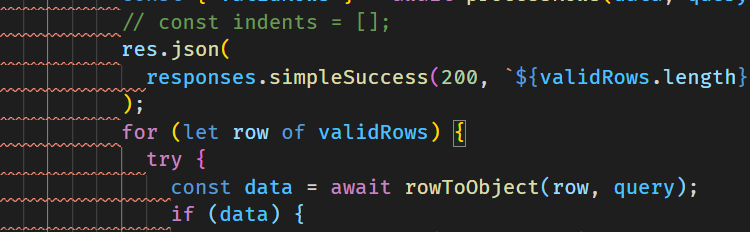
I had a similar issue when using the new "modifications" option for Format On Save Mode with Prettier as the formatter. Modified lines were formatted incorrectly, specifically, I was seeing lines being indented way too far when modifying the inside of a block. They would be pushed to the right of the opening bracket.
If I would edit the contents of a block like this:
if (someCondition === true) {
  console.log('Condition is true!');
}
It would get formatted something like this:
if (someCondition === true) {
                              console.log('Condition is still true!');
                            }
It appears that the root of the issue for me was that older versions of Prettier would handle indentation incorrectly with rangeStart and rangeEnd. In most cases, the recommended fix is to upgrade Prettier in the project to the latest with something like npm install [email protected] --save-exact --save-dev or npm install prettier@latest --save-dev. In my case, I decided to use a global installation of [email protected] and set the Prettier Path setting in the Prettier plugin to the global Prettier path and that solved the problem.
TL;DR The VS Code "modifications" option for Format On Save Mode doesn't work with older versions of Prettier.
 localjo
on 21 Oct 2020
localjo
on 21 Oct 2020
Related issues
 sirius1024
·
3Comments
sirius1024
·
3Comments
 trstringer
·
3Comments
trstringer
·
3Comments
 omidgolparvar
·
3Comments
omidgolparvar
·
3Comments
 chrisdias
·
3Comments
chrisdias
·
3Comments
 VitorLuizC
·
3Comments
VitorLuizC
·
3Comments
Most helpful comment
I had a similar issue when using the new "modifications" option for Format On Save Mode with Prettier as the formatter. Modified lines were formatted incorrectly, specifically, I was seeing lines being indented way too far when modifying the inside of a block. They would be pushed to the right of the opening bracket.
If I would edit the contents of a block like this:
It would get formatted something like this:
It appears that the root of the issue for me was that older versions of Prettier would handle indentation incorrectly with
rangeStartandrangeEnd. In most cases, the recommended fix is to upgrade Prettier in the project to the latest with something likenpm install [email protected] --save-exact --save-devornpm install prettier@latest --save-dev. In my case, I decided to use a global installation of [email protected] and set the Prettier Path setting in the Prettier plugin to the global Prettier path and that solved the problem.TL;DR The VS Code "modifications" option for Format On Save Mode doesn't work with older versions of Prettier.