Vscode: Terminal Cursor Ghosting When Window Zoom Set To -1
Issue Type: Bug
- Set "window.zoomLevel": -1
- Click into terminal window (Tested using powershell terminals both integrated and included)
- Remove cursor from window
- Place cursor in window and press enter to new line.
- Observe square cursor ghosting outline
Expected Result: No ghosted cursor outline when moving to new line in terminal
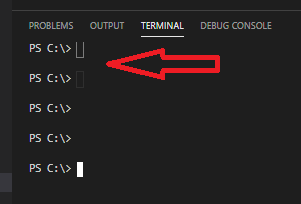
VS Code version: Code 1.49.1 (58bb7b2331731bf72587010e943852e13e6fd3cf, 2020-09-16T23:27:51.792Z)
OS version: Windows_NT x64 10.0.18363
Extensions (5)
Extension|Author (truncated)|Version
---|---|---
bracket-pair-colorizer-2|Coe|0.2.0
prettier-vscode|esb|5.6.0
powershell-preview|ms-|2020.9.0
material-icon-theme|PKi|4.3.0
vscodeintellicode|Vis|1.2.10
(1 theme extensions excluded)
 JT114881
All 25 comments
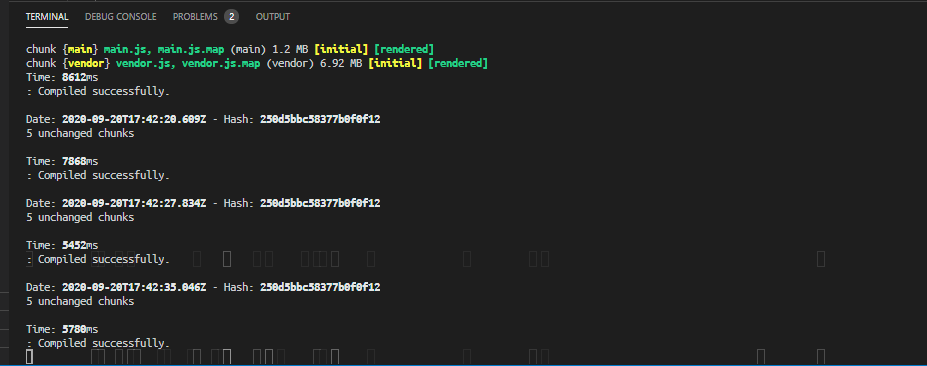
Same issue here.
 AxonneQ
on 20 Sep 2020
AxonneQ
on 20 Sep 2020
Yup @AxonneQ that's exactly what my terminal looks like after a while. Really annoying and distracting.
JT114881
on 20 Sep 2020
Can you share your settings.json file? A workaround is to set terminal.integrated.rendererType to dom
 Tyriar
on 21 Sep 2020
Tyriar
on 21 Sep 2020
{
"workbench.iconTheme": "material-icon-theme",
"[powershell]": {
"editor.renderWhitespace":"selection",
"editor.renderControlCharacters": false,
"files.trimTrailingWhitespace": true,
"files.encoding": "utf8bom",
"files.autoGuessEncoding": true,
"editor.tabCompletion": "on"
},
"bracket-pair-colorizer-2.activeScopeCSS": [
"borderStyle : solid",
"borderWidth : 2px",
"borderColor : {color}",
"opacity: 0.8"
],
"bracket-pair-colorizer-2.showBracketsInGutter": true,
"editor.suggestSelection": "first",
"vsintellicode.modify.editor.suggestSelection": "automaticallyOverrodeDefaultValue",
"terminal.integrated.shell.windows": "C:\Windows\System32\WindowsPowerShell\v1.0\powershell.exe",
"files.autoSave": "afterDelay",
"powershell.codeFormatting.autoCorrectAliases": true,
"powershell.integratedConsole.suppressStartupBanner": true,
"terminal.integrated.automationShell.linux": "",
"powershell.powerShellDefaultVersion": "Windows PowerShell (x64)",
"powershell.codeFormatting.useCorrectCasing": true,
"terminal.integrated.cursorBlinking": false,
"workbench.colorCustomizations": {
"terminalCursor.foreground": "#FFFFFF",
"terminalCursor.background": "#1e1e1e"
},
"workbench.view.alwaysShowHeaderActions": true,
"window.zoomLevel": -1
}
JT114881
on 21 Sep 2020
Looks like the issue is with the window.zoomLevel: -1 when the value is 0 or higher, ghosting disappears. Kind of sucks since on 1440p, the UI is a bit too big for me. that's why I zoomed it out.
AxonneQ
on 21 Sep 2020
Can you try close vscode and launch using code --disable-featuers="LayoutNG" to see if the issue still happens?
Tyriar
on 23 Sep 2020
Can you try close vscode and launch using
code --disable-featuers="LayoutNG"to see if the issue still happens?
Removed the workaround and tried starting using what you suggested. Issue is still happening. Here is the output of the command prompt:
C:\Users\jt114881\AppData\Local\Programs\Microsoft VS Code> code --disable-featuers="LayoutNG"
Warning: 'disable-featuers' is not in the list of known options, but still passed to Electron/Chromium.
[main 2020-09-23T23:38:52.827Z] update#setState idle
(node:109112) Electron: Loading non-context-aware native module in renderer: '\\?\C:\Users\jt114881\AppData\Local\Programs\Microsoft VS Code\resources\app\node_modules.asar.unpacked\vscode-sqlite3\build\Release\sqlite.node'. This is deprecated, see https://github.com/electron/electron/issues/18397.
(node:109112) Electron: Loading non-context-aware native module in renderer: '\\?\C:\Users\jt114881\AppData\Local\Programs\Microsoft VS Code\resources\app\node_modules.asar.unpacked\node-pty\build\Release\conpty.node'. This is deprecated, see https://github.com/electron/electron/issues/18397.
(node:109112) Electron: Loading non-context-aware native module in renderer: '\\?\C:\Users\jt114881\AppData\Local\Programs\Microsoft VS Code\resources\app\node_modules.asar.unpacked\windows-process-tree\build\Release\windows_process_tree.node'. This is deprecated, see https://github.com/electron/electron/issues/18397.
(node:109112) Electron: Loading non-context-aware native module in renderer: '\\?\C:\Users\jt114881\AppData\Local\Programs\Microsoft VS Code\resources\app\node_modules.asar.unpacked\spdlog\build\Release\spdlog.node'. This is deprecated, see https://github.com/electron/electron/issues/18397.
(node:113736) Electron: Loading non-context-aware native module in renderer: '\\?\C:\Users\jt114881\AppData\Local\Programs\Microsoft VS Code\resources\app\node_modules.asar.unpacked\spdlog\build\Release\spdlog.node'. This is deprecated, see https://github.com/electron/electron/issues/18397.
[main 2020-09-23T23:39:22.827Z] update#setState checking for updates
[main 2020-09-23T23:39:23.205Z] update#setState idle
Having the same issue here, VSCode 1.49.1, windows 10
 lucas-rds
on 24 Sep 2020
lucas-rds
on 24 Sep 2020
Can confirm with Manjaro and the Snap version.
Versión: 1.50.0-insider
Confirmación: e6a742d2407c4a94c6540b49aa5f801468dbd1c8
Fecha: 2020-09-22T18:12:43.551Z
Electron: 9.3.0
Chrome: 83.0.4103.122
Node.js: 12.14.1
V8: 8.3.110.13-electron.0
Sistema Operativo: Linux x64 5.4.64-1-MANJARO snap
Window zoom level, --disable-features flag have no effect. DOM renderer is a confirmed workaround.
 amyspark
on 28 Sep 2020
amyspark
on 28 Sep 2020
@Tyriar this is still marked as 'needs more info', do you require any more information from me?
JT114881
on 5 Oct 2020
I was able to repro with stable but I cannot repro the issue with our insiders https://code.visualstudio.com/insiders/, can others confirm ?
 deepak1556
on 14 Oct 2020
deepak1556
on 14 Oct 2020
@deepak1556 confirmed issue still happening on latest insiders build as well.
Set it up with the same extensions and settings file, minus the workaround.
JT114881
on 14 Oct 2020
I followed your steps and reused same settings but wasn't able to repro the issue with insiders. Attaching the screen recording from both stable and insiders.
deepak1556
on 14 Oct 2020
I followed your steps and reused same settings but wasn't able to repro the issue with insiders. Attaching the screen recording from both stable and insiders.
See my repro attached.
Confirmation.zip
JT114881
on 14 Oct 2020
@deepak1556 unfortunately, it's still ghosting even on insiders build

 AregGhazaryan
on 14 Oct 2020
AregGhazaryan
on 14 Oct 2020
thanks for confirming, couple of things I want to check
Can you launch with
code --disable-features=LayoutNG, I know that it was requested in https://github.com/microsoft/vscode/issues/106981#issuecomment-697971958 but the flag has a typo in that comment.Can you launch with
code --disable-gpuCan you check with our exploration builds https://az764295.vo.msecnd.net/exploration/a9522785ef3c54961079e12afab9d3915ea68e08/VSCodeUserSetup-x64-1.51.0-exploration.exe that comes with newer chromium runtime.
let me know which of these work and don't.
deepak1556
on 14 Oct 2020
thanks for confirming, couple of things I want to check
- Can you launch with
code --disable-features=LayoutNG, I know that it was requested in #106981 (comment) but the flag has a typo in that comment.- Can you launch with
code --disable-gpu- Can you check with our exploration builds https://az764295.vo.msecnd.net/exploration/a9522785ef3c54961079e12afab9d3915ea68e08/VSCodeUserSetup-x64-1.51.0-exploration.exe that comes with newer chromium runtime.
let me know which of these work and don't.
I have tried code --disable-gpu and it seems that the ghosting has stopped but when you use --disable-features=LayoutNG its still there. The newest chromium runtime does not help too.
AregGhazaryan
on 14 Oct 2020
@Tyriar considering this is a gpu specific issue, next step would be create a minimal repro and file report in chromium, can you help with that ?
In the meantime users can disable gpu via runtime arguments https://code.visualstudio.com/updates/v1_40#_disable-gpu-acceleration
deepak1556
on 15 Oct 2020
Same issue. "terminal.integrated.rendererType": "dom" and code --disable-gpu are both confirmed workarounds.
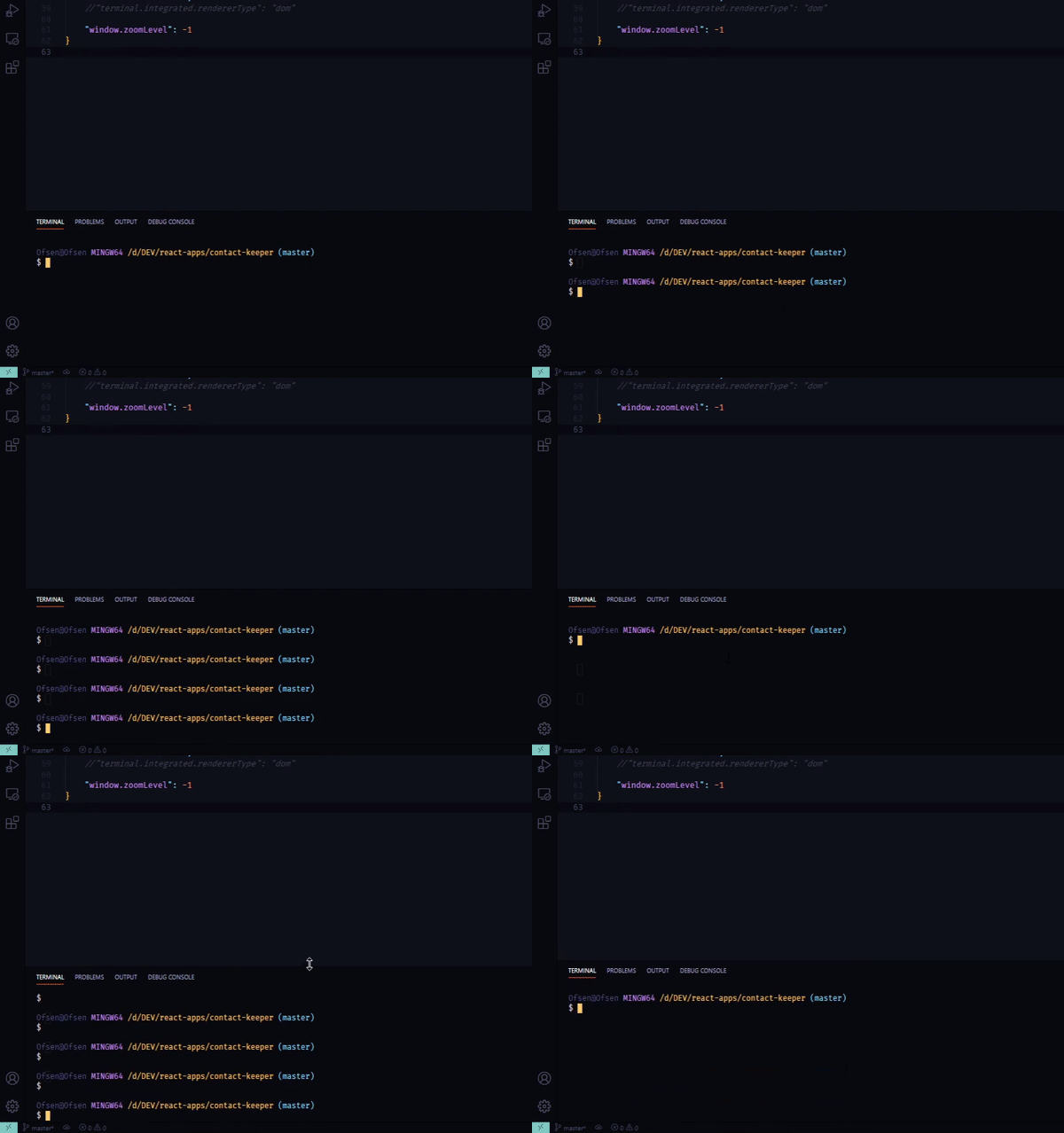
I just want to add that adjusting the size of the terminal makes the effect go away, for me at least, but it comes back after some time.
It also seem that the ghosting only shows when :
"window.zoomLevel"is less than 0- clicking out of terminal and then getting back in it
here's a gif of how i repro
 Ofsen
on 24 Oct 2020
Ofsen
on 24 Oct 2020
Can anyone confirm whether "terminal.integrated.rendererType": "experimentalWebgl" also works around the issue?
Tyriar
on 29 Oct 2020
works for me - thanks!
 colinpmillar
on 29 Oct 2020
colinpmillar
on 29 Oct 2020
@colinpmillar great to hear! So this is restricted to the canvas renderer that while it is the default, I want to get rid of in favor of webgl with a fallback of dom based on some automatic detection https://github.com/microsoft/vscode/issues/106202. This is after we close the gap in functionality, which I think is only context loss and underline support at this point https://github.com/xtermjs/xterm.js/issues?q=is%3Aopen+is%3Aissue+label%3Aarea%2Faddon%2Fwebgl
Tyriar
on 29 Oct 2020
"terminal.integrated.rendererType": "experimentalWebgl" doesn't work for me, unfortunately.
I also noticed that this "cube" shows up on experimentalWebgl , canvas and auto

But when i set it on dom this shows up

These two pictures shows the cursor when i clic away from the terminal
Ofsen
on 29 Oct 2020
I also see the "two-lines" cursor that @Ofsen mentions when using the "terminal.integrated.rendererType": "dom" setting!
 Juanpam
on 5 Nov 2020
Juanpam
on 5 Nov 2020
I also see the "two-lines" cursor that @Ofsen mentions when using the "terminal.integrated.rendererType": "dom" setting!
@Juanpam This sounds like a separate bug as this issue is specifically about canvas changes in Chromium. I don't think that's been reported yet so feel free to create it.
Tyriar
on 5 Nov 2020
Related issues
 philipgiuliani
·
3Comments
philipgiuliani
·
3Comments
 curtw
·
3Comments
curtw
·
3Comments
 NikosEfthias
·
3Comments
NikosEfthias
·
3Comments
 sijad
·
3Comments
sijad
·
3Comments
 shanalikhan
·
3Comments
shanalikhan
·
3Comments
Most helpful comment
Can anyone confirm whether
"terminal.integrated.rendererType": "experimentalWebgl"also works around the issue?