Vscode: macOS's Touch bar shows word suggestions instead of debug buttons
- VSCode Version: 1.49.0
- OS Version: macOS 10.15.6
Steps to Reproduce:
- Open a project in VSCode with a launch.json already set up
- Click on the text editor to give it focus
- No _Run_ and _Run without debugger_ buttons (two triangles) in the touch bar
- Select the left side bar, giving it focus
- The _Run_ and _Run without debugger_ buttons show up.
It used to be the case these buttons always showed. Is it a conscious decision to hide these when editing text? Not a very convenient way of working, to have to click on the sidebar first.
Does this issue occur when all extensions are disabled?: Yes
 stijnfrishert
All 22 comments
I can confirm this issue. I didn't have this issue on 1.48 and now the Touch Bar buttons get replaced by predictive text suggestions, even when in debug mode, if the focus is with the text editor.
Version: 1.49.0
Commit: e790b931385d72cf5669fcefc51cdf65990efa5d
Date: 2020-09-10T17:39:53.251Z
Electron: 9.2.1
Chrome: 83.0.4103.122
Node.js: 12.14.1
V8: 8.3.110.13-electron.0
OS: Darwin x64 19.5.0
 philipmat
on 13 Sep 2020
philipmat
on 13 Sep 2020
I have found the same issue on 1.49 on my macOS. But it works well on 1.48.
 leonkong
on 14 Sep 2020
leonkong
on 14 Sep 2020
Thanks for filling this, but I can not really reproduce this.
My steps:
- I open VS Code with Explorer view open
- After some time (2 seconds) the
RunandRun without debuggerbuttons appear in the touch bar
So I do not have to open the debug view.
What we changed this milestone is that these touch bar entries are disabled for the first 2 seconds while the debugger extensions are still not there.
If you use https://code.visualstudio.com/insiders/ can you still reproduce the issue (that the debug touch bar items never appear, unless you open the Debug view)
 isidorn
on 16 Sep 2020
isidorn
on 16 Sep 2020
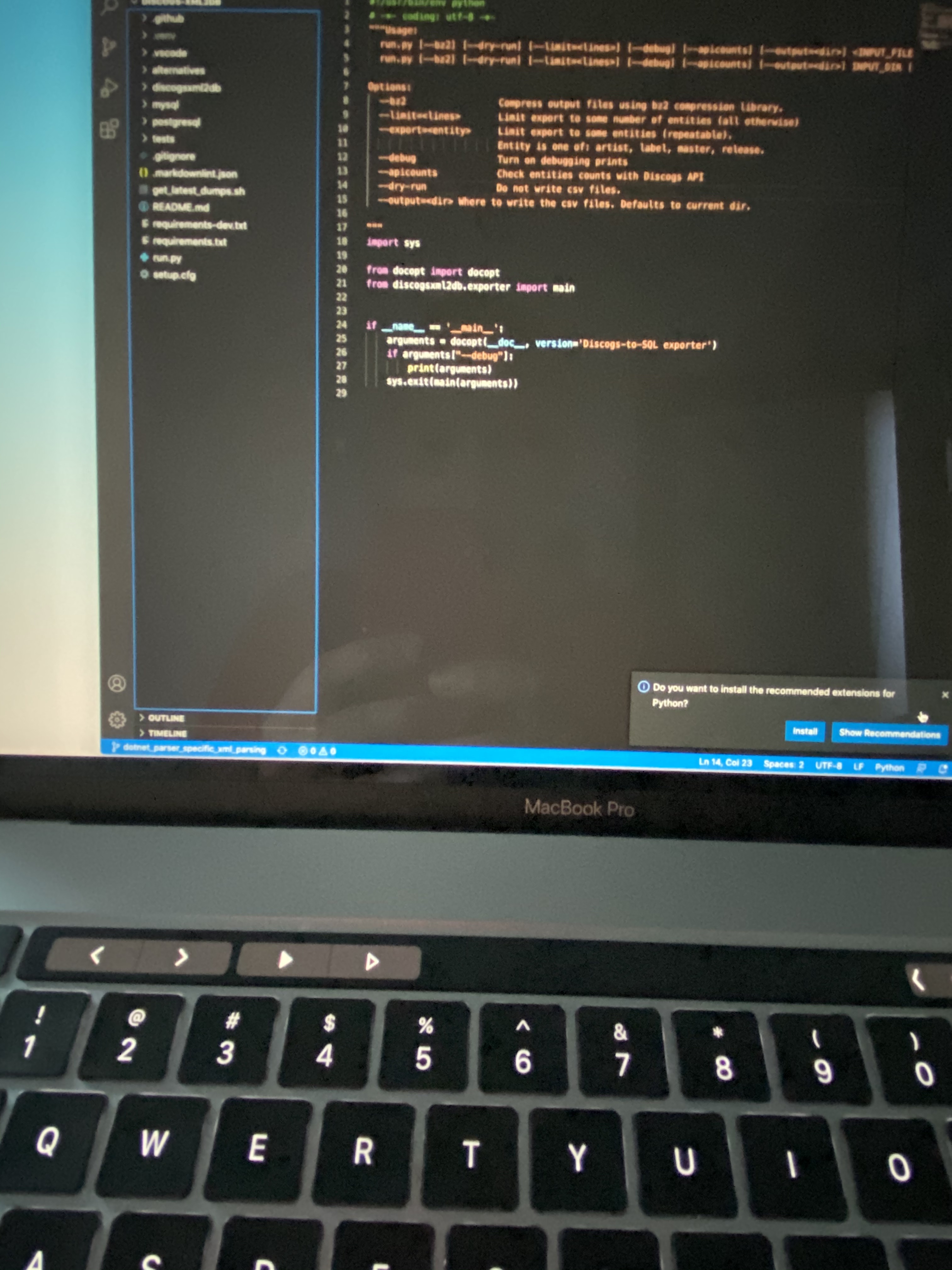
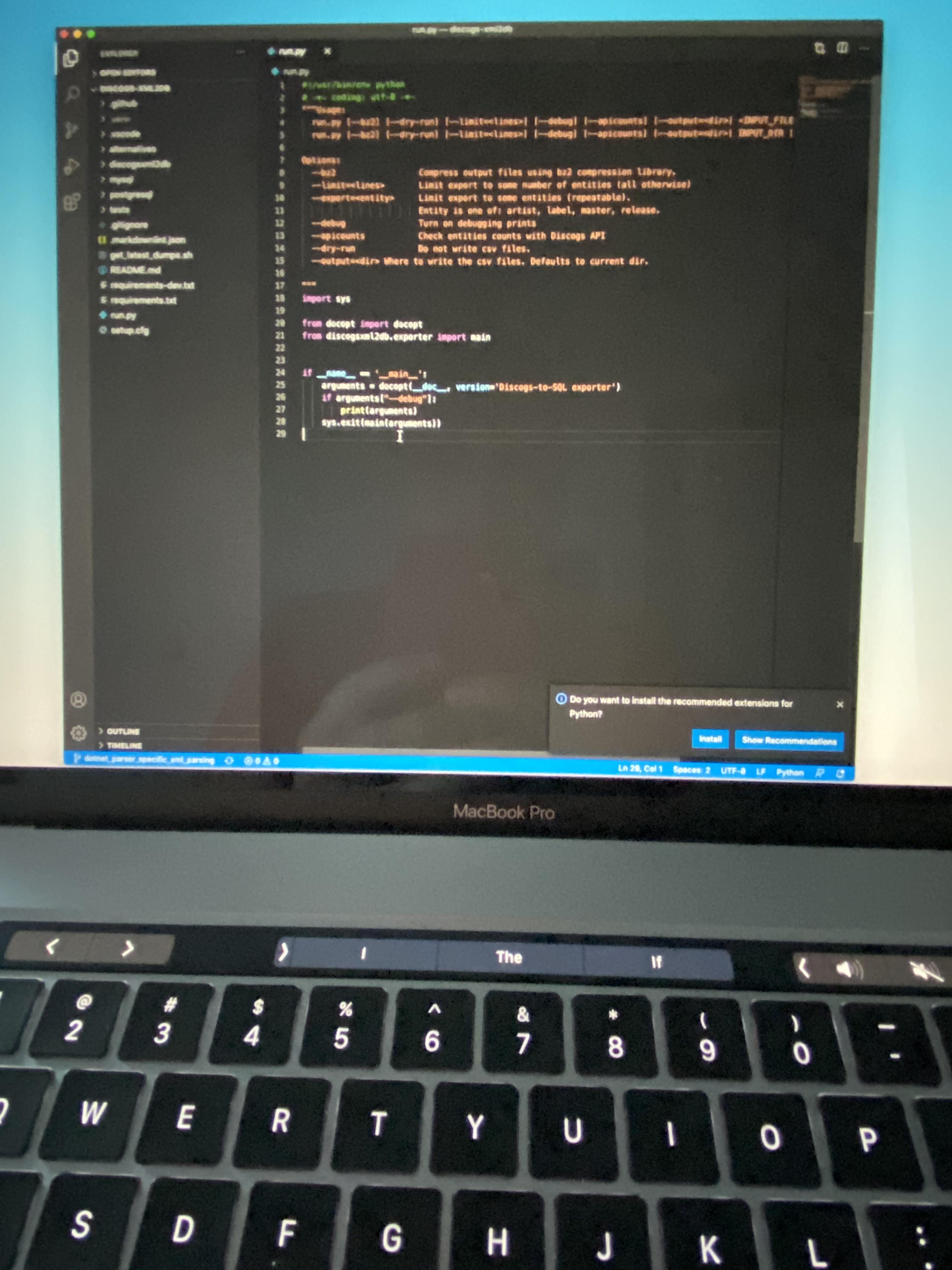
Happens with Insiders too:
When the focus is on Explorer:
When the focus is in the text editor:
philipmat
on 16 Sep 2020
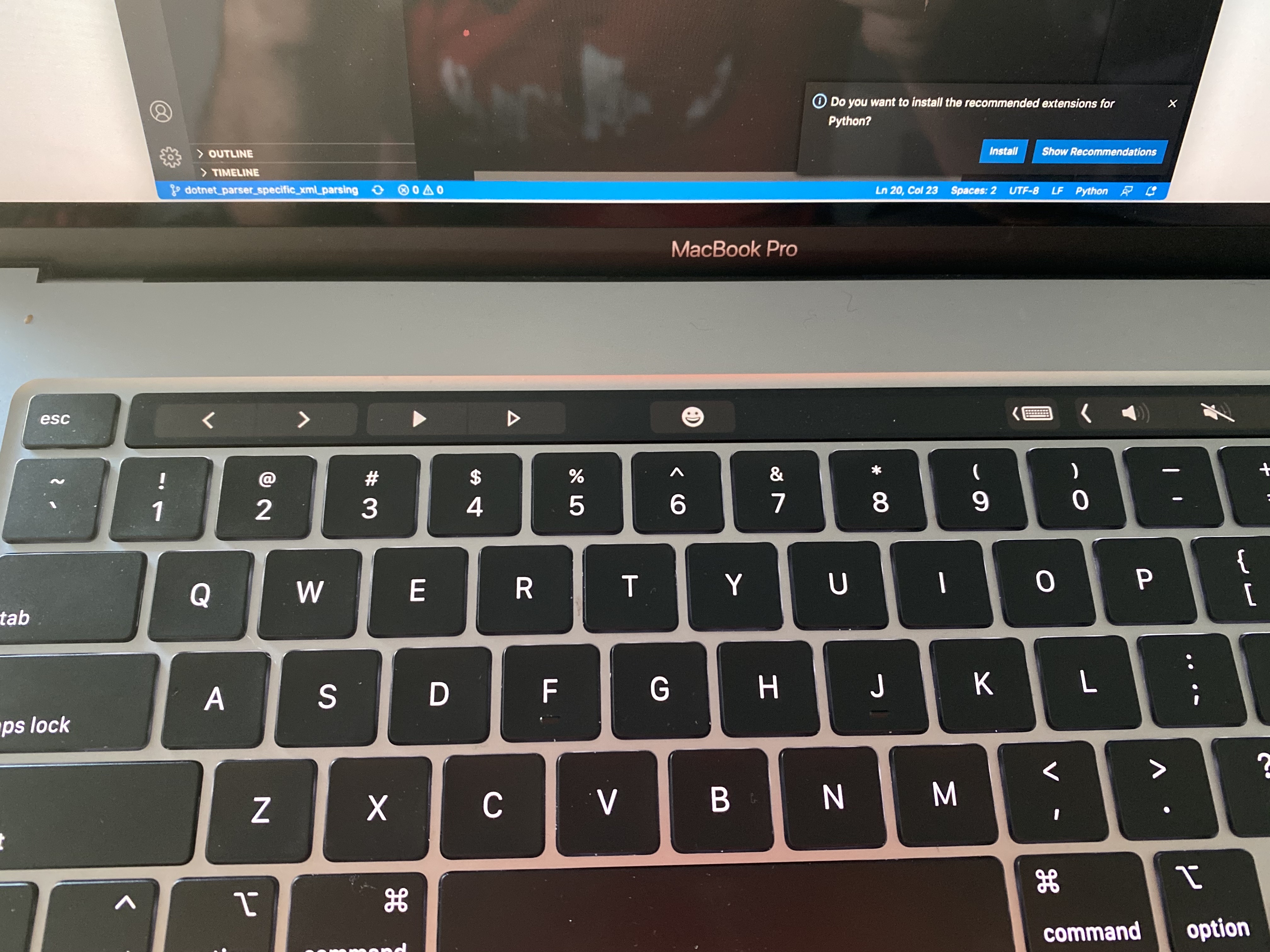
But if you click on the > next to the I character the play button should appear. Right?
So this has nothing to do with timing. The issue is that macOS with latest Electron seems to decide to show word suggestions in the touch bar when editor is focused.
Is there maybe an open Electron issue for this? @deepak1556
fyi @bpasero
isidorn
on 16 Sep 2020
Indeed it does!
And it seems to stay that way even as other editor windows are opened.
philipmat
on 16 Sep 2020
The issue is that macOS with latest Electron seems to decide to show word suggestions in the touch bar when editor is focused.
Yeah this is due to the previous fix being reverted in https://bugs.chromium.org/p/chromium/issues/detail?id=1024914#c11
@isidorn if you read that bug thread, there is lack of examples for vscode need to hide suggestions when autocorrect=off and spellcheck=false, might wanna pop up there and add your reason ? specifically in response to https://bugs.chromium.org/p/chromium/issues/detail?id=1024914#c9 . Thanks!
 deepak1556
on 16 Sep 2020
deepak1556
on 16 Sep 2020
@deepak1556 is this maybe the cause for https://github.com/microsoft/vscode/issues/106495 too?
 bpasero
on 16 Sep 2020
bpasero
on 16 Sep 2020
@deepak1556 thanks for the pointer. However that issue is "retired", should I just open a new duplicate issue or what is the best thing to do here?
isidorn
on 16 Sep 2020
Thanks for taking this up, @isidorn! The arrow key does solve the problem, hopefully the issue itself can be fixed over on Electron's side then. :)
stijnfrishert
on 16 Sep 2020
@isidorn yup opening a new bug with more details as to why this is a problem for vscode and linking to the old chromium bug would do. Thanks!
@bpasero yup this is the root cause for the other issue.
deepak1556
on 16 Sep 2020
I have opened this issue on the Chromium side https://bugs.chromium.org/p/chromium/issues/detail?id=1128972
isidorn
on 16 Sep 2020
What I'm seeing is that while the debug "play" button still appears if the text editor has focus and the keyboard suggestions are collapsed via the arrow button, if you actually _start debugging_, the debug controls (pause, step, etc) _only appear if the debug pane has the focus_.
(as in, even with the keyboard suggestions collapsed, that just means the touchbar will be empty)
 TheAlmightyBob
on 17 Sep 2020
TheAlmightyBob
on 17 Sep 2020
After discussion with @deepak1556 we would have to fix this issue on the electron side.
@TheAlmightyBob the issue is related when the editor has focus, if you are interested in more details please ready my comments from above. thanks.
isidorn
on 18 Sep 2020
For me pressing the arrow character on the Touch Bar does not bring back the debug buttons while the editor is active. As mentioned in #106948 I get this view:

The only way to bring them back is to have the side bar in focus.
 goda
on 18 Sep 2020
goda
on 18 Sep 2020
I can also confirm that this bug persists on Code 1.49.2 (in addition to the 1.49.0). (and I also realized how much I really used the step buttons on Touch Bar when debugging)
 canpoyrazoglu
on 29 Sep 2020
canpoyrazoglu
on 29 Sep 2020
This will be fixed in tomorrow's insider and upcoming stable 1.50
deepak1556
on 29 Sep 2020
Maybe if someone from the people on this issue could verify with todays insider build.
bpasero
on 30 Sep 2020
Unable to locate closing commit in issue timeline. You can manually reference a commit by commenting \closedWith someCommitSha.
![github-actions[bot] picture](https://avatars2.githubusercontent.com/in/15368?v=4&s=40) github-actions[bot]
on 30 Sep 2020
github-actions[bot]
on 30 Sep 2020
Maybe if someone from the people on this issue could verify with todays insider build.
Downloaded insider build and I've verified that the issue is no longer present on my machine.
Version: 1.50.0-insider
Commit: 0c50e1db17168a738235bd7e5c02b9f05ea5df59
Date: 2020-09-30T06:45:45.996Z (5 hrs ago)
Electron: 9.2.1
Chrome: 83.0.4103.122
Node.js: 12.14.1
V8: 8.3.110.13-electron.0
OS: Darwin x64 19.5.0
goda
on 30 Sep 2020
Thanks!
bpasero
on 30 Sep 2020
Yup, I got the 1.50.0 insider and I can confirm that the bug is fixed. Thanks!
canpoyrazoglu
on 4 Oct 2020
Related issues
 omidgolparvar
·
3Comments
omidgolparvar
·
3Comments
 biij5698
·
3Comments
biij5698
·
3Comments
 lukehoban
·
3Comments
lukehoban
·
3Comments
 sijad
·
3Comments
sijad
·
3Comments
 vsccarl
·
3Comments
vsccarl
·
3Comments
Most helpful comment
But if you click on the
>next to theIcharacter the play button should appear. Right?So this has nothing to do with timing. The issue is that macOS with latest Electron seems to decide to show word suggestions in the touch bar when editor is focused.
Is there maybe an open Electron issue for this? @deepak1556
fyi @bpasero