Vscode: SCM diff gutter is not working since v1.48
- VSCode Version: v1.48
- OS Version: Fedora 32
Steps to Reproduce:
- Use the vscode extension
- Make changes to a tracked file
- No gutter appears
Does this issue occur when all extensions are disabled?: Yes (with all other extensions apart from the svn one)
Works in VSCode v1.47.3
 JohnstonCode
All 22 comments
JohnstonCode
on 14 Aug 2020
Confirming the same behavior, diff gutters are gone.
VS Code: Version: 1.48.0
OS: Mac OS 10.12.4
 jordankaiser
on 14 Aug 2020
jordankaiser
on 14 Aug 2020
Confirming the same behavior in vscode-hg: https://github.com/mrcrowl/vscode-hg/issues/158
 hdpoliveira
on 15 Aug 2020
hdpoliveira
on 15 Aug 2020
Looking at git extension, seems it is using registerFileSystemProvider, while vscode-hg uses registerTextDocumentContentProvider. I'm not sure what the differences are between the two.
hdpoliveira
on 15 Aug 2020
I've reimplemented Mercurial's context provider in terms of registerFileSystemProvider and the gutter indicator works.
Used https://github.com/microsoft/vscode/blob/master/extensions/git/src/fileSystemProvider.ts as reference.
hdpoliveira
on 15 Aug 2020
@joaomoreno @mjbvz please let us know if SCM extensions should be moved to use FileSystemProvider or stick to TextDocumentContentProvider
FileSystemProvider was added to git on 7 Nov 2019 (https://github.com/microsoft/vscode/commit/5d60b7fdc4d1e22a951083ad1870153431265334)
TextDocumentContentProvider was removed from git on 15 Apr 2020 (https://github.com/microsoft/vscode/commit/b8512b2055f4cfa63971bd83f49ea4c835e9cfcc)
hdpoliveira
on 16 Aug 2020
since @joaomoreno is on vacation forwarding to @eamodio as he might know more
 isidorn
on 17 Aug 2020
isidorn
on 17 Aug 2020
@hdpoliveira As for a recommendation, I would say it depends on the use-case. If you were to start today, I would definitely recommend using a FileSystemProvider (even though its harder to use, it provides the ability to do a lot more and better deals with any encoding issues (since it uses the built-in vscode encoding mechanisms). At the same time, if you have a narrower use-case and TextDocumentContentProvider is fulfilling your needs, I don't see a reason to switch. And we aren't planning to deprecate the TextDocumentContentProvider or anything.
I will dig into what changed with the TextDocumentContentProvider that's causing this issue.
 eamodio
on 18 Aug 2020
eamodio
on 18 Aug 2020
Hi @eamodio !
I decided to switch to FileSystemProvider in Mercurial extesion, given that Git extension is using it and Perforce extension is too.
hdpoliveira
on 18 Aug 2020
I'm pretty sure this was introduced because of this commit: https://github.com/microsoft/vscode/commit/003a3678c879ee5e9a72ad9e5088d89672d75bd8, but still investigating a fix
eamodio
on 18 Aug 2020
@eamodio thanks for investigating, should this be a candidate (sounds like a regression, but not high impact). You would know better.
isidorn
on 18 Aug 2020
I can also confirm with @JohnstonCode, except my OS is Windows 10. I'm using SVN as the SCM.
 henry000dev
on 23 Aug 2020
henry000dev
on 23 Aug 2020
The issue has gone away - I can see the gutters are now available again with release 1.48.2.
henry000dev
on 26 Aug 2020
The issue has gone away - I can see the gutters are now available again with release 1.48.2.
The issue is still there for me - Ubuntu 18.04, vscode 1.48.2.
 RLThomaz
on 26 Aug 2020
RLThomaz
on 26 Aug 2020
Can confirm gutter diff is showing up again on 1.48.2 under Windows and Linux.
 brneor
on 26 Aug 2020
brneor
on 26 Aug 2020
Okay, gutter diff is showing up again, but only if you get the latest version of SVN-SCM (https://github.com/JohnstonCode/svn-scm/pull/1053), the fix was not due to the new VSCode release (1.48.2).
RLThomaz
on 27 Aug 2020
@joaomoreno @mjbvz please let us know if SCM extensions should be moved to use FileSystemProvider or stick to TextDocumentContentProvider
This was definitely an unintended breakage. Looking into where the assumption actually breaks down...
 joaomoreno
on 2 Sep 2020
joaomoreno
on 2 Sep 2020
I believe the wrong assumption lies here: https://github.com/microsoft/vscode/blob/018e9a21f1c50e8b09ff72e523bb431da36dc309/src/vs/workbench/contrib/scm/browser/dirtydiffDecorator.ts#L1145-L1145
This breaks down with model references coming in from TextDocumentContentProvider, in ref.object is an instance of ResourceEditorModel which does not implement IResolvedTextFileEditorModel. @bpasero I remember we did this together, can you guide towards a solution here?
joaomoreno
on 2 Sep 2020
Thanks to @bpasero for the help in fixing this!
joaomoreno
on 2 Sep 2020
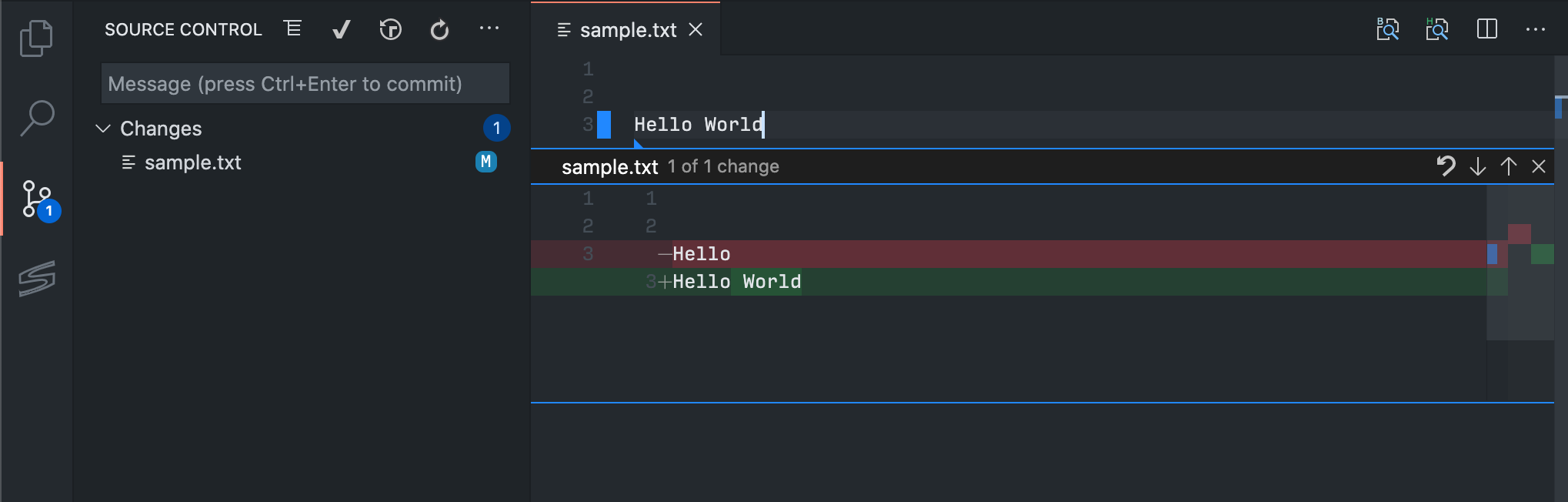
Confirmed that this works now works using an svn project:
 misolori
on 3 Sep 2020
misolori
on 3 Sep 2020
When will this fix be released? v1.49?
 DavidGoldman
on 3 Sep 2020
DavidGoldman
on 3 Sep 2020
@DavidGoldman yes, this will be in out in the August release (1.49) which should drop next week. It's already fixed on our Insiders (nightly build). You can also use Settings Sync to sync your settings/extensions/keybindings between Insiders and Stable.
misolori
on 3 Sep 2020
Related issues
 lukehoban
·
3Comments
lukehoban
·
3Comments
 mrkiley
·
3Comments
mrkiley
·
3Comments
 trstringer
·
3Comments
trstringer
·
3Comments
 VitorLuizC
·
3Comments
VitorLuizC
·
3Comments
 ryan-wong
·
3Comments
ryan-wong
·
3Comments
Most helpful comment
Thanks to @bpasero for the help in fixing this!