Vscode: NPM Scripts bar does not appear in sidebar explorer
Issue Type: Bug
The NPM Scripts bar does not appear anymore for some of my workspaces, while it appears in others for no apparent reason. I have scripts in all projects, they are in the "scripts" section of package.json.
It seems this this problem appeared in this latest update.
VS Code version: Code 1.48.0 (db40434f562994116e5b21c24015a2e40b2504e6, 2020-08-13T07:50:42.600Z)
OS version: Windows_NT x64 10.0.18363
Extensions (26)
Extension|Author (truncated)|Version
---|---|---
overtype|ada|0.2.0
vscode-css-formatter|aes|1.0.1
path-intellisense|chr|2.2.1
jsrefactor|cms|2.20.6
file-tree-to-text-generator|d-k|1.2.1
vscode-eslint|dba|2.1.8
LogFileHighlighter|emi|2.9.0
nunjucks-template|ese|0.3.1
git-commits|Exe|3.7.4
vscode-highlight|fab|1.4.1
todo-tree|Gru|0.0.178
git-last-commit-message|Jan|1.9.0
vue|jcb|0.1.5
hjson|lak|0.3.2
vetur|oct|0.26.1
vscode-sort-json|ric|1.18.0
live-sass|rit|3.0.0
LiveServer|rit|5.6.1
nunjucks|ron|0.3.0
vscode-scss-formatter|sib|2.0.1
code-spell-checker|str|1.9.0
code-spell-checker-portuguese-brazilian|str|0.1.2
language-stylus|sys|1.11.0
es6-string-html|Tob|1.8.8
txt-syntax|xsh|0.0.4
markdown-all-in-one|yzh|3.2.0
 leosdad
All 17 comments
@leosdad, just a friendly note: The NPM Scripts section won't appear if you don't have a package.json in the root directory of your workspace.
 RudiVuuren
on 14 Aug 2020
RudiVuuren
on 14 Aug 2020
@leosdad, just a friendly note: The NPM Scripts section won't appear if you don't have a package.json in the root directory of your workspace.
Thanks. As said above, I have package.json in all projects.
leosdad
on 14 Aug 2020
@leosdad are you able to get the NPM Scripts view to appear by clicking the "..." on the EXPLORER header bar and picking it from the menu?
I think some work was done in 1.48 affecting whether this view shows by default.
 gjsjohnmurray
on 14 Aug 2020
gjsjohnmurray
on 14 Aug 2020
See also #104591
gjsjohnmurray
on 14 Aug 2020
/duplicate
gjsjohnmurray
on 14 Aug 2020
Thanks for creating this issue! We figured it's covering the same as another one we already have. Thus, we closed this one as a duplicate. You can search for existing issues here. See also our issue reporting guidelines.
Happy Coding!
 vscode-triage-bot
on 14 Aug 2020
vscode-triage-bot
on 14 Aug 2020
@leosdad are you able to get the NPM Scripts view to appear by clicking the "..." on the EXPLORER header bar and picking it from the menu?
I think some work was done in 1.48 affecting whether this view shows by default.
Thanks, but no. View / Open View also does not show it.
I'll break it all down using four different projects of mine. These were captured from project 1 ("web"):
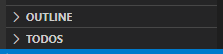

Here's a snippet of its package.json:
{
  "scripts": {
    "serve": "vue-cli-service serve --port 8085",
    "build": "vue-cli-service build",
    "lint": "vue-cli-service lint",
    "doc": "jsdoc --configure jsdoc.json"
  },
}
I tried pasting all package.jsons, but this post became too long.
Project 2 ("ide") has the same bug, i.e. it also does not show the NPM Scripts bar / menu.
On the other hand, here are screen captures from project # 3 ("builder") that has no NPM scripts:
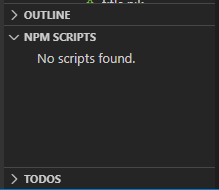
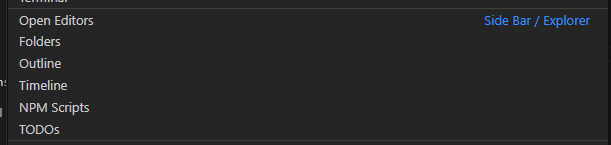
Finally, here's the capture from project # 4 ("sat") that does have scripts:
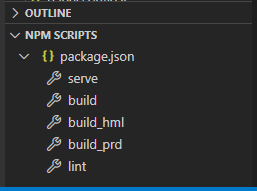
To summarize:
| # | Project | Has scripts | Project.json | Shows NPM Scripts bar |
|----|----|----|----|----|
|1|web|yes|yes|no|
|2|ide|yes|yes|no|
|3|builder|no|yes|yes|
|4|sat|yes|yes|yes|
So that's not the same as issue #104591. All projects use package.json, so this issue is being caused by something else.
leosdad
on 14 Aug 2020
@alexr00 please reopen this and investigate.
gjsjohnmurray
on 14 Aug 2020
@leosdad thanks for the break down. Just to make sure I'm understanding the setup of "web" and "ide" correctly can you confirm: Do both "web" and "ide" have a package.json file _at the root of the project_? You clearly state that you have a package.json in all projects, but is it in a folder at the root? I'm sorry to be repetitive, but since I can't repro the issue I want to make sure I understand what's going on.
Are any of the projects you're seeing the issue on available publicly? I'd like to clone it and see if I can repro the issue.
 alexr00
on 14 Aug 2020
alexr00
on 14 Aug 2020
Hmmmm. Yes, there are differences. The ones where the Npm Scripts bar do not appear are the ones where package.json is not in the same folder as the .code-workspace file. But I don't recall this being a problem before, and I still think the bar should appear nonetheless. Is there any setting to inform the location of package.json?
leosdad
on 14 Aug 2020
@leosdad its looking like you are seeing https://github.com/microsoft/vscode/issues/104591. The NPM scripts explorer should appear as shown below, but because of https://github.com/microsoft/vscode/issues/104591, it's missing from there. In workspaces where you previously had the NPM script explorer visible there should have been no change; however, https://github.com/microsoft/vscode/issues/104591 causes it to vanish from there too.

The easiest way to determine if the fix for https://github.com/microsoft/vscode/issues/104591 will solve your issue is for you to install the VS Code Insiders build on Monday. It installs side by side with stable, so it's easy to try. Note that the NPM scripts view will only appear as in the gif above (instead of being visible in the sidebar) since you haven't used insiders before.
alexr00
on 14 Aug 2020
Just did that, installed Insiders, but no dice. It's just the same. In project "ide" all I get is:
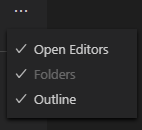
And in project "web":
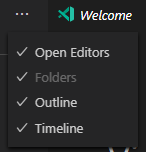
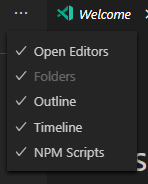
It's okay with project "builder", though:
leosdad
on 14 Aug 2020
Are any of the projects you're seeing the issue on available publicly? I'd like to clone it and see if I can repro the issue.
Unfortunately not. I can send you my project.json and .code-workspace files, though.
leosdad
on 14 Aug 2020
@leosdad the fix was only merged today and isn't available in Insiders yet, which is why I suggested Monday.
alexr00
on 14 Aug 2020
Oh, next Monday. Okay, I'll surely try it then. Many thanks for now.
leosdad
on 14 Aug 2020
Yep, the insiders version works as it should. The NPM Scripts bar is working again.
leosdad
on 17 Aug 2020
Thanks for creating this issue! We figured it's covering the same as another one we already have. Thus, we closed this one as a duplicate. You can search for existing issues here. See also our issue reporting guidelines.
Happy Coding!
vscode-triage-bot
on 17 Aug 2020
Related issues
 omidgolparvar
·
3Comments
omidgolparvar
·
3Comments
 biij5698
·
3Comments
biij5698
·
3Comments
 trstringer
·
3Comments
trstringer
·
3Comments
 ryan-wong
·
3Comments
ryan-wong
·
3Comments
 vsccarl
·
3Comments
vsccarl
·
3Comments
Most helpful comment
Yep, the insiders version works as it should. The NPM Scripts bar is working again.