Vscode: Preference Sync wont' turn on due to cloud sync being turned off
Issue Type: Bug
I'm attempting to use vscode-insiders to try out the preferences sync feature. However, when trying to turn it on, it immediately turns off because saying that syncing is turned off in the cloud. I'm not really sure how to enable syncing in the cloud. I'm signing in using a GitHub account.
Output Log:
[2020-07-17 20:31:06.094] [userDataSync] [info] Did reset the local sync state.
[2020-07-17 20:31:06.423] [userDataSync] [info] Settings: Skipped synchronizing settings as it is running already.
[2020-07-17 20:31:07.232] [userDataSync] [info] GlobalState: Skipped synchronizing globalstate as it is disabled.
[2020-07-17 20:31:07.232] [userDataSync] [info] Extensions: Skipped synchronizing extensions as it is running already.
[2020-07-17 20:31:07.235] [userDataSync] [info] Keybindings: No changes found during synchronizing keybindings.
[2020-07-17 20:31:07.244] [userDataSync] [info] Keybindings: Updated last synchronized keybindings
[2020-07-17 20:31:07.245] [userDataSync] [info] Snippets: No changes found during synchronizing snippets.
[2020-07-17 20:31:07.254] [userDataSync] [info] Snippets: Updated last synchronized snippets
[2020-07-17 20:31:07.257] [userDataSync] [info] Auto Sync: Started
[2020-07-17 20:31:07.257] [userDataSync] [info] Auto Sync: Triggered by Interval
[2020-07-17 20:31:07.640] [userDataSync] [error] TurnedOff (UserDataSyncError) syncResource:unknown operationId:unknown: Cannot sync because syncing is turned off in the cloud
at y.doSync (file:///Applications/Visual Studio Code - Insiders.app/Contents/Resources/app/out/vs/code/electron-browser/sharedProcess/sharedProcessMain.js:518:742)
[2020-07-17 20:31:07.640] [userDataSync] [info] Auto Sync: Disabled because sync is disabled
[2020-07-17 20:31:07.640] [userDataSync] [info] Auto Sync: Stopped
[2020-07-17 20:31:07.643] [userDataSync] [info] Did reset the local sync state.
[2020-07-17 20:31:07.643] [userDataSync] [info] Auto Sync: Turned off sync because sync is turned off in the cloud
VS Code version: Code - Insiders 1.48.0-insider (ff6b1c5984a4c2116a06318f07e871a4169fdb1b, 2020-07-17T13:13:00.639Z)
OS version: Darwin x64 19.5.0
System Info
|Item|Value|
|---|---|
|CPUs|Intel(R) Core(TM) i7-9750H CPU @ 2.60GHz (12 x 2600)|
|GPU Status|2d_canvas: enabled
flash_3d: enabled
flash_stage3d: enabled
flash_stage3d_baseline: enabled
gpu_compositing: enabled
metal: disabled_off
multiple_raster_threads: enabled_on
oop_rasterization: disabled_off
opengl: enabled_on
protected_video_decode: unavailable_off
rasterization: enabled
skia_renderer: disabled_off_ok
video_decode: enabled
viz_display_compositor: enabled_on
webgl: enabled
webgl2: enabled|
|Load (avg)|3, 3, 2|
|Memory (System)|16.00GB (0.14GB free)|
|Process Argv||
|Screen Reader|no|
|VM|0%|
Extensions: none
 jobara
All 7 comments
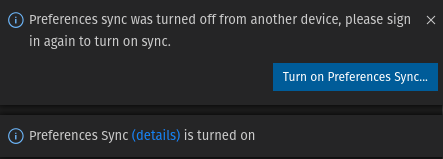
Getting same error over here...
 pmualaba
on 18 Jul 2020
pmualaba
on 18 Jul 2020
pmualaba
on 18 Jul 2020
I'm seeing the same as @pmualaba.
 olsnacky
on 19 Jul 2020
olsnacky
on 19 Jul 2020
+1
 bluprince13
on 19 Jul 2020
bluprince13
on 19 Jul 2020
I just noticed the same behaviour, tried with both Microsoft and GitHub account. I had no previous Preferences Sync setup before today.
~A possible workaround that I can't quite verify at the moment (I can't see where the sync data is stored in my Microsoft account and haven't setup a second system to sync to yet):~
Workaround:
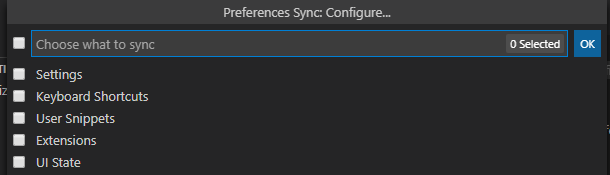
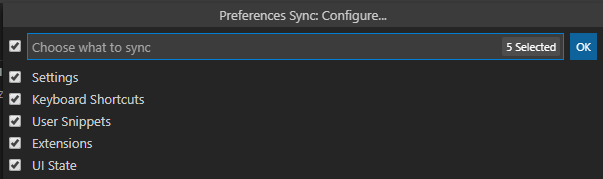
If I setup to sync with all config unchecked, syncing nothing I guess, I do not get the above "turned off" message. I can then turn all those setting on and then sync I get "Sync done" in the logs and no "turned off" message following that.
Edit:
Tested and the settings did sync up after the workaround.
For clarity sake, the workaround is:
first sync like this
then sync like this
 aglasson
on 20 Jul 2020
aglasson
on 20 Jul 2020
@aglasson 's solution worked for me also.
I'm guessing this is a common bug
 mattmogford
on 20 Jul 2020
mattmogford
on 20 Jul 2020
This is fixed in latest insiders.
Please update your insiders and let us know if you are still setting this issue.
 sandy081
on 23 Jul 2020
sandy081
on 23 Jul 2020
Related issues
 biij5698
·
3Comments
biij5698
·
3Comments
 curtw
·
3Comments
curtw
·
3Comments
 chrisdias
·
3Comments
chrisdias
·
3Comments
 shanalikhan
·
3Comments
shanalikhan
·
3Comments
 sijad
·
3Comments
sijad
·
3Comments
Most helpful comment
I just noticed the same behaviour, tried with both Microsoft and GitHub account. I had no previous Preferences Sync setup before today.
~A possible workaround that I can't quite verify at the moment (I can't see where the sync data is stored in my Microsoft account and haven't setup a second system to sync to yet):~
Workaround:
If I setup to sync with all config unchecked, syncing nothing I guess, I do not get the above "turned off" message. I can then turn all those setting on and then sync I get "Sync done" in the logs and no "turned off" message following that.
Edit:


Tested and the settings did sync up after the workaround.
For clarity sake, the workaround is:
first sync like this
then sync like this