Vscode: Terminal filled with ^[[D^[[D^[[D^[[D when alt-clicking a link
- VSCode Version: 1.46.1
- OS Version: Ubuntu 20.04 LTS x86_64
- shell: bash
When alt-clicking in terminal (e. g. to open a file or URL), it gets filled up with lots of ^[[D^[[D^[[D^[[D or ^[[C^[[C^[[C^[[C:

Steps to Reproduce:
- Open integrated terminal
- Run
read(or, for a more practical example,yarn create react-app . && yarn startin a temp dir) - Alt-click anywhere
Does this issue occur when all extensions are disabled?: Yes
 notpushkin
All 15 comments
Having the same issue in WSL with Ubuntu 18.04 when alt+clicking any link.
```
Copied 111 files / Wrote 420 files in 3.46 seconds (8.2ms each, v0.11.0)
Watching…
[Browsersync] Access URLs:
   Local: http://localhost:8080
External: http://192.168.1.205:8080
UI: http://localhost:3001
UI External: http://localhost:3001
[Browsersync] Serving files from: _site
^[[D^[[D^[[D^[[D^[[D^[[D^[[D^[[D^[[D^[[D^[[D^[[D^[[D^[[D^[[D^[[D^[[D^[[D^[[D^[[D^[[D^[[D^[[D^[[D^[[D^[[D^[[D^[[D^[[D^[[D^[[D^[[D^[[D^[[D^[[D^[[D^[[D^[[D^[[D^[[D^[[D^[[D^[[D^[[D^[[D^[[D^[[D^[[D^[[D^[[D^[[D^[[D^[[D^[[D^[[D^[[D^[[D^[[D^[[D^[[D^[[D^[[D^[[D^[[D^[[D^[[D^[[D^[[D^[[D^[[D^[[D^[[D^[[D^[[D^[[D^[[D^[[D^[[D^[[D^[[D^[[D^[[D^[[D^[[D^[[D^[[D^[[D^[[D^[[D^[[D^[[D^[[D^[[D^[[D^[[D^[[D^[[D^[[D^[[D^[[D^[[D^[[D^[[D^[[D^[[D^[[D^[[D^[[D^[[D^[[D^[[D^[[D^[[D^[[D^[[D^[[D^[[D^[[D^[[D^[[D^[[D^[[D^[[D^[[D^[[D^[[D^[[D^[[D^[[D^[[D^[[D^[[D^[[D^[[D^[[D^[[D^[[D^[[D^[[D^[[D^[[D^[[D^[[D^[[D^[[D^[[D^[[D^[[D^[[D^[[D^[[D^[[D^[[D^[[D^[[D^[[D^[[D^[[D^[[D^[[D^[[D^[[D^[[D^[[D^[[D^[[D^[[D^[[D^[[D^[[D^[[D^[[D^[[D^[[D^[[D^[[D^[[D^[[D^[[D^[[D^[[D^[[D^[[D^[[D^[[D^[[D^[[D^[[D^[[D^[[D^[[D^[[D^[[D^[[D^[[D^[[D^[[D^[[D^[[D^[[D^[[D^[[D^[[D^[[D^[[D^[[D^[[D^[[D^[[D^[[D^[[D^[[D^[[D^[[D^[[D^[[D^[[D^[[D^[[D^[[D^[[D^[[D^[[D^[[D^[[D^[[D^[[D^[[D^[[D^[[D^[[D^[[D^[[D^[[D^[[D^[[D^[[D^[[D^[[D^[[D^[[D^[[D^[[D^[[D^[[D^[[D^[[D^[[D^[[D^[[D^[[D^[[D^[[D^[[D^[[D^[[D^[[D^[[D^[[D^[[D^[[D^[[D^[[D^[[D^[[D^[[D^[[D^[[D^[[D^[[D^[[D^[[D^[[D^[[D^[[D^[[D^[[D^[[D^[[D^[[D^[[D^[[D^[[D^[[D^[[D^[[D^[[D^[[D^[[D^[[D^[[D^[[D^[[D^[[D^[[D^[[D^[[D^[[D^[[D^[[D^[[D^[[D^[[D^[[D^[[D^[[D^[[D^[[D^[[D^[[D^[[D^[[D^[[D^[[D^[[D^[[D^[[D^[[D^[[D^[[D^[[D^[[D^[[D^[[D^[[D^[[D^[[D^[[D^[[D^[[D^[[D^[[D^[[D^[[D^[[D^[[D^[[D^[[D```
 davatron5000
on 30 Jun 2020
davatron5000
on 30 Jun 2020
Looks like this is an issue where the alt+click feature (move cursor when clicking) is conflicting with links, only when "editor.multiCursorModifier": "ctrlCmd" is used.
 Tyriar
on 7 Jul 2020
Tyriar
on 7 Jul 2020
This issue also occurs on MacOS, only with Opt+Click instead of Alt+Click.
I thought at first that this was related to the Opt+Click on a detected link in the terminal (since that is an Alt+Click on Windows/Linux). But this truly does occur when Opt+Clicking anywhere in the terminal while a read command is waiting for input.
@Tyriar I can confirm that this occurs on my MacOS regardless of the value of "editor.multiCursorModifier" setting.
 securedirective
on 14 Aug 2020
securedirective
on 14 Aug 2020
set "terminal.integrated.macOptionIsMeta": true in setting.json , now the way you click url is cmd + click, and it wont happen again
 yulinfeng000
on 14 Aug 2020
yulinfeng000
on 14 Aug 2020
@yulinfeng000, nope, that only slightly changes the junk that is dumped into the Terminal, but it doesn't get rid of it...
With "terminal.integrated.macOptionIsMeta": false (default):
11:20:12 0 user@laptop ~ > read -p "Type something: " testvar
Type something: ^[[C^[[C^[[C^[[C^[[C^[[C^[[C^[[C^[[C^[[C^[[C^[[C^[[C^[[C^[[C^[[C^[[C^[[C^[[C^[[C^[[C^[[C^[[C^[[C^[[C^[[C^[[C^[[C^[[C^[[C^[[C^[[C^[[C^[[C^[[C^[[C^[[C^[[C^[[C^[[C^[[C^[[C^[[C^[[C^[[C^[[C^[[C^[[C^[[C^[[C^[[C^[[C^[[C^[[C^[[C^[[C^[[C^[[C^[[C^[[C^[[C^[[C^[[C^[[C^[[C^[[C^[[C^[[C^[[C^[[C^[[C^[[C^[[C^[[C^[[C^[[C^[[C^[[C^[[C^[[C^[[C^[[C^[[C^[[C^[[C^[[C^[[C^[[C^[[C^[[C^[[C^[[C^[[C^[[C^[[C^[[C^[[C^[[C^[[C^[[C^[[C^[[C^[[C^[[C^[[C^[[C^[[C^[[C^[[C^[[C^[[C^[[C^[[C^[[C^[[C^[[C^[[C^[[C^[[C^[[C^[[C^[[C^[[C^[[C^[[C^[[C^[[C^[[C^[[C^[[C^[[C^[[C^[[C^[[C^[[C^[[C^[[C^[[C^[[C^[[C^[[C^[[C^[[C^[[C^[[C^[[C^[[C^[[C^[[C^[[C^[[C^[[C^[[C^[[C^[[C^[[C^[[C^[[C^[[C^[[C^[[C^[[C^[[C^[[C^[[C^[[C^[[C^[[C^[[C^[[C^[[C^[[C^[[C^[[C^[[C^[[C^[[C^[[C^[[C^[[C^[[C^[[C^[[C^[[C^[[C^[[C^[[C^[[C^[[C^[[C^[[C^[[C^[[C^[[C^[[C^[[C^[[C^[[C^[[C^[[C^[[C^[[C^[[C^[[C^[[C^[[C^[[C^[[C^[[C^[[C^[[C^[[C^[[C^[[C^[[C^[[C^[[C^[[C^[[C^[[C^[[C^[[C^[[C^[[C^[[C^[[C^[[C^[[C^[[C^[[C^[[C^[[C^[[C^[[C^[[C^[[C^[[C^[[C^[[C^[[C^[[C^[[C^[[C^[[C^[[C^[[C^[[C^[[C^[[C^[[C^[[C^[[C^[[C^[[C^[[C^[[C^C
With "terminal.integrated.macOptionIsMeta": true:
11:20:35 0 user@laptop ~ > read -p "Type something: " testvar
Type something: ^[[D^[[D^[[D^[[D^[[D^[[D^[[D^[[D^[[D^[[D^[[D^[[D^[[D^[[D^[[D^[[D^[[D^[[D^[[D^[[D^[[D^[[D^[[D^[[D^[[D^[[D^[[D^[[D^[[D^[[D^[[D^[[D^[[D^[[D^[[D^[[D^[[D^[[D^[[D^[[D^[[D^[[D^[[D^[[D^[[D^[[D^[[D^[[D^[[D^[[D^[[D^[[D^[[D^[[D^[[D^[[D^[[D^[[D^[[D^[[D^[[D^[[D^[[D^[[D^[[D^[[D^[[D^[[D^[[D^[[D^[[D^[[D^[[D^[[D^[[D^[[D^[[D^[[D^[[D^[[D^[[D^[[D^[[D^[[D^[[D^[[D^[[D^[[D^[[D^[[D^[[D^[[D^[[D^[[D^[[D^[[D^[[D^[[D^[[D^[[D^[[D^[[D^[[D^[[D^[[D^[[D^[[D^[[D^[[D^[[D^[[D^[[D^[[D^[[D^[[D^[[D^[[D^[[D^[[D^[[D^[[D^[[D^[[D^[[D^[[D^[[D^[[D^[[D^[[D^[[D^[[D^[[D^[[D^[[D^[[D^[[D^[[D^[[D^[[D^[[D^[[D^[[D^[[D^[[D^[[D^[[D^[[D^[[D^[[D^[[D^[[D^[[D^[[D^[[D^[[D^[[D^[[D^[[D^[[D^[[D^[[D^[[D^[[D^[[D^[[D^[[D^[[D^[[D^[[D^[[D^[[D^[[D^[[D^[[D^[[D^[[D^[[D^[[D^[[D^[[D^[[D^[[D^[[D^[[D^[[D^[[D^[[D^[[D^[[D^[[D^[[D^[[D^[[D^[[D^[[D^[[D^[[D^[[D^[[D^[[D^[[D^[[D^[[D^[[D^[[D^[[D^[[D^[[D^[[D^[[D^[[D^[[D^[[D^[[D^[[D^[[D^[[D^[[D^[[D^[[D^[[D^[[D^[[D^[[D^[[D^[[D^[[D^[[D^[[D^[[D^[[D^[[D^[[D^[[D^[[D^[[D^[[D^[[D^[[D^[[D^[[D^[[D^[[D^[[D^[[D^[[D^[[D^[[D^[[D^[[D^[[D^[[D^[[D^[[D^[[D^[[D^C
@yulinfeng000, nope, that only slightly changes the junk that is dumped into the Terminal, but it doesn't get rid of it...
With
"terminal.integrated.macOptionIsMeta": false(default):11:20:12 0 user@laptop ~ > read -p "Type something: " testvar Type something: ^[[C^[[C^[[C^[[C^[[C^[[C^[[C^[[C^[[C^[[C^[[C^[[C^[[C^[[C^[[C^[[C^[[C^[[C^[[C^[[C^[[C^[[C^[[C^[[C^[[C^[[C^[[C^[[C^[[C^[[C^[[C^[[C^[[C^[[C^[[C^[[C^[[C^[[C^[[C^[[C^[[C^[[C^[[C^[[C^[[C^[[C^[[C^[[C^[[C^[[C^[[C^[[C^[[C^[[C^[[C^[[C^[[C^[[C^[[C^[[C^[[C^[[C^[[C^[[C^[[C^[[C^[[C^[[C^[[C^[[C^[[C^[[C^[[C^[[C^[[C^[[C^[[C^[[C^[[C^[[C^[[C^[[C^[[C^[[C^[[C^[[C^[[C^[[C^[[C^[[C^[[C^[[C^[[C^[[C^[[C^[[C^[[C^[[C^[[C^[[C^[[C^[[C^[[C^[[C^[[C^[[C^[[C^[[C^[[C^[[C^[[C^[[C^[[C^[[C^[[C^[[C^[[C^[[C^[[C^[[C^[[C^[[C^[[C^[[C^[[C^[[C^[[C^[[C^[[C^[[C^[[C^[[C^[[C^[[C^[[C^[[C^[[C^[[C^[[C^[[C^[[C^[[C^[[C^[[C^[[C^[[C^[[C^[[C^[[C^[[C^[[C^[[C^[[C^[[C^[[C^[[C^[[C^[[C^[[C^[[C^[[C^[[C^[[C^[[C^[[C^[[C^[[C^[[C^[[C^[[C^[[C^[[C^[[C^[[C^[[C^[[C^[[C^[[C^[[C^[[C^[[C^[[C^[[C^[[C^[[C^[[C^[[C^[[C^[[C^[[C^[[C^[[C^[[C^[[C^[[C^[[C^[[C^[[C^[[C^[[C^[[C^[[C^[[C^[[C^[[C^[[C^[[C^[[C^[[C^[[C^[[C^[[C^[[C^[[C^[[C^[[C^[[C^[[C^[[C^[[C^[[C^[[C^[[C^[[C^[[C^[[C^[[C^[[C^[[C^[[C^[[C^[[C^[[C^[[C^[[C^[[C^[[C^[[C^[[C^[[C^[[C^[[C^[[C^[[C^[[C^[[C^[[C^[[C^[[C^[[C^[[C^[[C^[[C^[[C^[[C^[[C^CWith
"terminal.integrated.macOptionIsMeta": true:11:20:35 0 user@laptop ~ > read -p "Type something: " testvar Type something: ^[[D^[[D^[[D^[[D^[[D^[[D^[[D^[[D^[[D^[[D^[[D^[[D^[[D^[[D^[[D^[[D^[[D^[[D^[[D^[[D^[[D^[[D^[[D^[[D^[[D^[[D^[[D^[[D^[[D^[[D^[[D^[[D^[[D^[[D^[[D^[[D^[[D^[[D^[[D^[[D^[[D^[[D^[[D^[[D^[[D^[[D^[[D^[[D^[[D^[[D^[[D^[[D^[[D^[[D^[[D^[[D^[[D^[[D^[[D^[[D^[[D^[[D^[[D^[[D^[[D^[[D^[[D^[[D^[[D^[[D^[[D^[[D^[[D^[[D^[[D^[[D^[[D^[[D^[[D^[[D^[[D^[[D^[[D^[[D^[[D^[[D^[[D^[[D^[[D^[[D^[[D^[[D^[[D^[[D^[[D^[[D^[[D^[[D^[[D^[[D^[[D^[[D^[[D^[[D^[[D^[[D^[[D^[[D^[[D^[[D^[[D^[[D^[[D^[[D^[[D^[[D^[[D^[[D^[[D^[[D^[[D^[[D^[[D^[[D^[[D^[[D^[[D^[[D^[[D^[[D^[[D^[[D^[[D^[[D^[[D^[[D^[[D^[[D^[[D^[[D^[[D^[[D^[[D^[[D^[[D^[[D^[[D^[[D^[[D^[[D^[[D^[[D^[[D^[[D^[[D^[[D^[[D^[[D^[[D^[[D^[[D^[[D^[[D^[[D^[[D^[[D^[[D^[[D^[[D^[[D^[[D^[[D^[[D^[[D^[[D^[[D^[[D^[[D^[[D^[[D^[[D^[[D^[[D^[[D^[[D^[[D^[[D^[[D^[[D^[[D^[[D^[[D^[[D^[[D^[[D^[[D^[[D^[[D^[[D^[[D^[[D^[[D^[[D^[[D^[[D^[[D^[[D^[[D^[[D^[[D^[[D^[[D^[[D^[[D^[[D^[[D^[[D^[[D^[[D^[[D^[[D^[[D^[[D^[[D^[[D^[[D^[[D^[[D^[[D^[[D^[[D^[[D^[[D^[[D^[[D^[[D^[[D^[[D^[[D^[[D^[[D^[[D^[[D^[[D^[[D^[[D^[[D^[[D^[[D^[[D^[[D^[[D^[[D^[[D^[[D^[[D^C
emmm, you say is right, i just change a way to open url in vscode terminal to avoid echo ^[[D but not fix it , this also occurs in terminal.app, item.app if you use option + click.
by the way,my final setting as follows
  "editor.multiCursorModifier": "alt",
 "terminal.integrated.macOptionIsMeta": true
(if "editor.multiCursorModifier": "ctrlcmd" , vscode still let you click url with option + click )
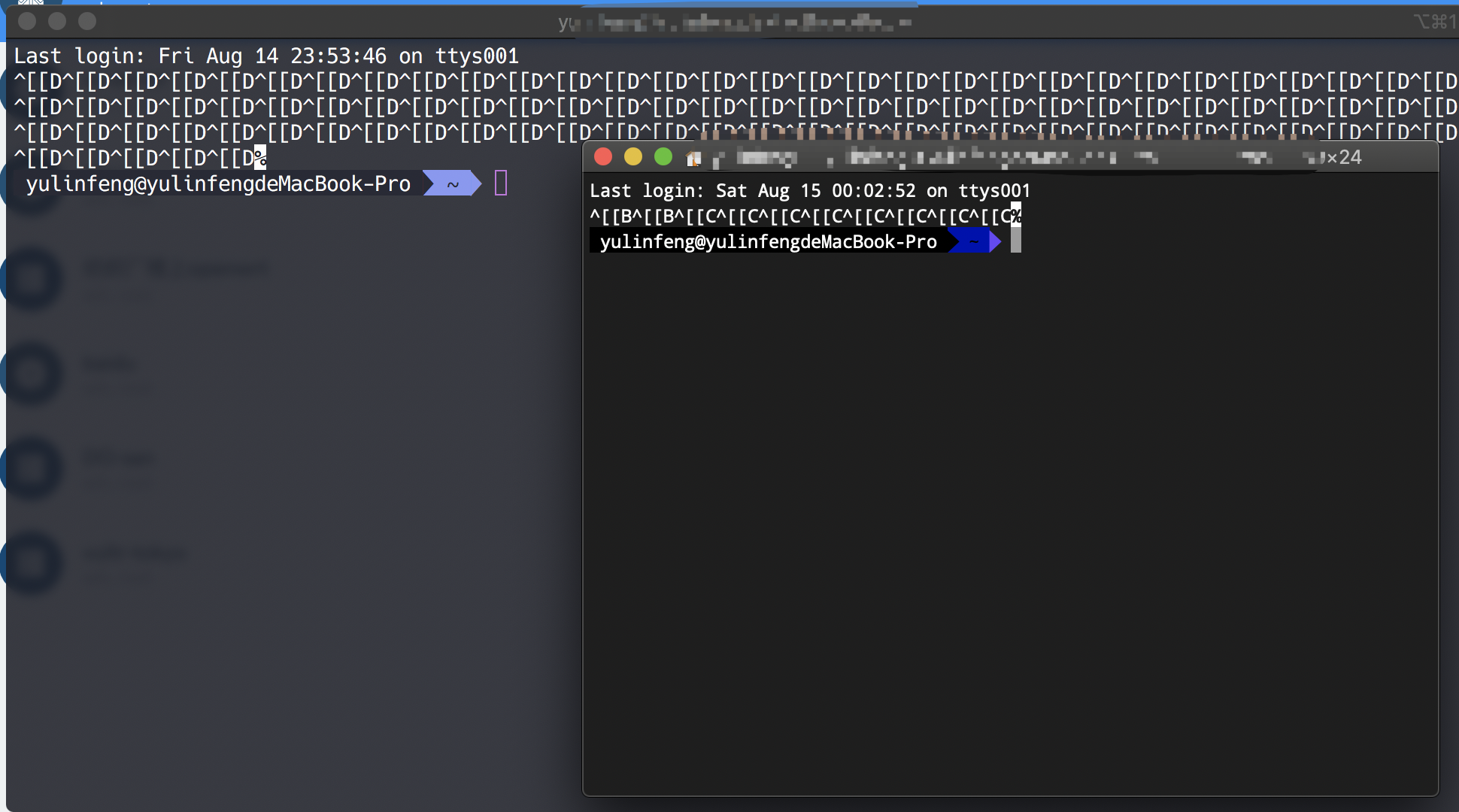
yulinfeng000
on 14 Aug 2020
Oh! That's a great observation, @yulinfeng000.... Alt+Click fills the terminal with junk even in the standard MacOS Terminal app and also in iTerm2.
Now, I am aware that @notpushkin is originally reporting this for Ubuntu. I checked my Linux laptop (Fedora 31), and Alt+Click in the standard system terminal emulator does nothing. It only occurs in VSCode's terminal.
But this still makes me wonder if all of this is system-level issues, or perhaps terminal "emulator" issues, not really a VSCode issue. Hard to know. But the Microsoft devs would know.
securedirective
on 14 Aug 2020
As for your workaround, @yulinfeng000, thank you so much for that!!! I still don't see any change in VSCode's behavior when using "terminal.integrated.macOptionIsMeta": true, but changing "editor.multiCursorModifier" definitely avoids the core issue.
I hope you don't mind me describing in more detail...
- According to VSCode documentation for editor.multiCursorModifier, "The Go To Definition and Open Link gestures will also respect this setting and adapt such that they do not conflict. For example, when the setting is ctrlCmd, multiple cursors can be added with Ctrl/Cmd+Click, and opening links or going to definition can be invoked with Alt+Click."
- You probably did what I did when originally installing VSCode... I'm using to using Ctrl+Click in Linux and Cmd+Click in MacOS to multi-select files in Finder, items in a list, etc. So I set
"editor.multiCursorModifier"to bectrlCmd. However, this means that attempting to click on a link in the terminal (for example, an error message referencing the offending line in your source code) requires the use of the other shortcut (Alt + Click). - Since it seems that Linux and MacOS have various strange behaviors when Alt + Clicking in a terminal, you are suggesting we switch back to the default
"editor.multiCursorModifier": "alt". Now we'll use Ctrl+Click / Cmd+Click to follow links in the Terminal, avoiding all that ^[[D^[[D^[[D^[[D nonsense that sometimes causes the terminal to hang. - For multi-selecting in the editor window, we'll have to get used to using Alt + Click for that, but in my opinion, that is better than having terminal hanging issues unexpectedly.
securedirective
on 14 Aug 2020
So to clarify what I originally posted to @Tyriar... Alt+Click will still cause junk to fill the screen, regardless of the value of "editor.multiCursorModifier" setting. However, the above workaround means we don't need the Alt+Click anymore.
securedirective
on 14 Aug 2020
Alt+Click will still cause junk to fill the screen
@securedirective it's a feature that's sending keys to move the terminal cursor to the position of the mouse cursor. It needs support in whatever program is running in the terminal though which is why you might see the ^[[D printed, we cannot detect this support though. The advice right now is to avoid alt clicking if it doesn't work in the program.
Tyriar
on 3 Sep 2020
@Tyriar could you clarify... Is this a feature in Linux that's doing it, and vscode is not able to see that it's happening? Or do you mean this is a feature in vscode to move the cursor, and vscode is not able to tell if the terminal shell supports it?
securedirective
on 3 Sep 2020
@securedirective it's a feature in vscode/xterm.js, you can see the PR here https://github.com/xtermjs/xterm.js/pull/896
Tyriar
on 3 Sep 2020
@Tyriar, what an interesting feature, and I never even knew that was there. Thank you for the perspective.
I looked through that PR and searched the settings in VSCode; unfortunately, there doesn't seem to be any way to disable that cursor-moving feature.
securedirective
on 4 Sep 2020
Yeah, that feature might be useful but the ability to disable it or, even better, change a modifier to another one (so that it doesn't conflict with the “open file in editor” one) :)
notpushkin
on 4 Sep 2020
I'm seeing this happen regardless of the "editor.multiCursorModifier" setting, on Ubuntu 18.04
 matthias-ccri
on 27 Oct 2020
matthias-ccri
on 27 Oct 2020
Related issues
 villiv
·
3Comments
villiv
·
3Comments
 curtw
·
3Comments
curtw
·
3Comments
 ryan-wong
·
3Comments
ryan-wong
·
3Comments
 sijad
·
3Comments
sijad
·
3Comments
 borekb
·
3Comments
borekb
·
3Comments
Most helpful comment
Looks like this is an issue where the alt+click feature (move cursor when clicking) is conflicting with links, only when
"editor.multiCursorModifier": "ctrlCmd"is used.