Vscode: Changes view: harder for me to understand "clean" state for a repo
One thing I am not so happy about the new changes UX is that I often think that the other repos are dirty changes I need to review:

I wonder if there is anyway to distinguish changes (= files) more from other repos. Of course this is harder for me where file icons are turned off.
//cc @misolori
 bpasero
All 37 comments
From @gjsjohnmurray:
I don't like that the new UX no longer displays the
labelparameter passed on thevscode.scm.createSourceControl(...)call (e.g.GitandDeltanji). Perhaps they can be added as hovers on theTrial2andWebTerminalheaders.
👍
 joaomoreno
on 26 Jun 2020
joaomoreno
on 26 Jun 2020
In #101112 I wrote:
I like how the new UX no longer uppercases the
SourceControlandSourceControlResourceGrouplabels, (e.g.Trial2andWebTerminal,Changesand#4: Fourth) but perhaps they could be bolded or get some other visual differentiation from theSourceControlResourceStateentries (e.g.README2.txtandWebTerminal.Updater.CLS [WEBTERMINAL.0])
(examples cited are from screenshots in the other issue that compare 1.46 and 1.47 side by side)
 gjsjohnmurray
on 26 Jun 2020
gjsjohnmurray
on 26 Jun 2020
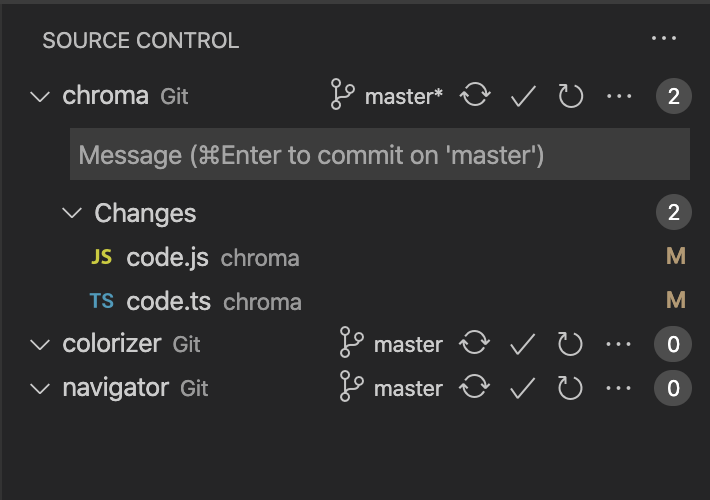
Adding the scm label I think would definitely help here:
 misolori
on 30 Jun 2020
misolori
on 30 Jun 2020
I've added the SCM label.
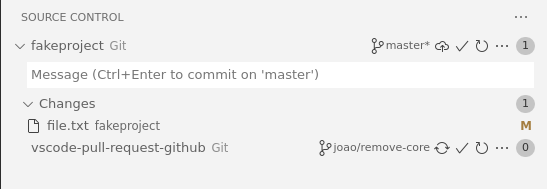
I can't really hide the twistie if the repositories have no changes as it makes it even worse:
joaomoreno
on 1 Jul 2020
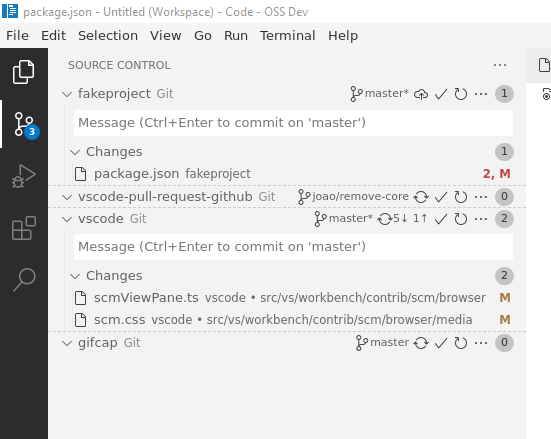
I kinda like this, will push it:
joaomoreno
on 1 Jul 2020
Even removing the twistie looks good:
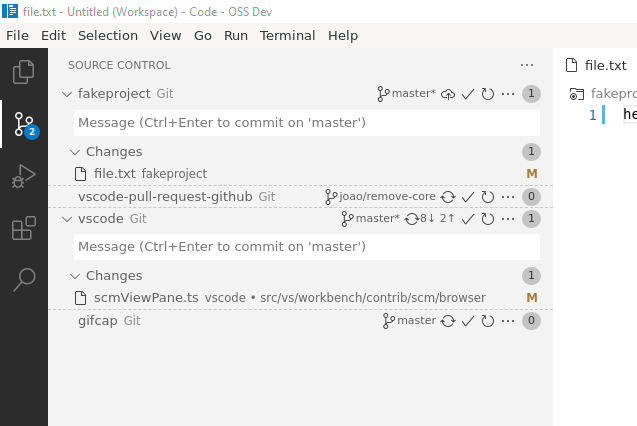
What do you think?
joaomoreno
on 1 Jul 2020
I would probably prefer a look that is in sync with our split views, e.g. a full border:

I would even think that bold could work for the first nodes?
bpasero
on 1 Jul 2020
I thought the solid border was fine, I don't think we ever use a dashed border so this feels inconsistent.
misolori
on 1 Jul 2020
How about the proposal from elsewhere to drop the badge if its value is zero?
gjsjohnmurray
on 1 Jul 2020
@bpasero @misolori Using a full border will _fool_ the user into thinking that it can be dragged, since now the core themes all render split views that very same way. This is something I've been trying to avoid since the beginning of this adventure. I'm just going to get an issue: _can't resize SCM provider view_.
I'm really all up for more ideas, keep them coming, but I don't think aligning this with splitviews is a good idea.
@gjsjohnmurray I tried that but didn't really like the fact that the actions wouldn't align with other repositories'.
joaomoreno
on 1 Jul 2020
I tried that but didn't really like the fact that the actions wouldn't align with other repositories'.
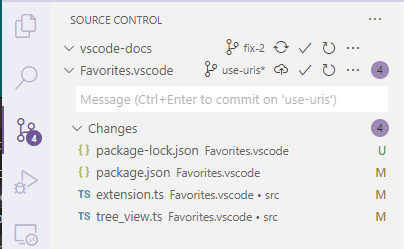
@joaomoreno how about styling the badge div as visibility: hidden; ?
gjsjohnmurray
on 2 Jul 2020
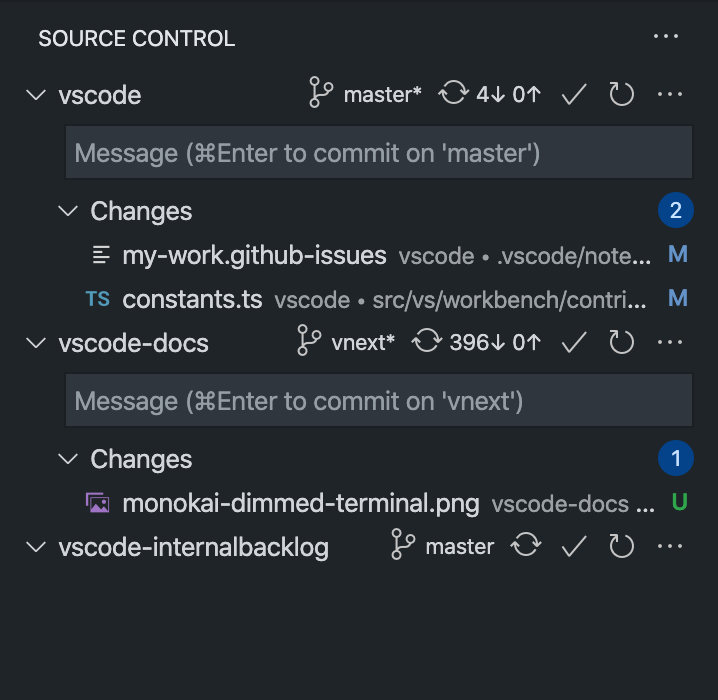
Do we really need the top level badges at the repo level? Feels like the changes one is the only important one and most of the time it just repeats itself. I think this would look better too:
misolori
on 2 Jul 2020
Throwing in another idea: use different background colors for the repos. Compare with our keybindings editor:

This gives a nice separation between logical units in the list. Though arguably can only be a light change in background color given we have so many selection colors.
bpasero
on 2 Jul 2020
@misolori Yeah I kinda like that. Though your screenshot shows the _good_ case: you wanna see vscode-docs with no changes and vscode-internalbacklog with changes. That's the ugly edge case. I'll push the change though!
I'm also going to remove the dotted lines, they haven't grown nicely on me.
This gives a nice separation between logical units in the list. Though arguably can only be a light change in background color given we have so many selection colors.
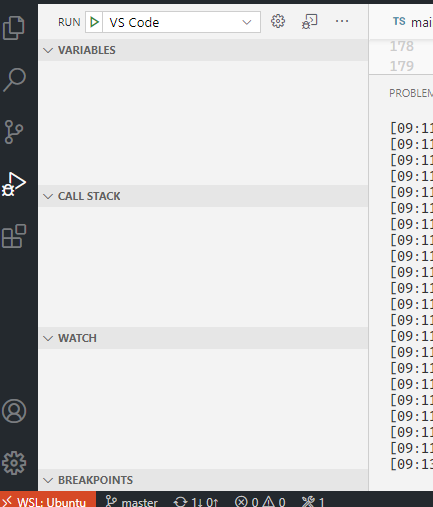
@bpasero That's also the style of the splitview for the other half of themes:
@joaomoreno how about styling the badge div as
visibility: hidden;?
@gjsjohnmurray Good idea but I'll just get the _bad layout in SCM view_ bug right after, since it looks broken.
joaomoreno
on 2 Jul 2020
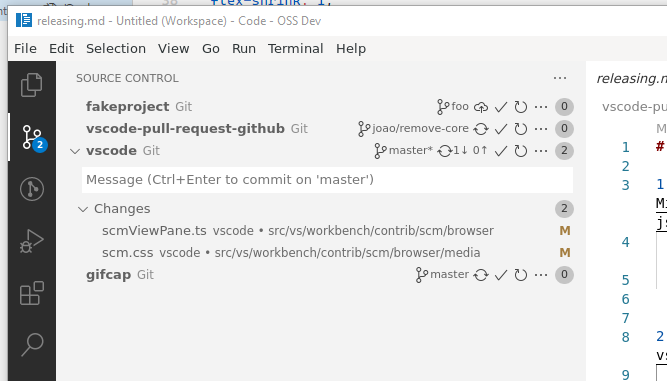
Latest exploration:
joaomoreno
on 2 Jul 2020
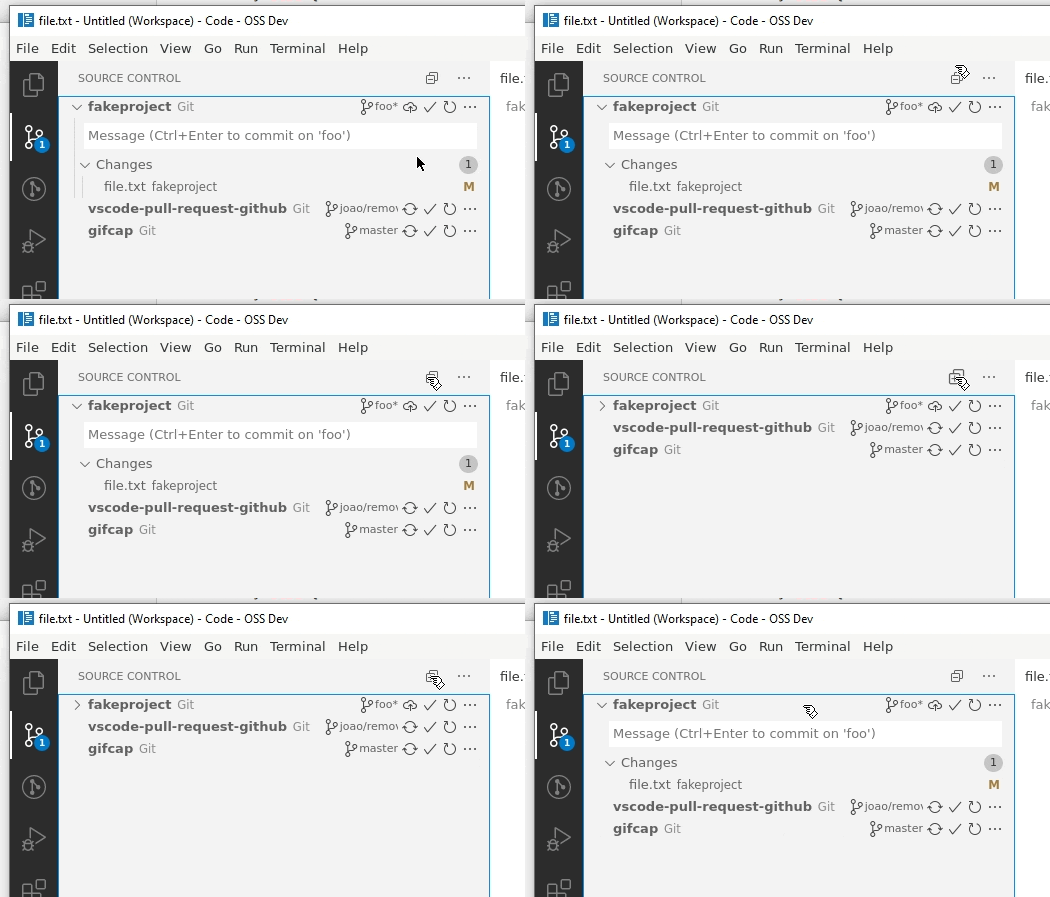
And one more iteration, now with a collapse/expand repositories action:
joaomoreno
on 2 Jul 2020
@joaomoreno I like the Collapse All, but I see you have also dropped the top level badges entirely. So after Collapse All the only clue about which rows have changes is the presence of absence of the collapse icon at the left end.
I take your earlier point about folk reporting a suppressed 0-badge as a UI bug. How about an empty badge (i.e. no zero in it)? Or fade them?
gjsjohnmurray
on 2 Jul 2020
@gjsjohnmurray I'm thinking a setting to show/hide the badge, but maybe keep the default hidden.
joaomoreno
on 2 Jul 2020
@joaomoreno a setting sounds like a good compromise. Maybe tri-state, so we can "hide", "show", and "hide if zero". Default to "hide", which has the benefit of leaving a but more space for command buttons and branch name.
gjsjohnmurray
on 2 Jul 2020
@gjsjohnmurray Will push a scm.providerCountBadge setting with values ['hidden', 'auto', 'visible'].
joaomoreno
on 3 Jul 2020
I want to share my thoughts about the new design.
The "check" button used to be visible only if the corresponding repository's view is expanded, rather than showing all the time now. I wonder who would use this button without seeing what's actually changed/stage?
So I tried to move it into the view itself. From this starting point, I also came with the menu refinement ideas.
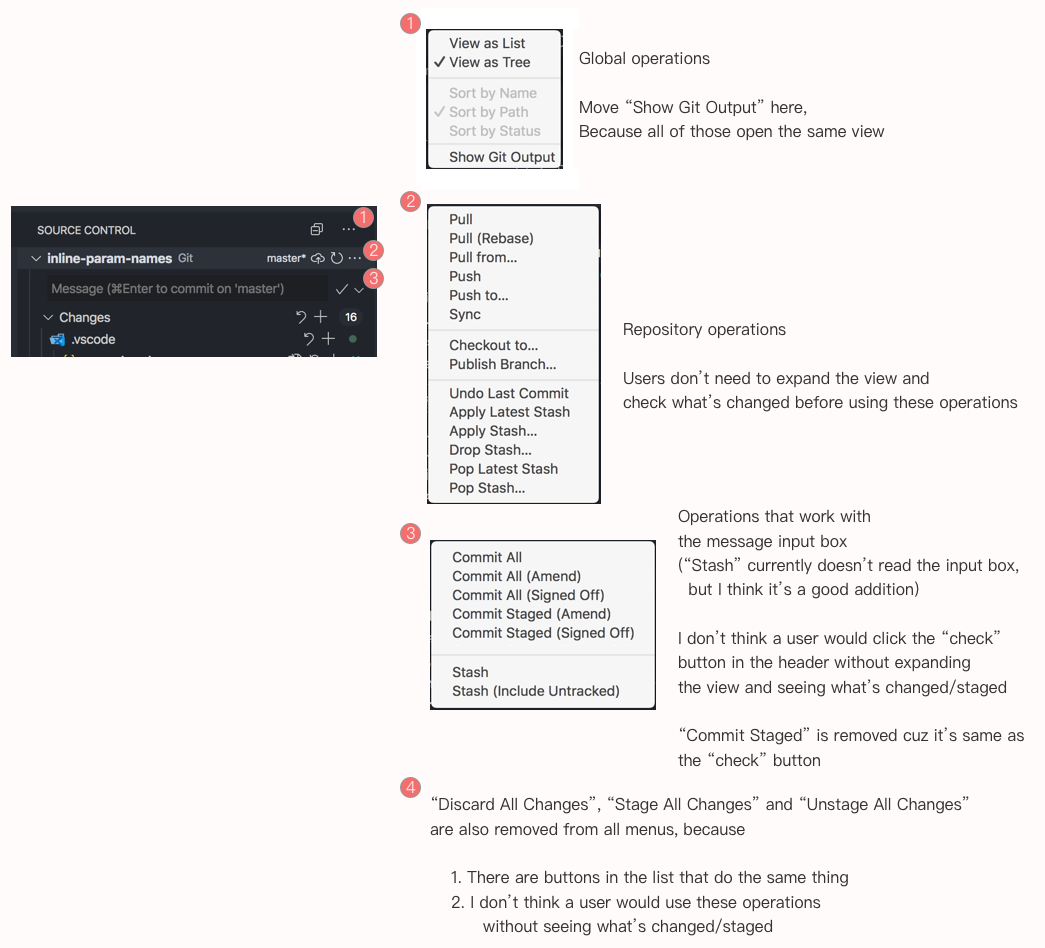
I also thought that maybe hovering on the counting badge will show the ... menu, so more spaces can be saved. But this may cause some confusion so I rejected this one.
 yume-chan
on 3 Jul 2020
yume-chan
on 3 Jul 2020
Surprise! There are two more operations when right-clicking the header
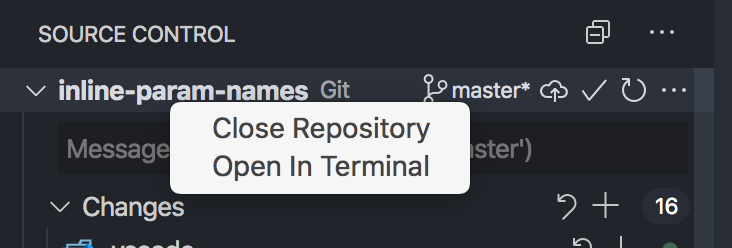
Maybe these can be moved to the left of the "collapse all" button, same as the explorer.
For discoverability maybe they should also be in the header ... menu.
yume-chan
on 3 Jul 2020
@yume-chan I really like your ideas. Having multiple "..." menus solves the problem of the very long Git context menu without us having to wait for submenu support for extensions.
Maybe the menu button at (3) should be a "..." rather than an "expand down", for better consistency.
As for the surprise "Close Repository" and "Open in Terminal" context menu, maybe replicate them on menu (2). I don't think they could go alongside "collapse all" because they apply to a single repo.
gjsjohnmurray
on 3 Jul 2020
Maybe the menu button at (3) should be a "..." rather than an "expand down", for better consistency.
I want to make it a "button with menu". For example in mail apps usually there is a Reply | ▼ button. Clicking on "Reply" will do one thing, clicking the down arrow will show more operations that relates to the label. But yes I didn't see this pattern in Code.
As for the surprise "Close Repository" and "Open in Terminal" context menu, maybe replicate them on menu (2). I don't think they could go alongside "collapse all" because they apply to a single repo.
You are right. The explorer can have "New File" and "New Folder" alongside "Collapse All" is because its item can have focus, can't apply to the scm view.
yume-chan
on 3 Jul 2020
Will push a
scm.providerCountBadgesetting with values['hidden', 'auto', 'visible']
@joaomoreno thanks for this, but for auto mode maybe use visibility: hidden;
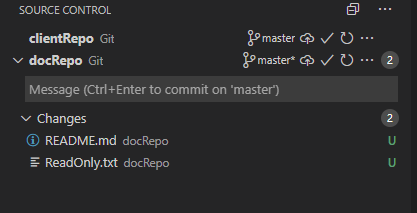
rather than the display: none; which you implemented:
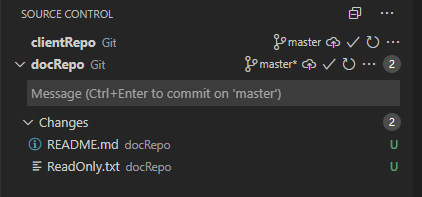
And I suggest default should be 'auto' so people discover the most sophisticated form of the badge feature at this level in the new UX (first screenshot above). Then if they don't like/want these badges they can find the setting and pick 'hidden'.
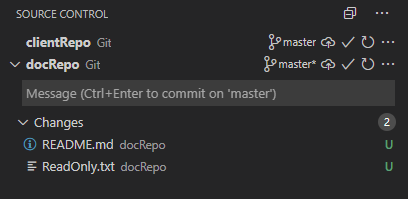
And if the white space to the right of the "..." disturbs them they can pick 'visible'.

gjsjohnmurray
on 3 Jul 2020
@joaomoreno thanks for this, but for auto mode maybe use
visibility: hidden;
I don't think that's a good idea, since we'd be wasting precious space. Especially if no repository has changes: there would just be an empty column. That is exactly the compromise with auto, otherwise we'd take it as the default.
joaomoreno
on 6 Jul 2020
I don't think that's a good idea, since we'd be wasting precious space. Especially if no repository has changes: there would just be an empty column
Maybe make auto smart enough only to use visibility: hidden; if at least one other repo has changes?
Are you going to keep the default of scm.providerCountBadge as hidden? I'd still argue for defaulting to show, else some people may not realize it's even possible to show change count badges at this level.
gjsjohnmurray
on 6 Jul 2020
Maybe make auto smart enough only to use visibility: hidden; if at least one other repo has changes?
This will make thing jump around in all repositories if one repository changes.
Are you going to keep the default of
scm.providerCountBadgeashidden? I'd still argue for defaulting toshow, else some people may not realize it's even possible to show change count badges at this level.
Yes that's the idea. The hypothesis is that most users don't even care. And the power users have the setting. Trying to stay lightweight here.
joaomoreno
on 6 Jul 2020
Can you add option to hide action buttons from provider line? They takes too much space +
- Synchronize button we have in "..." menu
- Commit button require commit description => it has to be in "Changes" subtree
- Refresh button also has to be in "Changes" subtree, because of what we have to see after it pressed in closed provider tree?
And look at #102080 . I think it was a mistake.
thank you.
 SailorMax
on 10 Jul 2020
SailorMax
on 10 Jul 2020
Throwing out a few suggestions here:
- What if we moved the refresh action to a global view command? This would free up a bit of space + visual noise
- What if we only showed the commit check icon when there are changes? This would also free some space
- What if we ellipse the repo name? You can still hover the repo to get the title but when the actions are truncated it requires more clicks
- What if we showed the twisties for repos with no changes? We do this in the explorer with empty folders and I think could help with the hierarchy confusion
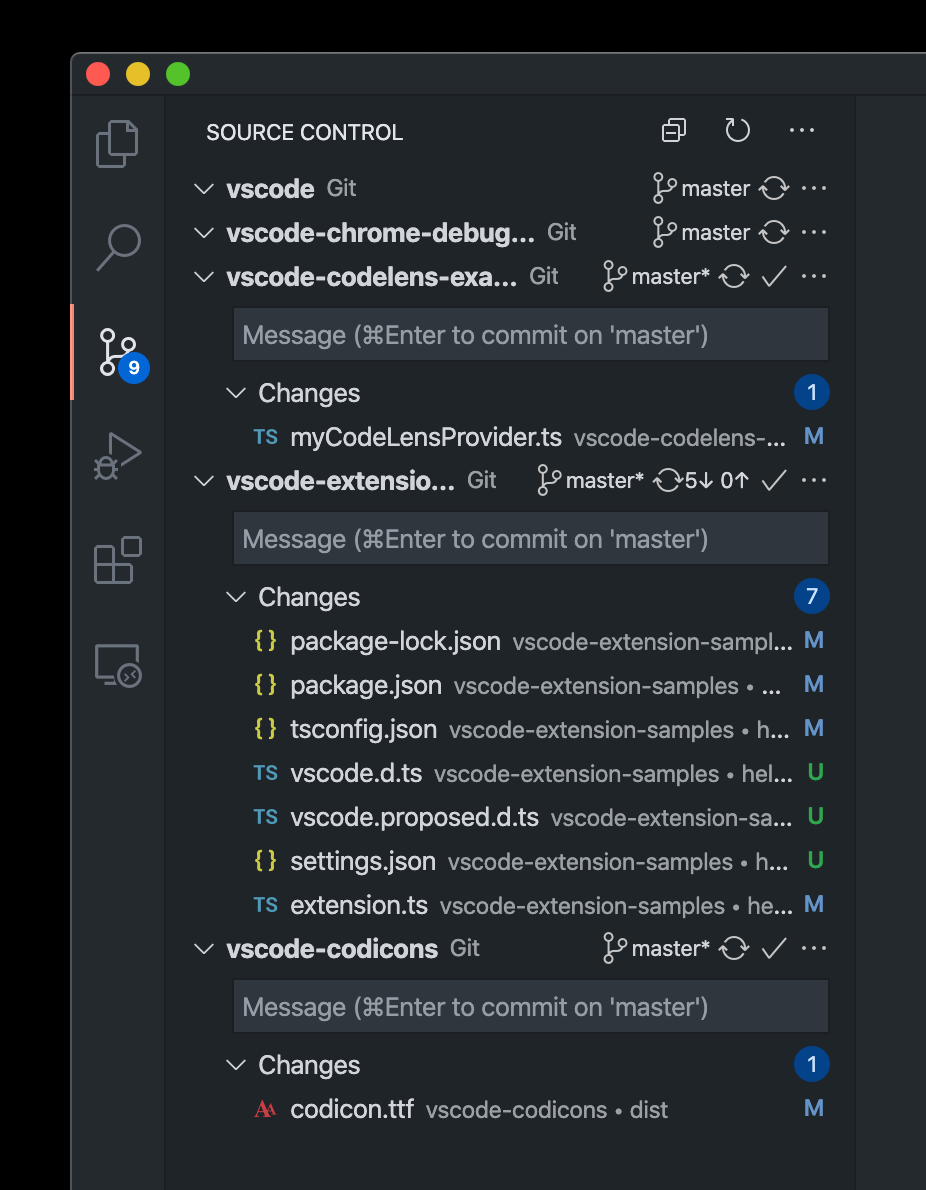
misolori
on 10 Jul 2020
- What if we moved the refresh action to a global view command? This would free up a bit of space + visual noise
We can't really do this since if you have many repositories, refreshing them all is a potentially expensive operation.
- What if we only showed the commit check icon when there are changes? This would also free some space
This can be interesting yes.
- What if we ellipse the repo name? You can still hover the repo to get the title but when the actions are truncated it requires more clicks
Yeah that will be the fix of https://github.com/microsoft/vscode/issues/102108
- What if we showed the twisties for repos with no changes? We do this in the explorer with empty folders and I think could help with the hierarchy confusion
Yeah, let me push that already.
joaomoreno
on 16 Jul 2020
Yeah, let me push that already.
@joaomoreno for bonus points maybe try moving the optional repo-level count badges to the start of the row instead of the end. I think having badges there will help, particularly with scm.providerCountBadge set to auto. Plus it will solve the button alignment issue auto mode gives when badges are on the right.
gjsjohnmurray
on 16 Jul 2020
With providerCountBadge set to auto and moved to the left, plus small increases to indents of the tree descendants.
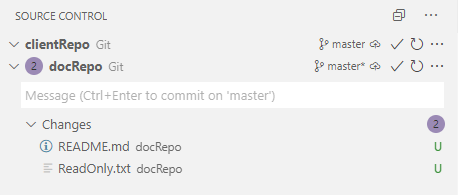
And with the changed repo collapsed:

Without my tweaks:

and collapsed:

gjsjohnmurray
on 17 Jul 2020
Honestly, I prefer the badge count on the right. Maybe my eyes are trained to search for info on the right side but I find the repo names all properly left aligned to be more pleasing and easier to read
 carlocardella
on 17 Jul 2020
carlocardella
on 17 Jul 2020
Yes, I'm really not convinced to move the badge to the left, since it would remove the badge alignment.
joaomoreno
on 17 Jul 2020
I still think provider count badges on the left may be helpful to users who are finding it hard to spot where the changed files of one repo end and the title of the next repo starts. Personally I find the duplication of counts aligned on the right a bit unsatisfactory. When a provider section is collapsed I like to know how many changes it contains, but once I expand it and get subhead counts it's those I want to focus on, and the top-level count is distracting.
How about offering auto-left and visible-left as additional choices for scm.providerCountBadge?
On a related topic, is there any telemetry on the SCM view that would give data on how many providers users have there?
gjsjohnmurray
on 17 Jul 2020
We've always had badge counts on the right and moving it to the left would make it inconsistent.



misolori
on 17 Jul 2020
Related issues
 ryan-wong
·
3Comments
ryan-wong
·
3Comments
 v-pavanp
·
3Comments
v-pavanp
·
3Comments
 chrisdias
·
3Comments
chrisdias
·
3Comments
 shanalikhan
·
3Comments
shanalikhan
·
3Comments
 trstringer
·
3Comments
trstringer
·
3Comments
Most helpful comment
Throwing out a few suggestions here: