Vscode: Integrated terminal poor performance on WSL 2 (laggy)
Version: 1.47.0-insider (system setup)
Commit: 7e4cc2c435927e5a2845897961a2af10ee7f784d
Date: 2020-06-12T06:03:53.183Z
Electron: 7.3.1
Chrome: 78.0.3904.130
Node.js: 12.8.1
V8: 7.8.279.23-electron.0
OS: Windows_NT x64 10.0.19041
OS Version: Windows 10 Pro
Steps to Reproduce:
- Open a project VSCode native to windows
- use the terminal
- Open another (or the same) project in WSL 2 (using the WSL2 extension not just typing wsl in the terminal)
- use the terminal again..
- If you have Windows Terminal installed, compare the performance between that and the integrated terminal (with a project in WSL 2)
Does this issue occur when all extensions are disabled?: Yes
The integrated terminal seems to be a bit slow when using WSL2.
I have zsh installed but i don't think its that because Windows Terminal is snappy and works fine in the same directories, the issue is only in the integrated terminal.
It isn't super slow, but it does have a laggy feel.
The issue doesn't appear to be with WSL as other terminals outside of VSCode are fine.
 jasonwilliams
All 38 comments
There is a know problem with speed here: https://github.com/microsoft/vscode/issues/74620, if it's rendering being slow you could try using the setting "terminal.integrated.rendererType": "experimentalWebgl"
/duplicate
 Tyriar
on 18 Jun 2020
Tyriar
on 18 Jun 2020
@Tyriar I will try that, thanks
jasonwilliams
on 18 Jun 2020
@Tyriar switching to experimentalWebgl made no difference, are you sure the 2 issues are related? This only happens on WSL so I don’t think it’s a rendering problem
jasonwilliams
on 19 Jun 2020
The VSCode terminal is also running slow for me in the WSL2 terminal.
When I use the new Windows terminal then WSL2 is speedy.
So, I do think its VSCode related.
 Minituff
on 23 Jun 2020
Minituff
on 23 Jun 2020
Can you open dev tools (Help > Toggle Developer Tools), and do a performance profile (Performance tab, hit record button) of the lagginess, save and upload that here?
Tyriar
on 8 Jul 2020
@Tyriar I didn't see anything obvious between each profile, but there is a lag on the WSL one, for example, just typing my name feels slower than the native (powershell) version
jasonwilliams
on 9 Jul 2020
This one is more interesting, it looks like the WSL version generates less frames than the windows version, maybe this could be contributing to the laggy feel
jasonwilliams
on 9 Jul 2020
So from those profiles everything seems to be working fine, the WSL ones even seem better as expected as they're not being routed through pty emulation (conpty). If it's purely input latency that wouldn't show up in the profiles, my only explanation for what you're seeing is that the communication bridge between Windows and WSL2 on your machine is slower than normal which would slow the entirety of VS Code.
Not sure what I can do about this unless I can repro it unfortunately and I use a WSL2 remote every day and it's always been faster than in Windows.
Tyriar
on 10 Jul 2020
@Tyriar i was also surprised by the performance output. I agree i think maybe its an input latency issue with the communication bridge, are there any tools for debugging this (or even confirming that's the case)?
interestingly enough i don't find the whole of VSCode slow (maybe it is slower and i haven't noticed) just when I type in the integrated terminal
jasonwilliams
on 10 Jul 2020
@jasonwilliams if my theory is true, the same latency would happen when you open or save a file, not when you type in the editor though. I'd think such latency would be much harder to perceive though than keystroke to character on screen. I don't know of any way to debug this, maybe @aeschli might know?
Tyriar
on 10 Jul 2020
Aside: Windows Terminal seems ok and faster than the integrated terminal in VSCode, so I'm not sure if its a "Windows OS" issue. Opening and closing files is pretty fast (if that helps)
jasonwilliams
on 10 Jul 2020
pings @aeschli
jasonwilliams
on 13 Aug 2020
Maybe run it out of sources and add log statements? I would check if it reproduces with the TestResolver. Otherwise you need WSL out-of-sources setup (setup is described on our (internal) remote wiki (@Tyriar can access))
 aeschli
on 14 Aug 2020
aeschli
on 14 Aug 2020
What’s the testResolver? And what’s the out of sources setup? @Tyriar does this make sense to you?
jasonwilliams
on 14 Aug 2020
Below two screen-captures that hopefully demonstrate what @jasonwilliams is describing:
Remote-WSL (WSL2)

"regular"

Captured on the same machine, same installation of VS Code (1.48.0 – same extensions enabled). The only difference is that one is running "direct" and the other via the Remote-WSL extension.
Had my password manager type out the text; animated GIF captured at 60 FPS. The captures don't fully do it justice ("in person" it feels much worse), but I hope it helps to get "the picture" across... 🙂
~I've been having some related odd behaviours as well:~
~Multiple times per hour, VS Code running remotely on WSL2 stops processing my keyboard input for a couple seconds. It appears to hang, but the caret keeps blinking and the UI remains responsive (i.e. I can click open menus). After a couple seconds, all input is spit out in one go...
Additionally, sometimes when trying to open a folder in the "Explorer", I get a little spinning disc for a couple seconds until the contents of the directory are displayed (similar behaviour sometimes occurs when trying to open a file; wait a couple seconds while looking at a blue "progress bar").~
All seems to point to some kind of issue in the connection between VS Code and the "remote" WSL?
I'm using WSL2 quite actively for other stuff and haven't noticed any strange behaviour when interacting with it directly (through Windows Terminal) or while using Docker to, for example, run test-suites.
Recently got a new laptop, so I'm not sure if it's related to a specific version of VS Code, something I did with my Windows-installation or something specific to the hardware of this device...
 thijsputman
on 19 Aug 2020
thijsputman
on 19 Aug 2020
Ahh @thijsputman thank you very much for that, I’m glad it’s not just me going mad. I tried to find a way to show this but couldn’t so I’m happy you’ve done that.
@Tyriar @aeschli what @thijsputman is describing is what I experience also, and as he’s said the comparison gifs don’t do it justice.
jasonwilliams
on 19 Aug 2020
Ahh @thijsputman thank you very much for that, I’m glad it’s not just me going mad.
My pleasure!
Had been blaming my video card driver for the sluggishness (and was thus on a wild goose chase attempting to resolve that issue). Very happy to come across your bug report.
Just set up a clean copy of Ubuntu on WSL2 and that exhibits the same issue. It doesn't appear to be caused by any specific modifications made _inside_ the WSL2 distro...
thijsputman
on 20 Aug 2020
Ran a couple more tests:
Connecting to WSL2 via SSH exhibits the same issue; using SSH to connect to another device (a Raspberry Pi on the local network) appears laggy too.
Interestingly, the problems seems to be purely input-related: Observing the output of cmatrix shows no stutter, no lag, whatsoever.
thijsputman
on 20 Aug 2020
Looks like it was raised before https://github.com/microsoft/vscode-remote-release/issues/1732 but it didn't go anywhere
jasonwilliams
on 20 Aug 2020
Maybe run it out of sources and add log statements? I would check if it reproduces with the TestResolver. Otherwise you need WSL out-of-sources setup (setup is described on our (internal) remote wiki (@Tyriar can access))
@Tyriar @bpasero are you able to help us with this? or copy over the internal wiki details?
jasonwilliams
on 20 Aug 2020
I'm not sure if this is the location the terminal is used, but it could be worth logging here and building from source.
jasonwilliams
on 20 Aug 2020
@jasonwilliams, I think I can do you one better:
Created a little shell-script to measure the input latency: https://gist.github.com/thijsputman/b6471bc82e26afea978264f2e599c885.
Open a terminal in VS Code, run sh ./input-latency.sh and keep the A-key (or any other key) pressed for a couple seconds.
The script captures the repeated key-presses 105 times and then prints out the time (in microseconds) each "capture" took. The first 5 samples are disregard as they skew the graph (numbers start out very high; in both situations).
Doing the above on my machine in both a WSL terminal and a "direct" terminal gives the following result:
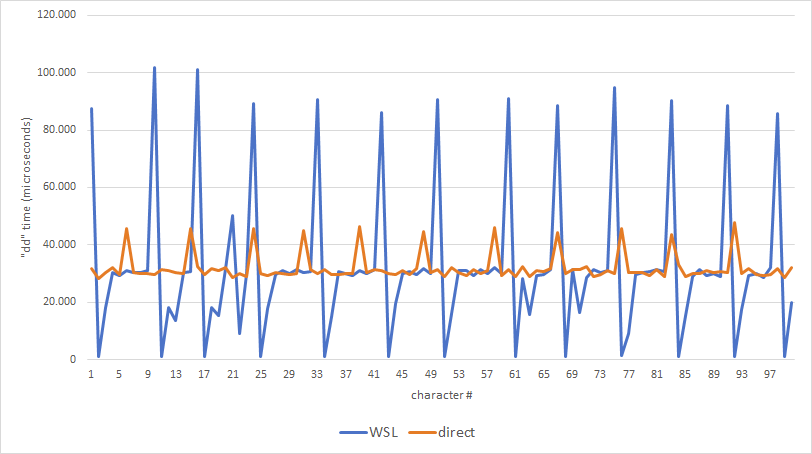
Bit more obvious than the two GIFs I posted earlier 🙂
Hopefully this helps to lift the discussion out of subjectiveness a bit...
@Tyriar, @aeschli, would love to get your input on this approach. I'm no expert when it comes to terminals, so my this might be (way too) crude...
thijsputman
on 21 Aug 2020
@Tyriar, @aeschli does this extra information help?
jasonwilliams
on 3 Sep 2020
@jasonwilliams please don't ping people not involved in the issue
Quick thoughts on this: Some additional latency is expected as normally the terminal's pty runs in the renderer process whereas in remote it runs in the extension host.
Multiple times per hour, VS Code running remotely on WSL2 stops processing my keyboard input for a couple seconds. It appears to hang, but the caret keeps blinking and the UI remains responsive (i.e. I can click open menus). After a couple seconds, all input is spit out in one go...
This says to me you probably have extensions that are making the extension host busy, it's a single thread that all extensions run on, including terminal input/output processing, so this could be the issue with the latency too
What’s the testResolver? And what’s the out of sources setup?
Out of sources is the dev setup: https://github.com/Microsoft/vscode/wiki/How-to-Contribute
You can run the test resolver via the command palette (ctrl/cmd+shift+p) in the dev setup, this would determine whether the problem is the extension host connection on your machine, but not test WSL specifically.
Tyriar
on 3 Sep 2020
@jasonwilliams please don't ping people not involved in the issue
I've only pinged people who have spoken in this thread.
This says to me you probably have extensions that are making the extension host busy, it's a single thread that all extensions run on, including terminal input/output processing, so this could be the issue with the latency too
Its not extensions, Ive ran these tests with and without extensions (--disable-extensions) and the results are the same
Does this issue occur when all extensions are disabled?: Yes
As @thijsputman mentioned, it only seems to be on the input not the output. I would expect a busy thread to affect both?
jasonwilliams
on 3 Sep 2020
@jasonwilliams https://github.com/microsoft/vscode/issues/100427#issuecomment-677845208 is what I was talking about
Tyriar
on 3 Sep 2020
@Tyriar would a busy extension thread not affect output as well as input? It would seem odd for it to only affect input.
I will try the testResolver when i next have some time
jasonwilliams
on 3 Sep 2020
Input does this:
- Keyboard event
- Terminal frontend gets it and serializes to text
- Sends to ext host
- Ext host sends to terminal shell
- Terminal shell processes it
Output:
- Terminal shell sends to ext host
- Ext host sends to frontend
- Terminal parses and displays
It would seem odd for it to only affect input.
This is a little confusing to answer as often input is tied to output, note that when you press a, it gets sent over to the ext host, to the shell and back again before a will get displayed. AFAIK there is no way for you to measure this "output latency".
Tyriar
on 3 Sep 2020
This says to me you probably have extensions that are making the extension host busy [...]
@Tyriar, that indeed appears to be the case.
I'll strike out that part of my comment to not further muddy this discussion – an investigation for some other time...
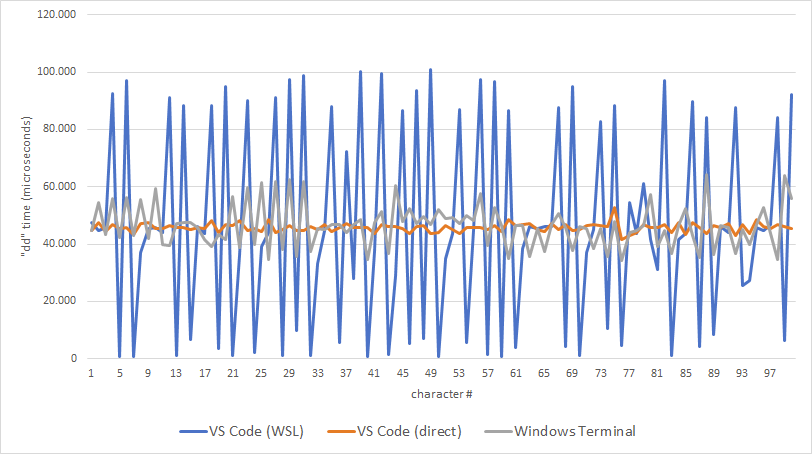
Regardless, I can reproduce the lag using a new and clean user profile (with only the "Remote - WSL" extension installed/enabled). The issue is not so much higher latency, but wildly varying latency (which makes the terminal appear to respond very "choppy").
Given your comments concerning input and output, I modified my test-script from https://github.com/microsoft/vscode/issues/100427#issuecomment-678272218 slightly to not echo anything to the terminal (stty -echo).
Interestingly, with that modification, there is no difference in latency between the "direct" and the remote terminals. Does that warrant the conclusion the problem is output-related?
Echoing input
Not echoing input
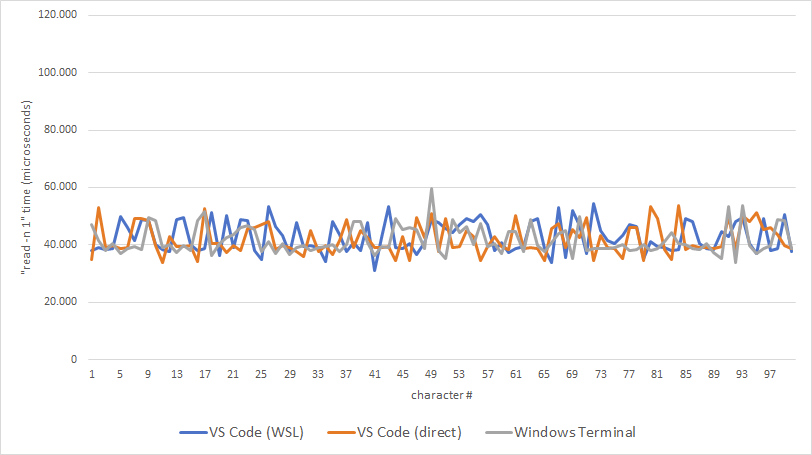
Edit: Corrected for a small oversight in the test-script
thijsputman
on 3 Sep 2020
@thijsputman I'm not sure I understand what this benchmark is saying, aren't all these events captured purely on the shell side? How does it take into account the data transfer across processes?
Tyriar
on 3 Sep 2020
@Tyriar, both are indeed captured on the shell side.
The second script/graph supresses the echoing of output (so when I press a, nothing appears in the terminal).
I'm out of my depth here, but I guess this means that given this:
Input does this:
1. Keyboard event

2. Terminal frontend gets it and serializes to text

3. Sends to ext host

4. Ext host sends to terminal shell

5. Terminal shell processes it
Output:
1. Terminal shell sends to ext host

2. Ext host sends to frontend

3. Terminal parses and displays
The second script/graph doesn't spend any time in the "Output" stage at all (as no output is generated at all when running the script)?
thijsputman
on 3 Sep 2020
@thijsputman I have a feeling you're measuring something outside of VS Code. Can you explain what VS Code (direct) means? Is that VS Code on a separate machine running just Linux? Is it the same Windows machine running wsl.exe as your shell instead of via Remote-WSL?
Tyriar
on 3 Sep 2020
It all happens on my local Windows 10 machine; no other machines are involved.
In both cases, I start a new instance of VS Code from my Start Menu:
For "VS Code (WSL)" I click on
Open a Remote Windowin the bottom left corner and selectRemote-WSL: New Window. I then execute the test in the Bash-terminal that opens when I pressCtrl+`.For "VS Code (direct)" I use this extension (😇) to launch a WSL Bash shell (
C:\Windows\system32\bash.exe) inside a "normal" (not connected to a remote) VS Code instance. I then run the test there.
thijsputman
on 3 Sep 2020
So (direct) will use whatever mechanism the Windows console team created to natively talk to WSL, (WSL) will use our extension host protocol to do the communication and then connect to a native pty (which is definitely fine as Linux and macOS terminals fly).
I can't explain the discrepancy and it's also hard to tell what you mean exactly by "laggy", the gifs don't give me a sense of the issue. Are we talking 10-50ms as something like that is acceptable imo to allow for the extension host comm.
Tyriar
on 9 Sep 2020
This issue has been closed automatically because it needs more information and has not had recent activity. See also our issue reporting guidelines.
Happy Coding!
 vscode-triage-bot
on 17 Sep 2020
vscode-triage-bot
on 17 Sep 2020
@Tyriar or @aeschli can you reopen this? We’re still planning to look into this on sources build.
Does this still need the "needs more info" tag?
Looking at the VSCode contribution guidelines we've provided more than what's considered acceptable. Including gifs, images and diagrams plus versions (with and without extensions) of what's happening.
I can't explain the discrepancy and it's also hard to tell what you mean exactly by "laggy", the gifs don't give me a sense of the issue. Are we talking 10-50ms as something like that is acceptable imo to allow for the extension host comm.
Without some sort of timing its hard to give an exact answer that isn't relative.
All i can say is that typing is "sluggish" and doesn't feel acceptable, so far more than the 10-50ms range.
jasonwilliams
on 17 Sep 2020
I can't debug this. The bug/delay looks to be in the WSL extension, not in Code itself. (launching wsl in the terminal and using it like that is fine).
I'm unable to use the extension in the sources version so I've gone as far as I can.
jasonwilliams
on 18 Sep 2020
Facing the same issue! Seems like there is no solution yet.
 adil-waqar
on 16 Oct 2020
adil-waqar
on 16 Oct 2020
Related issues
 Brakkar
·
364Comments
Brakkar
·
364Comments
 mariusa
·
219Comments
mariusa
·
219Comments
 lw-schick
·
229Comments
Tyriar
·
314Comments
Tyriar
·
200Comments
lw-schick
·
229Comments
Tyriar
·
314Comments
Tyriar
·
200Comments
Most helpful comment
@jasonwilliams, I think I can do you one better:
Created a little shell-script to measure the input latency: https://gist.github.com/thijsputman/b6471bc82e26afea978264f2e599c885.
Open a terminal in VS Code, run
sh ./input-latency.shand keep theA-key (or any other key) pressed for a couple seconds.The script captures the repeated key-presses 105 times and then prints out the time (in microseconds) each "capture" took. The first 5 samples are disregard as they skew the graph (numbers start out very high; in both situations).
Doing the above on my machine in both a WSL terminal and a "direct" terminal gives the following result:
Bit more obvious than the two GIFs I posted earlier 🙂
Hopefully this helps to lift the discussion out of subjectiveness a bit...
@Tyriar, @aeschli, would love to get your input on this approach. I'm no expert when it comes to terminals, so my this might be (way too) crude...