Vscode: Integrated terminal "Search workspace (ctrl + click)" appears whenever I hover over any text on the terminal
Issue Type: Bug
I use windows + git bash, after the latest update when I hover over any text in the terminal, it shows me the tooltip "Search workspace (ctrl + click)". There doesn't seem to be a way to disable it.
I'm guessing this is a major bug in the latest link detection?
Thank you.
VS Code version: Code 1.46.0 (a5d1cc28bb5da32ec67e86cc50f84c67cc690321, 2020-06-10T09:03:20.462Z)
OS version: Windows_NT x64 10.0.17763
System Info
|Item|Value|
|---|---|
|CPUs|Intel(R) Core(TM) i7-6500U CPU @ 2.50GHz (4 x 2592)|
|GPU Status|2d_canvas: enabled
flash_3d: enabled
flash_stage3d: enabled
flash_stage3d_baseline: enabled
gpu_compositing: enabled
multiple_raster_threads: enabled_on
oop_rasterization: disabled_off
protected_video_decode: unavailable_off
rasterization: enabled
skia_renderer: disabled_off_ok
video_decode: enabled
viz_display_compositor: enabled_on
viz_hit_test_surface_layer: disabled_off_ok
webgl: enabled
webgl2: enabled|
|Load (avg)|undefined|
|Memory (System)|15.81GB (2.93GB free)|
|Process Argv||
|Screen Reader|no|
|VM|0%|
Extensions (14)
Extension|Author (truncated)|Version
---|---|---
lua-debug|act|1.23.8
code-gnu-global|aus|0.2.2
gitlens|eam|10.2.2
file-icons|fil|1.0.24
latex-workshop|Jam|8.10.0
hex-fmt|ker|1.0.0
python|ms-|2020.5.86806
cpptools|ms-|0.28.3
veriloghdl|msh|1.1.0
material-icon-theme|PKi|4.1.0
vscode-hexdump|sle|1.7.2
vscode-icons|vsc|10.1.1
p4|xi|0.0.3
material-theme|zhu|3.7.3
(6 theme extensions excluded)
 Ahmed-Nematallah
All 19 comments
It's actually a major _feature_ added in the latest release. The hover only appears if you pause the mouse on the word just like in the editor, do the editor hovers bother you the same way? Is it the fact that it's basically every piece of text that now has a hover compare to the editor which typically has most?
 Tyriar
on 12 Jun 2020
Tyriar
on 12 Jun 2020
It's actually a major _feature_ added in the latest release. The hover only appears if you pause the mouse on the word just like in the editor, do the editor hovers bother you the same way? Is it the fact that it's basically every piece of text that now has a hover compare to the editor which typically has most?
Thank you very much,
What is quite strange is that the hover is the same nearly every time, so it's not needed and at most should be a highlight, so if it's the same nearly every time then it isn't giving any new information and should be disabled, especially given the fact that:
1) It's not very useful in the common case (IMO, it is needed less that 0.01% of the time).
2) The action is very easy to do without the hover.
3) It's only telling the user that there is a ctrl + click shortcut which is a very simple shortcut that can be looked up in the documentation like most other shortcuts rather than being told about it every time.
The editor hovers are not that same since they are different every time, and thus convey useful information.
It's maybe similar to the question "Are we there yet?" every few seconds or clippy..
An example I have is this screenshot that is obscuring some useful information to repeat something that has been repeated hundreds of times before, for a feature will probably never be used, at least on the highlighted text (since the majority of text in any terminal window is not a file).

Same here
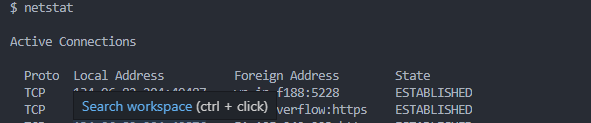
The fact that is appears after a short bit also ensures that it appears after I stopped moving my mouse and started reading.
Ahmed-Nematallah
on 12 Jun 2020
Maybe just for Search workspace the hover should show up after a longer delay than the others. It's an accessibility issue that it shows up with a link there such that you can hit the link with only a mouse.
Tyriar
on 12 Jun 2020
Maybe just for Search workspace the hover should show up after a longer delay than the others. It's an accessibility issue that it shows up with a link there such that you can hit the link with only a mouse.
Thank you very much, while it makes more sense now, and is definitely a useful feature for some, I guess an option to disable them would maybe be more useful than having a longer delay?
Ahmed-Nematallah
on 12 Jun 2020
I guess an option to disable them would maybe be more useful than having a longer delay?
It would be nice to have an option to disable this. Definitely not a useful feature for me and can interfere when I am hovering and considering selecting text in the terminal, regardless of how long it takes to pop up.
 codestothestars
on 12 Jun 2020
codestothestars
on 12 Jun 2020
Thanks for the feedback, I'll try make some changes this version to tone it down a bit.
Tyriar
on 12 Jun 2020
As a strong advocate for using VS Code in the classroom I would very strongly support a setting by which I could disable this control-click popup in the terminal. (command-click for me, as a Mac user). VSCode is wonderful because I can (through settings) titrate the level by which students feel ownership of what they do. Popups dramatically diminish the feeling of ownership and belonging among novices. (Note: my "novices" and yours are very different.)
Many thanks!
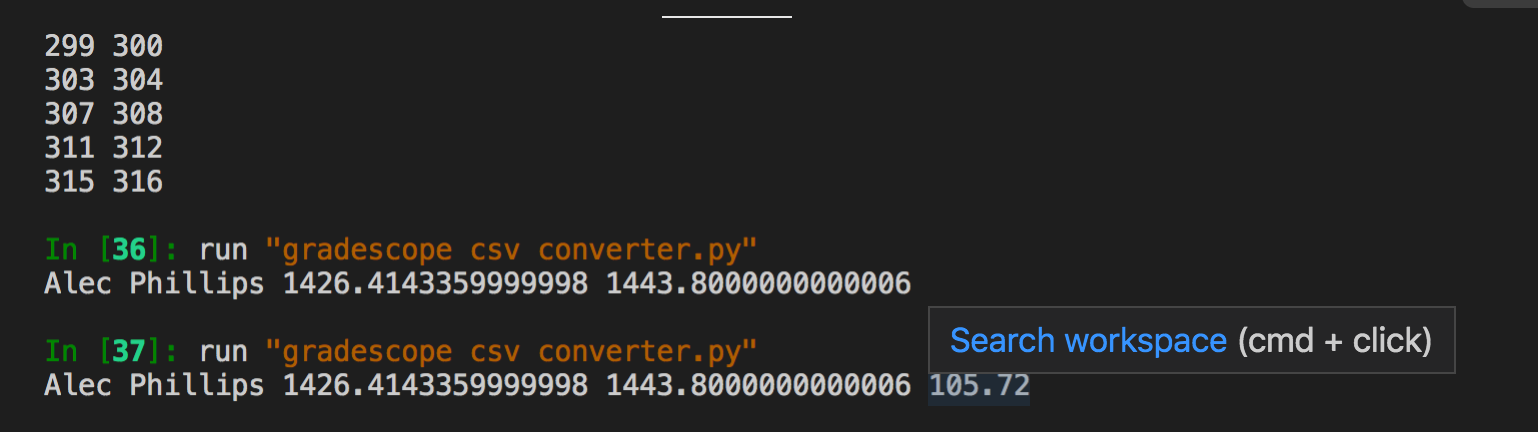
This image illustrates that, for example, it pops up for every floating-point number printed at the terminal.
[[ Tyriar, please feel free to send me an email, easily found -- I'm on the faculty at Harvey Mudd College, and happy to share thoughts on how VSCode is a wonderful gateway for building identity and confidence for computer science at the Claremont Colleges... ]]
 zdodds
on 14 Jun 2020
zdodds
on 14 Jun 2020
It's actually a major _feature_ added in the latest release. The hover only appears if you pause the mouse on the word just like in the editor, do the editor hovers bother you the same way? Is it the fact that it's basically every piece of text that now has a hover compare to the editor which typically has most?
Speaking as somebody who uses VSCode mainly for PowerShell:
One of the differences is that in the editor the hover only appears for commands, functions, variables, and the likes. In the terminal it appears for every single word string. In 99.99% of the cases the hover has no purpose for me, because the output of the script is hardly ever to be found anywhere in the workspace.
So if you could add an option to hide the tooltip - just the tooltip, not the Ctrl+Click functionality itself - that would be great.
P.S. Thanks for all your efforts in making VSCode better with every release! :-)
 ruudhanegraaf
on 14 Jun 2020
ruudhanegraaf
on 14 Jun 2020
This feature may cause the search to be accidentally triggered. I am able to reproduce it on macOS:
- Drag and select text in Integrated terminal, and do not release the mouse
- Press
cmd + Cto copy the selected text - Release the mouse
- Release
cmd + C
However "Search workspace" action is triggered in step 3. In other words, VSCode gave the same feedback to the following two user inputs
cmd + click
cmd + C + click
The second case is obviously undesirable behavior, because the user usually just want to copy text instead of searching.
It would be nice to have an option to disable this. Thanks for your contribution to VSCode :-)
 stevenjoezhang
on 15 Jun 2020
stevenjoezhang
on 15 Jun 2020
Thanks for the feedback all, I've removed the hover and highlight all together for the search workspace links.
Tyriar
on 15 Jun 2020
This bug has been fixed in to the latest release of VS Code Insiders!
@Ahmed-Nematallah, you can help us out by commenting /verified if things are now working as expected.
If things still don't seem right, please ensure you're on version 84f52fe1c0124307046ac0f5443493cda946e60f of Insiders (today's or later - you can use Help: About in the command pallette to check), and leave a comment letting us know what isn't working as expected.
Happy Coding!
 vscode-triage-bot
on 17 Jun 2020
vscode-triage-bot
on 17 Jun 2020
/verified
BUT @stevenjoezhang's point is still valid. Please add an option to disable this behaviour.

Thanks!
 moshfeu
on 24 Jun 2020
moshfeu
on 24 Jun 2020
Yes, I came here because I was looking to disable this feature. This overlay has been getting in my way constantly. I am simply trying to copy text in the terminal and this overlay keeps on blocking my view and generally making it hard to use. I'd disable it immediately and permanently if that was an option.
When will the updated release be out?
 brennanMKE
on 26 Jun 2020
brennanMKE
on 26 Jun 2020
@brennanMKE 1-2 weeks
Tyriar
on 29 Jun 2020
How can we disable this feature? Is there a property for this in settings.json?
 balnazarr
on 3 Jul 2020
balnazarr
on 3 Jul 2020
How can we disable this feature? Is there a property for this in
settings.json?
Not yet. As @balnazarr said, such an option will added in 1-2 weeks.
moshfeu
on 3 Jul 2020
can we disable this feature? Is there
Perfect, thank you for responding on this, VScode is awesome! :-)
balnazarr
on 3 Jul 2020
Now in the Terminal I keep getting "Open folder new window" covering the text all the time. It is in the way. How can this be disabled? How can all these Terminal overlays be disabled?
brennanMKE
on 24 Jul 2020
@brennanMKE is this a folder you're hovering? If not please create a new issue. You cannot disable the popups currently as they are there for discoverability and accessibility.
Tyriar
on 31 Jul 2020
Related issues
 mrkiley
·
3Comments
mrkiley
·
3Comments
 trstringer
·
3Comments
trstringer
·
3Comments
 villiv
·
3Comments
trstringer
·
3Comments
villiv
·
3Comments
trstringer
·
3Comments
 VitorLuizC
·
3Comments
VitorLuizC
·
3Comments
Most helpful comment
It would be nice to have an option to disable this. Definitely not a useful feature for me and can interfere when I am hovering and considering selecting text in the terminal, regardless of how long it takes to pop up.