Vscode: git fatal error: file is outside directory
- VSCode Version: 1.46.0 ( a5d1cc28bb5da32ec67e86cc50f84c67cc690321, 2020-06-10T09:03:20.462Z )
- OS Version: Windows_NT x64 10.0.18363
Steps to Reproduce:
- Click the "Initialize Repository" button on the source control panel.
- Add files to stage by clicking the plus sign on the "CHANGES" panel.
- Then the error occurred:
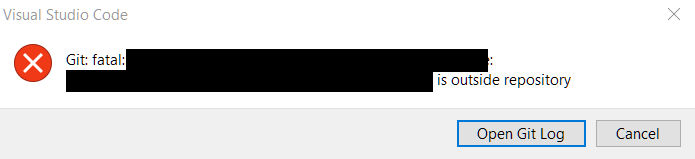
The Git log is here with some of my edits:
Looking for git in: D:\Program Files\Git\bin\git.exe
Using git 2.9.2.windows.1 from D:\Program Files\Git\bin\git.exe
> git rev-parse --show-toplevel
fatal: Not a git repository (or any of the parent directories): .git
> git rev-parse --show-toplevel
> git rev-parse --show-toplevel
fatal: Not a git repository (or any of the parent directories): .git
> git rev-parse --show-toplevel
> git rev-parse --show-toplevel
> git rev-parse --show-toplevel
fatal: Not a git repository (or any of the parent directories): .git
> git init
> git rev-parse --show-toplevel
> git rev-parse --git-dir
Open repository: c:\Users\JohnDoe\my-repo
> git fetch
> git status -z -u
fatal: No remote repository specified.  Please, specify either a URL or a
remote name from which new revisions should be fetched.
> git symbolic-ref --short HEAD
> git rev-parse master
fatal: ambiguous argument 'master': unknown revision or path not in the working tree.
Use '--' to separate paths from revisions, like this:
'git <command> [<revision>...] -- [<file>...]'
> git for-each-ref --format %(refname) %(objectname) --sort -committerdate
> git remote --verbose
> git config --get commit.template
> git check-ignore -v -z --stdin
> git add -A -- c:\Users\JohnDoe\my-repo\.gitignore c:\Users\JohnDoe\my-repo\some.files.a c:\Users\JohnDoe\my-repo\some.files.b
fatal: c:\Users\JohnDoe\my-repo\.gitignore: 'c:\Users\JohnDoe\my-repo\.gitignore' is outside repository
However, my Git works when using pure commands:
PS C:\JohnDoe\my-repo> git add *
warning: LF will be replaced by CRLF in .gitignore
The file will have its original line endings in your working directory.
warning: LF will be replaced by CRLF in some.files.a
The file will have its original line endings in your working directory.
warning: LF will be replaced by CRLF in some.files.b
The file will have its original line endings in your working directory.

PS C:\JohnDoe\my-repo> git rm --cached *
rm '.gitignore'
rm 'some.files.a'
rm 'some.files.b'
I don't know if this issue is related to the closed issue #88890.
Does this issue occur when all extensions are disabled?: Yes
 iigmir
All 21 comments
See also #99870
 gjsjohnmurray
on 11 Jun 2020
gjsjohnmurray
on 11 Jun 2020
Same issue after upgrading to 1.46.0
 DarrenLevine
on 11 Jun 2020
DarrenLevine
on 11 Jun 2020
- 1 after upgrading to 1.46.0
 OYWB-keep
on 12 Jun 2020
OYWB-keep
on 12 Jun 2020
Same
 gongcChen
on 12 Jun 2020
gongcChen
on 12 Jun 2020
Same issue after update yesterday, and I resolve it update my git to 2.27
 wz71014q
on 12 Jun 2020
wz71014q
on 12 Jun 2020
Same issue for me after updating to 1.46.0
 ViperTG
on 12 Jun 2020
ViperTG
on 12 Jun 2020
cc @joaomoreno
gjsjohnmurray
on 12 Jun 2020
same question version 1.46.0
 DreFalPoetry
on 12 Jun 2020
DreFalPoetry
on 12 Jun 2020
@joaomoreno maybe the built-in Git extension has been affected by this change
gjsjohnmurray
on 12 Jun 2020
I also face the same issue after VS Code updated to 1.46.
I checked my Git version and it was version 2.8.x
Then I update my Git to version 2.27 and I don't found any problems anymore.
I think it occurs when someone using older version of Git
Either update the Git version or wait for the next VS Code update
 sozonome
on 12 Jun 2020
sozonome
on 12 Jun 2020
Thank you @wz71014q and @sozonome, I updated my Git to 2.27 and the issue is solved.
iigmir
on 12 Jun 2020
Works for me after updating git
 albu77
on 14 Jun 2020
albu77
on 14 Jun 2020
Thanks to everyone for confirming the update to Git 2.27. And special thanks to @gjsjohnmurray for being such a good inbox tracker! 👏
 joaomoreno
on 16 Jun 2020
joaomoreno
on 16 Jun 2020
Any solutions other than updating git? I'm on git 2.11 for the foreseeable future, as my git installation is controlled by the organization.
 sharpround
on 2 Jul 2020
sharpround
on 2 Jul 2020
@sharpround 2.11 should actually work OK. What is the exact error you're seeing? Show me the actual error/output, thanks!
joaomoreno
on 3 Jul 2020
I reproduce what @sharpround said in Windows 7. Here is my error/output:
Version: 1.46.1 (user setup)
Commit: cd9ea6488829f560dc949a8b2fb789f3cdc05f5d
Date: 2020-06-17T21:13:20.174Z
Electron: 7.3.1
Chrome: 78.0.3904.130
Node.js: 12.8.1
V8: 7.8.279.23-electron.0
OS: Windows_NT x64 6.1.7601
Looking for git in: C:\Program Files\Git\cmd\git.exe
Using git 2.11.1.windows.1 from C:\Program Files\Git\cmd\git.exe
> git rev-parse --show-toplevel
> git rev-parse --git-dir
Open repository: c:\Users\john-doe\test-repo
> git status -z -u
> git symbolic-ref --short HEAD
> git rev-parse master
fatal: ambiguous argument 'master': unknown revision or path not in the working tree.
Use '--' to separate paths from revisions, like this:
'git <command> [<revision>...] -- [<file>...]'
> git for-each-ref --format %(refname) %(objectname) --sort -committerdate
> git remote --verbose
> git config --get commit.template
> git check-ignore -v -z --stdin
> git add -A -- c:\Users\john-doe\test-repo\some.files.a c:\Users\john-doe\test-repo\some.files.b c:\Users\john-doe\test-repo\some.files.c
fatal: c:\Users\john-doe\test-repo\some.files.a: 'c:\Users\john-doe\test-repo\some.files.a' is outside repository
Maybe @sharpround you can use older versions of VScode instead?
iigmir
on 3 Jul 2020
Had the same issue with pretty much the same setup as @iigmir
- OS: Windows 7 (Windows_NT x64 6.1.7601)
- VS Code 1.46.1 (user setup), commit cd9ea6, Electron 7.3.1, Chrome 78.0.3904.130 etc
- Git: v2.6
Upgrading Git to v2.22 solved the problem (git version choices limited by enterprise)
 shreepads
on 4 Jul 2020
shreepads
on 4 Jul 2020
@joaomoreno
@sharpround 2.11 should actually work OK. What is the exact error you're seeing? Show me the actual error/output, thanks!
Sure. There's really not much, though. From the beginning of the git terminal.
git fetch
git ls-files --stage -- C:\Users\project-folder\.gitignore
git cat-file -s xxxxx
git show :.gitignore
git status -z -u
git symbolic-ref --short HEAD
git ls-files --stage -- C:\Users\project-folder\.gitignore
git rev-parse master
git cat-file -s xxxxx
git rev-parse --symbolic-full-name master@{u}
git show :.gitignore
git rev-list --left-right master...refs/remotes/origin/master
git for-each-ref --format %(refname) %(objectname) --sort -committerdate
git remote --verbose
git config --get commit.template
git add -A -- C:\Users\project-folder.gitignore C:\Users\project-folder\.gitignore
fatal: C:\Users\project-folder\.gitignore: 'C:\Users\project-folder\.gitignore' is outside repository
Version: 1.46.1 (user setup)
Commit: cd9ea6488829f560dc949a8b2fb789f3cdc05f5d
Date: 2020-06-17T21:13:20.174Z
Electron: 7.3.1
Chrome: 78.0.3904.130
Node.js: 12.8.1
V8: 7.8.279.23-electron.0
OS: Windows_NT x64 10.0.17134
@iigmir, I can probably back up the version. I have to do some pretty intense elevations and logging for audits every time I make a change like that, though, so I avoid it when I can. Honestly, it's going to be easier to just use the git CLI.
sharpround
on 4 Jul 2020
Unfortunately it seems 2.11 also has the same issue. 😢 There's really not much we can do besides recommending the update.
joaomoreno
on 6 Jul 2020
Any solutions other than updating git? I'm on git 2.11 for the foreseeable future, as my git installation is controlled by the organization.
@sharpround I have the same issue: VSCode 1.46.1 (user install), and Git 2.11 controlled by my organization. I added the GitLens extension and have been able to use it without any issues. This will be my workaround until they update Git.
@joaomoreno What would GitLens be doing differently that lets it work where the built-in Git does not?
 brammitch
on 15 Jul 2020
brammitch
on 15 Jul 2020
I have the same issue
Git version is 2.9.3
VSCode version is 1.46.1
 ahmedbeheiry
on 22 Jul 2020
ahmedbeheiry
on 22 Jul 2020
Related issues
 omidgolparvar
·
3Comments
omidgolparvar
·
3Comments
 biij5698
·
3Comments
biij5698
·
3Comments
 trstringer
·
3Comments
trstringer
·
3Comments
 sijad
·
3Comments
sijad
·
3Comments
 shanalikhan
·
3Comments
shanalikhan
·
3Comments
Most helpful comment
Same issue after update yesterday, and I resolve it update my git to 2.27