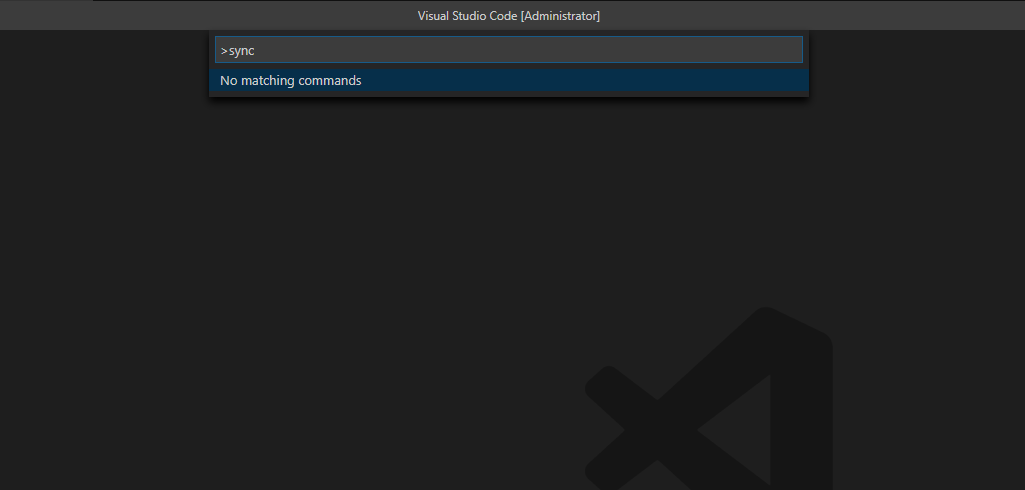
Vscode: Sync not working in new stable version 1.46.0
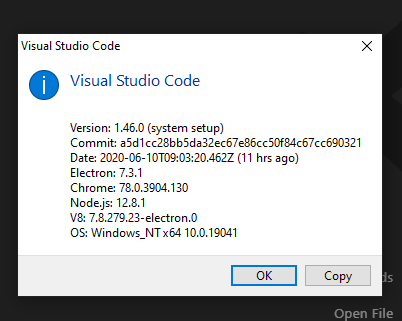
- VSCode Version: 1.46
- OS Version: win 10
Steps to Reproduce:
- install app
Does this issue occur when all extensions are disabled?: Yes
 coaperator
All 6 comments
AFAIK sync is still only available if you are running Insiders.
 gjsjohnmurray
on 11 Jun 2020
gjsjohnmurray
on 11 Jun 2020
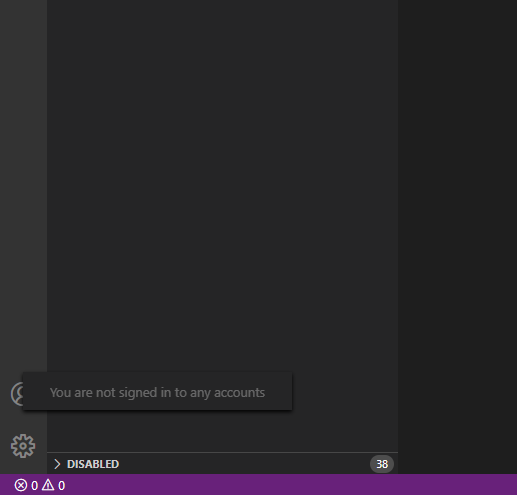
Then it is not clear why the synchronization icon appeared in the stable version
coaperator
on 11 Jun 2020
See #97167 for a request to allow the Accounts icon to be hidden.
gjsjohnmurray
on 11 Jun 2020
Yes, we did not enable Sync yet in stable and the accounts icon is not only meant for sync but also for accounts user is being signed in to - Please check our release notes - https://code.visualstudio.com/updates/v1_46#_accounts-management
 sandy081
on 11 Jun 2020
sandy081
on 11 Jun 2020
Yes, we did not enable Sync yet in stable and the accounts icon is not only meant for sync but also for accounts user is being signed in to - Please check our release notes - https://code.visualstudio.com/updates/v1_46#_accounts-management
Athough I do actually sign in to some accounts in VSCode ("Team: Signin" from "Azure Repos" extension, "Azure: Sign In" & "Azure: Sign in to Azure Cloud" from "Azure Account" extension), the "Accounts" icon shows me nothing ("You are not signed in ...").
Shouldn't it be hidden until I actually have any extensions which do leverage it (the new API-s) or even until the extensions actually have something to show there? Now it is useless and appears as if it was something broken, (i.e. with no hint how you can actually put it to some use).
 hilari0n
on 16 Jun 2020
hilari0n
on 16 Jun 2020
Shouldn't it be hidden until I actually have any extensions which do leverage it (the new API-s) or even until the extensions actually have something to show there? Now it is useless and appears as if it was something broken, (i.e. with no hint how you can actually put it to some use).
Already suggested in https://github.com/microsoft/vscode/issues/99960#issuecomment-643276588
gjsjohnmurray
on 16 Jun 2020
Related issues
 mrkiley
·
3Comments
mrkiley
·
3Comments
 ryan-wong
·
3Comments
ryan-wong
·
3Comments
 chrisdias
·
3Comments
chrisdias
·
3Comments
 curtw
·
3Comments
curtw
·
3Comments
 VitorLuizC
·
3Comments
VitorLuizC
·
3Comments
Most helpful comment
Yes, we did not enable Sync yet in stable and the accounts icon is not only meant for sync but also for accounts user is being signed in to - Please check our release notes - https://code.visualstudio.com/updates/v1_46#_accounts-management