Vscode: Show active file's GIT Branch name (when working with multiple repos)
Hello team
Hope you're healthy and safe from the pandemic.
I'd like to request a feature that addresses my scenario as below:
My working directory has multiple repositories and I have to keep working on them in parallel. I often get lost with the branch I'm working with. The status bar on the footer shows the branch currently selected (to the left side) in the Source Control, but not the active file's branch.
(Example:
Consider my directory [MyWork] has 2 repositories:
- repo_A[Master]
- repo_B[Master]
When I have to make changes in repos A/B, I create corresponding branches as required.
Say for example, I'm working on a bug 12345 which has files to be changed in repo_A. So, I create a branch for fix-for-bug-12345 under repo_A. Few moments after, I get to handle another bug, this time via repo_B (fix-for-bug-99887):
- repo_A[Master] --> fix-for-bug-12345
- repo_B[Master] --> fix-for-bug-99887
Now, while fixing bug 99887, I get to know the fix requires changes in repo_A also.. and I'm unaware of, in what branch of repo_A is selected now. And many times, resulting in overlapping fixes (in repo_B) of 12345 and 99887.
The branch name (selected in Source Control) is shown in the bottom left of the footer Status bar; but, that doesn't have the following (which is my request):
My Requests:
- [x] The footer status bar shall contain the repo-branch name of the active file in the editor section. This is to be made _dynamic_ and is updated whenever the file selection in the editor changes.
- [ ] The repository name shall be included along with the branch name in the left of the footer status bar.
This shall resolve my problem and also add more clarity to all of our users.
Thank you for providing a platform to hear us and to read a (_rather_) lengthy request.
 Vasista-Eranki
All 12 comments
The status bar on the footer shows the branch currently selected (to the left side) in the Source Control, but not the active file's branch.
The status bar actually also tracks the active file in the editor, doesn't that work for you?
 joaomoreno
on 9 Jun 2020
joaomoreno
on 9 Jun 2020
Hi
Yes; this seems working now. Can you help me with a way to show-up the repo name along with the active-branch?
Vasista-Eranki
on 9 Jun 2020
We only render the repo name on the hover tooltip, have you tried hovering over the branch name?
joaomoreno
on 9 Jun 2020
nice; I haven't tried it earlier.
Can we do any tweeks to show the _repo-name - branch-name_ like in the tooltip?
Vasista-Eranki
on 9 Jun 2020
This feature request is now a candidate for our backlog. The community has 60 days to upvote the issue. If it receives 20 upvotes we will move it to our backlog. If not, we will close it. To learn more about how we handle feature requests, please see our documentation.
Happy Coding!
 vscode-triage-bot
on 10 Jun 2020
vscode-triage-bot
on 10 Jun 2020
This feature request has not yet received the 20 community upvotes it takes to make to our backlog. 10 days to go. To learn more about how we handle feature requests, please see our documentation.
Happy Coding!
vscode-triage-bot
on 31 Jul 2020
hello @joaomoreno
Hope you're doing good.
I managed to secure the required votes.

You may please take it forward.
Vasista-Eranki
on 5 Aug 2020
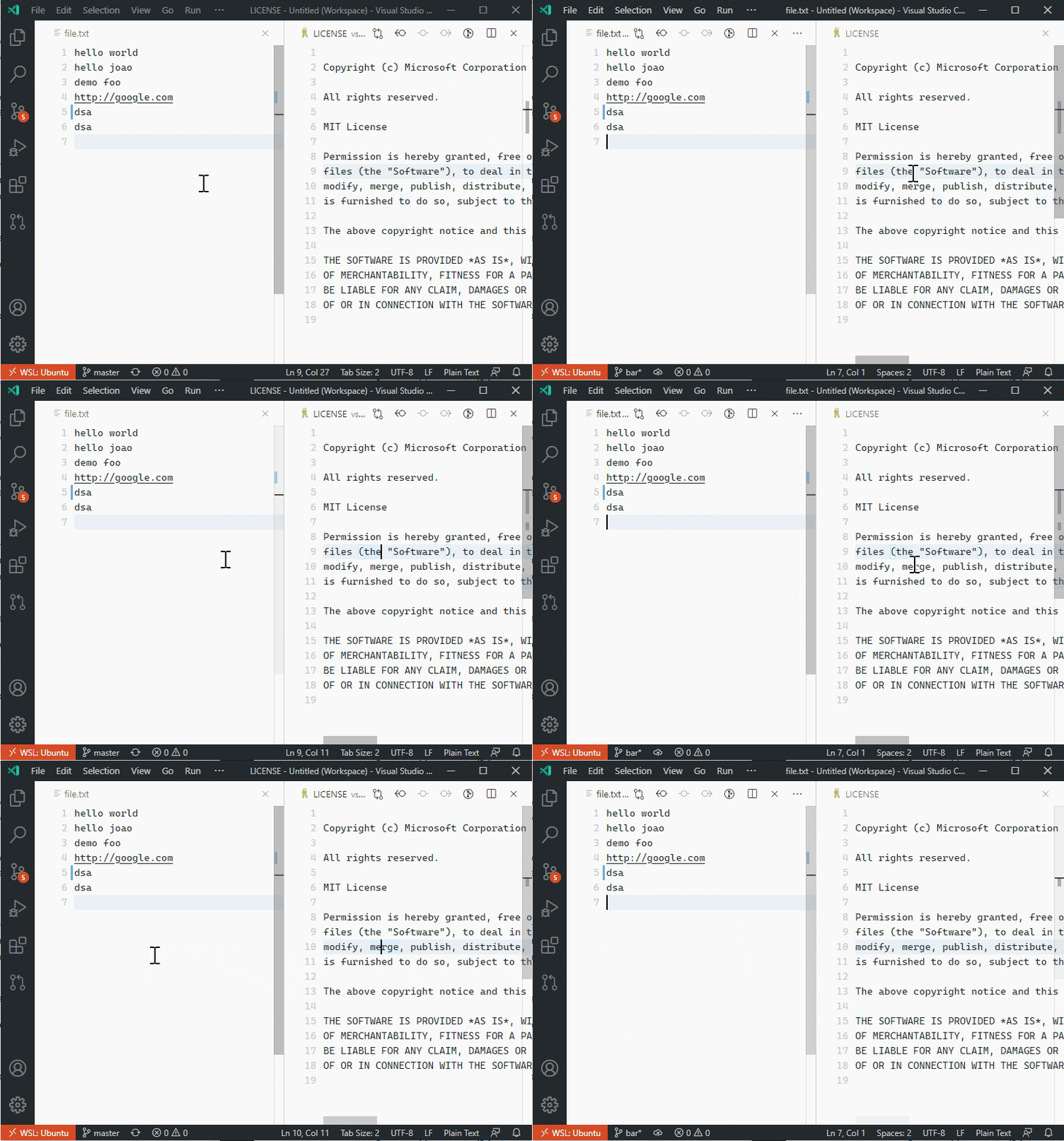
Is something like this what you were looking for?

Example of switching between two repositories in the same workspace:

I currently have it setup behind a setting called git.repositoryName, which defaults to false. Is that setting name suitable, or is there something else that might fit better?
Full commit here: https://github.com/SneakyFish5/vscode/commit/d8431699c72961e056bc6172aa6ba65c66810670
 SneakyFish5
on 9 Aug 2020
SneakyFish5
on 9 Aug 2020
@SneakyFish5 : looks good to me.
Vasista-Eranki
on 10 Aug 2020
:slightly_frowning_face: In the last 60 days, this feature request has received less than 20 community upvotes and we closed it. Still a big Thank You to you for taking the time to create this issue! To learn more about how we handle feature requests, please see our documentation.
Happy Coding!
vscode-triage-bot
on 11 Aug 2020
@vscode-triage-bot Votes are provided for the comments.
@SneakyFish5 I hope this is being taken care..
Vasista-Eranki
on 13 Aug 2020
I think the issues been closed because the votes were applied to your comment rather than the original post. I'll open the PR right now, it slipped my mind so sorry about that and thanks for the reminder.
SneakyFish5
on 13 Aug 2020
Related issues
 Perkovec
·
191Comments
Perkovec
·
191Comments
 ghost
·
234Comments
ghost
·
234Comments
 Tyriar
·
314Comments
Tyriar
·
314Comments
 Brakkar
·
364Comments
Brakkar
·
364Comments
 misolori
·
282Comments
misolori
·
282Comments
Most helpful comment
nice; I haven't tried it earlier.
Can we do any tweeks to show the _repo-name - branch-name_ like in the tooltip?