Vscode: Add command-line arg support for external terminal
One can set the external terminal in VSCode's settings to wt to launch Windows Terminal.
However, some users would like to specify which WT profile to launch with. This can be done by specifying -p "<profile-name>".
Further, Windows Terminal supports a rich set of command-line args supporting launching Terminal in many custom configurations.
If VSCode could support a "commandlineArgs" option for the external terminal, this would allow users to launch Windows Terminal configured precisely to their needs.
See this Twitter thread for the discussion that led to this ask: https://twitter.com/richturn_ms/status/1267909440134541313
 bitcrazed
All 10 comments
This feature request is now a candidate for our backlog. The community has 60 days to upvote the issue. If it receives 20 upvotes we will move it to our backlog. If not, we will close it. To learn more about how we handle feature requests, please see our documentation.
Happy Coding!
 vscode-triage-bot
on 4 Jun 2020
vscode-triage-bot
on 4 Jun 2020
Thanks for creating this issue @bitcrazed after our discussion on Twitter. I think this would be a first step in the right direction, but I would still like to see a tighter integration between the two great Microsoft products VS Code and Windows Terminal.
But first of all, let me explain my use case: I am using different WT profiles within the same project, eg. WSL for Git and other tools with X11 forwarding enabled as well as MSYS2 for cross-platform development. So just specifying a fixed profile per VS Code instance or even per project/folder would not really help me.
Instead I would like to see VS Code show the available WT profiles to select via a right-click sub-menu. The default for shortcuts and such could still be the default profile, but maybe even the shortcut could be extended to include an optional number to launch a specific profile, just like in WT itself. I am not sure if there is yet an easy way for other applications to retrieve the available WT profiles. An easy solution could be to add a list-profiles or similar option to wt itself, like described here https://github.com/microsoft/terminal/issues/5463.
But still, I guess this feature request in itself also makes sense for other tools.
 mback2k
on 5 Jun 2020
mback2k
on 5 Jun 2020
The more I thought about this the more I felt it should be an extension so I spent a bit of time just now building this https://marketplace.visualstudio.com/items?itemName=Tyriar.windows-terminal, I plan on building this extension out more so we can keep it out of core (avoid bloat in core, allow commands/config to get as complicated as we want).
 Tyriar
on 5 Jun 2020
Tyriar
on 5 Jun 2020
I must say: wow! I am totally surprised by your fast reaction @Tyriar. Thank you very much! I will try it out ASAP. I even thought about learning TypeScript myself and building it if this feature request would not have been accepted, so thank you again. I will certainly take a look into the extension to learn how you did it so quickly, even though https://github.com/microsoft/terminal/issues/5463 is not implemented yet. You made my day!
mback2k
on 5 Jun 2020
Quick side note: I guess @bitcrazed original request about command line args support could still be valid, right? Maybe a new issue should be opened for that if you still think it is needed, @bitcrazed? Sorry for hijacking this issue with my ideas based on the original feature request.
mback2k
on 5 Jun 2020
even though microsoft/terminal#5463 is not implemented yet
It appears the settings file is in a stable place that I can look up so it was fairly easy: https://github.com/Tyriar/vscode-windows-terminal/blob/9de7adfcce61e92b48d31461a71cff90ebd69cd9/src/settings.ts#L24-L35. Provided the access is correct and the format is stable (expected in v1), this is probably preferable to parsing out the CLI output as well.
Maybe a new issue should be opened for that if you still think it is needed,
The external terminal support is fairly barebones by design, I don't think we should be building much more into that as the integrated terminal will typically provide the best experience (especially in remote workspaces or Codespaces).
Tyriar
on 5 Jun 2020
@Tyriar I would recommend figuring out how to pass command-line args to wt - this will allow one to open Terminal with n tabs each opening the required profiles and/or split into the user's preferred panes, etc. The profile alone will not give you this.
bitcrazed
on 5 Jun 2020
@bitcrazed the extension could contain these sorts of commands like this if they are generally useful. It's using the CLI to drive cwd and profile atm: https://github.com/Tyriar/vscode-windows-terminal/blob/b4f0d62633d807622f5f71eb8469955b5fcd7338/src/extension.ts#L58
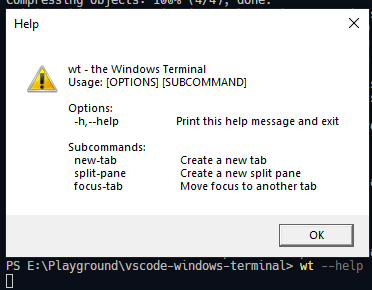
On the topic of the CLI, it would be nice if this was stdout and enumerated all CLI args (-p, -d, ;)
Tyriar
on 5 Jun 2020
The dialog is because wt is itself a Windows GUI app, not a command-line app (like when you run Cmd / PowerShell and Windows then spins-up and connects a Console for you in the background)
bitcrazed
on 5 Jun 2020
Great that you're using -p and path, etc., would love to also pass an arbitrary arg string allowing users to specify splits, tabs, etc.
bitcrazed
on 5 Jun 2020
Related issues
 sirius1024
·
3Comments
sirius1024
·
3Comments
 biij5698
·
3Comments
biij5698
·
3Comments
 borekb
·
3Comments
borekb
·
3Comments
 omidgolparvar
·
3Comments
omidgolparvar
·
3Comments
 shanalikhan
·
3Comments
shanalikhan
·
3Comments
Most helpful comment
The more I thought about this the more I felt it should be an extension so I spent a bit of time just now building this https://marketplace.visualstudio.com/items?itemName=Tyriar.windows-terminal, I plan on building this extension out more so we can keep it out of core (avoid bloat in core, allow commands/config to get as complicated as we want).