Vscode: Bulb menu should open immediately after clicking on the info icon in the problems view
When working through large no.s of lints in the 'problems' pane I use the quick fix bulb to rapidly fix many trivial errors.
This process is slowed down by how the 'quick fix bulb' appears and then disappears.
The process I used to apply these fixes is:
Open the 'problems pane'.
click on the line
wait for the bulb to appear
click the bulb
select the action.
The problem is that the bulb will appear and then disappear before re-appearing.
It also changes color from white to yellow (which I'm sure indicates something but I've not worked it out as yet).
My preferred operation would be:
click line
click 'info' icon.
The code then looks for quick fixes and displays the menu.
This would eliminate the slight delay in having to wait for the bulb to appear.

 bsutton
All 21 comments
My preferred operation would be:
click line
click 'info' icon.
The code then looks for quick fixes and displays the menu.
I think this works. Did you try clicking on line and wait until lightbulb is available?
 sandy081
on 27 May 2020
sandy081
on 27 May 2020
Its the waiting that is the problem.
If you are working through a large no of lint errors the waiting really
slows things down.
Just let me Click the info icon and if there are quick fixes show them.
Don't make me wait for the bulb to appear.
On Wed, 27 May 2020, 11:38 pm Sandeep Somavarapu, notifications@github.com
wrote:
My preferred operation would be:
click line
click 'info' icon.
The code then looks for quick fixes and displays the menu.I think this works. Did you try clicking on line and wait until lightbulb
is available?—
You are receiving this because you authored the thread.
Reply to this email directly, view it on GitHub
https://github.com/microsoft/vscode/issues/98618#issuecomment-634667315,
or unsubscribe
https://github.com/notifications/unsubscribe-auth/AAG32ODIQJP6HYBS6NX2Z6DRTUJWRANCNFSM4NLLISZA
.
bsutton
on 27 May 2020
I do not think delaying the context menu on click is not a good user interaction model. Also clicking on icon to show the quick fixes might be less discoverable. We have a command that you can run to show quick fixes for the selected item in problems view.
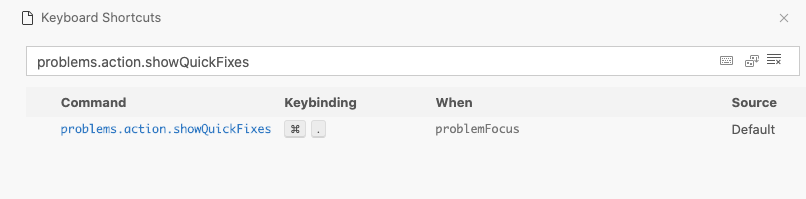
sandy081
on 2 Jun 2020
In not suggesting that you delay the context menu.
Rather that if I click the info icon it immediately displays the context
menu.
You can still display the bulb when you are ready, just don't make me wait
for it.
On Tue, 2 Jun 2020, 5:57 pm Sandeep Somavarapu, notifications@github.com
wrote:
I do not think delaying the context menu on click is not a good user
interaction model. Also clicking on icon to show the quick fixes might be
less discoverable. We have a command that you can run to show quick fixes
for the selected item in problems view.[image: image]
https://user-images.githubusercontent.com/10746682/83494983-5f1e1980-a4b7-11ea-97bd-34ef1c33e7a1.png—
You are receiving this because you authored the thread.
Reply to this email directly, view it on GitHub
https://github.com/microsoft/vscode/issues/98618#issuecomment-637362273,
or unsubscribe
https://github.com/notifications/unsubscribe-auth/AAG32OE5W7NYZIWQ3O722QTRUSWFDANCNFSM4NLLISZA
.
bsutton
on 2 Jun 2020
The short cut you mentioned is also not a particularly good solution.
I have to click on a problem line
Type the short cut
arrow down.
hit enter.
The above isn't too bad, but after I've activated the quick fix the problem
area loses focus so I'm back to using the mouse to reset the focus.
So it's still looks like my suggestion of simply changing the 'info' icon
so that clicking on it displays the context menu is the best option.
It doesn't change discoverability (you can still show the bulb when you
want to) and I can activate a quick fix with two quick clicks.
One of the 'info' icon.
One of the desired quick fix.
This workflow will allow a user to rapidly work through large no.s of
problems which is really important whenever you increase the lint level of
a project.
On Tue, 2 Jun 2020 at 17:57, Sandeep Somavarapu notifications@github.com
wrote:
I do not think delaying the context menu on click is not a good user
interaction model. Also clicking on icon to show the quick fixes might be
less discoverable. We have a command that you can run to show quick fixes
for the selected item in problems view.[image: image]
https://user-images.githubusercontent.com/10746682/83494983-5f1e1980-a4b7-11ea-97bd-34ef1c33e7a1.png—
You are receiving this because you authored the thread.
Reply to this email directly, view it on GitHub
https://github.com/microsoft/vscode/issues/98618#issuecomment-637362273,
or unsubscribe
https://github.com/notifications/unsubscribe-auth/AAG32OE5W7NYZIWQ3O722QTRUSWFDANCNFSM4NLLISZA
.
bsutton
on 2 Jun 2020
I think an issue here might be that VS Code doesn't know a problem has quick-fixes unless it sends an async request? So you click on the problem, then there's an async request, then VS Code knows there are fixes and shows a lightbulb, which you need to click again?
If so, would a reasonable fix be for an extension to be able to set a flag on a Diagnostic that there are fixes and VS code can show the lightbulb in the problems view in advance? (there would still be a delay in it appearing when you click it, but it's better to click+wait for menu than click+wait for bulb+click+wait for menu).
In Dart, the server already computes this info. We have a hasFix boolean on all errors, but it's not mappable to anything in VS Code.
 DanTup
on 2 Jun 2020
DanTup
on 2 Jun 2020
Rather that if I click the info icon it immediately displays the context menu.
Yes we do not know upfront if we have quick fixes upfront and needs to ask extension to provide them. Hence this delay is unavoidable.
I do not want to drag this request into a separate discussion asking for API change. If API change is needed for this, I do not think it is worth considering.
sandy081
on 2 Jun 2020
It might be possible without an API change, eg. by using a DiagnosticTag? I think it would be a fairly nice improvement if VS code knew which problems had quick-fixes from the problems view. Imagine something like enabling a new lint which generates a lot of issues - it would be much nicer to work through them if the bulb was visible/clickable in the list.
DanTup
on 2 Jun 2020
cc @mjbvz if you want to consider this request as you own code actions and from problems perspective I would want to align with the editor code actions.
sandy081
on 2 Jun 2020
Sounds like this can be done without an API change.
Click info icon.
Async call
Display menu
If no quick fixes are available display a single item
'No quick fixes available.'
On Wed, 3 Jun 2020, 1:29 am Sandeep Somavarapu, notifications@github.com
wrote:
Rather that if I click the info icon it immediately displays the context
menu.Yes we do not know upfront if we have quick fixes upfront and needs to ask
extension to provide them. Hence this delay is unavoidable.I do not want to drag this request into a separate discussion asking for
API change. If API change is needed for this, I do not think it is worth
considering.—
You are receiving this because you authored the thread.
Reply to this email directly, view it on GitHub
https://github.com/microsoft/vscode/issues/98618#issuecomment-637621456,
or unsubscribe
https://github.com/notifications/unsubscribe-auth/AAG32OCPDZ6SJVBXKUTSZ3LRUULGNANCNFSM4NLLISZA
.
bsutton
on 2 Jun 2020
cc @mjbvz if you want to consider this request as you own code actions and from problems perspective I would want to align with the editor code actions.
I don't understand this statement?
bsutton
on 3 Jun 2020
I do not think this is a good user interaction to show context menu after some delay.
sandy081
on 3 Jun 2020
The delay should be fairly minor.
You could change the info icon to a spinning gif until the context menu
appears.
On Wed, 3 Jun 2020, 7:16 pm Sandeep Somavarapu, notifications@github.com
wrote:
I do not think this is a good user interaction to show context menu after
some delay.—
You are receiving this because you authored the thread.
Reply to this email directly, view it on GitHub
https://github.com/microsoft/vscode/issues/98618#issuecomment-638072494,
or unsubscribe
https://github.com/notifications/unsubscribe-auth/AAG32OETLT5N4CBUSK7P64LRUYIHHANCNFSM4NLLISZA
.
bsutton
on 3 Jun 2020
The delay should be fairly minor.
Depends and we cannot rely on that.
Well, I see the request but I do not think it meet the priorities. So I have to tag this as out of scope and we would revisit this when there is a demand.
sandy081
on 3 Jun 2020
We closed this issue because we don't plan to address it in the foreseeable future. You can find more detailed information about our decision-making process here. If you disagree and feel that this issue is crucial: We are happy to listen and to reconsider.
If you wonder what we are up to, please see our roadmap and issue reporting guidelines.
Thanks for your understanding and happy coding!
 vscode-triage-bot
on 3 Jun 2020
vscode-triage-bot
on 3 Jun 2020
@sandy081 any reason why this couldn't be done using a DiagnosticTag or something as suggested above? It removes any delay between clicking/menu opening, and would be a nice usability improvement showing which problems have quickfixes in the problem list without having to click (the current behaviour already feels kinda awkward).
DanTup
on 3 Jun 2020
any reason why this couldn't be done using a DiagnosticTag or something as suggested above?
Can be done but not in priorities as mentioned above.
sandy081
on 3 Jun 2020
I can't say that I'm happy with the concept of closing issues out.
Even if you aren't going to do this now, having an open ticket lets other users find and vote on this ticket.
bsutton
on 4 Jun 2020
I also disagree with the priority position on this one.
Quick fixes are one of the most common elements that people interact with with in the UI.
Whilst it is a minor announce it is a high use work flow and as such I would suggest that it needs greater priority.
It falls in to the category which is often referred to as a paper cut. Its small and hurts a little bit, but when you are covered in them its a real pain.
bsutton
on 4 Jun 2020
Even if you aren't going to do this now, having an open ticket lets other users find and vote on this ticket.
Sorry for closing this. Reopened it and moved to backlog candidates.
sandy081
on 4 Jun 2020
It's still showing up as closed.
bsutton
on 4 Jun 2020
Related issues
 curtw
·
3Comments
curtw
·
3Comments
 trstringer
·
3Comments
trstringer
·
3Comments
 philipgiuliani
·
3Comments
philipgiuliani
·
3Comments
 omidgolparvar
·
3Comments
omidgolparvar
·
3Comments
 chrisdias
·
3Comments
chrisdias
·
3Comments
Most helpful comment
I can't say that I'm happy with the concept of closing issues out.
Even if you aren't going to do this now, having an open ticket lets other users find and vote on this ticket.