- VSCode Version: 1.45.1
- OS Version: macOS Mojave 10.14.6
Steps to Reproduce:
Recently, the autocomplete auto import text has become cropped so short as to be completely useless. In many cases over the past couple of days, I've had the option to import 2-4 same-named classes/components. Normally, I can select the correct one based on the additional text
Auto import from 'react-native'
Now the package name is cropped to the same text for all options:
Auto import from 'react...
This makes the auto-import feature completely useless (one of the most important features in an IDE).
See example:

- Create project with React Native + React Navigation
- Type in 'Header' and cmd+space to open autocomplete
(It may be that additional conditions apply, for example what the other options presented in the list would be.)
Does this issue occur when all extensions are disabled?: Yes
 plaa
plaa
All 10 comments
Press Cmd+Space again to see detailed info for suggestions.
Changing width of suggestions box already tracked in #29757 and #29126
 IllusionMH
on 20 May 2020
IllusionMH
on 20 May 2020
Or just remove this completely useless feature which was added around January 2020.
 Fasani
on 23 Jun 2020
Fasani
on 23 Jun 2020
Agree with @Fasani and others, that current implementation does not make too much sense, and adding this description to the same line as a code snippet makes snippet name and description basically useless.
 lnikell
on 23 Jun 2020
lnikell
on 23 Jun 2020
Since #100832 was closed (with reference to some obscure problem from 2017), this ticket is the closest I could come to the new issue.
The suggestion-list window is just too narrow for the info that is being presented there.
Introducing a new feature to put more information there made the situation worse.
It's simple not enough room to read the fully qualified names many are using.
Snippets for PS/XML and other languages. (Sample image included)
Alternative fixes :
- Allow us to turn OFF the 'descriptions' in column 2 of the snippet list.
- Allow people to customize the width of the list-window.
- Roll back the feature that gave us 2 columns instead of just 1 column (with the name only).
I sincerely need a workaround or fix. Very frustrating.

 jecarlsen
on 23 Jun 2020
jecarlsen
on 23 Jun 2020
The autocomplete just got even more useless! Here are the options that I see (cycling using ctrl+space):

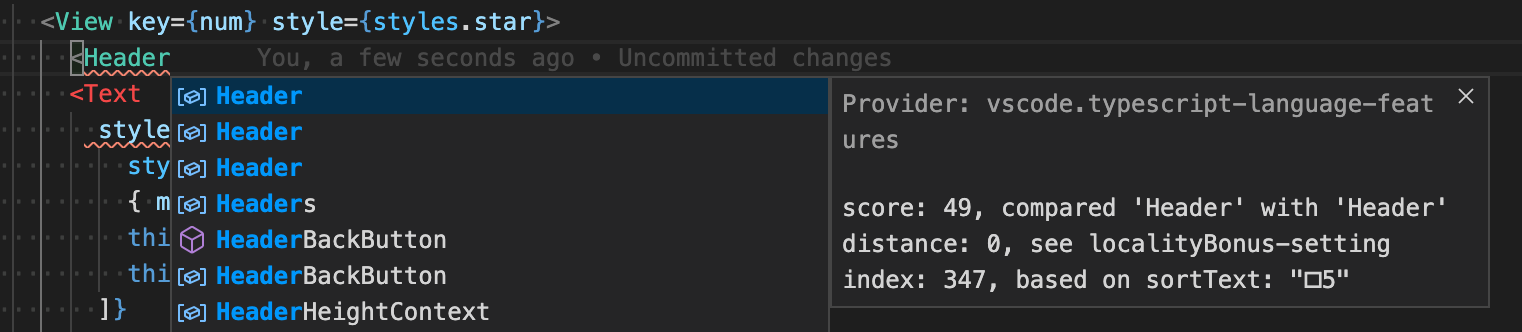
Previously the detail screen showed details on the option, not details why this suggestion is being provided. What's the use of that to a developer? Have I unknowingly enabled some obscure autocomplete-debugging mode or something?
plaa
on 25 Jun 2020
Have I unknowingly enabled some obscure autocomplete-debugging mode or something?
Yes. Press Cmd+? to toggle the suggest debug mode
 jrieken
on 25 Jun 2020
jrieken
on 25 Jun 2020
@jrieken Cmd+? does nothing. I couldn't find anything similar in the Cmd+Shift+P command palette either nor by googling.
plaa
on 25 Jun 2020
Aha! To en/disable the suggest debug mode (on European keyboard):
- Open the suggestion dialog
- Press
Cmd+/(i.e. the same hotkey as for (un)commenting a line)
(I figured it out by seeing that ? on a US keyboard is Shift+/.)
So if you accidentally have the suggestions open when trying to comment out a line, you'll end up with a useless autocomplete system and no idea how to make it work again.
@jrieken May I suggest that a functionality that is useful to 0.01% of users and causes a lot of confusion for 99.99% if accidentally used would not have a default hotkey? It could be clearly labeled as "Toggle autocomplete suggest debug mode" or similar in the command palette, which would be just as easy for suggestion debugging cases but users would not accidentally trigger it.
plaa
on 25 Jun 2020
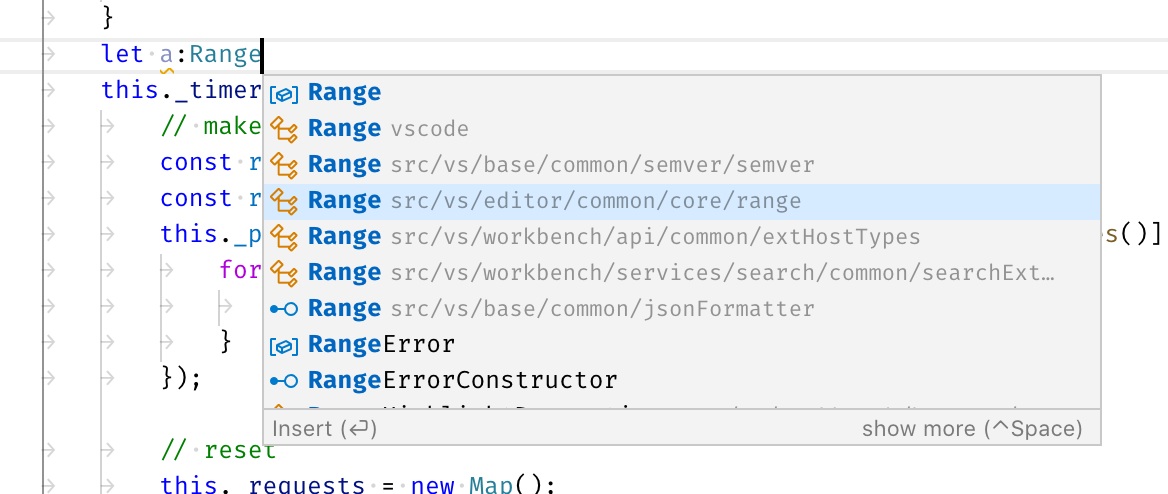
Just a heads-up that for the suggest widget and its details parts are going to be resizable. See https://github.com/microsoft/vscode/issues/29126. This issue will all about the specific TS case and how to improve the situation for auto-importing modules
jrieken
on 27 Oct 2020
@mjbvz There might be more to it and things I don't know esp. the doc for tsEntry.source says it might not be human readable but it kinda looks nice already.
diff --git a/extensions/typescript-language-features/src/languageFeatures/completions.ts b/extensions/typescript-language-features/src/languageFeatures/completions.ts
index 73f54f20c6..bf6916c925 100644
--- a/extensions/typescript-language-features/src/languageFeatures/completions.ts
+++ b/extensions/typescript-language-features/src/languageFeatures/completions.ts
@@ -62,6 +62,9 @@ class MyCompletionItem extends vscode.CompletionItem {
            // De-prioritze auto-imports
            // https://github.com/microsoft/vscode/issues/40311
            this.sortText = '\uffff' + tsEntry.sortText;
+
+           this.label2 = { name: tsEntry.name, qualifier: vscode.workspace.asRelativePath(tsEntry.source) };
+
        } else {
            this.sortText = tsEntry.sortText;
        }
jrieken
on 2 Nov 2020
Related issues
 lw-schick
·
229Comments
lw-schick
·
229Comments
 Brakkar
·
364Comments
Brakkar
·
364Comments
 Tyriar
·
187Comments
Tyriar
·
187Comments
 filfat
·
246Comments
filfat
·
246Comments
 mariusa
·
219Comments
mariusa
·
219Comments
Most helpful comment
The autocomplete just got even more useless! Here are the options that I see (cycling using ctrl+space):
Previously the detail screen showed details on the option, not details why this suggestion is being provided. What's the use of that to a developer? Have I unknowingly enabled some obscure autocomplete-debugging mode or something?