Vscode: File extension cpuprofile not recognized by javascript profiler when filename changed using Mac's finder
- VSCode Version: 1.46.0-insider (Commit: e1d8f5155c0db5ffdc130c9aa0f14efac02dfdfb)
- OS Version: MacOS Catalina, 10.15.4
Loading a cpuprofile results on the javascript profiler does not recognize the .cpuprofile extension.
Steps to Reproduce:
- Follow the instructions in profile the running extensions
- end up with the following cpuprofile file: CPU-20200514T083510.480Z.cpuprofile.txt
- Remove the
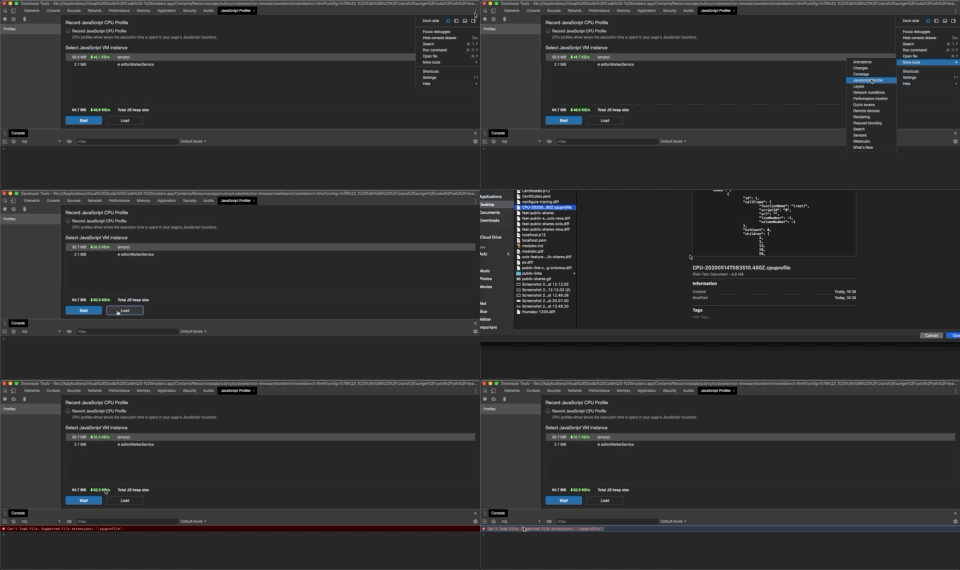
.txtsuffix from step 2 - Load the file on the javascript profiler
- Can't load file:

Does this issue occur when all extensions are disabled?: Yes
 refs
refs
All 6 comments
(Experimental duplicate detection)
Thanks for submitting this issue. Please also check if it is already covered by an existing one, like:
![vscodebot[bot] picture](https://avatars2.githubusercontent.com/in/2406?v=4&s=40) vscodebot[bot]
on 14 May 2020
vscodebot[bot]
on 14 May 2020
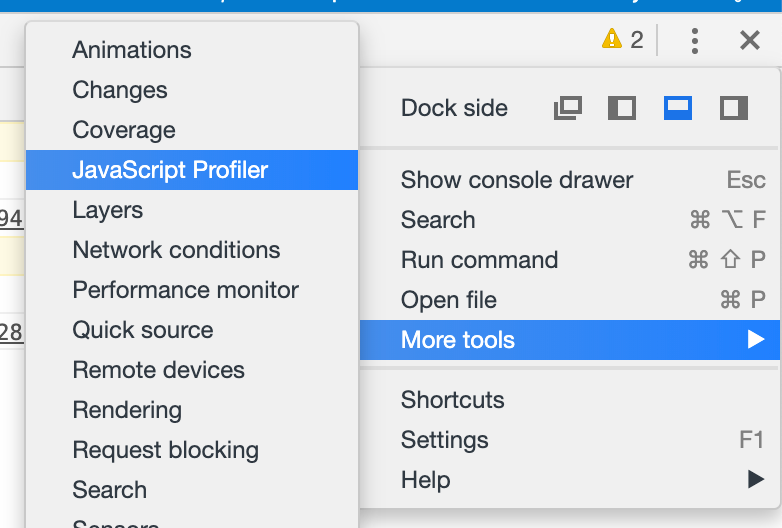
@refs A .cpuprofile must be loaded in the JavaScript Profile tab:
 alexdima
on 14 May 2020
alexdima
on 14 May 2020
@alexdima that is indeed the sequence of steps I follow:
refs
on 14 May 2020
@refs Can you please use ls in a terminal to confirm the file extension is .cpuprofile? I have just tried to profile the extensions, which generates a file named CPU....cpuprofile.txt and for whatever reason using the macOS finder to strip the .txt extension does not work. The macOS finder is ignoring my file rename. I have tried in a terminal and that worked well.
alexdima
on 14 May 2020
@alexdima wow... can confirm that renaming it via the cli did solve the issue, as opposite to using the finder app to rename it. The file extension on an ls was .cpuprofile, but using the finder app, even with the .cpuprofile extension, the finder still thinks displays a text file metadata. Only after renaming through the cli it doesn't recognize it as a text file anymore, and loading works.
refs
on 14 May 2020
- the macOS finder is written by Apple
- the Chrome developer tools are written by Chromium
Please create issues against those projects if you want.
alexdima
on 14 May 2020
Related issues
 borekb
·
3Comments
borekb
·
3Comments
 ryan-wong
·
3Comments
ryan-wong
·
3Comments
 omidgolparvar
·
3Comments
omidgolparvar
·
3Comments
 philipgiuliani
·
3Comments
philipgiuliani
·
3Comments
 mrkiley
·
3Comments
mrkiley
·
3Comments
Most helpful comment
@refs Can you please use
lsin a terminal to confirm the file extension is.cpuprofile? I have just tried to profile the extensions, which generates a file namedCPU....cpuprofile.txtand for whatever reason using the macOS finder to strip the.txtextension does not work. The macOS finder is ignoring my file rename. I have tried in a terminal and that worked well.