Vscode: [v1.45] Cannot authenticate proxies
While using vscode version 1.45, I cannot submit the username and password of the proxy. The following popup prompted as expected, but both the OK button and the Enter key cannot submit the login info.

 matthewkwong2
All 32 comments
Confirm! The same issue for me, i can't submit it.
 shamarin
on 8 May 2020
shamarin
on 8 May 2020
Same issue for me.
I rollback to install version 1.44 temporarily
https://code.visualstudio.com/updates/v1_44
 marco-cc
on 8 May 2020
marco-cc
on 8 May 2020
Confirm.
And one more thing, I cannot setup proxy in settings.json file to bypass popup. Is there anyone?
My setup is: http://username:[email protected]:port
 quyleanh
on 8 May 2020
quyleanh
on 8 May 2020
Confirm.
And one more thing, I cannot setup proxy in settings.json file to bypass popup. Is there anyone?
My setup is:http://username:[email protected]:port
In my case,
I tried
- set proxy credential in settings.json
- set proxy command line in VSCode shortcut
Those methods still can't work.
So I still keep input my credential in first launching VSCode.
marco-cc
on 8 May 2020
Confirm.
And one more thing, I cannot setup proxy in settings.json file to bypass popup. Is there anyone?
My setup is:http://username:[email protected]:portIn my case,
I tried
- set proxy credential in settings.json
- set proxy command line in VSCode shortcut
Those methods still can't work.
So I still keep input my credential in first launching VSCode.
It's annoyed. Hope there are some work around for this.
quyleanh
on 8 May 2020
Could you clear the http.proxy setting and then restart VS Code (File > Quit to make sure all windows are gone) and retry?
 chrmarti
on 8 May 2020
chrmarti
on 8 May 2020
Could you clear the http.proxy setting and then restart VS Code (File > Quit to make sure all windows are gone) and retry?
I have no proxy settings in json config, but I couldn't submit proxy credentials in popup window.
shamarin
on 8 May 2020
@shamarin Could you check if this older 1.45-insiders build has the same problem:
chrmarti
on 8 May 2020
@shamarin Could you check if this older 1.45-insiders build has the same problem:
* [Windows 64](https://az764295.vo.msecnd.net/insider/b83339a3a7bd8e3ec8a8b79deda9c37e0d91f094/VSCodeUserSetup-x64-1.45.0-insider.exe)

* [MacOS](https://az764295.vo.msecnd.net/insider/b83339a3a7bd8e3ec8a8b79deda9c37e0d91f094/VSCode-darwin-insider.zip)

* [.deb](https://az764295.vo.msecnd.net/insider/b83339a3a7bd8e3ec8a8b79deda9c37e0d91f094/code-insiders_1.45.0-1587447574_amd64.deb)
Just checked - the same issue with this insider version. Tested on Win64 platform (Windows 7 x64)
shamarin
on 8 May 2020
@shamarin Do you have any of the HTTP_PROXY, HTTPS_PROXY or NO_PROXY environment variables set?
chrmarti
on 8 May 2020
@shamarin Do you have any of the
HTTP_PROXY,HTTPS_PROXYorNO_PROXYenvironment variables set?
No, settings as is (default values after first install)
shamarin
on 8 May 2020
@shamarin Can you launch 1.45.0 with --log-net-log=netlog.json, retry (is it with the extension viewlet, the update check or just by itself?) and attach the resulting netlog.json here?
chrmarti
on 8 May 2020
@shamarin Can you launch 1.45.0 with
--log-net-log=netlog.json, retry (is it with the extension viewlet, the update check or just by itself?) and attach the resultingnetlog.jsonhere?
How to do that? I don't know.
shamarin
on 8 May 2020
@shamarin Take the following steps:
- Close all VS Code windows.
- Open a command line window.
- Launch
code --log-net-log=netlog.json. - Trigger the auth dialog (what triggers it?).
- Close VS Code.
- Upload the
netlog.jsonon this issue through the GitHub web UI (mail won't let attachments through).
/cc @deepak1556
chrmarti
on 8 May 2020
@shamarin Take the following steps:
* Close all VS Code windows.

* Open a command line window.

* Launch `code --log-net-log=netlog.json`.

* Trigger the auth dialog (what triggers it?).

* Close VS Code.

* Upload the `netlog.json` on this issue through the GitHub web UI (mail won't let attachments through).
/cc @deepak1556
Did it. Thank you for helping me!
shamarin
on 8 May 2020
@shamarin I see some requests successfully authenticate. Can you search for and install extensions when you keep entering the credentials?
@deepak1556 I ruled out the removal of header forwarding (03a7223ee2a086bbcf028801da9370d5deff5093) with the build in https://github.com/microsoft/vscode/issues/97199#issuecomment-625860342 and the session.setProxy() call with the netlog.json (that only shows a PAC file being configured). Are you aware of any other changes we should check?
/cc @joaomoreno In case you are aware of anything with regard to the auth dialog. Where do we store the credentials?
chrmarti
on 8 May 2020
@shamarin I see some requests successfully authenticate. Can you search for and install extensions when you keep entering the credentials?
I couldn't search and install any extensions because to make any action in program I need to close proxy auth popup. After that even if I pressed OK in popup window with correctly entered credentials extension installer and search showing dialog that it couldn't connect to internet.
shamarin
on 8 May 2020
@chrmarti the net-log shows there is an explicit request for authentication from the proxy server
HTTP/1.1 407 Proxy Authentication Required
  Server: squid/3.5.23
  Mime-Version: 1.0
  Date: Fri, 08 May 2020 16:00:48 GMT
  Content-Type: text/html;charset=utf-8
  Content-Length: 2256
  X-Squid-Error: ERR_CACHE_ACCESS_DENIED 0
  Proxy-Authenticate: Basic realm="Krista internet proxy server"
  X-Cache: MISS from proxy6.krista.ru
  X-Cache-Lookup: NONE from proxy6.krista.ru:8080
  Via: 1.1 proxy6.krista.ru (squid/3.5.23)
  Connection: keep-alive
If the authentication scheme is basic, it will trigger the login event on app module https://github.com/electron/electron/blob/master/docs/api/app.md#event-login
We are handling this in https://github.com/microsoft/vscode/blob/master/src/vs/code/electron-main/auth.ts which provides the dialog seen by users.
 deepak1556
on 8 May 2020
deepak1556
on 8 May 2020
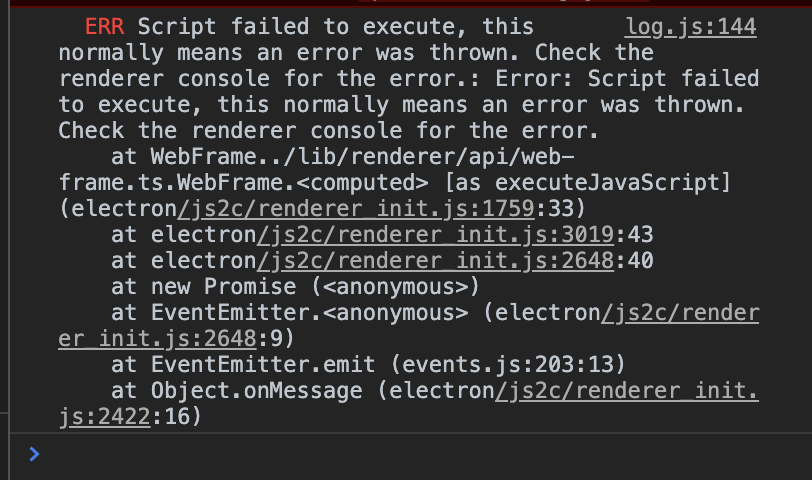
Reproduced and I misunderstood: The UI is non-functional in that the buttons do not do anything. The dev tools show (the dialog is modal so I can't copy the text):
chrmarti
on 8 May 2020
@deepak1556 helped track it down to the addition of a content security policy that makes the script execution fail: https://github.com/microsoft/vscode/commit/a873a9cca89d733f92e39489e5121364da88f182
[14109:0508/220747.365803:INFO:CONSOLE(81)] "Refused to execute inline script because it violates the following Content Security Policy directive: "script-src 'self'". Either the 'unsafe-inline' keyword, a hash ('sha256-gwG0y+iDKxFvH2kBXU4EiwnPdGFE1C6ygbR24+UxvhI='), or a nonce ('nonce-...') is required to enable inline execution.
", source: file:///Users/chrmarti/Development/repos/vscode/out/vs/code/electron-browser/proxy/auth.html?config=%7B%7D (81)
[14109:0508/220747.466220:INFO:CONSOLE(1)] "Uncaught ReferenceError: promptForCredentials is not defined", source: file:///Users/chrmarti/Development/repos/vscode/out/vs/code/electron-browser/proxy/auth.html?config=%7B%7D (1)
Removing that policy fixes it for me.
chrmarti
on 8 May 2020
Removing lines 7 and 8 from <install folder>/Contents/Resources/app/out/vs/code/electron-browser/proxy/auth.html appears to be a workaround (if you cannot go back to 1.44).
chrmarti
on 8 May 2020
But can I fix the proxy setting for not showing popup? I don't want to enter username and password every time opening vscode.
quyleanh
on 9 May 2020
If your proxy server is only configured for basic HTTP authentication, you will have to enter the credentials on the first run and the credentials will be cached, successive runs will delegate to the cache unless credentials were rejected then auth dialog will be prompted again.
For any further proxy configuration, I would suggest to contact your network administrator to try other proxy authentication schemes.
deepak1556
on 9 May 2020
If your proxy server is only configured for basic HTTP authentication, you will have to enter the credentials on the first run and the credentials will be cached, successive runs will delegate to the cache unless credentials were rejected then auth dialog will be prompted again.
For any further proxy configuration, I would suggest to contact your network administrator to try other proxy authentication schemes.
I mean I would like to enter the credential only one time. Can I? If I close the vscode and reopen, the dialog is display. Is there any mechanism to set vscode use the Windows proxy setting?
quyleanh
on 9 May 2020
here are screen shots from my VSCODE
 jonathan-meyer
on 10 May 2020
jonathan-meyer
on 10 May 2020
Removing lines 7 and 8 from
<install folder>/Contents/Resources/app/out/vs/code/electron-browser/proxy/auth.htmlappears to be a workaround (if you cannot go back to 1.44).
Yep, this is a working workaround, at least for now.
matthewkwong2
on 11 May 2020
Removing lines 7 and 8 from
<install folder>/Contents/Resources/app/out/vs/code/electron-browser/proxy/auth.htmlappears to be a workaround (if you cannot go back to 1.44).
https://github.com/microsoft/vscode/issues/97199#issuecomment-626002254
The file location for me (Windows 10 default install location) was here:
C:\Users\<username>\AppData\Local\Programs\Microsoft VS Code\resources\app\out\vs\code\electron-browser\proxy\auth.html
And yes it works! Removing lines 7 and 8 from that file fixed the issue for me :D
 Dan503
on 11 May 2020
Dan503
on 11 May 2020
I couldn't find such code in my auth.html file. I have "" on line 7 and 8
shamarin
on 11 May 2020
Removing lines 7 and 8 from
<install folder>/Contents/Resources/app/out/vs/code/electron-browser/proxy/auth.htmlappears to be a workaround (if you cannot go back to 1.44).
Same issue, and improved.
(environment)
Windows10 1909 64bit
Visual Studio Code 1.45.0 (system setup)
The target is
"C:\Program Files\Microsoft VS Code\resources\app\out\vs\code\electron-browser\proxy\auth.html"
Comment out lines 7 and 8
meta http-equiv="Content-Security-Policy"
content="default-src 'none'; img-src 'self' https: data:; media-src 'none'; child-src 'self'; object-src 'self'; script-src 'self'; style-src 'self' 'unsafe-inline'; connect-src 'self' https:; font-src 'self' https:;"
I solved this issue.
 NoahSchelling
on 11 May 2020
NoahSchelling
on 11 May 2020
Confirm, commenting those lines solve the problem.
shamarin
on 11 May 2020
I mean I would like to enter the credential only one time. Can I? If I close the vscode and reopen, the dialog is display. Is there any mechanism to set vscode use the Windows proxy setting?
@quyleanh by default VSCode will respect system proxy settings. But based on the logs I saw in this issue, proxy settings are mostly set over PAC and they are configured for basic auth, VSCode has no choice but to explicitly request the credentials. The authenticated proxy connection will be valid in an open VSCode session as long as the Proxy server allows it, but once you close and reopen VSCode, authentication is required for new connection. You might want to check NTLM or negotiate authentication schemes for your proxy server.
deepak1556
on 11 May 2020
Sorry for the breakage, all! We'll include the fix in the May recovery build, out soon.
 joaomoreno
on 11 May 2020
joaomoreno
on 11 May 2020
Related issues
 shanalikhan
·
3Comments
shanalikhan
·
3Comments
 philipgiuliani
·
3Comments
philipgiuliani
·
3Comments
 villiv
·
3Comments
villiv
·
3Comments
 v-pavanp
·
3Comments
v-pavanp
·
3Comments
 vsccarl
·
3Comments
vsccarl
·
3Comments
Most helpful comment
Removing lines 7 and 8 from
<install folder>/Contents/Resources/app/out/vs/code/electron-browser/proxy/auth.htmlappears to be a workaround (if you cannot go back to 1.44).