Vscode: Renaming files seems to have stopped working
Issue Type: Bug
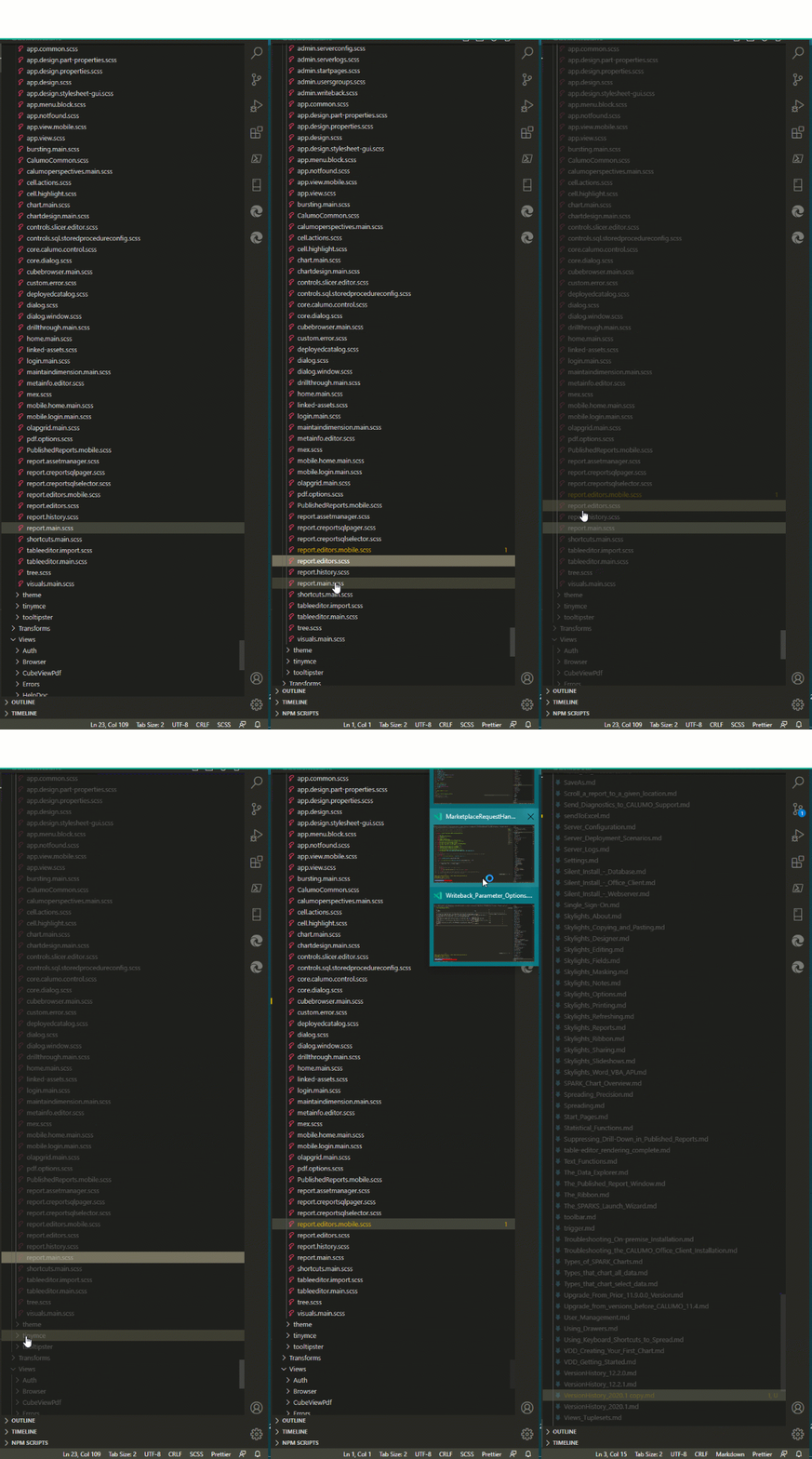
Pressing F2 or right click -> rename causes the file explorer to grey out with no ability to rename.
Typing causes the top right filtering to be populated.
VS Code version: Code - Insiders 1.45.0-insider (1c36d747fbf113144d3bf82b0aa3cbd290714e38, 2020-04-15T05:37:18.376Z)
OS version: Windows_NT x64 10.0.18363
System Info
|Item|Value|
|---|---|
|CPUs|Intel(R) Core(TM) i7-5500U CPU @ 2.40GHz (4 x 2394)|
|GPU Status|2d_canvas: enabled
flash_3d: enabled
flash_stage3d: enabled
flash_stage3d_baseline: enabled
gpu_compositing: enabled
multiple_raster_threads: enabled_on
oop_rasterization: disabled_off
protected_video_decode: unavailable_off
rasterization: enabled
skia_renderer: disabled_off_ok
video_decode: enabled
viz_display_compositor: enabled_on
viz_hit_test_surface_layer: disabled_off_ok
webgl: enabled
webgl2: enabled|
|Load (avg)|undefined|
|Memory (System)|15.88GB (6.17GB free)|
|Process Argv||
|Screen Reader|no|
|VM|0%|
Extensions (19)
Extension|Author (truncated)|Version
---|---|---
path-intellisense|chr|1.4.2
xml|Dot|2.5.0
EditorConfig|Edi|0.14.5
knockoutjs|fur|0.1.0
code-beautifier|mic|2.3.3
easy-less|mrc|1.6.3
vscode-docker|ms-|1.0.0
powershell|ms-|2020.3.0
vscode-typescript-tslint-plugin|ms-|1.2.3
debugger-for-chrome|msj|4.12.6
vscode-subword-navigation|ow|1.2.0
autolaunch|phi|2.0.3
csharp2ts|raf|0.0.24
typescript-hero|rbb|3.0.0
vscode-yaml|red|0.7.2
blueprint|tea|3.0.0
vscode-icons|vsc|10.1.1
vscode-wakatime|Wak|4.0.0
html-css-class-completion|Zig|1.19.0
(1 theme extensions excluded)
 richRubie
All 20 comments
/needsMoreInfo
Is it reproducible with all extensions disabled?
You can try this with F1 and >Developer: Reload Window With Extensions Disabled
Tried on the same build - no problems.
Version: 1.45.0-insider (user setup)
Commit: 1c36d747fbf113144d3bf82b0aa3cbd290714e38
Date: 2020-04-15T05:37:18.376Z
V8: 7.8.279.23-electron.0
OS: Windows_NT x64 10.0.18363
 IllusionMH
on 15 Apr 2020
IllusionMH
on 15 Apr 2020
Thanks for creating this issue! We figured it's missing some basic information or in some other way doesn't follow our issue reporting guidelines. Please take the time to review these and update the issue.
Happy Coding!
 vscode-triage-bot
on 15 Apr 2020
vscode-triage-bot
on 15 Apr 2020

i seem to have the same issue
Version: 1.45.0-insider
Commit: ec0d19789f89d4c25895f4a0cf364276cfb0c6ed
Date: 2020-04-20T06:04:22.698Z
Electron: 7.2.1
Chrome: 78.0.3904.130
Node.js: 12.8.1
V8: 7.8.279.23-electron.0
OS: Darwin x64 19.5.0
 FernandoMiguel
on 20 Apr 2020
FernandoMiguel
on 20 Apr 2020
+1
Version: 1.45.0-insider (user setup)
Commit: ec0d19789f89d4c25895f4a0cf364276cfb0c6ed
Date: 2020-04-20T06:08:30.812Z
Electron: 7.2.1
Chrome: 78.0.3904.130
Node.js: 12.8.1
V8: 7.8.279.23-electron.0
OS: Windows_NT x64 10.0.14393
 sharkweek
on 20 Apr 2020
sharkweek
on 20 Apr 2020
I acknowledge that something seems to have been broken since multiple users have reported this.
Some questions since I can not reproduce:
- do you get this when you rename any file in the file explorer, not only the top one?
- Was this working 5 days ago for example, did this break in the last couple of days
- If somebody is adventourouse, F1 > developer tools > put a breakpoint here and try to figure out what gets broken
 isidorn
on 21 Apr 2020
isidorn
on 21 Apr 2020
@isidorn started last week
so far, renaming any file, inside any level of folders.
mine are all git repos
it is really hard to reproduce, cause i can be editing files for an hour and it won't happen.
then happens, i restart, and happens again.
running without extensions for a long time, will cripple my productivity, since i dont have a way to force this to happen.
I know not having a reproducible steps, doesnt help, but if we are able to collect any form of logs, i will do it
FernandoMiguel
on 21 Apr 2020
I acknowledge that something seems to have been broken since multiple users have reported this.
Some questions since I can not reproduce:
- do you get this when you rename any file in the file explorer, not only the top one?
- Was this working 5 days ago for example, did this break in the last couple of days
- If somebody is adventourouse, F1 > developer tools > put a breakpoint here and try to figure out what gets broken
It was working fine few days back. This has happened recently.
 shrutipant7
on 21 Apr 2020
shrutipant7
on 21 Apr 2020
@isidorn
Version: 1.45.0-insider (user setup)
Commit: b83339a3a7bd8e3ec8a8b79deda9c37e0d91f094
Date: 2020-04-21T05:41:11.873Z (6 hrs ago)
Electron: 7.2.2
Chrome: 78.0.3904.130
Node.js: 12.8.1
V8: 7.8.279.23-electron.0
OS: Windows_NT x64 10.0.19041
Point 1:
Yes, I get this _generally_ when I try to rename *.md or *.ts files by clicking the file and F2 or right-clicking and Rename.
Some more testing of a folder with a lot of SCSS files in it and all but the last 6 files could be renamed correctly.
If feels with this that it has to do with the fact the file explorer view wants to scroll to a certain position and then enable the rename of the file
I also tried to reload with extension disabled and it still occurs in the same way.
Point 2:
It is recent, I think it came in on Thursday 16th April my time (GMT+10) when I updated VSCode insiders
Point 3:
I made an animated gif vid instead...
 demyte
on 21 Apr 2020
demyte
on 21 Apr 2020
mine are almost always terraform .tf files
i press Enter to rename
and it too seems to jump to the bottom of the screen
seems to happen more frequently on very large list of files....
FernandoMiguel
on 21 Apr 2020
yep... on folders with one or two files is fine.
if i try on folders with twice the size of my screen, it will fail
but even then, not every time
FernandoMiguel
on 21 Apr 2020
Reproduced on large folders as mentioned above - when folder list is larger than Explorer(tree) section. However there were cases when top part of the files renamed correctly but files at the end of the folder always triggered this issue.
IllusionMH
on 21 Apr 2020
Hi, sorry for the lack of respone.
@IllusionMH yes i have reproduced it with all extensions disabled.
@isidorn
- it is inconsistent when renaming files, though i seem to be able to consistently dot it when renaming particular folders.
- I created the issue the first time i came across it, i had just updated VScode so i thought it was something to do with that and thought you guys should know. Renaming files and folders is not something i do everyday but regularly.
- The event fires twice, first time editable is true, then it's false. i hope that is more helpful that it seems. It looks like i can reproduce it consistently, so let me know if you need more info.
Thanks for looking into this and sorry again for the lack of response.
richRubie
on 21 Apr 2020
Ok so this seems fairly straight forward to re-create as I did it from a blank project.
- The files need to be expanded to the point they are off the screen as mentioned
- The file being renamed needs to be towards the bottom of the scrollable list of files
- Do not click on the file then rename it. Right click on it without first clicking on it then rename. Rename seems to work fine if you click the file first then go to rename it.
EDIT Actually this doesn't appear to always be the case. In my workspace the clicking on the file first then renaming did not fix the issue, however my theory below seems correct still. When renaming in this workspace it is scrolling up immediately after i click rename, even if already clicked which is different from the behavior i noticed in the blank project i created.
It does indeed seem to me that it is related to the scrollbar scrolling items into view (specifically when right clicking on the file without clicking first then renaming) and it ends up cancelling/closing the rename element while leaving the grayed out state.
 bradennapier
on 23 Apr 2020
bradennapier
on 23 Apr 2020
@bradennapier smart! Ok now with your steps I could reproduce somehow. Investigating....
@joaomoreno we did some scrollbar changes this milestone? Could you somehow correlate that to the rename box disapering. Just in case you have an idea...
Also fyi @jeanp413
And oh how much I hate our input box explorer solution :)
isidorn
on 23 Apr 2020
Ok found the issue. I changed some of the logic that the parent gets revealed, and if the parent is not in the viewport all gets broken. Pushing a fix soon.
@bradennapier thanks again!
isidorn
on 23 Apr 2020
Glad to help :).
bradennapier
on 23 Apr 2020
This is my stupid commit which broke it https://github.com/microsoft/vscode/commit/7ab6b3d4817c7ac7319747b6ece1935839bb9363
isidorn
on 23 Apr 2020
Heh think I ran into that bug at one point as well :(
bradennapier
on 23 Apr 2020
This is my stupid commit which broke it https://github.com/microsoft/vscode/commit/7ab6b3d4817c7ac7319747b6ece1935839bb9363
We are all in a blameless culture.
No point in being "abusive", even to yourself.
Thank you for finding and fixing the issue.
We all appreciate immensely the product you work on.
It's a life changer for many of us
FernandoMiguel
on 23 Apr 2020
Reopened the other issue, this one is more severe.
If somebody has time a PR which fixes that one is welcome.
@FernandoMiguel thanks.
isidorn
on 23 Apr 2020
Related issues
 ryan-wong
·
3Comments
ryan-wong
·
3Comments
 curtw
·
3Comments
curtw
·
3Comments
 shanalikhan
·
3Comments
shanalikhan
·
3Comments
 chrisdias
·
3Comments
chrisdias
·
3Comments
 trstringer
·
3Comments
trstringer
·
3Comments
Most helpful comment
Ok found the issue. I changed some of the logic that the parent gets revealed, and if the parent is not in the viewport all gets broken. Pushing a fix soon.
@bradennapier thanks again!